sketchucation logo sketchucation
    • Login
    Oops, your profile's looking a bit empty! To help us tailor your experience, please fill in key details like your SketchUp version, skill level, operating system, and more. Update and save your info on your profile page today!
    Mac User? | Join the Rayscaper Beta for Mac Learn More

    [Plugin] Silhouette to Plane v1.1

    Scheduled Pinned Locked Moved Plugins
    32 Posts 17 Posters 35.5k Views 17 Watching
    Loading More Posts
    • Oldest to Newest
    • Newest to Oldest
    • Most Votes
    Reply
    • Reply as topic
    Log in to reply
    This topic has been deleted. Only users with topic management privileges can see it.
    • honoluludesktopH
      honoluludesktop
      last edited by

      TIG, How many plugin, and point releases are you currently averaging? 1 a week?-)

      And, you still find time to help us. Thanks!!!!!

      1 Reply Last reply
      Reply Quote 0
      • pilouP
        pilou
        last edited by

        @unknownuser said:

        1 a week?

        1 a day is more appropriated πŸ˜‰

        Frenchy Pilou
        Is beautiful that please without concept!
        My Little site :)

        1 Reply Last reply
        Reply Quote 0
        • Didier BurD
          Didier Bur
          last edited by

          Hi TIG,
          I suggest you change line #63 to: @model.start_operation("Silhouette to Plane") 😎
          Thanks for all your hard work !

          DB

          1 Reply Last reply
          Reply Quote 0
          • TIGT
            TIG Moderator
            last edited by

            Here's v1.1 http://forums.sketchucation.com/viewtopic.php?p=281445#p281445
            The correct Plane of a 'WorkPlane' is now used even if it has been Transformed inside its own Group.
            Speed and reliability improved.
            Title fixed.

            TIG

            1 Reply Last reply
            Reply Quote 0
            • EarthMoverE
              EarthMover
              last edited by

              Great Script! πŸ‘ Perfect for sorting out faces that have trouble closing. Could you possibly have it so that if no work plane is selected, that it will default to a placing the silhouette on the 0 z plane? Similar to ThomThoms Flatten script in his "Plan Tools", except yours automagically creates the face and groups it.

              3D Artist at Clearstory 3D Imaging
              Guide Tool at Winning With Sketchup
              Content Creator at Skapeup

              1 Reply Last reply
              Reply Quote 0
              • TIGT
                TIG Moderator
                last edited by

                @earthmover said:

                Great Script! πŸ‘ Perfect for sorting out faces that have trouble closing. Could you possibly have it so that if no work plane is selected, that it will default to a placing the silhouette on the 0 z plane? Similar to ThomThoms Flatten script in his "Plan Tools", except yours automagically creates the face and groups it.

                You could always make a quick WorkPlane on the ground...

                TIG

                1 Reply Last reply
                Reply Quote 0
                • shuraS
                  shura
                  last edited by

                  Just great! You are a hero, hats off to thee!

                  hats_off.jpg

                  1 Reply Last reply
                  Reply Quote 0
                  • TIGT
                    TIG Moderator
                    last edited by

                    Here's an example...Capture.PNG

                    TIG

                    1 Reply Last reply
                    Reply Quote 0
                    • pilouP
                      pilou
                      last edited by

                      This sort of image must be at each first post πŸ˜„

                      Frenchy Pilou
                      Is beautiful that please without concept!
                      My Little site :)

                      1 Reply Last reply
                      Reply Quote 0
                      • EarthMoverE
                        EarthMover
                        last edited by

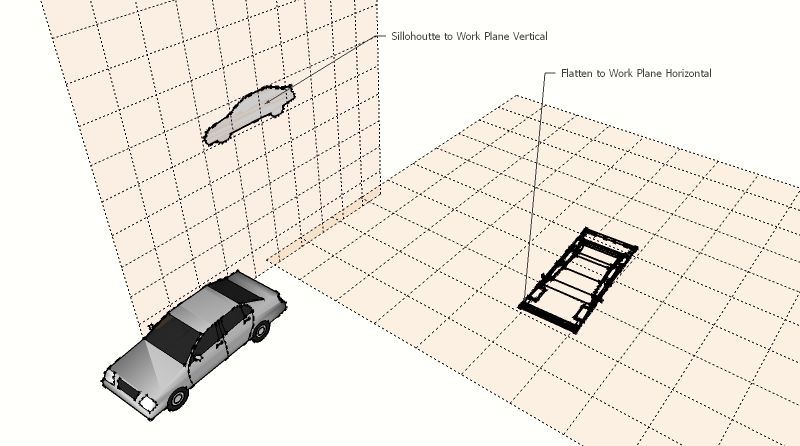
                        Here's another example.

                        Silhouette to plane is also great for flattening a set of looped edges you want to be planar to form a face, but cant seem to find the vert that's out of whack.

                        Flatten to plan.jpg

                        3D Artist at Clearstory 3D Imaging
                        Guide Tool at Winning With Sketchup
                        Content Creator at Skapeup

                        1 Reply Last reply
                        Reply Quote 0
                        • X
                          xrok1
                          last edited by

                          this could be great for making face me components! render the 3d version then apply as texture to the 2d. πŸ˜„

                          β€œThere are three classes of people: those who see. Those who see when they are shown. Those who do not see.”

                          http://www.Twilightrender.com try it!

                          1 Reply Last reply
                          Reply Quote 0
                          • B
                            Ben Ritter
                            last edited by

                            TIG, fabulous! Thank you for the flatten to plane script as well. You are very generous, and gifted.

                            1 Reply Last reply
                            Reply Quote 0
                            • C
                              caleidos4d
                              last edited by

                              TIG!!!

                              http://www.caleidos4d.it

                              1 Reply Last reply
                              Reply Quote 0
                              • D
                                danbig
                                last edited by

                                Thanks, TIG. Amazing script.

                                Does this plugin do the flatten to plane, or is that a separate plugin? I can't seem to find the command for flatten to plane. (Silhouette to Plane is working great)

                                1 Reply Last reply
                                Reply Quote 0
                                • shuraS
                                  shura
                                  last edited by

                                  Flatten to Plane:

                                  404 Not Found

                                  favicon

                                  (forums.sketchucation.com)

                                  1 Reply Last reply
                                  Reply Quote 0
                                  • shuraS
                                    shura
                                    last edited by

                                    Just to point out again what Adam already said, Silhouette to Workplane makes closing difficult outlines sooo easy. Brought back the faith in freehand tool to me.
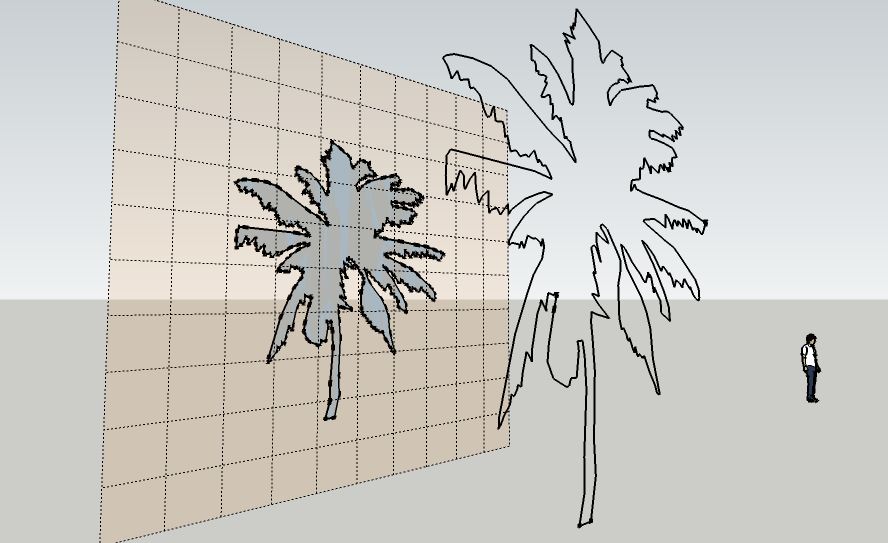
                                    with freehand tool quickly drawn outlines often do not close. solved with silhouettes to workplane.

                                    Rocky, that is a pretty smart idea. I am having thoughts about this kind of matte painting tricks all the time.
                                    (like here: http://forums.sketchucation.com/viewtopic.php?f=79&t=31069)

                                    thanks again for your generosity TIG!

                                    1 Reply Last reply
                                    Reply Quote 0
                                    • JClementsJ
                                      JClements
                                      last edited by

                                      TIG:
                                      When I click on the script's download button the #SilhoutteTpoPlane.rb downloads. I put the script in the plugins directory of SU8. When I open SU8 I get the following error:

                                      %(#FF0000)[Error Loading File #SilhouetteToPlane.rb
                                      no such file to load -- #WorkPlane.rb
                                      ]

                                      Should #WorkPlane.rb also have been downloaded?

                                      Regards, John

                                      John | Illustrator | Beaverton, Oregon

                                      1 Reply Last reply
                                      Reply Quote 0
                                      • TIGT
                                        TIG Moderator
                                        last edited by

                                        @jclements said:

                                        TIG:
                                        When I click on the script's download button the #SilhoutteTpoPlane.rb downloads. I put the script in the plugins directory of SU8. When I open SU8 I get the following error:

                                        %(#FF0000)[Error Loading File #SilhouetteToPlane.rb
                                        no such file to load -- #WorkPlane.rb
                                        ]

                                        Should #WorkPlane.rb also have been downloaded?

                                        Regards, John

                                        John
                                        IF you had read the notes you'd see that you need 'WorkPlane.rb'... because you must first make and then select a 'WorkPlane' with your other parts you want to project - that's how it knows what plane to project its result on to... πŸ˜’

                                        TIG

                                        1 Reply Last reply
                                        Reply Quote 0
                                        • CAntonisC
                                          CAntonis
                                          last edited by

                                          Working great as always

                                          Thank U TIG

                                          1 Reply Last reply
                                          Reply Quote 0
                                          • B
                                            Bertier
                                            last edited by

                                            sweet

                                            1 Reply Last reply
                                            Reply Quote 0

                                            Hello! It looks like you're interested in this conversation, but you don't have an account yet.

                                            Getting fed up of having to scroll through the same posts each visit? When you register for an account, you'll always come back to exactly where you were before, and choose to be notified of new replies (either via email, or push notification). You'll also be able to save bookmarks and upvote posts to show your appreciation to other community members.

                                            With your input, this post could be even better πŸ’—

                                            Register Login
                                            • 1
                                            • 2
                                            • 1 / 2
                                            • First post
                                              Last post
                                            Buy SketchPlus
                                            Buy SUbD
                                            Buy WrapR
                                            Buy eBook
                                            Buy Modelur
                                            Buy Vertex Tools
                                            Buy SketchCuisine
                                            Buy FormFonts

                                            Advertisement