sketchucation logo sketchucation
    • 登入
    Oops, your profile's looking a bit empty! To help us tailor your experience, please fill in key details like your SketchUp version, skill level, operating system, and more. Update and save your info on your profile page today!
    🔌 Smart Spline | Fluid way to handle splines for furniture design and complex structures. Download

    [NEW]Sketchup 2 Vue

    已排程 已置頂 已鎖定 已移動 Extensions & Applications Discussions
    extensions
    164 貼文 28 Posters 40.2k 瀏覽 28 Watching
    正在載入更多貼文
    • 從舊到新
    • 從新到舊
    • 最多點贊
    回覆
    • 在新貼文中回覆
    登入後回覆
    此主題已被刪除。只有擁有主題管理權限的使用者可以查看。
    • Bob JamesB 離線
      Bob James
      最後由 編輯

      Great news, Dave, but...

      I've gone to my C3D account, but see no obvious way to download the update.
      I did a search for SU to Vue and it led me to your post: the link on the post sent me to a page to buy it.

      Edit: My SU2Vue came as a part of the Vue 9 Complete Bundle - I didn't buy it separately: is that the problem?

      i7-4930K 3.4Ghz, 2x GTX780 6GB, 32GB DDR3-1600 ECC, OCZ Vertex 4 500GB, WD Black 3TB, 32TB NAS, 4x 27" Monitors, SpaceMouse Pro, X-keys XK-60

      1 條回覆 最後回覆 回覆 引用 0
      • Bob JamesB 離線
        Bob James
        最後由 編輯

        It's really strange: I have both Vue 8 Complete and Vue 9 Complete.

        I can export from SU into V8C just fine, but the same model winds up being just a sphere in V9C.

        It seems to me that there is a bug in V9C.

        i7-4930K 3.4Ghz, 2x GTX780 6GB, 32GB DDR3-1600 ECC, OCZ Vertex 4 500GB, WD Black 3TB, 32TB NAS, 4x 27" Monitors, SpaceMouse Pro, X-keys XK-60

        1 條回覆 最後回覆 回覆 引用 0
        • D 離線
          dburdick
          最後由 編輯

          @bob james said:

          Great news, Dave, but...

          I've gone to my C3D account, but see no obvious way to download the update.
          I did a search for SU to Vue and it led me to your post: the link on the post sent me to a page to buy it.

          Edit: My SU2Vue came as a part of the Vue 9 Complete Bundle - I didn't buy it separately: is that the problem?

          Hi Bob,

          There's a new update of Vue 9 complete coming out next week which should have the updated plugin as well. In the meantime, drop me an e-mail and I'll send you a copy of the plugin:

          dburdick@e-onsoftware.com

          1 條回覆 最後回覆 回覆 引用 0
          • T 離線
            thecravatman
            最後由 編輯

            @dburdick said:

            There's a new update of Vue 9 complete coming out next week which should have the updated plugin as well.
            dburdick@e-onsoftware.com

            Hi Dave are we still on for the update this week?

            1 條回覆 最後回覆 回覆 引用 0
            • T 離線
              thecravatman
              最後由 編輯

              Many thanks Dave, the new build works really well. I have something I actually want for Christmas now!

              1 條回覆 最後回覆 回覆 引用 0
              • Bob JamesB 離線
                Bob James
                最後由 編輯

                What about the update to SU2Vue?
                Where do I download that in the future?

                i7-4930K 3.4Ghz, 2x GTX780 6GB, 32GB DDR3-1600 ECC, OCZ Vertex 4 500GB, WD Black 3TB, 32TB NAS, 4x 27" Monitors, SpaceMouse Pro, X-keys XK-60

                1 條回覆 最後回覆 回覆 引用 0
                • S 離線
                  Starlex
                  最後由 編輯

                  Does this bug solved in SU2Vue Exporter? Using via .3ds or .obj export method it is impossible to use texture displacement on sketchup surfaces
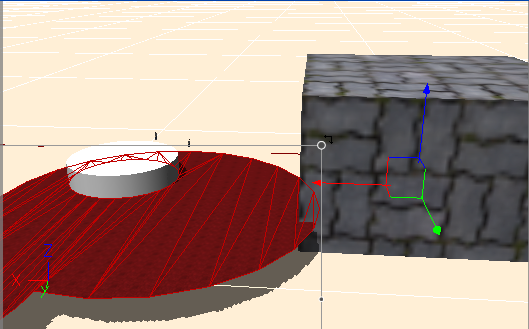
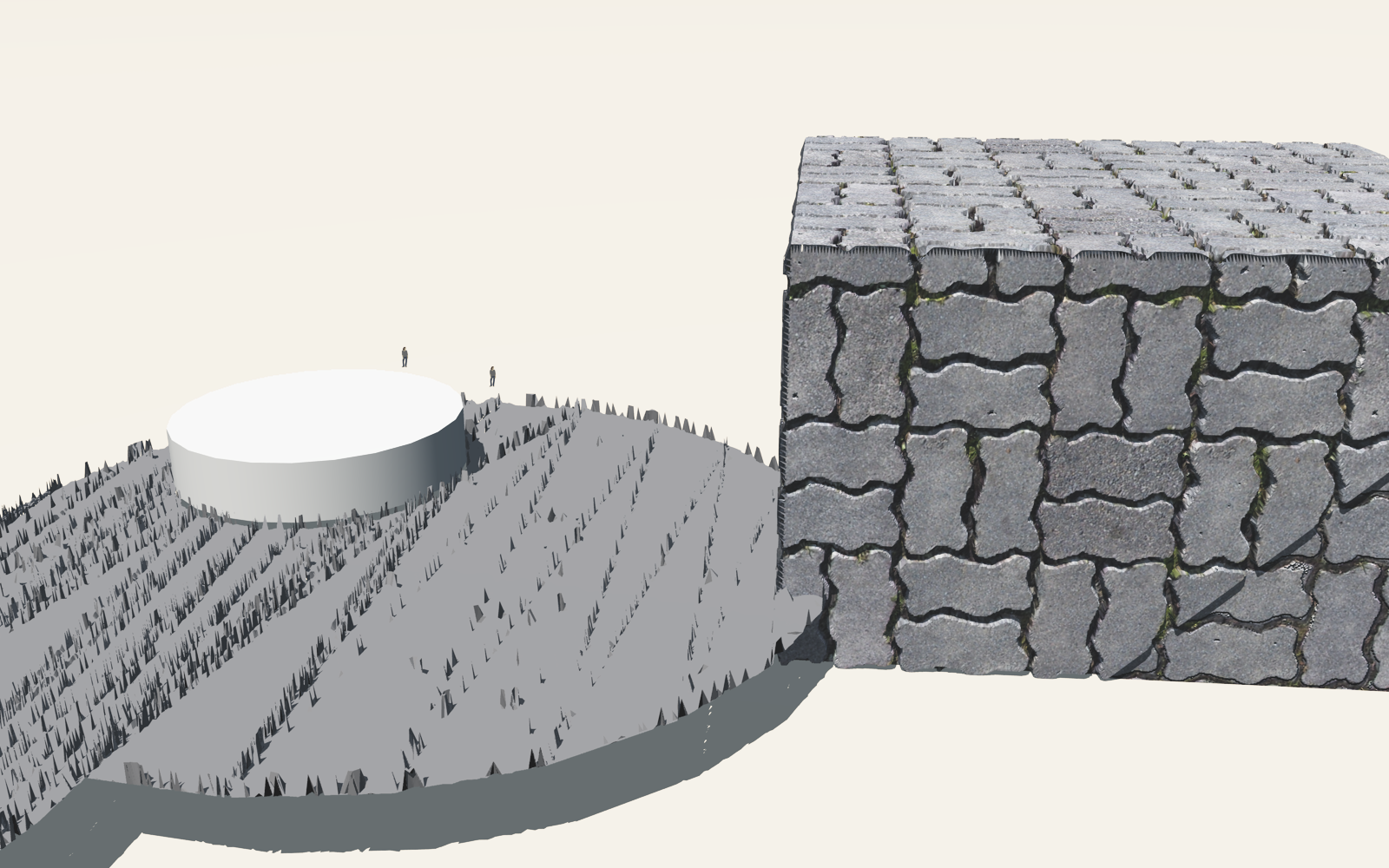
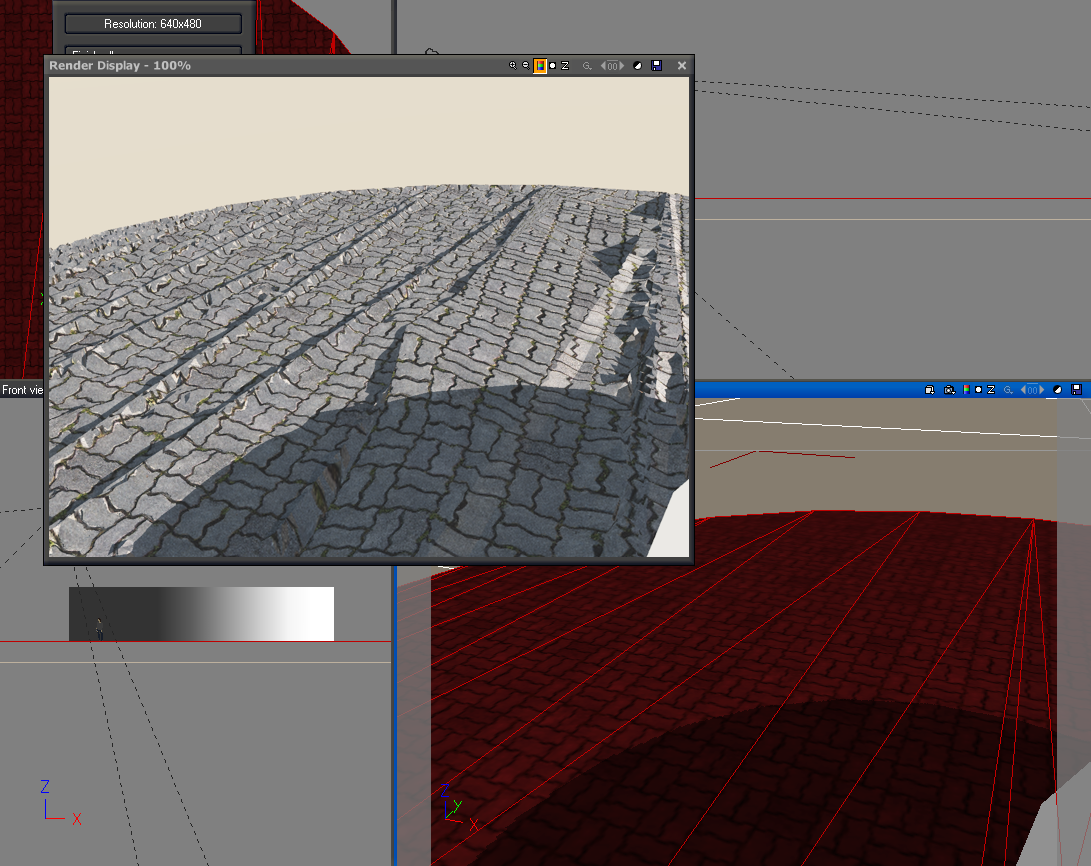
                  VUE1.PNG


                  VUE2.png


                  Single-sided, inverted normals reduce high freq noise, but still bad

                  1 條回覆 最後回覆 回覆 引用 0
                  • D 離線
                    dburdick
                    最後由 編輯

                    @starlex said:

                    Does this bug solved in SU2Vue Exporter? Using via .3ds or .obj export method it is impossible to use texture displacement on sketchup surfaces

                    It looks like your base model is too low poly for such high frequency displacement. Have you tried just using bump?

                    1 條回覆 最後回覆 回覆 引用 0
                    • D 離線
                      d12dozr
                      最後由 編輯

                      Vladimir from Geekatplay has posted some excellent SU2Vue tutorials. I found the "Working with textures" tut very helpful 👍

                      3D Printing with SketchUp Book
                      http://goo.gl/f7ooYh

                      1 條回覆 最後回覆 回覆 引用 0
                      • N 離線
                        notareal
                        最後由 編輯

                        In general (don't have much experience with vue) displacement does require a good mesh topology. Something like this if triangulated (quad faces are even better). Perhaps need more sub divs.
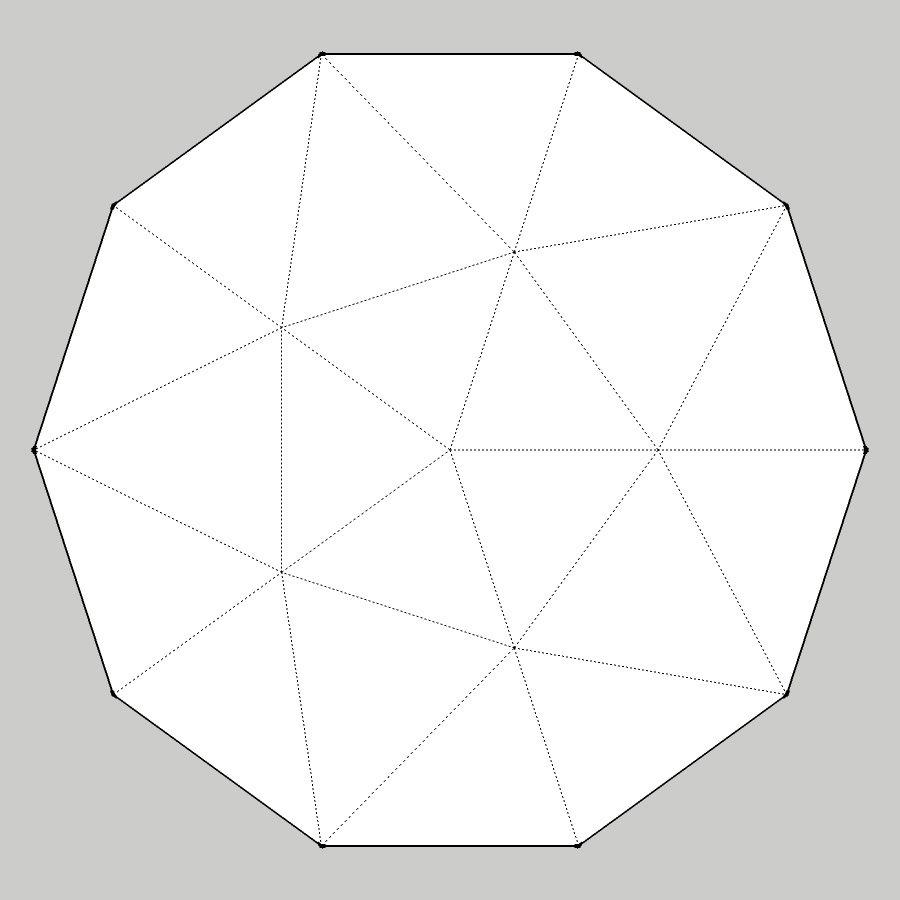

                        Topogoly.jpg

                        Welcome to try Thea Render, Thea support | kerkythea.net -team member

                        1 條回覆 最後回覆 回覆 引用 0
                        • thomthomT 離線
                          thomthom
                          最後由 編輯

                          @notareal said:

                          In general (don't have much experience with vue) displacement does require a good mesh topology. Something like this if triangulated (quad faces are even better). Perhaps need more sub divs.

                          Why are quad-faces better than triangles?

                          Thomas Thomassen — SketchUp Monkey & Coding addict
                          List of my plugins and link to the CookieWare fund

                          1 條回覆 最後回覆 回覆 引用 0
                          • thomthomT 離線
                            thomthom
                            最後由 編輯

                            What Solso asked there - turning a mesh into quads - I recently replied to a similar thread where I mentioned that Quad faces in other applications are often different in that they are not limited to being co-linear. Internally they are triangulated, it's just the application that treats two triangles as a quad and simplifies the presentation tot he user so you get a more predictable mesh.

                            Thomas Thomassen — SketchUp Monkey & Coding addict
                            List of my plugins and link to the CookieWare fund

                            1 條回覆 最後回覆 回覆 引用 0
                            • thomthomT 離線
                              thomthom
                              最後由 編輯

                              Ah - that post was also from Solo... http://forums.sketchucation.com/viewtopic.php?f=323&t=33895&p=297883#p297883

                              Thomas Thomassen — SketchUp Monkey & Coding addict
                              List of my plugins and link to the CookieWare fund

                              1 條回覆 最後回覆 回覆 引用 0
                              • N 離線
                                notareal
                                最後由 編輯

                                It's later more demanding to go from tris to quads, if you happen to export mesh to a program that uses quads.
                                For rendering quads are not particular critical as most render engines do use triangulated meshes. But even then if mesh is triangulated and is not dense enough and render engine have some issue with geometry smoothing, smoothing artifacts may appear when "poles" or "spikes" are present. Using quads for modelling should prevent this, even if mesh is later triangulated. This topic might be good to look http://forums.sketchucation.com/viewtopic.php?f=18&t=33894
                                I do believe that if Starlex where modelling with quads in the beginning, he would not had those displacement issues.

                                Welcome to try Thea Render, Thea support | kerkythea.net -team member

                                1 條回覆 最後回覆 回覆 引用 0
                                • N 離線
                                  notareal
                                  最後由 編輯

                                  Requirements for displacement are similar than in Subdivision Modeling (Displacement essentially needs to subdivide the original mesh). Considering SU limitations with quads, it might be best to model quad-like manner, like you suggest in the other topic, and then avoid need for co-planar quads. Anyhow, basic issue in earlier displacement problem is in the poor mesh topology.

                                  Welcome to try Thea Render, Thea support | kerkythea.net -team member

                                  1 條回覆 最後回覆 回覆 引用 0
                                  • S 離線
                                    Starlex
                                    最後由 編輯

                                    @notareal said:

                                    I do believe that if Starlex where modelling with quads in the beginning, he would not had those displacement issues.

                                    this is it, but I can't imagine how it will be with arcs...

                                    1 條回覆 最後回覆 回覆 引用 0
                                    • N 離線
                                      notareal
                                      最後由 編輯

                                      @starlex said:

                                      @notareal said:

                                      I do believe that if Starlex where modelling with quads in the beginning, he would not had those displacement issues.

                                      this is it, but I can't imagine how it will be with arcs...

                                      If you know that you are going to use displacement, use some lofting tool like in this tutorial http://forums.sketchucation.com/viewtopic.php?f=18&t=34018 You will automatically get reasonable good topology.

                                      Welcome to try Thea Render, Thea support | kerkythea.net -team member

                                      1 條回覆 最後回覆 回覆 引用 0
                                      • J 離線
                                        JT Artifex
                                        最後由 編輯

                                        I've got a question about syncing objects between SU and Vue.

                                        Is there a way to set things up so that the models exported from SU to Vue would update if the original SketchUp model was modified. I don't believe there is a way to link the sketchup file, but I have read that there is a synchronizing feature that should allow you to update modified objects.

                                        So far I have been opening the .vob file created from the exporter and then saving the model as an object into my Vue library. Then I have access to it in Vue for any of my scenes. This is were the question came up... if I use it in a scene and then decide to modify it a bit, do I need to reopen it in Vue, overwrite it in the library and reload/replace it in the scene. Is there not a way for this to update itself... I even tried to just overwrite the object in the library and see if it would update once the scene was reopened but that did not seem to work either.

                                        So when does the synchronizing of objects apply... is that only for certain file types of programs?

                                        Thanks for any thoughts.

                                        1 條回覆 最後回覆 回覆 引用 0
                                        • J 離線
                                          JT Artifex
                                          最後由 編輯

                                          So I managed to get the links feature to work...

                                          If I save it as a obj. file and then import it to Vue it shows up in the Links tab. I can then save it to my library as a .vob file. After going back and updating it in SU and re-saving the obj. file Vue informs me the file has changed and asks me if I want to update it.

                                          So shouldn't this also work with the .vob file that is created with the SU to Vue exporter?

                                          1 條回覆 最後回覆 回覆 引用 0
                                          • KrisidiousK 離線
                                            Krisidious
                                            最後由 編輯

                                            how do you get the cameras in sketchup to import to Vue?

                                            By: Kristoff Rand
                                            Home DesignerUnique House Plans

                                            1 條回覆 最後回覆 回覆 引用 0
                                            • 1
                                            • 2
                                            • 3
                                            • 4
                                            • 5
                                            • 6
                                            • 7
                                            • 8
                                            • 9
                                            • 6 / 9
                                            • 第一個貼文
                                              最後的貼文
                                            Buy SketchPlus
                                            Buy SUbD
                                            Buy WrapR
                                            Buy eBook
                                            Buy Modelur
                                            Buy Vertex Tools
                                            Buy SketchCuisine
                                            Buy FormFonts

                                            Advertisement

