sketchucation logo sketchucation
    • Login
    Oops, your profile's looking a bit empty! To help us tailor your experience, please fill in key details like your SketchUp version, skill level, operating system, and more. Update and save your info on your profile page today!
    Mac User? | Join the Rayscaper Beta for Mac Learn More

    Problem with .VISMAT materials

    Scheduled Pinned Locked Moved V-Ray
    renderpluginsextensions
    9 Posts 2 Posters 5.2k Views 2 Watching
    Loading More Posts
    • Oldest to Newest
    • Newest to Oldest
    • Most Votes
    Reply
    • Reply as topic
    Log in to reply
    This topic has been deleted. Only users with topic management privileges can see it.
    • 3
      3D-kreativ
      last edited by

      Hi,

      When I'm going to add a new material in material editor, I right click scene material and the load material. And when I have loaded a material like wood or grass, I make a preview. But all I get is a black ball!? Every material that uses some kind of texture don't work. But if I use a material like chrome or carpaint, then I can get a preview and it's also working when I render.

      Please, someone who could help and tell me what I do wrong?! Thanks!

      1 Reply Last reply
      Reply Quote 0
      • thomthomT
        thomthom
        last edited by

        Exactly what is the version number of the VfSU you are using?

        Thomas Thomassen β€” SketchUp Monkey & Coding addict
        List of my plugins and link to the CookieWare fund

        1 Reply Last reply
        Reply Quote 0
        • 3
          3D-kreativ
          last edited by

          I use Sketchup 7.1 and Vray 1.48

          1 Reply Last reply
          Reply Quote 0
          • thomthomT
            thomthom
            last edited by

            @3d-kreativ said:

            Vray 1.48

            Can you give the full version number please? The two last digits is also important.

            Thomas Thomassen β€” SketchUp Monkey & Coding addict
            List of my plugins and link to the CookieWare fund

            1 Reply Last reply
            Reply Quote 0
            • 3
              3D-kreativ
              last edited by

              I can't reach that computer right now to check the number. Perhaps I later. Any ideas why I get this dark preview balls?

              Thanks!

              1 Reply Last reply
              Reply Quote 0
              • thomthomT
                thomthom
                last edited by

                You might need to reload the textures. The textures might be pointing to an invalid path (the path it was on the computer where it was created)
                I think they corrected this in the last beta.

                Thomas Thomassen β€” SketchUp Monkey & Coding addict
                List of my plugins and link to the CookieWare fund

                1 Reply Last reply
                Reply Quote 0
                • 3
                  3D-kreativ
                  last edited by

                  Thanks! But where do I reload the texture? Must texture be saved at a special place?

                  1 Reply Last reply
                  Reply Quote 0
                  • thomthomT
                    thomthom
                    last edited by

                    For each Texture map in the material you need to click the "..." button and navigate to where the bitmap is.

                    Thomas Thomassen β€” SketchUp Monkey & Coding addict
                    List of my plugins and link to the CookieWare fund

                    1 Reply Last reply
                    Reply Quote 0
                    • 3
                      3D-kreativ
                      last edited by

                      Hi, thanks for the help!

                      But I still have some trouble with my grass materials. I use the Grass Plane.vismat material that I have downloaded from the ASGVIS homepage. Please have a look at the attached image. I can't see any bump and the grass looks so small?! I have tried to increase the texture inside Sketcup paintbucket by editing the texture to 2 x 2 meters, but it looks very unrealistic to me in the render. Is there any other options that I have missed that I can change in the materials properties to get a more realistic grass?

                      Is there any better method to create grass instead of using a texture like this? Is there better grass materials to dowmnload somewhere else?

                      Preciate som help? Thanks!
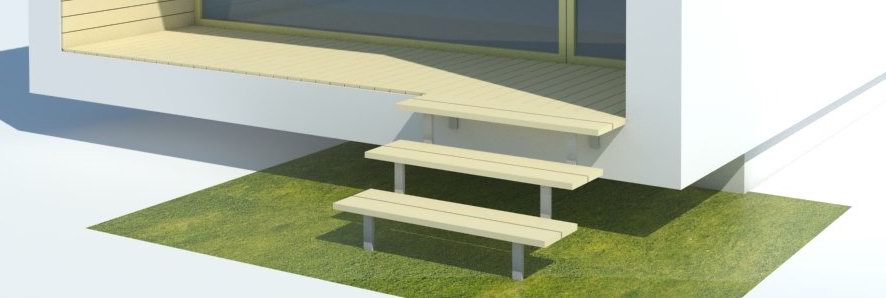

                      forum1.jpg

                      1 Reply Last reply
                      Reply Quote 0

                      Hello! It looks like you're interested in this conversation, but you don't have an account yet.

                      Getting fed up of having to scroll through the same posts each visit? When you register for an account, you'll always come back to exactly where you were before, and choose to be notified of new replies (either via email, or push notification). You'll also be able to save bookmarks and upvote posts to show your appreciation to other community members.

                      With your input, this post could be even better πŸ’—

                      Register Login
                      • 1 / 1
                      • First post
                        Last post
                      Buy SketchPlus
                      Buy SUbD
                      Buy WrapR
                      Buy eBook
                      Buy Modelur
                      Buy Vertex Tools
                      Buy SketchCuisine
                      Buy FormFonts

                      Advertisement