sketchucation logo sketchucation
    • 登入
    Oops, your profile's looking a bit empty! To help us tailor your experience, please fill in key details like your SketchUp version, skill level, operating system, and more. Update and save your info on your profile page today!
    🔌 Easy Offset | Offset selected faces in SketchUp in positive and negative offsets. Download

    [Plugin] Bitmap To Mesh

    已排程 已置頂 已鎖定 已移動 Plugins
    264 貼文 75 Posters 433.4k 瀏覽 75 Watching
    正在載入更多貼文
    • 從舊到新
    • 從新到舊
    • 最多點贊
    回覆
    • 在新貼文中回覆
    登入後回覆
    此主題已被刪除。只有擁有主題管理權限的使用者可以查看。
    • thomthomT 離線
      thomthom
      最後由 編輯

      @keyston said:

      I was also wondering if it would be possible to use a bitmap from an object in your scene to generate the mesh, say like you have texture mapped a cube for example, with 1 texture on all faces, you select the object, then generate mesh on all the mapped faces.Possible? too difficult? Just an idea from someone with no idea. 💭 👍 👎 ❓

      It'd be challenging to make the mesh work between faces, but the biggest problem is that it would most likely create a mesh that is all too dense for SketchUp to handle.

      Thomas Thomassen — SketchUp Monkey & Coding addict
      List of my plugins and link to the CookieWare fund

      1 條回覆 最後回覆 回覆 引用 0
      • jamalitoJ 離線
        jamalito
        最後由 編輯

        wow every good I like this plugin
        becouse I am used it in ornamentation
        thnx
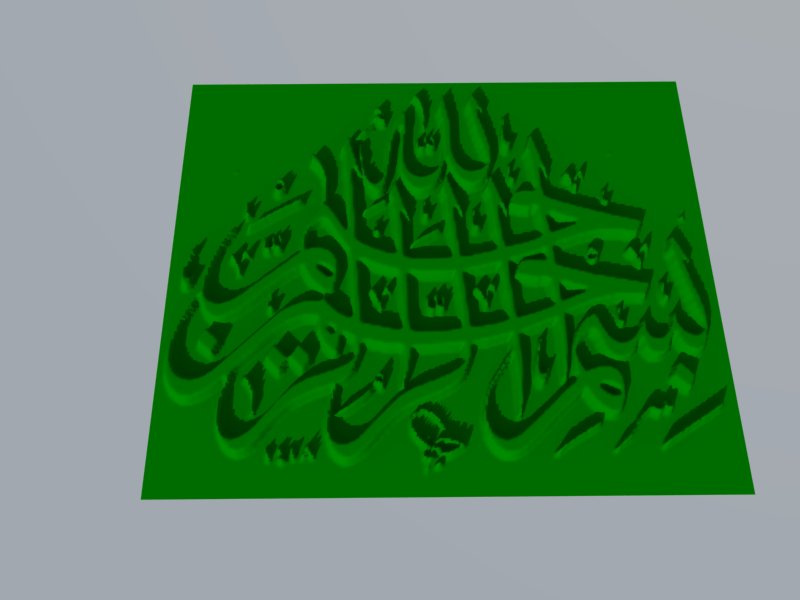

        basmah.jpg

        Albert Einstein:
        ((I am enough of an artist to draw freely upon my imagination. Imagination is more important than knowledge. Knowledge is limited. Imagination encircles the world.))

        1 條回覆 最後回覆 回覆 引用 0
        • B 離線
          Ben Ritter
          最後由 編輯

          Thomas, I love it. I have the mesh made, but struggling to find the right image size to make the mesh workable. I've broken the image down into 6 parts and I have a mesh, but can't get a texture applied. SU crashes.

          I've been able to apply the texture when it's grouped, but the image gets applied rotated 180 deg.

          So, for anyone, is there a way to simplify the mesh first? Would that actually help in applying the projected texture?

          SU8.0.3117, File is 98mb

          1 條回覆 最後回覆 回覆 引用 0
          • M 離線
            Matias Germán
            最後由 編輯

            It´s a great plugin. Thanks Thomas. 👍

            1 條回覆 最後回覆 回覆 引用 0
            • thomthomT 離線
              thomthom
              最後由 編輯

              @ben ritter said:

              So, for anyone, is there a way to simplify the mesh first? Would that actually help in applying the projected texture?

              If you need a simpker mesh, resample the bitmap you generated it from down. Less pixels - simpler mesh.

              Thomas Thomassen — SketchUp Monkey & Coding addict
              List of my plugins and link to the CookieWare fund

              1 條回覆 最後回覆 回覆 引用 0
              • B 離線
                Ben Ritter
                最後由 編輯

                I will try the resampling. Any idea why the image gets turned around?

                1 條回覆 最後回覆 回覆 引用 0
                • thomthomT 離線
                  thomthom
                  最後由 編輯

                  @ben ritter said:

                  I will try the resampling. Any idea why the image gets turned around?

                  Got a screenshot? I'm not sure if I understand what you describe.

                  Thomas Thomassen — SketchUp Monkey & Coding addict
                  List of my plugins and link to the CookieWare fund

                  1 條回覆 最後回覆 回覆 引用 0
                  • majidM 離線
                    majid
                    最後由 編輯

                    Dear tomtom, I'ven;t tested your plugin yet, seems to be great and so many thanx, but as a suggestion to reduce faces and improvement, maybe you could add an option for merging co-planar faces

                    My inspiring A, B, Sketches book: https://sketchucation.com/shop/books/intermediate/2612-alphabet-inspired-sketches--inspiring-drills-for-architects--3d-artists-and-designers-

                    1 條回覆 最後回覆 回覆 引用 0
                    • B 離線
                      Ben Ritter
                      最後由 編輯

                      @thomthom said:

                      @ben ritter said:

                      I will try the resampling. Any idea why the image gets turned around?

                      Got a screenshot? I'm not sure if I understand what you describe.

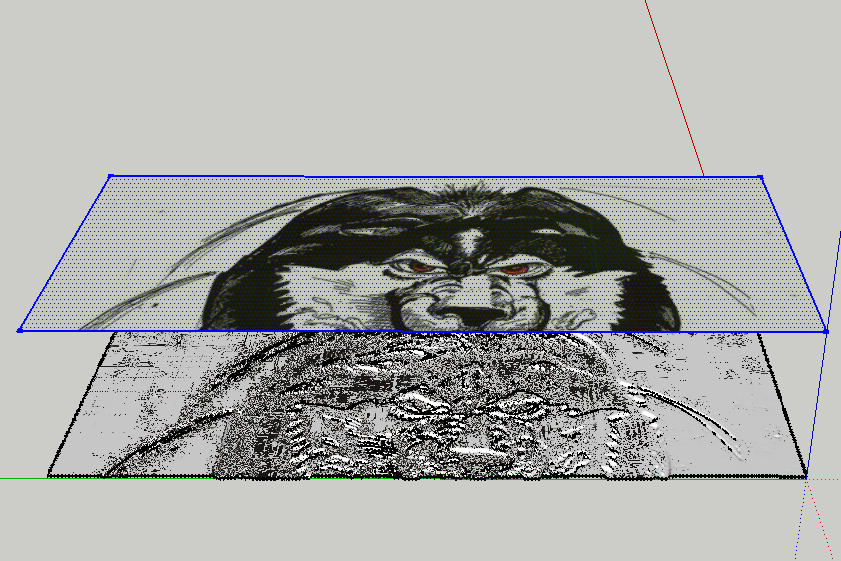
                      Thomas, thanks for your help, I can't seem to recreate that scenario now, but here's what happens when I try to project the texture above it. I get bits and pieces onto the mesh.

                      huskie.jpg

                      1 條回覆 最後回覆 回覆 引用 0
                      • thomthomT 離線
                        thomthom
                        最後由 編輯

                        @majid said:

                        Dear tomtom, I'ven;t tested your plugin yet, seems to be great and so many thanx, but as a suggestion to reduce faces and improvement, maybe you could add an option for merging co-planar faces

                        You could run CleanUp afterwards.

                        Thomas Thomassen — SketchUp Monkey & Coding addict
                        List of my plugins and link to the CookieWare fund

                        1 條回覆 最後回覆 回覆 引用 0
                        • F 離線
                          Fletch
                          最後由 編輯

                          Ben, look at my example of roof tile above very closely - you will see that you should use a TINY .bmp... I mean TINY.

                          Then scale the mesh that is generated UP in SketchUp, then PROJECT your texture DOWN onto the face. Be sure the texture position is set to PROJECTED.

                          Remember that BLACK is the lowest point, and WHITE is the HIGHEST point on the final mesh... so make sure to create your displacement map appropriately... a sketch like that is not likely to give you the exact results you want... depending on what you want I guess.

                          Thom Thom, I used your plugin to helpme create this image... thanks again! 👍
                          It is KEY to use a very good displacement map and very small resolution.
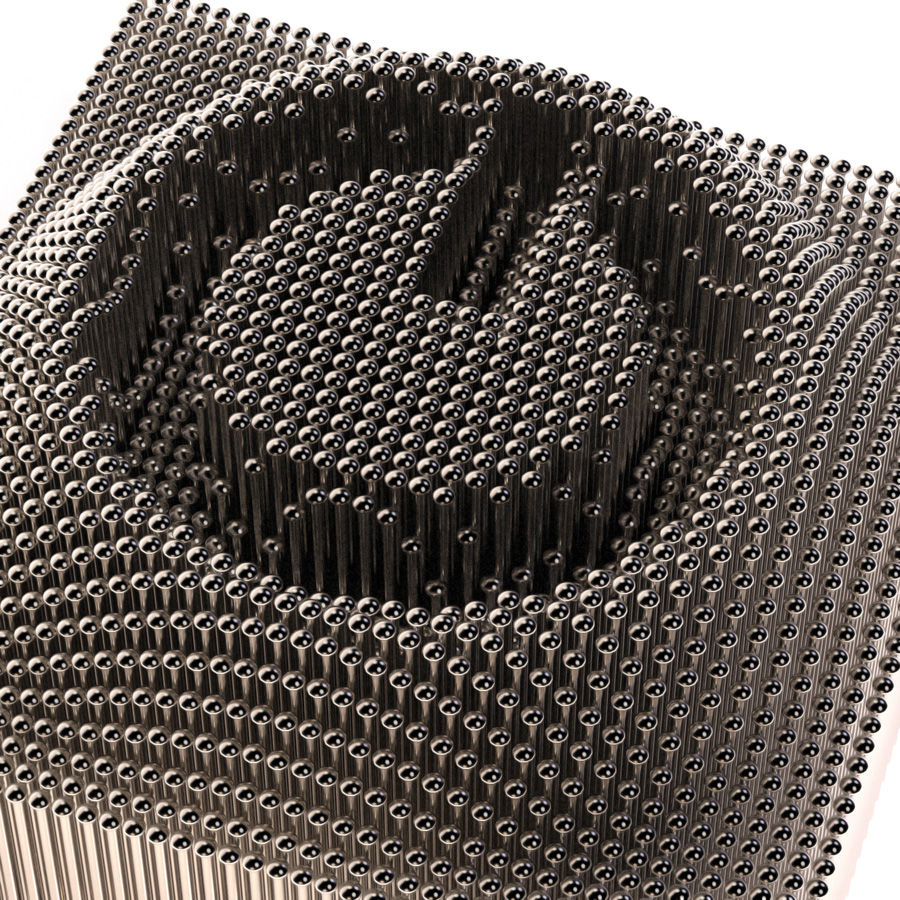

                          Pins-Final_Twilight-Render.jpg

                          Fletch
                          Twilight Render Cross-platform Plugin for SketchUp on PC or Mac

                          1 條回覆 最後回覆 回覆 引用 0
                          • thomthomT 離線
                            thomthom
                            最後由 編輯

                            Fletch - how did you do that?
                            A plugin that inserts components at vertices?

                            Thomas Thomassen — SketchUp Monkey & Coding addict
                            List of my plugins and link to the CookieWare fund

                            1 條回覆 最後回覆 回覆 引用 0
                            • Dave RD 離線
                              Dave R
                              最後由 編輯

                              Fletch, that is way cool! It looks like an On/Off button but makes me think it's label could be changed by controlling which pins are up and which are down.

                              Etaoin Shrdlu

                              %

                              (THERE'S NO PLACE LIKE)

                              G28 X0.0 Y0.0 Z0.0

                              M30

                              %

                              1 條回覆 最後回覆 回覆 引用 0
                              • B 離線
                                Ben Ritter
                                最後由 編輯

                                @fletch said:

                                Ben, look at my example of roof tile above very closely - you will see that you should use a TINY .bmp... I mean TINY.

                                Then scale the mesh that is generated UP in SketchUp, then PROJECT your texture DOWN onto the face. Be sure the texture position is set to PROJECTED.

                                Remember that BLACK is the lowest point, and WHITE is the HIGHEST point on the final mesh... so make sure to create your displacement map appropriately... a sketch like that is not likely to give you the exact results you want... depending on what you want I guess.

                                Thom Thom, I used your plugin to helpme create this image... thanks again! 👍
                                It is KEY to use a very good displacement map and very small resolution.

                                Fletch, thanks for the reminders. The bmp was a scanned in sketch that I tried. Perhaps not the best to use. Thank you anyway.

                                1 條回覆 最後回覆 回覆 引用 0
                                • GaieusG 離線
                                  Gaieus
                                  最後由 編輯

                                  @thomthom said:

                                  Fletch - how did you do that?
                                  A plugin that inserts components at vertices?

                                  Here is a bit of the workflow.
                                  http://twilightrender.com/phpBB3/viewtopic.php?f=26&t=2208

                                  Gai...

                                  1 條回覆 最後回覆 回覆 引用 0
                                  • thomthomT 離線
                                    thomthom
                                    最後由 編輯

                                    @unknownuser said:

                                    The board requires you to be registered and logged in to view this forum.

                                    😞

                                    Thomas Thomassen — SketchUp Monkey & Coding addict
                                    List of my plugins and link to the CookieWare fund

                                    1 條回覆 最後回覆 回覆 引用 0
                                    • GaieusG 離線
                                      Gaieus
                                      最後由 編輯

                                      Ah yeah, that is a restricted area for license holders.

                                      Anyway, it's drop.rb. 😉

                                      Gai...

                                      1 條回覆 最後回覆 回覆 引用 0
                                      • thomthomT 離線
                                        thomthom
                                        最後由 編輯

                                        Version 0.3.0b

                                        • Renamed Mesh From Bitmap to Mesh From Heightmap
                                        • Added new Mesh From Bitmap
                                          [attachment=0:3etwkcol]<!-- ia0 -->MeshFromBitmap.png<!-- ia0 -->[/attachment:3etwkcol]

                                        Known bug:
                                        Flipped image isn't properly recognised.

                                        Thomas Thomassen — SketchUp Monkey & Coding addict
                                        List of my plugins and link to the CookieWare fund

                                        1 條回覆 最後回覆 回覆 引用 0
                                        • J 離線
                                          jeffschaid01
                                          最後由 編輯

                                          Hello,

                                          After importing the bmp, I've adjusted height, width, etc. The program then follows through by indexing points and generating a mesh. After that I'm attempting to export as a vrml and the program continues to crash at 49%. I'm sure doing something incorrectly but not sure what. Any suggestions?

                                          Thanks,
                                          Jeff

                                          1 條回覆 最後回覆 回覆 引用 0
                                          • J 離線
                                            jeffschaid01
                                            最後由 編輯

                                            Hello,

                                            Are further steps needed prior to exporting as vrml after height, width and depth adjustments have been made along with point indexing and mesh generating? All of these steps have been completed but SU is crashing at the 49% mark while exporting as vrml. Any help will be greatly apprecaited.

                                            Thanks,
                                            Jeff

                                            1 條回覆 最後回覆 回覆 引用 0
                                            • 1
                                            • 2
                                            • 3
                                            • 4
                                            • 5
                                            • 6
                                            • 7
                                            • 13
                                            • 14
                                            • 5 / 14
                                            • 第一個貼文
                                              最後的貼文
                                            Buy SketchPlus
                                            Buy SUbD
                                            Buy WrapR
                                            Buy eBook
                                            Buy Modelur
                                            Buy Vertex Tools
                                            Buy SketchCuisine
                                            Buy FormFonts

                                            Advertisement