sketchucation logo sketchucation
    • Login
    Oops, your profile's looking a bit empty! To help us tailor your experience, please fill in key details like your SketchUp version, skill level, operating system, and more. Update and save your info on your profile page today!
    Mac User? | Join the Rayscaper Beta for Mac Learn More

    [Plugin] Bitmap To Mesh

    Scheduled Pinned Locked Moved Plugins
    264 Posts 75 Posters 517.1k Views 75 Watching
    Loading More Posts
    • Oldest to Newest
    • Newest to Oldest
    • Most Votes
    Reply
    • Reply as topic
    Log in to reply
    This topic has been deleted. Only users with topic management privileges can see it.
    • jamalitoJ
      jamalito
      last edited by

      wow every good I like this plugin
      becouse I am used it in ornamentation
      thnx
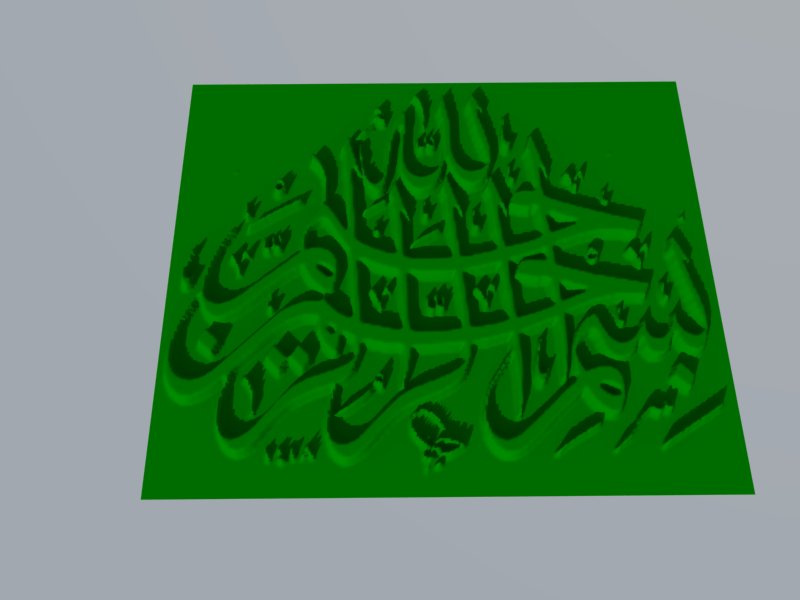

      basmah.jpg

      Albert Einstein:
      ((I am enough of an artist to draw freely upon my imagination. Imagination is more important than knowledge. Knowledge is limited. Imagination encircles the world.))

      1 Reply Last reply
      Reply Quote 0
      • B
        Ben Ritter
        last edited by

        Thomas, I love it. I have the mesh made, but struggling to find the right image size to make the mesh workable. I've broken the image down into 6 parts and I have a mesh, but can't get a texture applied. SU crashes.

        I've been able to apply the texture when it's grouped, but the image gets applied rotated 180 deg.

        So, for anyone, is there a way to simplify the mesh first? Would that actually help in applying the projected texture?

        SU8.0.3117, File is 98mb

        1 Reply Last reply
        Reply Quote 0
        • M
          Matias Germán
          last edited by

          It´s a great plugin. Thanks Thomas. 👍

          1 Reply Last reply
          Reply Quote 0
          • thomthomT
            thomthom
            last edited by

            @ben ritter said:

            So, for anyone, is there a way to simplify the mesh first? Would that actually help in applying the projected texture?

            If you need a simpker mesh, resample the bitmap you generated it from down. Less pixels - simpler mesh.

            Thomas Thomassen — SketchUp Monkey & Coding addict
            List of my plugins and link to the CookieWare fund

            1 Reply Last reply
            Reply Quote 0
            • B
              Ben Ritter
              last edited by

              I will try the resampling. Any idea why the image gets turned around?

              1 Reply Last reply
              Reply Quote 0
              • thomthomT
                thomthom
                last edited by

                @ben ritter said:

                I will try the resampling. Any idea why the image gets turned around?

                Got a screenshot? I'm not sure if I understand what you describe.

                Thomas Thomassen — SketchUp Monkey & Coding addict
                List of my plugins and link to the CookieWare fund

                1 Reply Last reply
                Reply Quote 0
                • majidM
                  majid
                  last edited by

                  Dear tomtom, I'ven;t tested your plugin yet, seems to be great and so many thanx, but as a suggestion to reduce faces and improvement, maybe you could add an option for merging co-planar faces

                  My inspiring A, B, Sketches book: https://sketchucation.com/shop/books/intermediate/2612-alphabet-inspired-sketches--inspiring-drills-for-architects--3d-artists-and-designers-

                  1 Reply Last reply
                  Reply Quote 0
                  • B
                    Ben Ritter
                    last edited by

                    @thomthom said:

                    @ben ritter said:

                    I will try the resampling. Any idea why the image gets turned around?

                    Got a screenshot? I'm not sure if I understand what you describe.

                    Thomas, thanks for your help, I can't seem to recreate that scenario now, but here's what happens when I try to project the texture above it. I get bits and pieces onto the mesh.
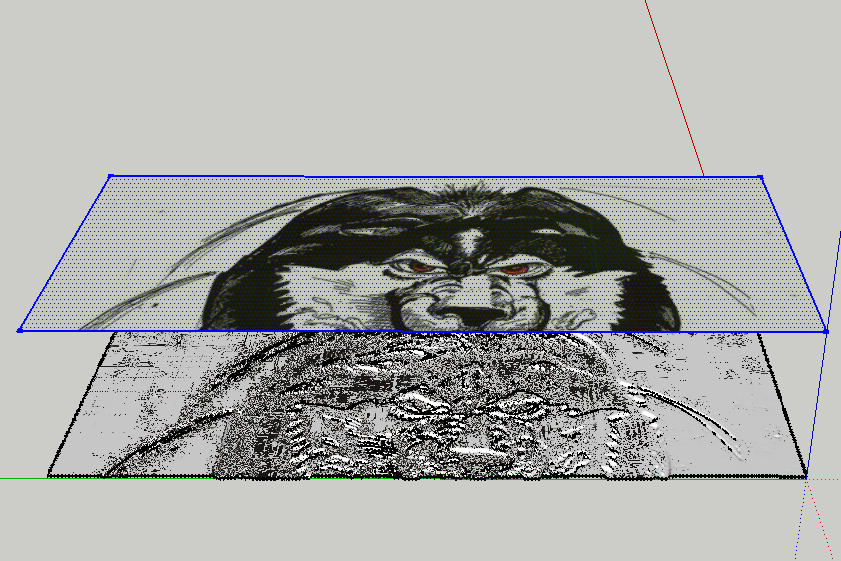

                    huskie.jpg

                    1 Reply Last reply
                    Reply Quote 0
                    • thomthomT
                      thomthom
                      last edited by

                      @majid said:

                      Dear tomtom, I'ven;t tested your plugin yet, seems to be great and so many thanx, but as a suggestion to reduce faces and improvement, maybe you could add an option for merging co-planar faces

                      You could run CleanUp afterwards.

                      Thomas Thomassen — SketchUp Monkey & Coding addict
                      List of my plugins and link to the CookieWare fund

                      1 Reply Last reply
                      Reply Quote 0
                      • FletchF
                        Fletch
                        last edited by

                        Ben, look at my example of roof tile above very closely - you will see that you should use a TINY .bmp... I mean TINY.

                        Then scale the mesh that is generated UP in SketchUp, then PROJECT your texture DOWN onto the face. Be sure the texture position is set to PROJECTED.

                        Remember that BLACK is the lowest point, and WHITE is the HIGHEST point on the final mesh... so make sure to create your displacement map appropriately... a sketch like that is not likely to give you the exact results you want... depending on what you want I guess.

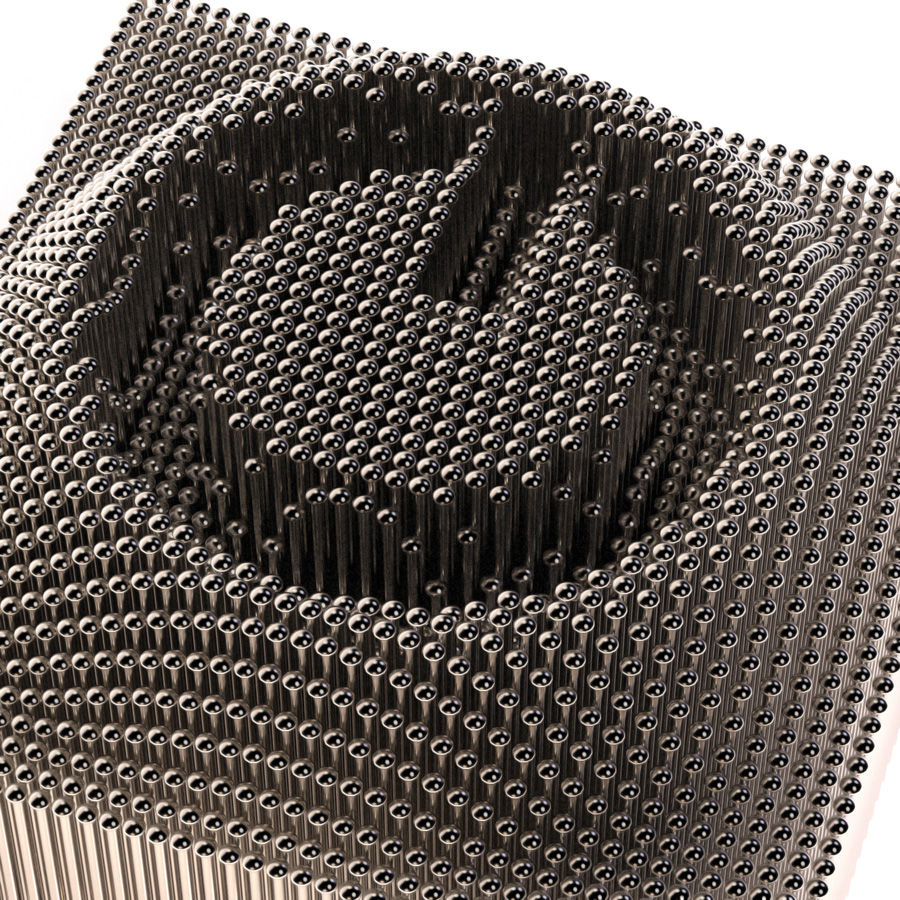
                        Thom Thom, I used your plugin to helpme create this image... thanks again! 👍
                        It is KEY to use a very good displacement map and very small resolution.

                        Pins-Final_Twilight-Render.jpg

                        Fletch
                        3D Modeling addict. Former owner/developer of Twilight Render. sleepinggiantvisual.com

                        1 Reply Last reply
                        Reply Quote 0
                        • thomthomT
                          thomthom
                          last edited by

                          Fletch - how did you do that?
                          A plugin that inserts components at vertices?

                          Thomas Thomassen — SketchUp Monkey & Coding addict
                          List of my plugins and link to the CookieWare fund

                          1 Reply Last reply
                          Reply Quote 0
                          • Dave RD
                            Dave R
                            last edited by

                            Fletch, that is way cool! It looks like an On/Off button but makes me think it's label could be changed by controlling which pins are up and which are down.

                            Etaoin Shrdlu

                            %

                            (THERE'S NO PLACE LIKE)

                            G28 X0.0 Y0.0 Z0.0

                            M30

                            %

                            1 Reply Last reply
                            Reply Quote 0
                            • B
                              Ben Ritter
                              last edited by

                              @fletch said:

                              Ben, look at my example of roof tile above very closely - you will see that you should use a TINY .bmp... I mean TINY.

                              Then scale the mesh that is generated UP in SketchUp, then PROJECT your texture DOWN onto the face. Be sure the texture position is set to PROJECTED.

                              Remember that BLACK is the lowest point, and WHITE is the HIGHEST point on the final mesh... so make sure to create your displacement map appropriately... a sketch like that is not likely to give you the exact results you want... depending on what you want I guess.

                              Thom Thom, I used your plugin to helpme create this image... thanks again! 👍
                              It is KEY to use a very good displacement map and very small resolution.

                              Fletch, thanks for the reminders. The bmp was a scanned in sketch that I tried. Perhaps not the best to use. Thank you anyway.

                              1 Reply Last reply
                              Reply Quote 0
                              • GaieusG
                                Gaieus
                                last edited by

                                @thomthom said:

                                Fletch - how did you do that?
                                A plugin that inserts components at vertices?

                                Here is a bit of the workflow.
                                http://twilightrender.com/phpBB3/viewtopic.php?f=26&t=2208

                                Gai...

                                1 Reply Last reply
                                Reply Quote 0
                                • thomthomT
                                  thomthom
                                  last edited by

                                  @unknownuser said:

                                  The board requires you to be registered and logged in to view this forum.

                                  😞

                                  Thomas Thomassen — SketchUp Monkey & Coding addict
                                  List of my plugins and link to the CookieWare fund

                                  1 Reply Last reply
                                  Reply Quote 0
                                  • GaieusG
                                    Gaieus
                                    last edited by

                                    Ah yeah, that is a restricted area for license holders.

                                    Anyway, it's drop.rb. 😉

                                    Gai...

                                    1 Reply Last reply
                                    Reply Quote 0
                                    • thomthomT
                                      thomthom
                                      last edited by

                                      Version 0.3.0b

                                      • Renamed Mesh From Bitmap to Mesh From Heightmap
                                      • Added new Mesh From Bitmap
                                        [attachment=0:3etwkcol]<!-- ia0 -->MeshFromBitmap.png<!-- ia0 -->[/attachment:3etwkcol]

                                      Known bug:
                                      Flipped image isn't properly recognised.

                                      Thomas Thomassen — SketchUp Monkey & Coding addict
                                      List of my plugins and link to the CookieWare fund

                                      1 Reply Last reply
                                      Reply Quote 0
                                      • J
                                        jeffschaid01
                                        last edited by

                                        Hello,

                                        After importing the bmp, I've adjusted height, width, etc. The program then follows through by indexing points and generating a mesh. After that I'm attempting to export as a vrml and the program continues to crash at 49%. I'm sure doing something incorrectly but not sure what. Any suggestions?

                                        Thanks,
                                        Jeff

                                        1 Reply Last reply
                                        Reply Quote 0
                                        • J
                                          jeffschaid01
                                          last edited by

                                          Hello,

                                          Are further steps needed prior to exporting as vrml after height, width and depth adjustments have been made along with point indexing and mesh generating? All of these steps have been completed but SU is crashing at the 49% mark while exporting as vrml. Any help will be greatly apprecaited.

                                          Thanks,
                                          Jeff

                                          1 Reply Last reply
                                          Reply Quote 0
                                          • thomthomT
                                            thomthom
                                            last edited by

                                            @jeffschaid01 said:

                                            Are further steps needed prior to exporting as vrml after height, width and depth adjustments have been made along with point indexing and mesh generating? All of these steps have been completed but SU is crashing at the 49% mark while exporting as vrml. Any help will be greatly apprecaited.

                                            VRML? What are you using to export that?

                                            Thomas Thomassen — SketchUp Monkey & Coding addict
                                            List of my plugins and link to the CookieWare fund

                                            1 Reply Last reply
                                            Reply Quote 0

                                            Hello! It looks like you're interested in this conversation, but you don't have an account yet.

                                            Getting fed up of having to scroll through the same posts each visit? When you register for an account, you'll always come back to exactly where you were before, and choose to be notified of new replies (either via email, or push notification). You'll also be able to save bookmarks and upvote posts to show your appreciation to other community members.

                                            With your input, this post could be even better 💗

                                            Register Login
                                            • 1
                                            • 2
                                            • 3
                                            • 4
                                            • 5
                                            • 6
                                            • 7
                                            • 8
                                            • 13
                                            • 14
                                            • 6 / 14
                                            • First post
                                              Last post
                                            Buy SketchPlus
                                            Buy SUbD
                                            Buy WrapR
                                            Buy eBook
                                            Buy Modelur
                                            Buy Vertex Tools
                                            Buy SketchCuisine
                                            Buy FormFonts

                                            Advertisement



