sketchucation logo sketchucation
    • 登入
    Oops, your profile's looking a bit empty! To help us tailor your experience, please fill in key details like your SketchUp version, skill level, operating system, and more. Update and save your info on your profile page today!
    🔌 Smart Spline | Fluid way to handle splines for furniture design and complex structures. Download

    Useful graphic apps

    已排程 已置頂 已鎖定 已移動 Extensions & Applications Discussions
    extensions
    91 貼文 39 Posters 135.9k 瀏覽 39 Watching
    正在載入更多貼文
    • 從舊到新
    • 從新到舊
    • 最多點贊
    回覆
    • 在新貼文中回覆
    登入後回覆
    此主題已被刪除。只有擁有主題管理權限的使用者可以查看。
    • P 離線
      pichuneke
      最後由 編輯

      Plugin for Gimp for normal map creation:

      Link Preview Image
      Google Code Archive - Long-term storage for Google Code Project Hosting.

      favicon

      (code.google.com)

      (Only free software, as always 😄 )

      By the way, do you know how to turn a normal map into a bump map? I want to use Bitmap to Mesh with a normal map, but first I have to turn it into a bump map...

      Forgive my spanglish...

      1 條回覆 最後回覆 回覆 引用 0
      • PixeroP 離線
        Pixero
        最後由 編輯

        @pichuneke said:

        By the way, do you know how to turn a normal map into a bump map? I want to use Bitmap to Mesh with a normal map, but first I have to turn it into a bump map...

        Converting a normal map to a bumpmap/heightmap/displacementmap isnt so easy.
        You can maybe fake it either by converting the normalmap to grayscale or using the blue channel as a base.
        There are some programs that can do it rather well:

        http://www.crazybump.com/
        Commercial, good but kind of expensive.

        http://www.xnormal.net/Downloads.aspx
        Free? Can convert normalmap to cavity map but that isnt really a heightmap more like a occlusion map.

        http://shadermap.com/
        Free command line version or commercial (19.95) pro version with UI.
        Here is some examples with Shadermap:
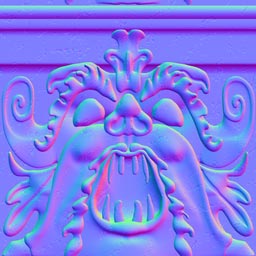
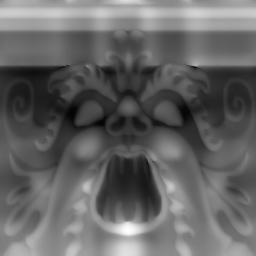
        nlinsample.jpgnlinsample_DISP.jpg

        1 條回覆 最後回覆 回覆 引用 0
        • P 離線
          pichuneke
          最後由 編輯

          Thanks Pixero. It seems that Shadermap is what I am looking for (as I do my work for free, with free tools). 😄

          Forgive my spanglish...

          1 條回覆 最後回覆 回覆 引用 0
          • Al HartA 離線
            Al Hart
            最後由 編輯

            @unknownuser said:

            By the way, do you know how to turn a normal map into a bump map? I want to use Bitmap to Mesh with a normal map, but first I have to turn it into a bump map...

            [Edit - I presumed you wanted to turn a mesh into a bump map - I may have answered the wrong question.]

            We wrote a (not free) app to turn a mesh into a bump-map. The trick is to look at the mesh from head on and make the closer faces either brighter or darker. A bump map does not have colors, but uses intensity of gray scale to represent Z-distance offsets.

            We did this by extracting all the faces and running them through an OpenGL renderer which turned the distance from the camera into shading intensity. This worked well, but it was hard to find a good application for it.

            You might be able to get a similar effect by making the object white, using a parallel projection, turning off all lighting, turning off edges, and adding fog. Then the amount of fog should represent the distance from the camera plane, and product the bump map.

            Al Hart

            http:wiki.renderplus.comimageseefRender_plus_colored30x30%29.PNG
            IRender nXt from Render Plus

            1 條回覆 最後回覆 回覆 引用 0
            • shuraS 離線
              shura
              最後由 編輯

              Thanks for sharing Pilou, Chaoscope is really beautiful!

              1 條回覆 最後回覆 回覆 引用 0
              • GaieusG 離線
                Gaieus
                最後由 編輯

                @al hart said:

                You might be able to get a similar effect by making the object white, using a parallel projection, turning off all lighting, turning off edges, and adding fog. Then the amount of fog should represent the distance from the camera plane, and product the bump map.

                I have made reasonable displacement maps like this actually. Best is to use hidden line face style (to get rid of face shading completely) and hide all edges in the style panel.

                You may want to exaggerate the geometry a little bit to get the desired effect with the fog but grouping the whole thing and scaling along the Z axis makes it easy.

                Gai...

                1 條回覆 最後回覆 回覆 引用 0
                • pilouP 離線
                  pilou
                  最後由 編輯

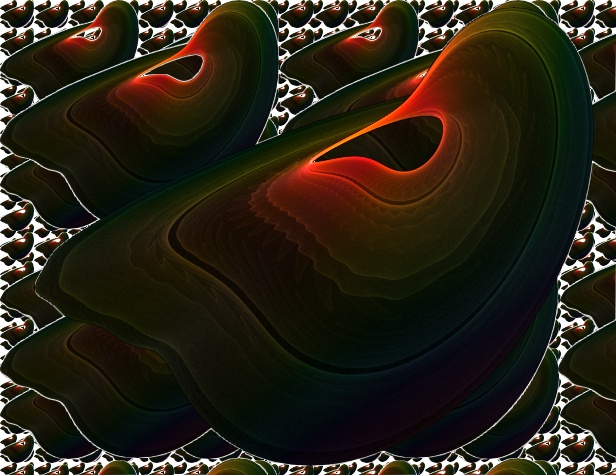
                  Chaoscope
                  The more easiest program : 3 keys F3,F4 ESCAPE 😎
                  Maybe a day it will gives the 3D Export 😒
                  Usefull for make crazzy background ☀

                  Click image if scroll bar
                  chaos.jpg

                  Frenchy Pilou
                  Is beautiful that please without concept!
                  My Little site :)

                  1 條回覆 最後回覆 回覆 引用 0
                  • N 離線
                    notareal
                    最後由 編輯

                    Link Preview Image
                    MeshMan - Mesh Manipulator

                    favicon

                    (www.holmes3d.net)

                    @unknownuser said:

                    What is MeshMan?

                    MeshMan is a 3D modeling tool. It loads and manipulates 3D mesh geometry in a few useful ways. It supports multiple subdivision schemes for smoothing a mesh, decimation for thinning a mesh, transforms for rotating, scaling, or translating a mesh, can tessellate a mesh into triangles, and supports a few other minor manipulations.

                    The primary file format MeshMan works with is the OFF format, a simple format for storing 3D data. For more information on the OFF format, see the pages for my RoffView OFF viewing program and the related OFF Tools page. MeshMan works only with the most basic type of OFF files and does not load the texture coordinates that RoffView can handle. This is because handling that extra data is beyond the scope of MeshMan's manipulations. MeshMan can also open simple OBJ files, and can export to several other formats, including STL and PLY.

                    Welcome to try Thea Render, Thea support | kerkythea.net -team member

                    1 條回覆 最後回覆 回覆 引用 0
                    • BurkhardB 離線
                      Burkhard
                      最後由 編輯

                      @zacchia said:

                      sure this is very helpful if you work with a lot of files:
                      http://www.mootools.com/plugins/us/index.asp
                      You can see all files as small tumbnails. It reads different files and you can also save them as different. Also convert files with batch command or polygon reduce with batch command and much more is possilbe. I could not be without it!

                      Skp files are only for 32 bit available 😠

                      http://www.ia-plus.de

                      1 條回覆 最後回覆 回覆 引用 0
                      • V 離線
                        valerostudio
                        最後由 編輯

                        http://www.artrage.com/Hands down one of the best 'painting' programs out there. The Ipad app is amazing and super cheap and the desktop versions are much much cheaper than Corel Painter and Artrage has all of the same functionalities.

                        1 條回覆 最後回覆 回覆 引用 0
                        • Mike LuceyM 離線
                          Mike Lucey
                          最後由 編輯

                          Thanks for the headsup on Artrage. I did not know it was now available for the iPad. Must check it out AND yes the iPad Apps are great value for money. This seems to be a GOOD trend. I imagine an app like Artrage would rock on the rumoured iPadHD 👍

                          Support us so we can support you! Upgrade to Premium Membership!

                          1 條回覆 最後回覆 回覆 引用 0
                          • B 離線
                            bjornkn
                            最後由 編輯

                            A program I've been using for many years, but still not often mentioned is Xara http://xara.com
                            It comes in different versions, and is a very fast and nice vector drawing program as well as capable of doing a lot of bitmap editing as well. Great for materials as well as all kinds of images, brochures, pdfs, Flash animations etc.
                            And it is also excellent for making great web sites, which looks pretty much identical in all browsers - which is not an easy task to do by hand 😄

                            1 條回覆 最後回覆 回覆 引用 0
                            • EscapeArtistE 離線
                              EscapeArtist
                              最後由 編輯

                              Don't know if this has been mentioned already:

                              https://chrome.google.com/webstore/detail/algoakekcdmbbikdjgjdahbfihboglmi?hl=en-US

                              For Chrome. 3DTin.

                              1 條回覆 最後回覆 回覆 引用 0
                              • 3 離線
                                3eighty
                                最後由 編輯

                                @zacchia said:

                                sure this is very helpful if you work with a lot of files:
                                http://www.mootools.com/plugins/us/index.asp
                                You can see all files as small tumbnails. It reads different files and you can also save them as different. Also convert files with batch command or polygon reduce with batch command and much more is possilbe. I could not be without it!

                                Is there a free version someplace?

                                (edited by solo as free copy sounded suspect, I'm sure you meant version)

                                1 條回覆 最後回覆 回覆 引用 0
                                • P 離線
                                  Pg09
                                  最後由 編輯

                                  Hello!
                                  Is there a free panorama maker that i could use for my photos?

                                  1 條回覆 最後回覆 回覆 引用 0
                                  • J 離線
                                    Jim
                                    最後由 編輯

                                    @pg09 said:

                                    Hello!
                                    Is there a free panorama maker that i could use for my photos?

                                    Hugin?

                                    Hi

                                    1 條回覆 最後回覆 回覆 引用 0
                                    • utilerU 離線
                                      utiler
                                      最後由 編輯

                                      @bjornkn said:

                                      A program I've been using for many years, but still not often mentioned is Xara http://xara.com
                                      It comes in different versions, and is a very fast and nice vector drawing program as well as capable of doing a lot of bitmap editing as well. Great for materials as well as all kinds of images, brochures, pdfs, Flash animations etc.
                                      And it is also excellent for making great web sites, which looks pretty much identical in all browsers - which is not an easy task to do by hand 😄

                                      Ditto!!! Very powerful app!!

                                      Just Curious...

                                      1 條回覆 最後回覆 回覆 引用 0
                                      • P 離線
                                        Pg09
                                        最後由 編輯

                                        @jim said:

                                        @pg09 said:

                                        Hello!
                                        Is there a free panorama maker that i could use for my photos?

                                        Hugin?

                                        Nice, gonna try it.

                                        Thank you!

                                        1 條回覆 最後回覆 回覆 引用 0
                                        • R 離線
                                          RichardCherry
                                          最後由 編輯

                                          Here is an app that I use quite frequently:
                                          Wood Workshop (Freeware) by Spiral Graphics
                                          http://www.spiralgraphics.biz/ww_overview.htm

                                          It's not only great for creating wood textures it is also great for creating stone patterns as well. It has lot of flexibility and is quite powerful for freeware.

                                          1 條回覆 最後回覆 回覆 引用 0
                                          • tridemT 離線
                                            tridem
                                            最後由 編輯

                                            😮 that's great! I believe to have already saw and then forgot it, in the past. thanks 👍

                                            1 條回覆 最後回覆 回覆 引用 0
                                            • 1
                                            • 2
                                            • 3
                                            • 4
                                            • 5
                                            • 2 / 5
                                            • 第一個貼文
                                              最後的貼文
                                            Buy SketchPlus
                                            Buy SUbD
                                            Buy WrapR
                                            Buy eBook
                                            Buy Modelur
                                            Buy Vertex Tools
                                            Buy SketchCuisine
                                            Buy FormFonts

                                            Advertisement