sketchucation logo sketchucation
    • 登入
    Oops, your profile's looking a bit empty! To help us tailor your experience, please fill in key details like your SketchUp version, skill level, operating system, and more. Update and save your info on your profile page today!
    🔌 Smart Spline | Fluid way to handle splines for furniture design and complex structures. Download

    [Plugin] Dxf_In v2.2 20110517 Dxf2Skp

    已排程 已置頂 已鎖定 已移動 Plugins
    200 貼文 41 Posters 283.3k 瀏覽 41 Watching
    正在載入更多貼文
    • 從舊到新
    • 從新到舊
    • 最多點贊
    回覆
    • 在新貼文中回覆
    登入後回覆
    此主題已被刪除。只有擁有主題管理權限的使用者可以查看。
    • F 離線
      freeWilly
      最後由 編輯

      yes, I tried various options (including centimeter). And it run for quite a while, but with all tries it finally aborted.
      I have SketchUp 8.0.11751 for Mac (Intel).

      Rolf

      1 條回覆 最後回覆 回覆 引用 0
      • TIGT 離線
        TIG Moderator
        最後由 編輯

        Strange - as I say the PC version is slow but works eventually...
        Are there any MAC users out there who have this working OK ?

        TIG

        1 條回覆 最後回覆 回覆 引用 0
        • F 離線
          freeWilly
          最後由 編輯

          is there a kind of a debug mode?
          To see when, what, why?

          1 條回覆 最後回覆 回覆 引用 0
          • TIGT 離線
            TIG Moderator
            最後由 編輯

            Running it with the Ruby Console open is the best there is - there's not coded-in debugging that I can see...

            TIG

            1 條回覆 最後回覆 回覆 引用 0
            • S 離線
              shrubman
              最後由 編輯

              @freewilly said:

              I installed the plugin on my Mac.
              I see it in the file menu, and can start an import.
              But after a certain time it aborts an I get an error window "<error> or empty File".
              I have tried different DXF-Files.

              What do I do wrong?

              Rolf

              I'm having the same problem. No matter what I do to prepare the file in illustrator, the import dxf dialog in sketchup gives me that error window and quits the import.

              1 條回覆 最後回覆 回覆 引用 0
              • C 離線
                Chrisn2011
                最後由 編輯

                This may be too late for you but I had used earlier versions of this on an iMac and found that there were sometimes problems which seem to relate to how the file is saved, some operating systems use carriage return -linefeed to denote the end of a line others just used one. I made a mod which allowed it to work on the iMac (see my post of Thu Feb 17, 2011 12:29 am), it may be worth trying it on the new version
                I edited the files using Textedit on the mac, just be careful that it doesn't add a .txt extension

                To help I have listed the suggested change below

                Find the following bit of code in the.rb file

                #get all block names, save them along with their location
                begin
                	aFile=File.open(chosen_file, "r")
                rescue
                	result=UI.messagebox "<Error> The DriveName\\Path\\FileName.dxf may not\nbe standard ASCII characters. If so, place the Dxf file\nin a ASCII named folder before accessing that file.", MB_OK
                end
                aFile.each_line do |line|						
                	count=count +1
                	if count==odd_number					#strip dxf tags thanks to TIG
                		odd_number=odd_number + 2
                		line=line.strip
                	end
                
                	last_line=this_line							#save last line data
                	this_line=line
                

                and insert the line
                line=line.chomp+"\n"
                after
                aFile.each_line do |line|
                it should ensure that all the data read in is terminated in a way that ruby scripts accept, and it shouldn't affect the way they run under windows either.

                1 條回覆 最後回覆 回覆 引用 0
                • L 離線
                  ltorresgdcllc
                  最後由 編輯

                  Thank you!!!

                  1 條回覆 最後回覆 回覆 引用 0
                  • A 離線
                    ANewBeat
                    最後由 編輯

                    @shrubman said:

                    @freewilly said:

                    I installed the plugin on my Mac.
                    I see it in the file menu, and can start an import.
                    But after a certain time it aborts an I get an error window "<error> or empty File".
                    I have tried different DXF-Files.

                    What do I do wrong?

                    Rolf

                    I'm having the same problem. No matter what I do to prepare the file in illustrator, the import dxf dialog in sketchup gives me that error window and quits the import.

                    Same here: "<Error> or Empty File"
                    Mac OS X 10.6.8
                    Sketchup 8.0.16845

                    1 條回覆 最後回覆 回覆 引用 0
                    • Dave RD 離線
                      Dave R
                      最後由 編輯

                      Did you read the next post? Maybe it will help since it seems to answer the question.

                      The best option would be to use the Pro version of SketchUp. 😒

                      Etaoin Shrdlu

                      %

                      (THERE'S NO PLACE LIKE)

                      G28 X0.0 Y0.0 Z0.0

                      M30

                      %

                      1 條回覆 最後回覆 回覆 引用 0
                      • A 離線
                        ANewBeat
                        最後由 編輯

                        OK, so I added the line=line.chomp+"\n" as described. What does the error message "Database contains Unsupported Entitys: SPLINE" mean? After receiving the message the file continued to import properly.

                        1 條回覆 最後回覆 回覆 引用 0
                        • A 離線
                          ANewBeat
                          最後由 編輯

                          Upon further inspection my file did not import correctly. It seams to be having trouble with the curves. I've attached the DXF file, a screenshot of the original artwork in Illustrator CS4
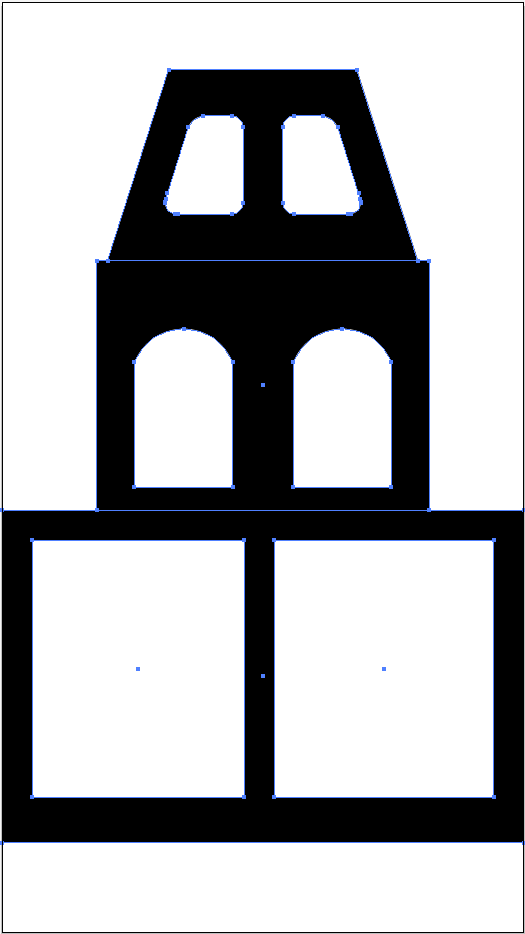
                          Screenshot of paths in Illustrator CS4

                          and a screenshot of the resulting import into Sketchup 8.
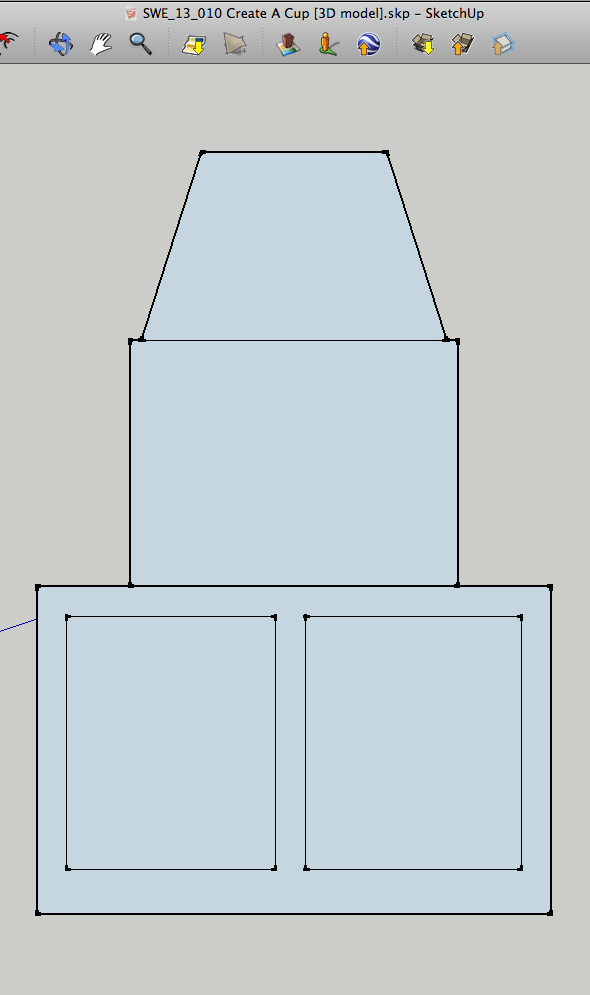
                          Screen shot of resulting import in Sketchup8


                          DXF exported from Illustrator CS4

                          1 條回覆 最後回覆 回覆 引用 0
                          • Dave RD 離線
                            Dave R
                            最後由 編輯

                            Works flawlessly with SketchUp's native DXF installer.
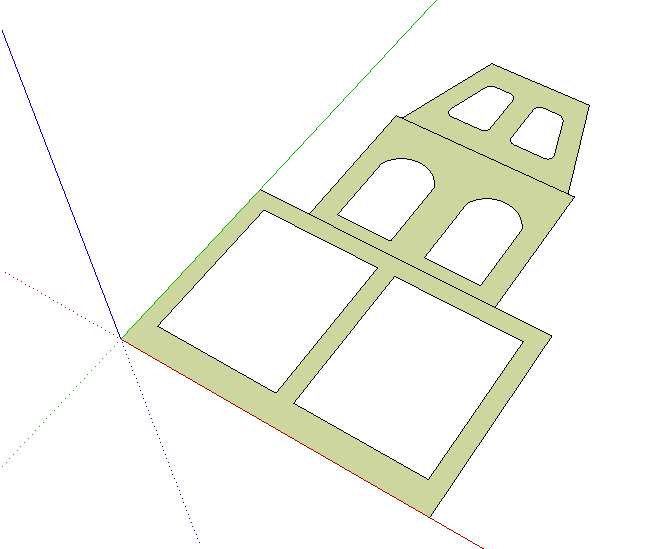
                            DXF in.png

                            Etaoin Shrdlu

                            %

                            (THERE'S NO PLACE LIKE)

                            G28 X0.0 Y0.0 Z0.0

                            M30

                            %

                            1 條回覆 最後回覆 回覆 引用 0
                            • J 離線
                              Jim
                              最後由 編輯

                              @anewbeat said:

                              OK, so I added the line=line.chomp+"\n" as described. What does the error message "Database contains Unsupported Entitys: SPLINE" mean? After receiving the message the file continued to import properly.

                              That means SPLINES are not supported in the plugin, and the arcs in your .dxf are made using splines.

                              You could covert the file to an older .dxf version using the Teigha converter, and try importing the converted file. Use dxf version R13 or earlier. There will be more cleanup required, but it should convert the splines to a supported entity.

                              Link Preview Image
                              ODA File Converter

                              ODA File Converter. ODA builds SDKs for people who work with complex engineering data

                              favicon

                              Open Design Alliance (www.opendesign.com)

                              Hi

                              1 條回覆 最後回覆 回覆 引用 0
                              • A 離線
                                ANewBeat
                                最後由 編輯

                                @jim said:

                                Use dxf version R13 or earlier. There will be more cleanup required, but it should convert the splines to a supported entity.

                                When I export from Illustrator as R13 I get this error message: "*Block U1 contains a unsupported mesh". These are extremely simple paths made up of simple arcs and line segments. Why don't the arcs remain arcs after export?

                                1 條回覆 最後回覆 回覆 引用 0
                                • Dave RD 離線
                                  Dave R
                                  最後由 編輯

                                  Sounds like a question for the Illustrator people. Do they have a support forum?

                                  Etaoin Shrdlu

                                  %

                                  (THERE'S NO PLACE LIKE)

                                  G28 X0.0 Y0.0 Z0.0

                                  M30

                                  %

                                  1 條回覆 最後回覆 回覆 引用 0
                                  • J 離線
                                    Jim
                                    最後由 編輯

                                    @dave r said:

                                    Sounds like a question for the Illustrator people. Do they have a support forum?

                                    The error is from the Dxf_in plugin.

                                    Try FreeDXF: http://sketchucation.com/forums/viewtopic.php?t=22199

                                    FreeDXF does a somewhat better import although still not perfect. These dxf importers are written by amateurs and hobbyists. If you need a Pro importer, your best option is to buy SketchUp Pro or get a commercial importer for SketchUp Free.

                                    Hi

                                    1 條回覆 最後回覆 回覆 引用 0
                                    • A 離線
                                      ANewBeat
                                      最後由 編輯

                                      As a work-around, I tried exporting the DXF from a different program (which allows "Save as Arcs" as an option) from my PC and I'm back to the "<Error> or Empty File" message. Ugh.

                                      1 條回覆 最後回覆 回覆 引用 0
                                      • A 離線
                                        ANewBeat
                                        最後由 編輯

                                        I finally got it to work. I had to export the DXF from FlexiSIGN with "Save as Arcs" checked, then convert to R12 via the converter mentioned above. A little convoluted, but I would typically build these types of shapes in FlexiSIGN anyway. When I simply converted the DXF exported from Illustrator I got a few errors and it segmented the arcs. Whew.

                                        1 條回覆 最後回覆 回覆 引用 0
                                        • bomastudioB 離線
                                          bomastudio
                                          最後由 編輯

                                          HI, I get with SU2014 the following on SU startup

                                          Errore di caricamento del file Dxf_In_v2.2.rb
                                          Error; #<SyntaxError; C;/Users/Ale/AppData/Roaming/SketchUp/SketchUp 2014/SketchUp/Plugins/Dxf_In_v2.2.rb;306; formal argument cannot be an instance variable
                                          	ramFile.each do |@line|	 #search for entities
                                          
                                          
                                                                ^>
                                          

                                          but the plugin semms to work properly.....

                                          1 條回覆 最後回覆 回覆 引用 0
                                          • J 離線
                                            jgt1942
                                            最後由 編輯

                                            Error loading plugin with SketchUp 2015 as follows
                                            Error Loading File Dxf_In_v2.2.rb
                                            Error: #<SyntaxError: C:/Users/John/AppData/Roaming/SketchUp/SketchUp 2015/SketchUp/Plugins/Dxf_In_v2.2.rb:306: formal argument cannot be an instance variable
                                            ramFile.each do |@line| #search for entities @line by @line

                                                                  ^>
                                            

                                            I don't know if it is something I have done wrong or there is an issue with SketchUp 2015. As I looked into the issue I discovered that I had several different versions of SketchUp installed. It seems that the SketchUp developers are not smart enough to remove an older version when installing a newer version. Thus I manually uninstalled all early versions I could find and I think I now only have SketchUp 2015 installed.

                                            The next chore was do find where the plugins are located, scanning my system I found the location to be C:\Users\John\AppData\Roaming\SketchUp\SketchUp 2015\SketchUp\Plugins thus I copied the Dxf_In_v2.2.rb file to this location. Now when I start SketchUp 2015 I get the above error for this extension. Any suggestions? I'm attempting to import some AutoCAD dxf files.


                                            jgt

                                            1 條回覆 最後回覆 回覆 引用 0
                                            • 1
                                            • 2
                                            • 5
                                            • 6
                                            • 7
                                            • 8
                                            • 9
                                            • 10
                                            • 7 / 10
                                            • 第一個貼文
                                              最後的貼文
                                            Buy SketchPlus
                                            Buy SUbD
                                            Buy WrapR
                                            Buy eBook
                                            Buy Modelur
                                            Buy Vertex Tools
                                            Buy SketchCuisine
                                            Buy FormFonts

                                            Advertisement