sketchucation logo sketchucation
    • Login
    Oops, your profile's looking a bit empty! To help us tailor your experience, please fill in key details like your SketchUp version, skill level, operating system, and more. Update and save your info on your profile page today!
    Mac User? | Join the Rayscaper Beta for Mac Learn More

    [Plugin] Solid Inspector

    Scheduled Pinned Locked Moved Plugins
    303 Posts 99 Posters 356.5k Views 98 Watching
    Loading More Posts
    • Oldest to Newest
    • Newest to Oldest
    • Most Votes
    Reply
    • Reply as topic
    Log in to reply
    This topic has been deleted. Only users with topic management privileges can see it.
    • voljankoV
      voljanko
      last edited by

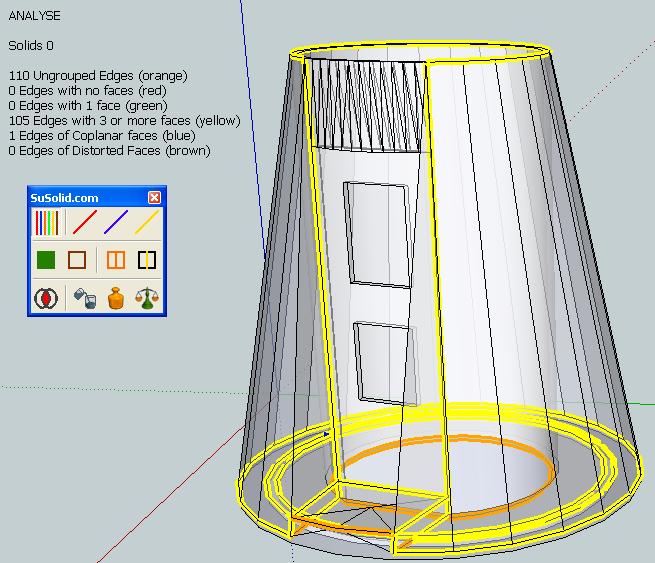
      There are also some ungrouped lines that can prevent your model to be solid.That means that they are outside the group or inside the group with the solid subgroup.In your case they are outside the group.See picture.

      analyse.JPG

      SuSolid.com - solid check - solid repair- solid intersection check - weight plugin

      1 Reply Last reply
      Reply Quote 0
      • I
        ik2012
        last edited by

        Thanks so much Gaieus and voljanko! Also a big thanks to thomthom for the awesome plugin!

        1 Reply Last reply
        Reply Quote 0
        • GaieusG
          Gaieus
          last edited by

          Hi jean-françois and welcome!

          The file is a simple ruby plugin (a text file) that you have to copy into this folder:
          C:\Program Files\Google\Google SketchUp 8\Plugins

          Also, there is a plugin library you will need (linked from the first post, above the attached plugin). It is a zipped library of several files. Unzip the archive onto your desktop, go into the folder that is created there and copy everything as you see there into the same plugin directory as above.

          Restart SU and find the plugin under the Tools menu.

          Gai...

          1 Reply Last reply
          Reply Quote 0
          • thomthomT
            thomthom
            last edited by

            @jean-françois said:

            Hi,
            I would like to install the solid inspector plugin on my computer.
            Can you explain me how to do it?
            Thanks in advance

            I've written a tutorial on how to install plugins: http://www.thomthom.net/thoughts/2012/01/installing-plugins-for-google-sketchup/
            Even includes link to an installer utility that will make it easier to install them.

            Thomas Thomassen — SketchUp Monkey & Coding addict
            List of my plugins and link to the CookieWare fund

            1 Reply Last reply
            Reply Quote 0
            • J
              jean-françois
              last edited by

              Subject: [Plugin] Solid Inspector (1.1.0) — 30 June 2011

              @jean-françois said:

              Hi,
              I would like to install the solid inspector plugin on my computer.
              Can you explain me how to do it?
              Thanks in advance

              Hi Guys, thanks for your answers. I am still facing some problems.
              I copied and unzip the file TT_lib2 into the folder "c/...sketchup8/plugins"
              I also copied the file TT_solid_inspector.rb in the same folder.
              I closed and restared SU but I get a window with "load error messages" everytime I open SU.
              Moreover, when I click on the tools Bar, I see "solid tools (pro only)->" but I can't click on it.
              I do not use SU pro, is it the reason of the problem?

              Thanks in advance

              Jean-François

              1 Reply Last reply
              Reply Quote 0
              • A
                archzag
                last edited by

                Geniale!

                1 Reply Last reply
                Reply Quote 0
                • R
                  Rich5
                  last edited by

                  How do you get out of solid inspector? Prob a very dumb question but it seems once on I can't get out and back to SU.

                  1 Reply Last reply
                  Reply Quote 0
                  • Dave RD
                    Dave R
                    last edited by

                    Have you tried picking another tool?

                    Etaoin Shrdlu

                    %

                    (THERE'S NO PLACE LIKE)

                    G28 X0.0 Y0.0 Z0.0

                    M30

                    %

                    1 Reply Last reply
                    Reply Quote 0
                    • thomthomT
                      thomthom
                      last edited by

                      @rich5 said:

                      How do you get out of solid inspector? Prob a very dumb question but it seems once on I can't get out and back to SU.

                      Just activate another tool, like Select (Spacebar).

                      Thomas Thomassen — SketchUp Monkey & Coding addict
                      List of my plugins and link to the CookieWare fund

                      1 Reply Last reply
                      Reply Quote 0
                      • D
                        d12dozr
                        last edited by

                        Just curious, why are some errors highlighted red, and some yellow? I haven't been able to figure out a pattern.

                        3D Printing with SketchUp Book
                        http://goo.gl/f7ooYh

                        1 Reply Last reply
                        Reply Quote 0
                        • thomthomT
                          thomthom
                          last edited by

                          @d12dozr said:

                          Just curious, why are some errors highlighted red, and some yellow? I haven't been able to figure out a pattern.

                          Red is the currently selected error. I think you can press a key (Return maybe=) to make it zoom in. You can also Tab around between errors.

                          There is lots of room for improvement - but not enough time... 😞

                          Thomas Thomassen — SketchUp Monkey & Coding addict
                          List of my plugins and link to the CookieWare fund

                          1 Reply Last reply
                          Reply Quote 0
                          • D
                            d12dozr
                            last edited by

                            @thomthom said:

                            Red is the currently selected error. I think you can press a key (Return maybe=) to make it zoom in. You can also Tab around between errors.

                            Oh cool, I knew about the Tab key, but I never knew about the colors.

                            Its an excellent tool - thanks again!

                            3D Printing with SketchUp Book
                            http://goo.gl/f7ooYh

                            1 Reply Last reply
                            Reply Quote 0
                            • T
                              thegreek87
                              last edited by

                              Wish I knew about this plugin sooner, gonna save me a lot of time. Thank you very much 😄

                              http://www.nicholasvaisey.co.uk/.

                              1 Reply Last reply
                              Reply Quote 0
                              • DesertRavenD
                                DesertRaven
                                last edited by

                                Hey TomTom, this is an awesome tool!!! thank you so much for sharing this.

                                A note to the Sketchup Programmers, weather they will read this or not, just have to say it:

                                Did it never occur to you that something like this should of been in the solid tool kit to begin with?!!

                                Do you guys ever test what you program? Put a little bit more muscle in to it, please for crying out loud!

                                Also try and make us some tools that don't leave fractions of tiny lines behind like that buggy follow me tool, fix it already!

                                Thanks. I just donated $50 to ThomThom. Keep the good work going!

                                simplicity is the ultimate sophistication

                                1 Reply Last reply
                                Reply Quote 0
                                • V
                                  VeniVidiVici
                                  last edited by

                                  Hi Thomas,

                                  Thank you again for this tool (belive I've said it before) great tool.
                                  I haven't used it in a while, and now I cant seem to get it working.
                                  It seems to load fine but nothing happens?

                                  I've double checked, and it is in the google sketchup 8 plugins folder...

                                  tt_solid_inspector.rb

                                  I also put in the newest TT_Lib2, which is in its own folder in the Plugins directory.

                                  I still cant seem to get anything to work, I have a few objects that arent quite solids, grouped, and it loads
                                  but I see no errors, yet it is not a solid.

                                  Any ideas?

                                  Thanks!

                                  😄

                                  1 Reply Last reply
                                  Reply Quote 0
                                  • V
                                    VeniVidiVici
                                    last edited by

                                    Thomas, your tools are awesome...I got it to work, not sure what it was, guess I just needed a reboot?!
                                    This tool has saved me countless hours of work...I will be contributing in the near future...tks again.

                                    • Brett
                                    1 Reply Last reply
                                    Reply Quote 0
                                    • thomthomT
                                      thomthom
                                      last edited by

                                      @venividivici said:

                                      I still cant seem to get anything to work, I have a few objects that arent quite solids, grouped, and it loads
                                      but I see no errors, yet it is not a solid.

                                      Any ideas?

                                      I don't have an idea as of yet - you need to be more specific to what "doesn't work". No menus? Tool doesn't activate?
                                      You see errors you say, in the Ruby Console? (If so, please post them - they would be extremely useful)

                                      Thomas Thomassen — SketchUp Monkey & Coding addict
                                      List of my plugins and link to the CookieWare fund

                                      1 Reply Last reply
                                      Reply Quote 0
                                      • xiombargX
                                        xiombarg
                                        last edited by

                                        It's actually cool to see people making donations to valued plugin programmers. I'm working through a prototyping, but as soon as I make any money, I'm committed to donate accordingly.

                                        1 Reply Last reply
                                        Reply Quote 0
                                        • voljankoV
                                          voljanko
                                          last edited by

                                          @venividivici said:

                                          I have a few objects that arent quite solids, grouped, and it loads
                                          but I see no errors, yet it is not a solid.

                                          Maybe you have ungroupped items mixed with grouped one.
                                          To detect this you need a SuSolid plugin (free for only solid inspections).
                                          David

                                          SuSolid.com - solid check - solid repair- solid intersection check - weight plugin

                                          1 Reply Last reply
                                          Reply Quote 0
                                          • S
                                            Snowy
                                            last edited by

                                            Thanks a lot! Great plugin

                                            1 Reply Last reply
                                            Reply Quote 0

                                            Hello! It looks like you're interested in this conversation, but you don't have an account yet.

                                            Getting fed up of having to scroll through the same posts each visit? When you register for an account, you'll always come back to exactly where you were before, and choose to be notified of new replies (either via email, or push notification). You'll also be able to save bookmarks and upvote posts to show your appreciation to other community members.

                                            With your input, this post could be even better 💗

                                            Register Login
                                            • 1
                                            • 2
                                            • 12
                                            • 13
                                            • 14
                                            • 15
                                            • 16
                                            • 16 / 16
                                            • First post
                                              Last post
                                            Buy SketchPlus
                                            Buy SUbD
                                            Buy WrapR
                                            Buy eBook
                                            Buy Modelur
                                            Buy Vertex Tools
                                            Buy SketchCuisine
                                            Buy FormFonts

                                            Advertisement