sketchucation logo sketchucation
    • 登入
    Oops, your profile's looking a bit empty! To help us tailor your experience, please fill in key details like your SketchUp version, skill level, operating system, and more. Update and save your info on your profile page today!
    ⚠️ Important | Libfredo 15.8b introduces important bugfixes for Fredo's Extensions Update

    [Plugin] TT_Lib²

    已排程 已置頂 已鎖定 已移動 Plugins
    310 貼文 66 Posters 407.7k 瀏覽 66 Watching
    正在載入更多貼文
    • 從舊到新
    • 從新到舊
    • 最多點贊
    回覆
    • 在新貼文中回覆
    登入後回覆
    此主題已被刪除。只有擁有主題管理權限的使用者可以查看。
    • thomthomT 離線
      thomthom
      最後由 編輯

      @daforum said:

      Hi. I've downloaded TT_Lib2 as I want to use QuadFaceTools_0.6.0 in SU7.
      Do I need to install the TT_Lib2 folder with all 50 items that are in the TT_Lib2 folder into the Plugins folder?

      Many thanks

      If you're unsure on how to install the plugin I'd advice you to use this utility:
      http://sketchucation.com/forums/viewtopic.php?t=42315

      Thomas Thomassen — SketchUp Monkey & Coding addict
      List of my plugins and link to the CookieWare fund

      1 條回覆 最後回覆 回覆 引用 0
      • daforumD 離線
        daforum
        最後由 編輯

        Hi thomthom.
        I had a look at the link and it says the utility is for SketchUp 8M2 or newer
        (i'm on SU v7 Mac)

        1 條回覆 最後回覆 回覆 引用 0
        • Rich O BrienR 離線
          Rich O Brien Moderator
          最後由 編輯

          Upgrade to v8

          Download the free D'oh Book for SketchUp 📖

          1 條回覆 最後回覆 回覆 引用 0
          • thomthomT 離線
            thomthom
            最後由 編輯

            @daforum said:

            Hi thomthom.
            I had a look at the link and it says the utility is for SketchUp 8M2 or newer
            (i'm on SU v7 Mac)

            Are you using Pro?
            If not, then I'd also recommend you upgrade to version 8.

            To manually install you'd need to ensure the files are located in such a manner indicated by the footprint description:
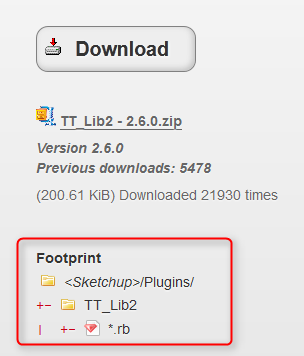
            TT_Lib2.png

            A general guide can be found here:
            http://www.thomthom.net/thoughts/2012/01/installing-plugins-for-google-sketchup/

            Thomas Thomassen — SketchUp Monkey & Coding addict
            List of my plugins and link to the CookieWare fund

            1 條回覆 最後回覆 回覆 引用 0
            • daforumD 離線
              daforum
              最後由 編輯

              Thank you, I will eventually upgrade to 8. I will have to do it manually.

              Do I still need to install all 50 items in the TT_Lib2 folder?

              1 條回覆 最後回覆 回覆 引用 0
              • thomthomT 離線
                thomthom
                最後由 編輯

                Yes, all content in the TT_Lib2 folder needs to be intact. Lots of them depend on each other.

                Thomas Thomassen — SketchUp Monkey & Coding addict
                List of my plugins and link to the CookieWare fund

                1 條回覆 最後回覆 回覆 引用 0
                • M 離線
                  matt.gordon320
                  最後由 編輯

                  Thanks for the awesome update thomthom!

                  1 條回覆 最後回覆 回覆 引用 0
                  • david_hD 離線
                    david_h
                    最後由 編輯

                    Thanks. I have that and I have run the little installer as well.

                    It's going now. thank you.

                    You see. . this is why I really shouldn't be wearing the green badge. 😳

                    If I make it look easy...It is probably easy

                    1 條回覆 最後回覆 回覆 引用 0
                    • thomthomT 離線
                      thomthom
                      最後由 編輯

                      I've been making it easier with my newer plugins, they will open a webdialog with a direct link to where to download.

                      Thomas Thomassen — SketchUp Monkey & Coding addict
                      List of my plugins and link to the CookieWare fund

                      1 條回覆 最後回覆 回覆 引用 0
                      • D 離線
                        dmitryzhuikov
                        最後由 編輯

                        Hi everyone. I'm stucking in installing TT_Lib2, somehow i don't have "Install Extension" button.
                        I'm using Sketchup 8 Pro, on win7. Thanks in advance
                        Link to screenshot:
                        http://letitbit.net/download/78848.7e37f4354d9034a91368ed6e3283/1212.JPG.html

                        1 條回覆 最後回覆 回覆 引用 0
                        • massimoM 離線
                          massimo Moderator
                          最後由 編輯

                          Maybe you don't have the latest SU8 version?

                          1 條回覆 最後回覆 回覆 引用 0
                          • D 離線
                            dmitryzhuikov
                            最後由 編輯

                            Ok, will try with latest

                            1 條回覆 最後回覆 回覆 引用 0
                            • P 離線
                              petrusyap
                              最後由 編輯

                              Hi.. I wonder why whenever I try to install TT_Lib2 2.7.1 into my sketchup 8 Pro, its always stated as 2.6.0 version. The CleanUp3 plugin cannot be used due to that issue. Please help.

                              1 條回覆 最後回覆 回覆 引用 0
                              • thomthomT 離線
                                thomthom
                                最後由 編輯

                                @petrusyap said:

                                Hi.. I wonder why whenever I try to install TT_Lib2 2.7.1 into my sketchup 8 Pro, its always stated as 2.6.0 version. The CleanUp3 plugin cannot be used due to that issue. Please help.

                                Please fill out your profile information with OS and SketchUp version.

                                Since I don't know what OS you have I have to guess - but I'm guessing you have Vista, Win7 or Win8. And you might have UAC enabled - which can restrict access to your plugins folder.

                                Some files might have ended up in VirtualStore. Install this utility and use the "Check VirtualStore" menu under Plugins. http://sketchucation.com/forums/viewtopic.php?t=48399
                                If there are files in the VirtualStore you should move them to the real plugins folder. And you will need admin rights to do so.

                                Otherwise I'd recommend you manually remove the old TT_Lib and install the new one.

                                Oh, btw - note that RBZ files is not the same as RB files. You need to use the "Install Extension" button to install RBZ packages. Just copying a RBZ file to the Plugins folder will not work.

                                Thomas Thomassen — SketchUp Monkey & Coding addict
                                List of my plugins and link to the CookieWare fund

                                1 條回覆 最後回覆 回覆 引用 0
                                • P 離線
                                  petrusyap
                                  最後由 編輯

                                  Hi Thom, thanks for the prompt reply. I am using Windows 8 Pro 64bit edition and have the UAC disabled. I use the install extension from the Preference >> Extensions menu to install the rbz files and but the system always identified the plugin as 2.6.0 when i try to use Libfredo Check For Plugin Update feature. But i will try the VirtualStore plugin as you suggested. Will keep u updated in minutes. Thanks

                                  1 條回覆 最後回覆 回覆 引用 0
                                  • P 離線
                                    petrusyap
                                    最後由 編輯

                                    Hi Thom,

                                    The error still remain the same. I try download the TT_Lib2 2.7.0, 2.7.1 and 2.8.0 from the BitBucket as well but still detected in the system as 2.6.0. Shall I try to re-install my SketchUp? Installed the VirtualStore Plugin, if i clicked on the Check Virtual Store, the windows automatically direct me to the sketchup plugin folder. Is it done correctly? Thank you

                                    1 條回覆 最後回覆 回覆 引用 0
                                    • thomthomT 離線
                                      thomthom
                                      最後由 編輯

                                      @petrusyap said:

                                      Installed the VirtualStore Plugin, if i clicked on the Check Virtual Store, the windows automatically direct me to the sketchup plugin folder. Is it done correctly? Thank you

                                      No - if it opened a folder it means it found files in the VirtualStore folder.

                                      Observe the full path to the folder opened in Explorer. If there was no files in VirtualStore you should have just gotten a messagebox.

                                      Also, when you navigate to the actual Plugin store you should see a button in Explorer "Compatibility Files". This is also an indication of files in VirtualStore.

                                      Thomas Thomassen — SketchUp Monkey & Coding addict
                                      List of my plugins and link to the CookieWare fund

                                      1 條回覆 最後回覆 回覆 引用 0
                                      • P 離線
                                        petrusyap
                                        最後由 編輯

                                        Hi Thom,

                                        I think i found out the problems. You are absolutely right. The problem lies in the VirtualStore. So, shall I empty all the files in the VirtualStore folder? Please advise. Thank you.

                                        1 條回覆 最後回覆 回覆 引用 0
                                        • thomthomT 離線
                                          thomthom
                                          最後由 編輯

                                          You probably want to move them to the real plugins folder. But beware that if you installed newer version you might overwrite them - like TT_Lib v2.8.0 which you said you installed. I'm guessing v2.6.0 is in VirtualStore and v2.8.0 is in the real Plugins folder. ...or the other way around...
                                          Truth be told it can be difficult to clean up mess caused by VirtualStore so it's hard for me to give exact advice. If you don't have too many plugins it might be wise to just install your plugins fresh. (if you have many it might still be wise to start fresh and avoid plugins you never use but potentially clutter up the syste,)

                                          Thomas Thomassen — SketchUp Monkey & Coding addict
                                          List of my plugins and link to the CookieWare fund

                                          1 條回覆 最後回覆 回覆 引用 0
                                          • P 離線
                                            petrusyap
                                            最後由 編輯

                                            Thank you Thom for your wise advise. I will re-install the sketchup and carefully install the plugin one by one and make sure only those plugins i often used will be installed. Thank you very much. Really appreciate it 😄

                                            1 條回覆 最後回覆 回覆 引用 0
                                            • 1
                                            • 2
                                            • 5
                                            • 6
                                            • 7
                                            • 8
                                            • 9
                                            • 15
                                            • 16
                                            • 7 / 16
                                            • 第一個貼文
                                              最後的貼文
                                            Buy SketchPlus
                                            Buy SUbD
                                            Buy WrapR
                                            Buy eBook
                                            Buy Modelur
                                            Buy Vertex Tools
                                            Buy SketchCuisine
                                            Buy FormFonts

                                            Advertisement