sketchucation logo sketchucation
    • Login
    Oops, your profile's looking a bit empty! To help us tailor your experience, please fill in key details like your SketchUp version, skill level, operating system, and more. Update and save your info on your profile page today!
    Mac User? | Join the Rayscaper Beta for Mac Learn More

    Continuous insert component

    Scheduled Pinned Locked Moved Plugins
    15 Posts 5 Posters 2.1k Views 5 Watching
    Loading More Posts
    • Oldest to Newest
    • Newest to Oldest
    • Most Votes
    Reply
    • Reply as topic
    Log in to reply
    This topic has been deleted. Only users with topic management privileges can see it.
    • D
      dedmin
      last edited by

      Thanks!

      1 Reply Last reply
      Reply Quote 0
      • D
        dedmin
        last edited by

        @thomthom said:

        @dedmin said:

        Is there a plugin like this

        Isn't video from SketchUp..?

        Yes. This is the freeware plugin ProjectSketch - http://www.renderplus.com/wk/ProjectSketch_-_Tutorial_w.htm

        But it doesn't use "Glue to" to place a component and is useless.

        1 Reply Last reply
        Reply Quote 0
        • thomthomT
          thomthom
          last edited by

          Glue to is a property of the Component Definition. You need to set this property for a component to glue to anything.

          Thomas Thomassen β€” SketchUp Monkey & Coding addict
          List of my plugins and link to the CookieWare fund

          1 Reply Last reply
          Reply Quote 0
          • D
            dedmin
            last edited by

            Yes it is set. But ProjectSketch has own settings for placement
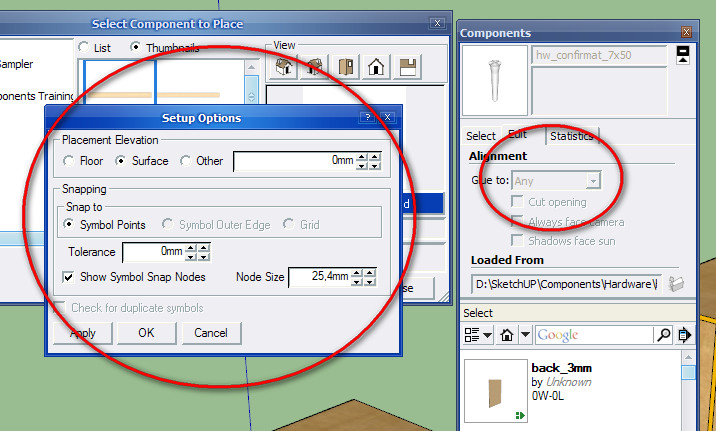
            2010-08-22_230134.jpg

            1 Reply Last reply
            Reply Quote 0
            • Rich O BrienR
              Rich O Brien Moderator
              last edited by

              Would Chris' script fulfil your needs? I think he has a similar script which doesn't have the scale or rotate function and it's free.

              But I recommend Repeat Copy as it is a great tool!

              Download the free D'oh Book for SketchUp πŸ“–

              1 Reply Last reply
              Reply Quote 0
              • D
                dedmin
                last edited by

                Yes, it would be great - I just need a simple plugin to paste multiple copies of a component - nothing more and fancy. But I cannot find it!

                1 Reply Last reply
                Reply Quote 0
                • Rich O BrienR
                  Rich O Brien Moderator
                  last edited by

                  Repeat Copy is found on Smustard.....Here's the thread with a video

                  I was wrong about the free version 😳

                  Download the free D'oh Book for SketchUp πŸ“–

                  1 Reply Last reply
                  Reply Quote 0
                  • D
                    dedmin
                    last edited by

                    No, I mean cannot find the simple one 🀣

                    1 Reply Last reply
                    Reply Quote 0
                    • Rich O BrienR
                      Rich O Brien Moderator
                      last edited by

                      I got confuddled! He's other version scales and rotates. Looks like you'll have to get the check book out!

                      Download the free D'oh Book for SketchUp πŸ“–

                      1 Reply Last reply
                      Reply Quote 0
                      • X
                        xrok1
                        last edited by

                        @dedmin said:

                        No, I mean cannot find the simple one 🀣

                        simply click back and forth between model and comp browser! πŸ˜’

                        β€œThere are three classes of people: those who see. Those who see when they are shown. Those who do not see.”

                        http://www.Twilightrender.com try it!

                        1 Reply Last reply
                        Reply Quote 0
                        • D
                          dedmin
                          last edited by

                          @xrok1 said:

                          @dedmin said:

                          No, I mean cannot find the simple one 🀣

                          simply click back and forth between model and comp browser! πŸ˜’

                          Too simple ... πŸ’š

                          1 Reply Last reply
                          Reply Quote 0
                          • T
                            thonsy
                            last edited by

                            hey guys,can u help me.where should i download components stringer plugins?

                            1 Reply Last reply
                            Reply Quote 0

                            Hello! It looks like you're interested in this conversation, but you don't have an account yet.

                            Getting fed up of having to scroll through the same posts each visit? When you register for an account, you'll always come back to exactly where you were before, and choose to be notified of new replies (either via email, or push notification). You'll also be able to save bookmarks and upvote posts to show your appreciation to other community members.

                            With your input, this post could be even better πŸ’—

                            Register Login
                            • 1 / 1
                            • First post
                              Last post
                            Buy SketchPlus
                            Buy SUbD
                            Buy WrapR
                            Buy eBook
                            Buy Modelur
                            Buy Vertex Tools
                            Buy SketchCuisine
                            Buy FormFonts

                            Advertisement
