[Plugin][$] Vertex Tools
-
One of the most frustrating things about teaching is how much students don't learn. Which can be read as hear, see, retain, remember, bother to take in, have any interest in, or simply haven't been exposed to. Amongst others.
Pretty much everything has already been asked, answered and argued over in these forums, much like the rest of the internet you never get to the end of it and there's not much that hasn't already gone before. -
@einstein said:
Wow, scaling to 0
 It is a game-changer I wished SketchUp had for a long time. And only now I realised FredoScale can do it as well.
Curious how many more surprises are hidden in these little buttons
I don't recall if v1 snap to scale 0 - but v2 will for sure. Making it easier.
(I had similar revelation about scaling negative to flip/mirror.)
@box said:
One of the most frustrating things about teaching is how much students don't learn. Which can be read as hear, see, retain, remember, bother to take in, have any interest in, or simply haven't been exposed to. Amongst others.
Pretty much everything has already been asked, answered and argued over in these forums, much like the rest of the internet you never get to the end of it and there's not much that hasn't already gone before.Challenge with all the gems in the forums is that they aren't always easy to find. Often they are buried deep in lengthy threads.
-
So true, I didn't mean anything by it. Just noting that we all tend to read what's in front then scroll on rather than following the story.
-
Hi Thomas,
Thank you so much for the great plugin.
Is there a chance to add some features to VT:1st: to extrude with scale similar to the move tool by holding the Ctrl key?
2nd: Furthermore moving only in one direction at a time is time consuming, I've seen you've got another type of gizmo which has three planes which you can move in two direction by clicking on each of them?
3rd: Also, the soft selection selects vertices in a sphere shape, could you add a feature to firstly choose which vertices to select and then continue to soft select?
-
@algorad88 said:
1st: to extrude with scale similar to the move tool by holding the Ctrl key?
Yes - in fact, it's already added to the upcoming v2.
@algorad88 said:
2nd: Furthermore moving only in one direction at a time is time consuming, I've seen you've got another type of gizmo which has three planes which you can move in two direction by clicking on each of them?
Also coming in v2.
@algorad88 said:
3rd: Also, the soft selection selects vertices in a sphere shape, could you add a feature to firstly choose which vertices to select and then continue to soft select?
Can elaborate on this? Screenshots? Example model?
-
@thomthom said:
Yes - in fact, it's already added to the upcoming v2.
Also coming in v2.
Thanks for the great news

@thomthom said:
Can elaborate on this? Screenshots? Example model?
This is how Vertex Tools selects vertices if I type 30 for soft selection:

But I only want the bottom quads selected. So, firstly I have to group those quads and then modify the vertices:

But this method has some deficiencies:
first, we will have separated quads by modifying vertices.
second, to join them again, we need to move those vertices which both takes much time and may not be accurate
third, we need to explode the group to join the parts again.
But if there were an option just like grouping which let you choose which vertices to affect the soft selection, then we could eliminate those steps
-
I see now. I got plans for that as well - to add an option to apply soft selection by connected edge distance.
-
Thom, I love the plugin, but there is a problem I keep running into, and I'm not sure if it's just a missing feature, or if it's a PEBKAC error. Is it possible to scale things unidirectionally?
For example, select group of vertices, and then scale with gizmo tool only in the positive direction on the chosen axis, instead of what it currently does, which is scale in both positive and negative on the chosen axis?
If there is a way to do this, it would make me very happy,
as currently, this is not as useful to me as it could be for shaping terrain, which is my main use for VT.In order to avoid this being a Pebkac error, I havealready looked over the manual, and read back through the thread. So far, I haven't found a way to do this. Basically, I just want hte scale function to work the same way SU's native scale tool does, or Fredo's scale tool. As it is right now, it acts like Fredo's scale tool after you press CTRL, with no way to turn that off.
Arigato!
-
You can scale in the choose axis by holding down Shift. But it doesn't stop at 0. (But v2 will stop at 0 so it's easier to scale to zero.)
-
Hmm. I guess I didn't do a very good job of explaining the problem.
 The Scale tool in VT seems to scale both up and down on whatever axis, from the centerpoint of the tool, or the selected geometry. It's not a matter of trying to scale to 0. Maybe if I put it this way; If I have a mesa in a piece of flat ground, and I select only the pillar portion of the mesa, and try to scale it upward in height by a factor of three, I should only have vertices moving upward. Instead, I get some vertices moving upward, and some moving downward, leaving the pillar of the mesa, now sitting in a narrow crater. How do I alter settings so it only scales upward from the lowest point of the selected geometry? I keep thinking I remember it working this way once upon a time...
 I'll try to post some illustrations of the problem soon.
THanks
Ok. Pics.
 THis is what I'm trying to do is scale the selected portion to be 3 times the current height.
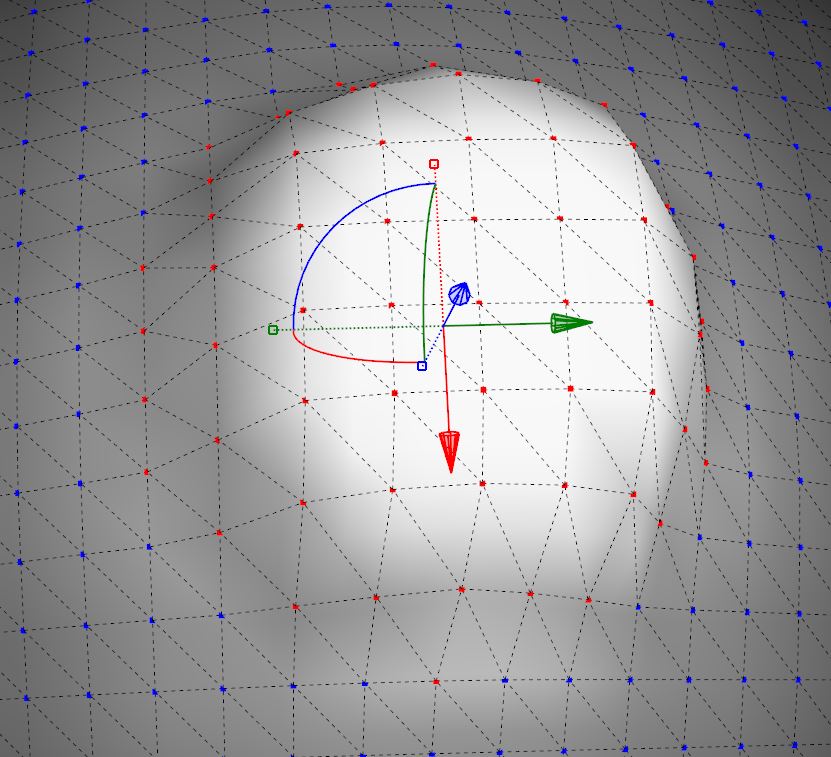
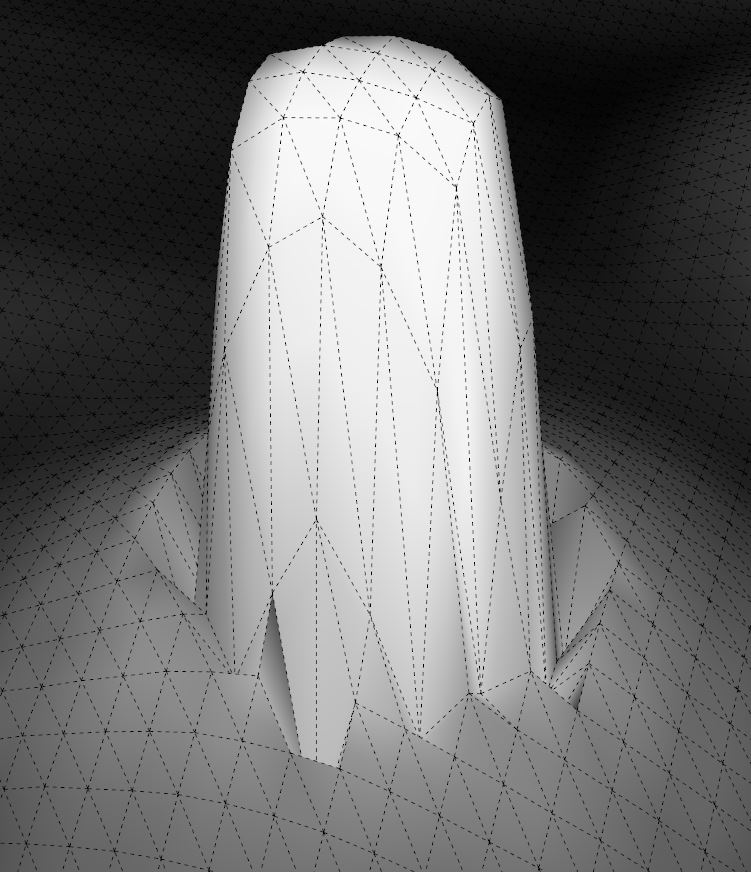
And this is what I get. Note the geometry around the pillar is scaled downward. I need to know how to turn that off, if it's possible. I hope the pictures help. -
I see.
I don't recall if Gizmo scale uses the Gizmo origin as scaling origin. If so then setting a custom position for the gizmo might help. (from the context menu on the Gizmo).But that's probably somewhat awkward workflow. The Vertex Tools Scale tool might be the better choice with the current version.
I logged an issue to look into better scaling control for future versions.
-
I thought that was the VT scale tool...? I'm confused now...Maybe there's something I'm missing? If there is something I'm missing, I do apolgise for being an ID10T error. Apparently that's a sin to some people around here, (not talking about you by the way,Thom) as I've found in the past.
I do appreciate you logging this though. A solution that would make it work more like Fredo's scale tool would be awesome.
-
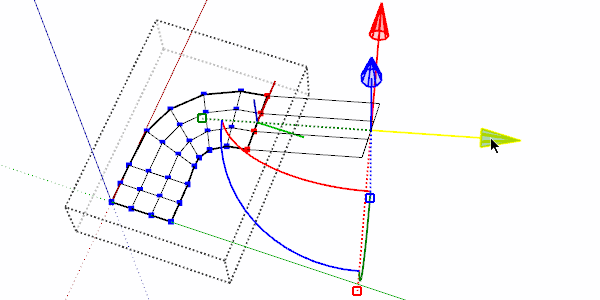
There are two ways of scaling in Vertex Tools, via the Gizmo;
and via the Vertex Tools scale tool:
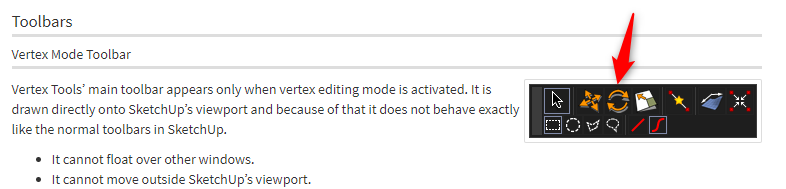
Which one of these were you referring to?
-
The Gizmo, because that was the only thing I had ever seen in VT. I found out why I thought that was the only method of scaling. I apparently had settings tweaked so the Gizmo would show up anytime I clicked on scale. Even so, neither the Gizmo, nor the scale tool does what I need at the moment. The scale tool keeps tapering things for some reason...
I guess I'll just have to find some other way to do things. A shame really, because in many other ways VT is great for Terrain forming.
Thanks!
-
Have you considered using soft select and just pulling up.
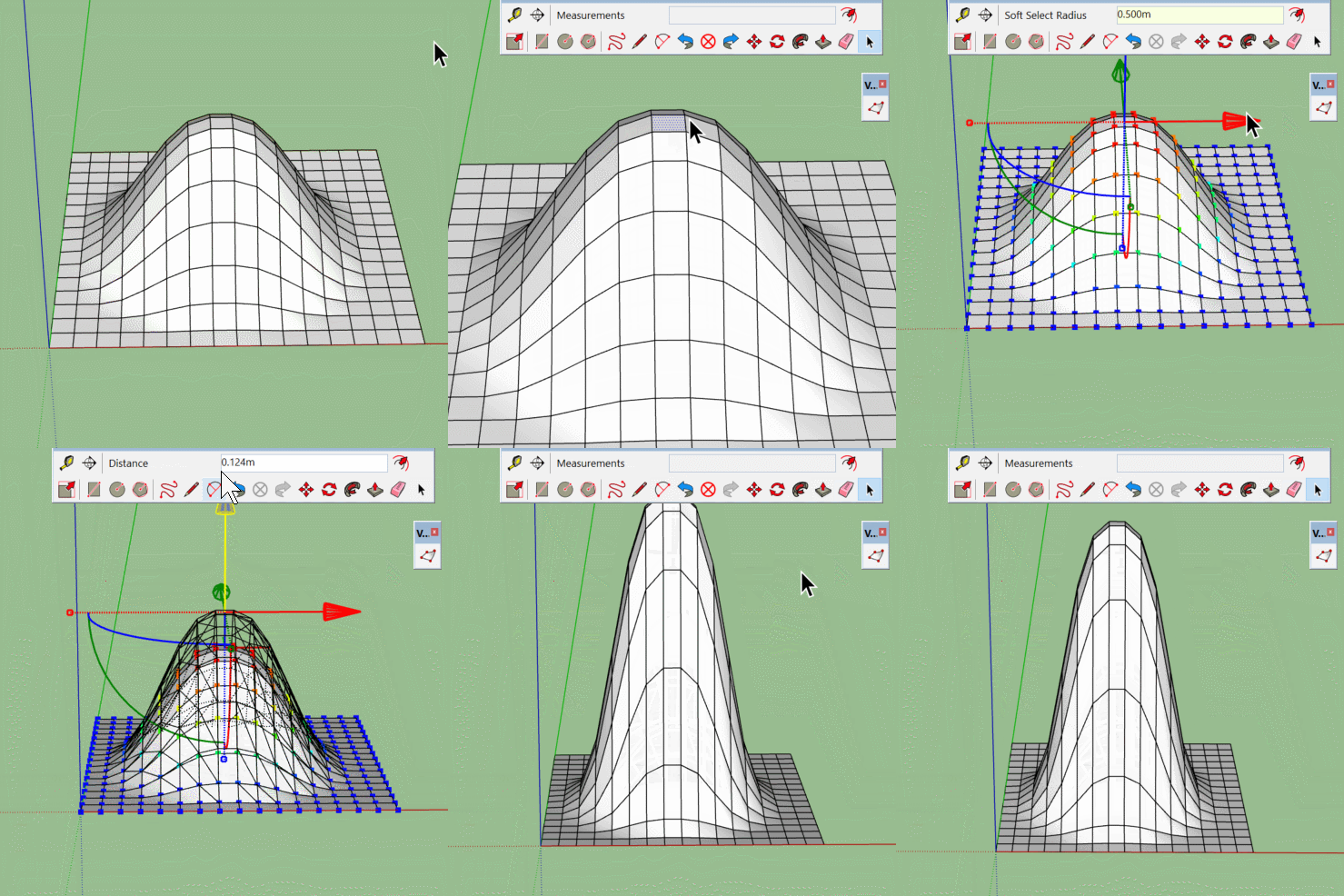
-
FYI. I can't purchase.
I tried both through sketch-up extensions warehouse and now through this website.
The error I get on this site is "nothing to see here" when I try to follow the purchase link
in sketch-up extensions I can not submit a payment, and If I go back and try again, it keeps adding quantity but I can't undo that.Thanks
Andy -
@ Box: Hai, I use that methosd in some circumstances, but it doesn' work so well when trying to scale a mountain range, or something of that nature. I appreciate the suggestion though!
-
@andreafryett said:
FYI. I can't purchase.
I tried both through sketch-up extensions warehouse and now through this website.
The error I get on this site is "nothing to see here" when I try to follow the purchase link
in sketch-up extensions I can not submit a payment, and If I go back and try again, it keeps adding quantity but I can't undo that.Thanks
AndyThe only place to purchase Vertex Tools is at its website: https://evilsoftwareempire.com/vertex-tools
It cannot be bought from Extension Warehouse.If you are having problems from https://evilsoftwareempire.com/vertex-tools - can you send me a screenshot of what you see?
-
@Thomthom
Why can't SketchUp incorporate the way your vertex tools don't destroy texture UVs when moving vertices? -






Advertisement