sketchucation logo sketchucation
    • 登入
    Oops, your profile's looking a bit empty! To help us tailor your experience, please fill in key details like your SketchUp version, skill level, operating system, and more. Update and save your info on your profile page today!
    🔌 Smart Spline | Fluid way to handle splines for furniture design and complex structures. Download

    [Plugin][$] Vertex Tools

    已排程 已置頂 已鎖定 已移動 Plugins
    667 貼文 92 Posters 434.0k 瀏覽 92 Watching
    正在載入更多貼文
    • 從舊到新
    • 從新到舊
    • 最多點贊
    回覆
    • 在新貼文中回覆
    登入後回覆
    此主題已被刪除。只有擁有主題管理權限的使用者可以查看。
    • pilouP 離線
      pilou
      最後由 編輯

      @unknownuser said:

      I have no idea on how to simplify a whole mesh.

      Plugin Polyreducer by Whaat 😉

      Frenchy Pilou
      Is beautiful that please without concept!
      My Little site :)

      1 條回覆 最後回覆 回覆 引用 0
      • honoluludesktopH 離線
        honoluludesktop
        最後由 編輯

        @thomthom said:

        @honoluludesktop said:

        Thom, How difficult would it be to use portions of your algorithm to redraw a selected mesh with 50% less faces? We could use a simple plugin to do this. I have a pair of shoes I like to include in my scenes to be rendered that have more faces then the model itself. If I could select the mesh that I needed reduced, even if the change is by every other vertex, I could reduce the mesh to something manageable.

        It would be difficult, yes. I have only implemented a polyline simplifier in one of my plugins - but that was just porting an algorithm I found. I have no idea on how to simplify a whole mesh.

        But didn't Fredo or Whaat do something like this in one of their plugins?

        Can someone point me to a link? The ones I tried hung or didn't do mesh, don't recall the names.

        1 條回覆 最後回覆 回覆 引用 0
        • pilouP 離線
          pilou
          最後由 編輯

          The plug Polyreducer by Whaat above your post don't make the trick? 😮

          Frenchy Pilou
          Is beautiful that please without concept!
          My Little site :)

          1 條回覆 最後回覆 回覆 引用 0
          • honoluludesktopH 離線
            honoluludesktop
            最後由 編輯

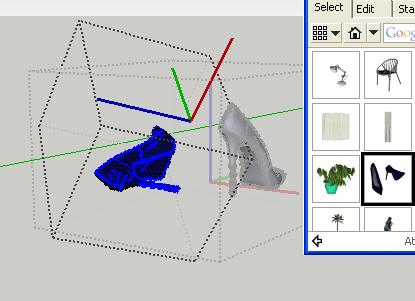
            Maybe I am doing something wrong, here is the model.


            Shoes01 high heels.skp


            temp06.jpg

            1 條回覆 最後回覆 回覆 引用 0
            • PixeroP 離線
              Pixero
              最後由 編輯

              Looks great Thomas. Will get it ASAP.

              By the way, now that your done with the vertex tool could you start thinking about a UV tool with planar and cubic mapping? 😉

              1 條回覆 最後回覆 回覆 引用 0
              • thomthomT 離線
                thomthom
                最後由 編輯

                @pixero said:

                By the way, now that your done with the vertex tool could you start thinking about a UV tool with planar and cubic mapping? 😉

                😄 🤓
                Yes - UV experimenting is on the schedule. I had some success with a quick mockup for planar mapping - basically projecting. Need to experiment with how cubic will be done and what kind of UI is needed.
                Also looking into a way to lock UV mapping co-ordinates - something that would be useful as a standalone plugin and as a feature of others, such as Vertex Tools.

                Thomas Thomassen — SketchUp Monkey & Coding addict
                List of my plugins and link to the CookieWare fund

                1 條回覆 最後回覆 回覆 引用 0
                • GaieusG 離線
                  Gaieus
                  最後由 編輯

                  @thomthom said:

                  Also looking into a way to lock UV mapping co-ordinates - something that would be useful as a standalone plugin and as a feature of others, such as Vertex Tools.

                  Yup, and Fredo scale (bending), Shape bender and all. I want to be able to create arches without any hassle. 😒

                  Gai...

                  1 條回覆 最後回覆 回覆 引用 0
                  • pilouP 離線
                    pilou
                    最後由 編輯

                    @Honolulu
                    Whith your shoe that curious, after Polyreduce, number of entities is increasing! 😮
                    I works with only one shoes, save at the end of a process of poly reduce 50%
                    Relaunch, poly reduce 50% etc... 6 times!
                    At the end I have more entities than the beginning! 😒


                    Shoes01medium6.zip

                    Frenchy Pilou
                    Is beautiful that please without concept!
                    My Little site :)

                    1 條回覆 最後回覆 回覆 引用 0
                    • X 離線
                      xrok1
                      最後由 編輯

                      i'm very surprised this isn't getting waaaaay more attention (its like the holy grail of SU IMHO). 😕 give people fur they'll play forever (this does work with fur you know), but give people a real tool and its too much like work i guess 🤣 ??????

                      “There are three classes of people: those who see. Those who see when they are shown. Those who do not see.”

                      http://www.Twilightrender.com try it!

                      1 條回覆 最後回覆 回覆 引用 0
                      • CadFatherC 離線
                        CadFather
                        最後由 編輯

                        ..wonderful ruby. well thought out in detail - amazing i had just the right need for it yesterday - put it through the paces and no glitch..
                        👍 👍

                        1 條回覆 最後回覆 回覆 引用 0
                        • honoluludesktopH 離線
                          honoluludesktop
                          最後由 編輯

                          On my system, with this model, Polyreduce just hangs:-(

                          1 條回覆 最後回覆 回覆 引用 0
                          • thomthomT 離線
                            thomthom
                            最後由 編輯

                            I'd love to see in action screenshots of what kind of modelling people use the plugin for. nudge nudge wink wink

                            Thomas Thomassen — SketchUp Monkey & Coding addict
                            List of my plugins and link to the CookieWare fund

                            1 條回覆 最後回覆 回覆 引用 0
                            • thomthomT 離線
                              thomthom
                              最後由 編輯

                              @xrok1 said:

                              i'm very surprised this isn't getting waaaaay more attention (its like the holy grail of SU IMHO). 😕 give people fur they'll play forever (this does work with fur you know), but give people a real tool and its too much like work i guess 🤣 ??????

                              Not being freeware (or Cookieware in my case) does present a barrier. Probably would have helped to have a trial - but that isn't a trivial matter.

                              None the less - I feel it's receive a nice amount of attention. Positive feedback so far. 😄

                              Thomas Thomassen — SketchUp Monkey & Coding addict
                              List of my plugins and link to the CookieWare fund

                              1 條回覆 最後回覆 回覆 引用 0
                              • D 離線
                                dedmin
                                最後由 編輯

                                And don't forget - it is a Summer time ☀ ☀

                                1 條回覆 最後回覆 回覆 引用 0
                                • CadFatherC 離線
                                  CadFather
                                  最後由 編輯

                                  don't have the shots now but i had a terrain and a road going up, then a tricky corner the road had to come sharply down and turn

                                  the fact that i was able to free-select the exact vertices made it easier to bring that part of the road nicely down... (for nicely of course i mean type in the coloured radius of influence.. smooth it with a cold bezier and there you have it!) worked like a cold guinness on a hot pub day 😉

                                  1 條回覆 最後回覆 回覆 引用 0
                                  • mitcorbM 離線
                                    mitcorb
                                    最後由 編輯

                                    Congratulations, ThomThom on your release of this very useful tool. I tried to post a comment here yesterday, but the Reply Button said Locked.??
                                    By the way the demo video was very informative and the voice was smooth and steady.
                                    Good work.
                                    Soon as my budget allows...

                                    I take the slow, deliberate approach in my aimless wandering.

                                    1 條回覆 最後回覆 回覆 引用 0
                                    • thomthomT 離線
                                      thomthom
                                      最後由 編輯

                                      @mitcorb said:

                                      Congratulations, ThomThom on your release of this very useful tool. I tried to post a comment here yesterday, but the Reply Button said Locked.??

                                      That was the old thread. I locked that and started a new one, so in case there was people reporting issues etc it'd be easier to follow.
                                      You're not going mad! 😄

                                      Thomas Thomassen — SketchUp Monkey & Coding addict
                                      List of my plugins and link to the CookieWare fund

                                      1 條回覆 最後回覆 回覆 引用 0
                                      • jeff hammondJ 離線
                                        jeff hammond
                                        最後由 編輯

                                        this isn't completely thought out yet but i just had a little situation where something like this would be sweet.. 😄

                                        when using 'make planar', as far as i can tell, the vertices are averaged and the slope of the plane is based off that..
                                        i needed the plane to be level and my vertices weren't quite there so i used 'make planar' then finagled the resulting plane to level using the rotate tool.

                                        would of been sweet if i could've made the plane then chose (either via a single vertex or some other kind of input) which height the plane would be leveled at..

                                        other uses might be for cutting a level tract in the side of a hill for instance..

                                        i dunno, not that important but just an idea.

                                        really a great plugin.

                                        dotdotdot

                                        1 條回覆 最後回覆 回覆 引用 0
                                        • thomthomT 離線
                                          thomthom
                                          最後由 編輯

                                          Yea - I have been thinking that some way of controlling the make planar would be good. But I've so far not worked out what kind of UI implementation it'd be.

                                          I think that when I get the manipulating gizmos working I'd might make sense to have virtual plane to manipulate. You can see what I'm talking about when I release the next UV mapping plugin.

                                          Thomas Thomassen — SketchUp Monkey & Coding addict
                                          List of my plugins and link to the CookieWare fund

                                          1 條回覆 最後回覆 回覆 引用 0
                                          • EarthMoverE 離線
                                            EarthMover
                                            最後由 編輯

                                            👍 👍 👍 Great work Thom! Been away for a while and came back to a real gem. I have a simple request.

                                            In Max if you select a bunch of verts, you can hold CTRL and click on the Edge button and it will select all the edges connected to those verts instead....and the same for polygons. Could you do something similar in your Vertex Tools? I would like to be able to utilize the "ignore backfacing" and freehand selection features for edges and faces also.

                                            Thanks again bro...really a well polished plugin!

                                            3D Artist at Clearstory 3D Imaging
                                            Guide Tool at Winning With Sketchup
                                            Content Creator at Skapeup

                                            1 條回覆 最後回覆 回覆 引用 0
                                            • 1
                                            • 2
                                            • 30
                                            • 31
                                            • 32
                                            • 33
                                            • 34
                                            • 32 / 34
                                            • 第一個貼文
                                              最後的貼文
                                            Buy SketchPlus
                                            Buy SUbD
                                            Buy WrapR
                                            Buy eBook
                                            Buy Modelur
                                            Buy Vertex Tools
                                            Buy SketchCuisine
                                            Buy FormFonts

                                            Advertisement