Add a face to my edges
-
Hi I opened some dxf file containing router profile but I'm unable to create a face even if the edges seem to be all closed and plane. What I'm doing wrong ?
thanks
-
Are the edges too small? SketchUp has problems with too small models, faces won't be created.
-
maybe, here's one ... hmm which file extension is allowed here ? I can't upload DXF file.
-
zip it
-
ok so here the zip taken from this site: http://www.woodworkersworkshop.com/cadfiles/cadsyms.htm
-
When you import a model, it becomes a SU component made up mostly of edges, and faces. Typically CAD lines and curves are imported as edges. Only CAD 3d faces (closed polylines) import as edges and faces. Explode the component and draw a new line (edge) over any existing line, and if the model has no flaws the surface will appear.
-
ok thanks but I wasn't able to do that earlier. Now it's ok .. don't know what I did wrong. Anyway

is there any example somewhere that load a dxf file and take the component inside in ruby script ? I wanna be able to do this in my script.
thanks again !
-
You'll need Pro ?
http://code.google.com/apis/sketchup/docs/ourdoc/model.html#import
Sketchup.active_model.import(path_to_file.dxf, false) -
is there any way to turn it into a surface without redrawing one of its edges ? thanks
-
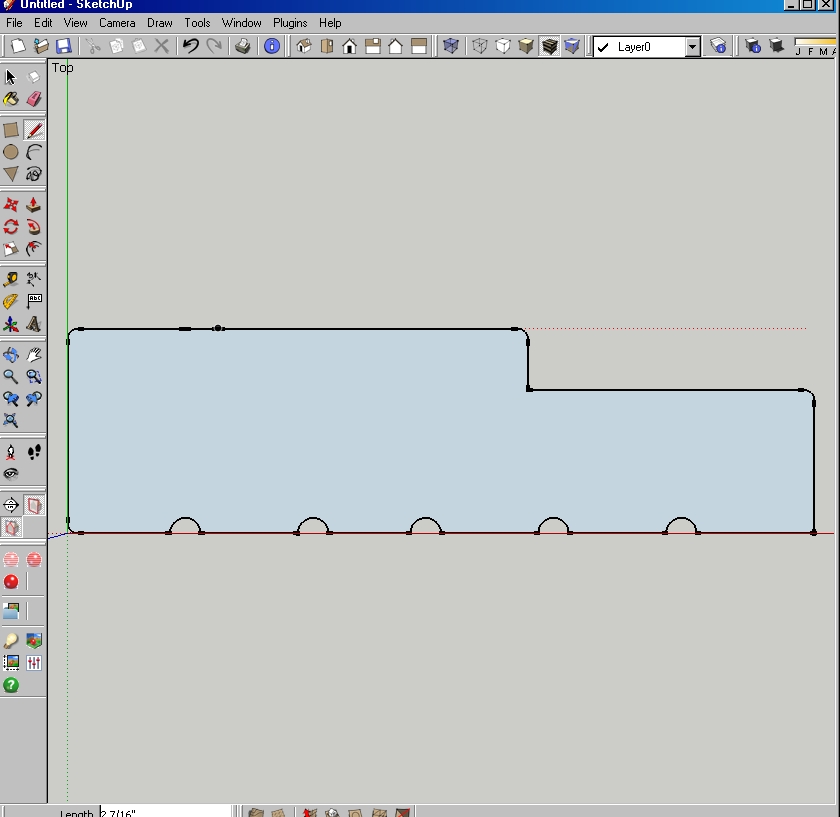
Should work, I imported the first dxf file in your folder (ExtJamb.dxf), exploded the component, then turned it into a face.
-
You could ask me to do it for you
 at $1.00 per byte per file. But seriously, any line touching any entity will do it, or you could write a ruby, but running it that would take as much time as inserting the line. Unless you batch it. Exactly what is it that you want to accomplish? If its simple, maybe Chris or TIG can bang one out for you.
 -
no don't worry, I was just wondering if there was other way of doing it ...
its gonna be in my scrip ... what I wanna do is to load the dxf file on the fly, place the profile inside just beside a door that I created on the fly and then do a followme around it.
-
If you import the dxf you should get a component named after the dxf file - e.g. "myfile.dxf".
Let's assume you have a name asname="myfile.dxf"...
You can find that indefn=nil model.definitions.each{|d|(defn=d;break)if d.name==name}In passing - you can also insert or manipulated instances of that definition...
tr=Geom;;Transformation.new(Geom;;Point3d.new(0,0,0))
inst=model.active_entities.add_instance(defn, tr)
We have found the definition [
defn] so we can now change it's entities...defn.entities.to_a.each{|e|e.find_faces if e.class==Sketchup;;Edge}Now all of your edges that can have faces should have got them.
If you want the faces to look 'up' [SUp always makes faces 'down' when z=0 !] use this...defn.entities.to_a.each{|e|e.reverse! if e.class==Sketchup;;Face}
-
Hi folks.
Maybe this trick is a bit off topic and well known to seasonned SU users, especially those that are at the level of writing scripts, but it may help newbies reading this thread.
To be able to fill many shapes in one operation, see attached SU file for ideas.
-
Thanks for all .. it works fine but my transformation doesn't seem to work .. what I did wrong ? thanks
require 'sketchup.rb' model = Sketchup.active_model Sketchup.active_model.import("G;/download/installation temporaire/SU-Ruby/pineprof/Wm41.DXF", false) name="Wm41.DXF" defn=nil model.definitions.each{|d|(defn=d;break)if d.name==name} tr=Geom;;Transformation.new(Geom;;Point3d.new(6,6,6)) inst=model.active_entities.add_instance(defn, tr) #defn.entities.to_a.each{|e|e.find_faces if e.class==Sketchup;;Edge} #defn.entities.to_a.each{|e|e.reverse! if e.class==Sketchup;;Face} #new_transformation = Geom;;Transformation.new([20,20,20]) #inst.transform(new_transformation) rv = Geom;;Vector3d.new(0,0,1) inst.entities.transform!(Geom;;Transformation.rotation(Geom;;Point3d.new(inst.entities.bounds.center), rv, 45.degrees)) -
You want to transform the instance NOT it's entities ?
inst.entities.transform!(Geom::Transformation.rotation(Geom::Point3d.new(inst.entities.bounds.center), rv, 45.degrees))
should be
inst.transform!(Geom::Transformation.rotation(Geom::Point3d.new(inst.entities.bounds.center), rv, 45.degrees))
Probably a lot clearer to maketr=(Geom::Transformation.rotation(Geom::Point3d.new(inst.entities.bounds.center), rv, 45.degrees)
and theninst.transform!(tr)too...
If you want to 'transform entities' there use something likeentities.transform_entities(entities_or_array_of_entities)method .
There's also aentities.transform_by_vector(array_of_entities, array_of_vectors)method...
These are useful foe move geometry and vertices etc inside a group's entities etc etc -
I want to rotate on the Component Instance since I want to retate the whole thing ... rotate entities would be if I want to rotate only part of the instance no ?
the rotate doesn't not work .. do I need to commit something ?
here's my code again thanks
require 'sketchup.rb' model = Sketchup.active_model Sketchup.active_model.import("G;/download/installation temporaire/SU-Ruby/pineprof/Wm41.DXF", false) name="Wm41.DXF" defn=nil model.definitions.each{|d|(defn=d;break)if d.name==name} tr=Geom;;Transformation.new(Geom;;Point3d.new(6,6,6)) inst=model.active_entities.add_instance(defn, tr) rv = Geom;;Vector3d.new(0,0,1) tr1=(Geom;;Transformation.rotation(Geom;;Point3d.new(inst.bounds.center), rv, 45.degrees)) inst.transform! (tr1) -
rv = Geom;;Vector3d.new(0,0,1)
pt = Geom;;Point3d.new(inst.bounds.center)
tr = Geom;;Transformation.rotation(pt, rv, 45.degrees)
inst.transform!(tr)
Should work - note no space between
.transform!(tr)whereas without the parenthesis it needs to be.transform! tr- the first way is recommended...
This should turn inst about its center 45 degrees ??
Test by adding 'puts ' in front of the variable setting line e.g.puts pt = Geom::Point3d.new(inst.bounds.center)and it prints the result in the Ruby Console - this lets you see what is getting set or error msgs... -
ok it works, my zoom was really high and my instance was out of my screen. Now I see the rotated ComponentInstance and the ComponentDefinition. I tried the remove the definition by doing defn.remove! but I have this exception : (eval):22:in `erase!': Cannot determine parent of entity
getting better .. ill try to figure out how to delete
thanks for all appreciated -
@nics said:
ok it works, my zoom was really high and my instance was out of my screen. Now I see the rotated ComponentInstance and the ComponentDefinition. I tried the remove the definition by doing defn.remove! but I have this exception : (eval):22:in `erase!': Cannot determine parent of entity
getting better .. ill try to figure out how to delete thanks for all appreciatedinst.erase!erases an instance.
group.erase!erases a group.
or to 'remove' a defn completely erase! all of it's entities inside astart_operation..commit..




Hello! It looks like you're interested in this conversation, but you don't have an account yet.
Getting fed up of having to scroll through the same posts each visit? When you register for an account, you'll always come back to exactly where you were before, and choose to be notified of new replies (either via email, or push notification). You'll also be able to save bookmarks and upvote posts to show your appreciation to other community members.
With your input, this post could be even better 💗
Register Login


Advertisement