sketchucation logo sketchucation
    • Login
    Oops, your profile's looking a bit empty! To help us tailor your experience, please fill in key details like your SketchUp version, skill level, operating system, and more. Update and save your info on your profile page today!
    ⚠️ Important | Libfredo 15.6a introduces important bugfixes for Fredo's Extensions Update

    [Plugin] Superglue

    Scheduled Pinned Locked Moved Plugins
    81 Posts 18 Posters 42.9k Views 18 Watching
    Loading More Posts
    • Oldest to Newest
    • Newest to Oldest
    • Most Votes
    Reply
    • Reply as topic
    Log in to reply
    This topic has been deleted. Only users with topic management privileges can see it.
    • GaieusG Offline
      Gaieus
      last edited by

      YouTube itself has these annotation tools. The video was simply captured with CamStudio but I did not edit anything in it.

      Gai...

      1 Reply Last reply Reply Quote 0
      • thomthomT Offline
        thomthom
        last edited by

        Ah cool. I'm about to produce the videos for Vertex Tools now. Never uploaded to YouTube before.

        Thomas Thomassen β€” SketchUp Monkey & Coding addict
        List of my plugins and link to the CookieWare fund

        1 Reply Last reply Reply Quote 0
        • GaieusG Offline
          Gaieus
          last edited by

          Let me know if I can help (although I myself am not a great YT'er either). Also, annotations/annotating can be shared so when you get to there, I can also help with doing that part.

          Gai...

          1 Reply Last reply Reply Quote 0
          • EscapeArtistE Offline
            EscapeArtist
            last edited by

            Very useful. Saves the time of having to align things with the rotate tool when they're slightly off kilter.

            Thanks!

            1 Reply Last reply Reply Quote 0
            • B Offline
              Ben Ritter
              last edited by

              Thank you Thomthom.

              1 Reply Last reply Reply Quote 0
              • thomthomT Offline
                thomthom
                last edited by

                Version 1.1.0
                Merged into one tool. Use Ctrl to toggle between Superglue and Solvent.

                Thomas Thomassen β€” SketchUp Monkey & Coding addict
                List of my plugins and link to the CookieWare fund

                1 Reply Last reply Reply Quote 0
                • Rich O BrienR Offline
                  Rich O Brien Moderator
                  last edited by

                  Thanks Thom πŸ‘

                  @gaieus
                  Warn Thom for spamming/bumping (spumping?)

                  @thom
                  Warn gaieus for bumping/spamming (bamping?)

                  @ rich
                  😎

                  Download the free D'oh Book for SketchUp πŸ“–

                  1 Reply Last reply Reply Quote 0
                  • pilouP Offline
                    pilou
                    last edited by

                    Sorry I am in total fog 😳
                    I believe that you must make another video more explicte πŸ˜’
                    (where are the axes of glue at the start and in which volumes...
                    I am waiting the Doh revelation πŸ˜„

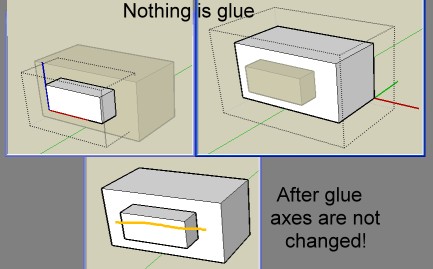
                    As you can see these 2 components have at the start no special Glue plane between them
                    They are just aligned
                    After glue no changement... so...foggy mood 😳
                    glue.jpg

                    Frenchy Pilou
                    Is beautiful that please without concept!
                    My Little site :)

                    1 Reply Last reply Reply Quote 0
                    • thomthomT Offline
                      thomthom
                      last edited by

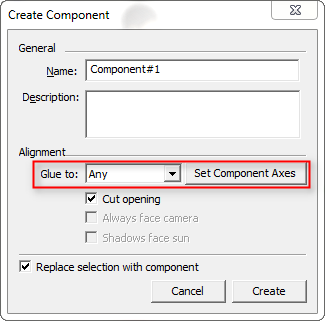
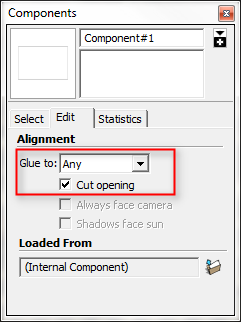
                      The components must already be defined as Glue to components. If they don't have this property they won't be glued.
                      make_comp.png

                      comp_browser.png

                      The tool doesn't turn components into GlueTo components - it just glue/unglues existing ones.

                      Thomas Thomassen β€” SketchUp Monkey & Coding addict
                      List of my plugins and link to the CookieWare fund

                      1 Reply Last reply Reply Quote 0
                      • thomthomT Offline
                        thomthom
                        last edited by

                        Here's my test file.


                        Superglue.skp

                        Thomas Thomassen β€” SketchUp Monkey & Coding addict
                        List of my plugins and link to the CookieWare fund

                        1 Reply Last reply Reply Quote 0
                        • thomthomT Offline
                          thomthom
                          last edited by

                          It's a wee bit tricker to define an arbitrary axis that yields predictable result.

                          Thomas Thomassen β€” SketchUp Monkey & Coding addict
                          List of my plugins and link to the CookieWare fund

                          1 Reply Last reply Reply Quote 0
                          • C Offline
                            CodyV1
                            last edited by

                            I can't illustrate this, but I can try to explain it.
                            You can rotate (using SU's native rotating tool) components on a specific glue line. Basically so that components are angled at something other than 90, 180, 270, 360 degrees. πŸ’­ ❓

                            Be There

                            http://www.facebook.com/#!/profile.php?id=100000814922209

                            1 Reply Last reply Reply Quote 0
                            • pilouP Offline
                              pilou
                              last edited by

                              hehe this was not implicite! πŸ’š
                              Now I more understand! πŸ‘

                              So next version must create the new Plane Glueing when any don't exist!
                              and maybe also very useful πŸ˜‰

                              Frenchy Pilou
                              Is beautiful that please without concept!
                              My Little site :)

                              1 Reply Last reply Reply Quote 0
                              • GaieusG Offline
                                Gaieus
                                last edited by

                                @thomthom said:

                                Version 1.1.0
                                Merged into one tool. Use Ctrl to toggle between Superglue and Solvent.

                                πŸ‘

                                Works like charm!

                                Gai...

                                1 Reply Last reply Reply Quote 0
                                • thomthomT Offline
                                  thomthom
                                  last edited by

                                  @codyv1 said:

                                  I can't illustrate this, but I can try to explain it.
                                  You can rotate (using SU's native rotating tool) components on a specific glue line. Basically so that components are angled at something other than 90, 180, 270, 360 degrees. πŸ’­ ❓

                                  Sorry - I'm still not understanding this. "rotate one a glue line"?

                                  Thomas Thomassen β€” SketchUp Monkey & Coding addict
                                  List of my plugins and link to the CookieWare fund

                                  1 Reply Last reply Reply Quote 0
                                  • C Offline
                                    CodyV1
                                    last edited by

                                    You basicaly rotate the glue, and every component stuck together with the glue. Like making a group of those components, and then rotating the group.

                                    Be There

                                    http://www.facebook.com/#!/profile.php?id=100000814922209

                                    1 Reply Last reply Reply Quote 0
                                    • thomthomT Offline
                                      thomthom
                                      last edited by

                                      @codyv1 said:

                                      You basicaly rotate the glue, and every component stuck together with the glue. Like making a group of those components, and then rotating the group.

                                      Isn't that just selecting the components and using the rotate tool?
                                      I can't get a grip on what this "glue" is. πŸ˜•

                                      Thomas Thomassen β€” SketchUp Monkey & Coding addict
                                      List of my plugins and link to the CookieWare fund

                                      1 Reply Last reply Reply Quote 0
                                      • C Offline
                                        CodyV1
                                        last edited by

                                        Nevermind πŸ˜’

                                        Be There

                                        http://www.facebook.com/#!/profile.php?id=100000814922209

                                        1 Reply Last reply Reply Quote 0
                                        • thomthomT Offline
                                          thomthom
                                          last edited by

                                          😒

                                          Thomas Thomassen β€” SketchUp Monkey & Coding addict
                                          List of my plugins and link to the CookieWare fund

                                          1 Reply Last reply Reply Quote 0
                                          • honoluludesktopH Offline
                                            honoluludesktop
                                            last edited by

                                            Very clever tool. Didn't try it myself, and the illustration looks like it cuts a hole in the face. How about a wall made up of two faces? Don't program much, but can the api provide a way to find all the faces that a component intersects?


                                            1 Reply Last reply Reply Quote 0
                                            • 1
                                            • 2
                                            • 3
                                            • 4
                                            • 5
                                            • 2 / 5
                                            • First post
                                              Last post
                                            Buy SketchPlus
                                            Buy SUbD
                                            Buy WrapR
                                            Buy eBook
                                            Buy Modelur
                                            Buy Vertex Tools
                                            Buy SketchCuisine
                                            Buy FormFonts

                                            Advertisement


