[Plugin] Superglue
-
It's a wee bit tricker to define an arbitrary axis that yields predictable result.
-
I can't illustrate this, but I can try to explain it.
You can rotate (using SU's native rotating tool) components on a specific glue line. Basically so that components are angled at something other than 90, 180, 270, 360 degrees.

-
hehe this was not implicite!

Now I more understand!
So next version must create the new Plane Glueing when any don't exist!
and maybe also very useful
-
@thomthom said:
Version 1.1.0
Merged into one tool. UseCtrlto toggle between Superglue and Solvent.Works like charm!
-
@codyv1 said:
I can't illustrate this, but I can try to explain it.
You can rotate (using SU's native rotating tool) components on a specific glue line. Basically so that components are angled at something other than 90, 180, 270, 360 degrees. Sorry - I'm still not understanding this. "rotate one a glue line"?
-
You basicaly rotate the glue, and every component stuck together with the glue. Like making a group of those components, and then rotating the group.
-
@codyv1 said:
You basicaly rotate the glue, and every component stuck together with the glue. Like making a group of those components, and then rotating the group.
Isn't that just selecting the components and using the rotate tool?
I can't get a grip on what this "glue" is.
-
Nevermind

-

-
Very clever tool. Didn't try it myself, and the illustration looks like it cuts a hole in the face. How about a wall made up of two faces? Don't program much, but can the api provide a way to find all the faces that a component intersects?
-
@honoluludesktop said:
Very clever tool. Didn't try it myself, and the illustration looks like it cuts a hole in the face. How about a wall made up of two faces? Don't program much, but can the api provide a way to find all the faces that a component intersects?
All it does it glue/unglue existing glueto components. In the examples given that happened to also be cutout components.
-
Also haven't tried this myself either. But, how about equalizing the hight of components placed. Like if you have windows and their everywhere, just enter a hight or chose a component that you want to be adjacent to the others?

-
It would be a different plugin, but it would be an interesting way for bulk adjustments.
An align tool, where you specify bottom/center/top etc. and then just make a sweep across the comps/groups you want to adjust.I do like this way of choosing entities - I want to explore further ways other than the traditional pre-select or click-click-click select.
-
I (think) I always wanted something like this; downloading it now!

-
@unknownuser said:
About the glue

LOL!!!
 ultimate man..TINTIN IS ONE OF MY FAVOURITE CARTOON SERIES..used to watch it everyday on cartoon network when i was in class VI
 -
I have find a use of Super Glue
and at last understood the use
-
@gaieus said:
@thomthom said:
@unknownuser said:
HAve you a little animation of what must the glue's pot must do?
A video of the plugin in use? Yes I'll make one once I make v1.1.0.
Here you go sir (especially, with the annotations it is pretty fast so pause it when needed):
OH! Thanks so much Gaius, I was very confused what the point of this plugin was... so now, when I copy lights on the ceiling and they don't cut the opening in the face, the "Superglue" will "fix" it so that they DO cut the opening... BRILLIANT!

Thanks for sharing, ThomThom!
-
@fletch said:
OH! Thanks so much Gaius, I was very confused what the point of this plugin was... so now, when I copy lights on the ceiling and they don't cut the opening in the face, the "Superglue" will "fix" it so that they DO cut the opening... BRILLIANT!
Provided that the axes are correct for the component you try to glue on - if the axis isn't aligned to match the face you try to glue on it won't do anything.
-
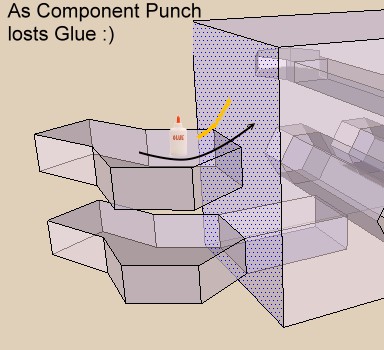
No more need glue for the plug Component Punch!!!
Tig found just add a # at the line 186 and all works fine!My bottle of glue will be full at the end of the week
Sorry Thomthom
Edit Ah damned , this modify works only on the same face!My bottle of glue will be empty at the end of the week
-
Edit Curious this morning all works fine!






Hello! It looks like you're interested in this conversation, but you don't have an account yet.
Getting fed up of having to scroll through the same posts each visit? When you register for an account, you'll always come back to exactly where you were before, and choose to be notified of new replies (either via email, or push notification). You'll also be able to save bookmarks and upvote posts to show your appreciation to other community members.
With your input, this post could be even better 💗
Register Login


Advertisement