[Plugin] Superglue
-
Works like a charm under SU6.
-
@thomthom said:
@unknownuser said:
HAve you a little animation of what must the glue's pot must do?
A video of the plugin in use? Yes I'll make one once I make v1.1.0.
Here you go sir (especially, with the annotations it is pretty fast so pause it when needed):
YouTube - Superglue Plugin for SketchUp
[flash=480,385:3276ci3t]http://www.youtube.com/v/VS8-tjYTPXM&hl=en_GB&fs=1[/flash:3276ci3t] -
 Cheers Gaieus!
I owe you a cookie.
-

I forgot my Cookieware stamp!I forgot the cookie!!!
-
@thomthom said:
:thumb: Cheers Gaieus!
I realised I could (should) add your name to the Title filed, too, not just into the description filed.
@unknownuser said:
I owe you a cookie.
How about a beer instead?

-
Beer also works!
 ...but I forgot! I'm worried about my mind now...
 -
Wow!!
This thread just started and already has two pages of replies. -
@mitcorb said:
Wow!!
This thread just started and already has two pages of replies.hehe - inflated by my replies.
-
-
What do you use to make the videos with annotations?
-
YouTube itself has these annotation tools. The video was simply captured with CamStudio but I did not edit anything in it.
-
Ah cool. I'm about to produce the videos for Vertex Tools now. Never uploaded to YouTube before.
-
Let me know if I can help (although I myself am not a great YT'er either). Also, annotations/annotating can be shared so when you get to there, I can also help with doing that part.
-
Very useful. Saves the time of having to align things with the rotate tool when they're slightly off kilter.
Thanks!
-
Thank you Thomthom.
-
Version 1.1.0
Merged into one tool. UseCtrlto toggle between Superglue and Solvent. -
-
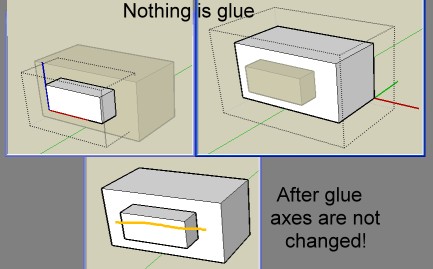
Sorry I am in total fog

I believe that you must make another video more explicte
(where are the axes of glue at the start and in which volumes...
I am waiting the Doh revelationAs you can see these 2 components have at the start no special Glue plane between them
They are just aligned
After glue no changement... so...foggy mood
-
The components must already be defined as Glue to components. If they don't have this property they won't be glued.
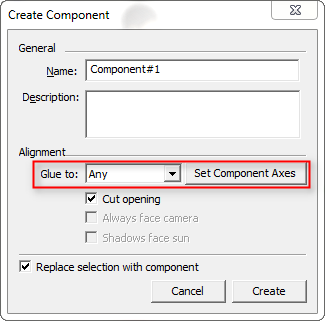
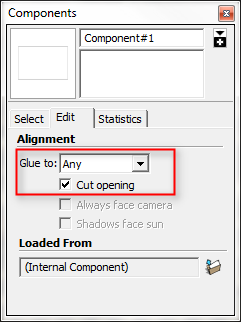
The tool doesn't turn components into GlueTo components - it just glue/unglues existing ones.
-








Hello! It looks like you're interested in this conversation, but you don't have an account yet.
Getting fed up of having to scroll through the same posts each visit? When you register for an account, you'll always come back to exactly where you were before, and choose to be notified of new replies (either via email, or push notification). You'll also be able to save bookmarks and upvote posts to show your appreciation to other community members.
With your input, this post could be even better 💗
Register Login


Advertisement