[Plugin] Draw Boundingbox
-
@Didier-Bur Your text code is wrong (different than the one from your picture) - the one from your picture is correct.!
Thank you anyway - it worked, after an error from SU 2024, I figured it out.! -
@Didier-Bur Hi. Thanks a lot, everything worked out. I was a little late thanking you, I completely forgot that I asked for help))
I also added the option to move the "Bounding Box" to a separate layer, which proved to be very useful. -
@AISmebel Will you please tell me how you add the option to move the "Bounding box" to a separate layer.!!
Anchor Points extension does that, but this one is more useful, and all the time i was thinking that it would be better if this one could move the bounding box to a separate layer (and maybe also group the Bounding Box, so you can easily separate later and delete it, or - like Anchor Points - at least put it inside the group/components so you can easily delete it later...).Thank you.!
-
@FlorinAp
You can probably modify that using Claude.ai which is pretty capable of editing ruby scripts for Sketchup, as long as you are accurate enough in the description of the changes that you need in the code.
That said, I recommend to be really careful when you mess with plugin logic.Looking at the example in the image above, the shape clearly looks created using SubD.
- If you create the construction geometry inside the group, it will be destroyed (regardless that you put in another layer or not) whenever you toggle the subdivisions.
- If you create the construction geometry it in a nested group, subdivision will not work anymore, due to the nested instances "illegal" condition.
- The cleanest (and the only working) solution would be creating a father group with 2 subgroups inside (one for the subdivision geometry and one for the construction geometry), but then you need to open the father group whenever you need to edit the subdivisions.
It's something that probably is better managed grouping the construction geometry manually depending on what you are trying to achieve in a given situation rather than having it hardcoded all the times.
If you hardcode it in the plugin, probably it could be handy in some situations, but will be more cumbersome in other situations.
Please notice that in order to achieve the same result you could look into Fredosketch plugin or Axyz plugin.
Both of them share an inbuilt logic for bounding box snapping.
Each of them has its advantages in therms of usability.- Fredosketch can be quickly launched pressing "M" key shortcut twice in order to replace the Sketchup native move tool when needed.
- Axyz allows moving with a gizmo, and also has an option to enable/disable the bounding box preview.
Both of them can do a lot more.
I recommend taking a look at both before messing with code on this one. -
@thomthom Congratulations, I use it often and it is very useful. I only ask you for a small change. It would be nice if once the box is created you group it. Thanks
-
@panixia Everything you wrote is much too much for me.!
I usually don't do things that i don't fully understand, and right now i have personal reasons for which I can't afford to explore unknowns.!Bounding Box doesn't need to be inside, but I've seen that Anchor Points do it this way.......
But grouping it and putting it in a separate tag would be very nice. -
-
@AISmebel Thank you.! It works.
But all versions add 3 Guide Points at every corner, which is useless. -
@FlorinAp Maybe I misunderstood you. For myself, I made an additional dot that shows the center. I work in the field of upholstered furniture, where it is very difficult to find a center in products of complex shape) These points help to mirror some objects or cut them in the middle. If you look at them from the other side, maybe they will be useful to you)))
-
@AISmebel That one is usefull.!
I was talking about corners of the Boundinbox - even the original version adds 3 guide points at every corner, I'm sure that is an error. -
Hi all,
With this new rework of the script, you can choose to group the BB or not, and assign its entities the tag of your choice:
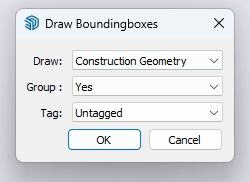
Oh and no more 3 duplicate cpoints at each corner...

Once again I hope ThomThom won't mind.Regards
-
@Didier-Bur Thanks.! Thanks.! Thanks.!

-
Hi, Sorry there was a little feature missing: when you don't group the BB, the tag you choose was not applied.
This one is correct:
core.rbRegards




Hello! It looks like you're interested in this conversation, but you don't have an account yet.
Getting fed up of having to scroll through the same posts each visit? When you register for an account, you'll always come back to exactly where you were before, and choose to be notified of new replies (either via email, or push notification). You'll also be able to save bookmarks and upvote posts to show your appreciation to other community members.
With your input, this post could be even better 💗
Register Login


Advertisement