Cannot Modify Solid created with Sketchy Solids
-
I created a Capsule using Sketchy Solids. I purposely scaled the solid 10x for clarity then I sliced the solid in half with Section Plane using "Slice model at Section". I then placed the half capsule upon a flat face which was larger than the slice. After I exploded the components I saved them as a single component which can be found at http://sketchup.google.com/3dwarehouse/details?mid=197efe8d8993094f46562fb347c7b4e9.
What I cannot do is "move" the flutes down or up in the board, if I select just the round portion of the flute and Move them, it's like a piece of the item is being left behind, therefore the move looks like crap. I have Intersected everything but it's like the Solid is a stand alone item that cannot be edited, like it's locked or something. Is this normal? Can it be fixed?
Thanks,
-
You have some stray edges inside your mesh.
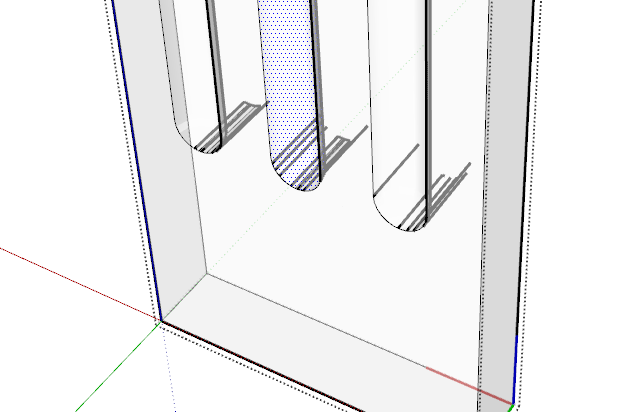
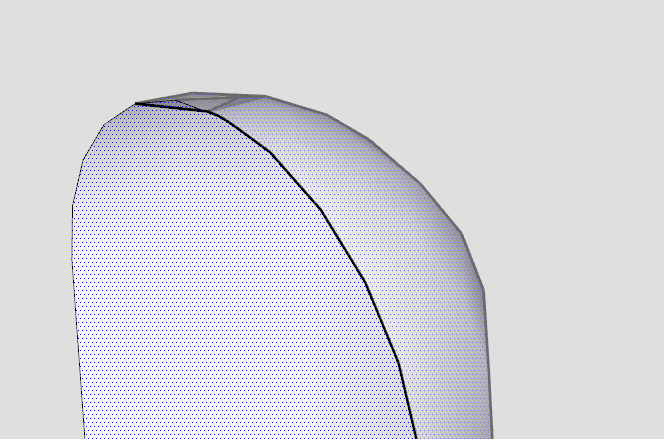
Also, at the top there is some messed up geometry:
-
It was quite quick to correct - took longer to type this explanation !
Draw some guides and erase all but one flute.
Use View > Hidden-Geometry 'on' and Xray mode.
Erase the stray edges inside the shape.
Erase the faulty part of the top shape.
Copy the correct parts [to the right] and Scale -1 mirror them, and Move it back over the 'hole' where you just Erased the wrong bits.
Select the flute and Move+Ctrl copy it with red-axis locked [shift] and snap to guide, type 2x to make two copies to complete the form.
Delete the Guide lines.
I also rotated the geometry so that it more logically set at the origin and faces the 'standard' way - it was 'backwards'...
I also exploded the component within the SKP and purged the file - if you import the flute into another SKP model it will come in as a component anyway...

New Flute.skp -
And the flutes could be made into CutOut components for easy reuse and quick editing.
-
@thomthom said:
And the flutes could be made into CutOut components for easy reuse and quick editing.
Another good idea



Hello! It looks like you're interested in this conversation, but you don't have an account yet.
Getting fed up of having to scroll through the same posts each visit? When you register for an account, you'll always come back to exactly where you were before, and choose to be notified of new replies (either via email, or push notification). You'll also be able to save bookmarks and upvote posts to show your appreciation to other community members.
With your input, this post could be even better 💗
Register Login


Advertisement