[Plugin][$] Curviloft 2.0a - 31 Mar 24 (Loft & Skinning)


-
It may not be complicated but you don't describe which direction you copied the lines or how far. why would you even want to use Curviloft of those lines? What sort of result are you expecting?
-
@dave r said:
It may not be complicated but you don't describe which direction you copied the lines or how far. why would you even want to use Curviloft of those lines? What sort of result are you expecting?
I am using a workflow process that is not uncommonly used in Rhino to connect two planes or surfaces without using arcs. I am trying to use simple geometry as a test first before it would be used later on a more complex model. I like to test things like this out on simple models before I try incorporate it into my modeling process, and I noticed this was causing sketchup to freeze on OSX. I am not sure if the same behavior happens in Windows as I am not at work to try it in that environment.
Mike.
-
@unknownuser said:
Draw a line
copy 4 times some distance
move 3 lines vertically up some to distance
select each line in sequence left to right
run curviloftThe tool activates then hangs sketchup. If I loft arcs or other shapes it seems to work fine.
Thanks,
Mike
I do not understand what you think CL will do with a set of unconnected lines. CL needs a closed perimeter of some sort to create the intervening mesh. With 5 parallel unconnected lines, CL can do nothing. I tried it and got the usual CL "I'm stumped" color codes. It did NOT hang my system.
-
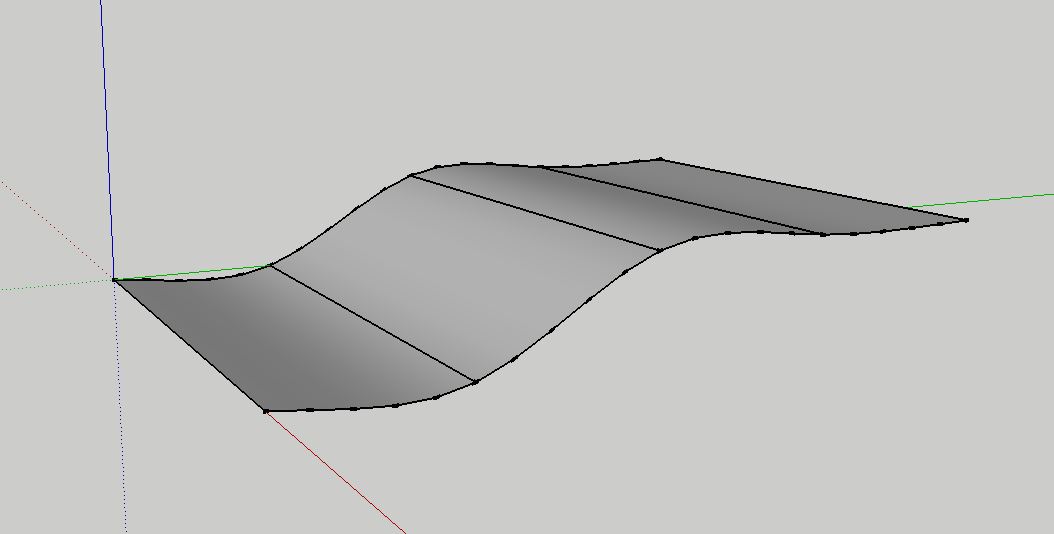
Selected the correct way it creates this, but the wrong way freezes SU.
-
-
hello,
I autoinstalled Libfredo 5.2 and curviloft using skecthucation pluginstore 2.0. But now I am having trouble locating them in sketchup in order to begin using them. Can anyone help. Thank you.
- Jason
-
Did you read the first post in this thread? It tells you where to look.
-
I did look under the tools tab and there is nothing there.
I am using Bootcamp, Windows 7, SU 2013 and using the sketchucation plugin store to autoinstall the plugins. -
Hi everybody,
I have the same problem as Missy_X a few posts above.
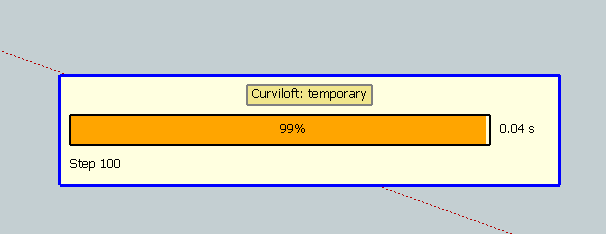
Whenever I activate one of the Curviloft functions in SU2013 (Windows 7, 64Bit), the "Curviloft: Temporary" window pops up immediately. I don't get the usual Fredo-Bar on top of the editor and the plug-in does not work. I can select edges behind the popup, but there's no preview and no lofting.The Ruby console shows nothing at all. I do have all the latest versions (including libFredo 6.5.2) installed.
This is going on for a few days now. The plugins used to work fine. My current workflow relies on setting up 3D-Bezier curves and skinning them with Curviloft.
Any help would be greatly appreciated.
-
Could you post an exmaple of the error traces (there is the button in the temporary window to export the trace file).
Thanks very much
Fredo
-
@fredo6 said:
Could you post an exmaple of the error traces (there is the button in the temporary window to export the trace file).
Thanks for your support.
Sorry, but I can't find any buttons on the window:
-
Then, could you post the model you are working on.
Thanks
Fredo
-
-
Curviloft does not know how to skin continuous loops. You should use TGI3d for that (or maybe Soap Skin & Bubble).
With Curviloft Skinning, you need to cut the contour into 4 pieces. This can be achieved by creating small breaker segments as shown in the picture.
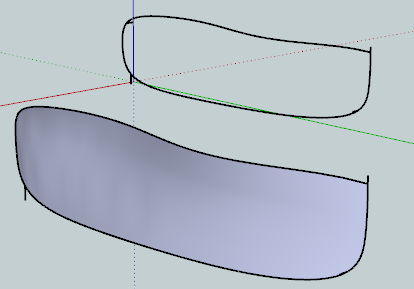
Then, you can skin the shape.
Daloop - Bezier12.skpFredo
-
Hi Fredo,
@fredo6 said:
Curviloft does not know how to skin continuous loops. You should use TGI3d for that (or maybe Soap Skin & Bubble).
With Curviloft Skinning, you need to cut the contour into 4 pieces. This can be achieved by creating small breaker segments as shown in the picture.
Thanks again.
To see if I got it right: If the tool stops working and I only get the temporary window, I have to break up the curve.
May I humbly suggest a future version of Curviloft that behaves a bit more gracefully?Attached is a lofted version I did last week. It is much more along the lines I need, as it is less concave than yours. It could be, though, that I broke the curve by lofting another, adjacent surface. But not into more than 2 pieces.
Loft13.zip
Any idea how to control the concavity? I can't change the Bezier curves, as they have real-world constraints.
I did try Soap Skin & Bubble but I like the Curviloft surface better. -
@daloop said:
To see if I got it right: If the tool stops working and I only get the temporary window, I have to break up the curve.
May I humbly suggest a future version of Curviloft that behaves a bit more gracefully?I would respectfully disagree with you. Curviloft works just fine and is graceful as it is. It does exactly what Fredo said it does in the first post of this thread.
@unknownuser said:
Curviloft is a script dedicated to Loft and Skinning, that is, generation of surfaces from contours.
- Loft by Spline joins separate contours, open or closed, by smooth splines
- Loft along Path joins contours, along a given rail curve.
- Skinning create surfaces bounded by 4 or 3 contiguous contours
The plugin can't help that the user doesn't set up the curves correctly.
@daloop said:
Any idea how to control the concavity? I can't change the Bezier curves, as they have real-world constraints.
Add some additional curves to define the concavity you desire.
-
Hi Dave,
Curviloft doesn't need your defense. The tool is a great piece of code and it does what is described in the docs.
Still, if I feed it a curve it can't compute it sometimes goes into a state where I only see the temporary window, even if I use it on other geometry that should loft just fine. And this state is even retained between restarts of SU.
I thought this could maybe qualify as a useability issue, if not as a bug, even if the behaviour was produced by user error.@dave r said:
@daloop said:
Any idea how to control the concavity? I can't change the Bezier curves, as they have real-world constraints.
Add some additional curves to define the concavity you desire.
Thanks for the suggestion. I do know, that I could even draw each and every face manually in 3D space to get the surface I want.
I was just hoping that Curviloft could maybe spare me from that tedium and as it already produced a nice surface with this Bezier curve in the past, I wondered why it stopped doing so.
I'm still learning the ins and outs of modeling in SU, so if a plugin gives me a nice result and saves me a few modeling steps, it is very welcome. -
@daloop said:
[attachment=0:3mxjzsa4]<!-- ia0 -->Loft13.zip<!-- ia0 -->[/attachment:3mxjzsa4]
If I remember correctly, I did this with the loft-by-spline and not the skinning tool.
-
I use Curviloft a lot, I LOVE it. Can't be without it.

But it does have some limitations and quirks.

One of the quirks I have learned to work around is CL's occasional failure to form some curves even when the perimeter seems fully intact and pristine. I can only attribute its fail to loft due to the connecting geometry in my model. Most likely due to very tiny undetectable fragments and/or gaps. Most times it works, but sometimes I need to do this.....
I select all the lines in my perimeter that failed to loft, and move/copy them some distance away in an axis direction, in free space. Fixing it in free space is far easier than in-situ.
CL will then loft in most cases.
 I simply move the group back in place.
However, sometimes it will still fail, so I look for changes in colors at endpoints. That usually signals a problem at the vertex and/or with the adjoining lines. I do a left/right select on only one side of the vertex and capture everything that touches the vertex, and delete. It also captures one line as well, leaving a gap. I do an endpoint to endpoint line draw and try CL again. Repeat until success.
However when you move the lofted group back into place, and explode it, you will need to redraw many connecting lines in the adjoining geometry, as those lines will have endpointed on the deleted entities. Your primary clue is failed faces touching the lofted curve.
 Please note that the biggest cause of tiny line fragments and tiny gaps is Intersect. So if you are lofting any part of a previously intersected geometry, expect problems. Another big cause of tiny endpoint gaps is drawing a line from point A to B where B is ever so slightly off axis to A and the dreaded "Constrained by" message was not heeded. You need to make sure you draw endpoint to endpoint.
If you do get the "Constrained by" message going from A to B, then Escape, and draw B to A. It will work then. -
@jgb said:
But it does have some limitations and quirks.
After your explanations I'm not sure if it is really the plugin








Advertisement