sketchucation logo sketchucation
    • 登入
    Oops, your profile's looking a bit empty! To help us tailor your experience, please fill in key details like your SketchUp version, skill level, operating system, and more. Update and save your info on your profile page today!
    🔌 Smart Spline | Fluid way to handle splines for furniture design and complex structures. Download

    [Plugin][$] Curviloft 2.0a - 31 Mar 24 (Loft & Skinning)


    已排程 已置頂 已鎖定 已移動 Plugins
    1.3k 貼文 299 Posters 2.5m 瀏覽 297 Watching
    正在載入更多貼文
    • 從舊到新
    • 從新到舊
    • 最多點贊
    回覆
    • 在新貼文中回覆
    登入後回覆
    此主題已被刪除。只有擁有主題管理權限的使用者可以查看。
    • fredo6F 離線
      fredo6
      最後由 編輯

      NEW RELEASE: Curviloft 1.2a - 21 Sep 11

      IMPORTANT: you need to install LibFredo6 4.2 (or higher). With this version of LibFredo6, the ZLoader__Curviloft.rb is no longer necessary.

      This release includes the generation of pseudo-quads for usage by the new QuadFaceTools by Thomthom.

      The surface is generated out of quads with a diagonal which is Soft and Smooth.

      Because there always 2 ways to triangulate a quad, Curviloft offers both options.

      Curviloft Pseudo quads.gif

      This release also prevents to get an empty group when something goes wrong in the generation of the geometry. This problem was signaled by jgb (see this post).

      See main post for download

      Fredo

      1 條回覆 最後回覆 回覆 引用 0
      • thomthomT 離線
        thomthom
        最後由 編輯

        👍 👍
        Very nice Fredo.
        I'll be looking into the revised definition of a Quad this week. I like your suggestion.

        (Btw, I see that the preview still display black meshes - you know that SU8 now makes use of view.drawingcolor, yes?)

        Thomas Thomassen — SketchUp Monkey & Coding addict
        List of my plugins and link to the CookieWare fund

        1 條回覆 最後回覆 回覆 引用 0
        • fredo6F 離線
          fredo6
          最後由 編輯

          @thomthom said:

          :thumb: 👍
          Very nice Fredo.
          I'll be looking into the revised definition of a Quad this week. I like your suggestion.

          I will release an update with

          • Border: Soft + Smooth
          • Diagonals: Soft + Smooth + Hidden

          @thomthom said:

          (Btw, I see that the preview still display black meshes - you know that SU8 now makes use of view.drawingcolor, yes?)

          I know, but for Curviloft, I'll keep Black anyway (due to the visual matching with the various colors of the lines).

          Fredo

          1 條回覆 最後回覆 回覆 引用 0
          • fredo6F 離線
            fredo6
            最後由 編輯

            NEW RELEASE: Curviloft 1.2b - 26 Sep 11

            IMPORTANT: you need to install LibFredo6 4.2 (or higher). With this version of LibFredo6, the ZLoader__Curviloft.rb is no longer necessary.

            This release includes more options for the generation of pseudo-quads for usage by the new QuadFaceTools by Thomthom.

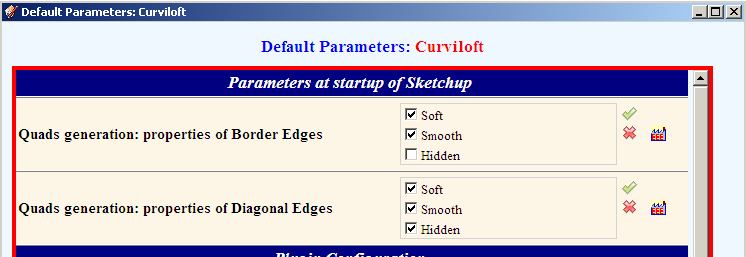
            Options are available in the Default Parameters dialog box
            Curviloft Quads Param.png

            By default, pseudo-quads are generated with:

            • Borders: Soft + Smooth
            • Diagonals: Soft + Smooth + Hidden

            This allows to have a nice-looking surface, while being compliant with all functionality of Thomthom quads tool (which should be upgraded soon)

            See main post for download

            Fredo

            1 條回覆 最後回覆 回覆 引用 0
            • thomthomT 離線
              thomthom
              最後由 編輯

              👍

              FYI to users of QuadFace 0.3 and earlier, you must set the border edges to not be soft.

              So for QuadFace 0.3 and earlier:
              Diagonal: Soft + Smooth (Hidden may be set - not required)
              Border: Not Soft (Smooth and Hidden can be set, but not a requirement)

              QuadFace 0.4
              Diagonal: Soft + Smooth + Hidden (All required)
              Border: Not diagonal. (Any combo can be used as long as not all the checkboxes are ticked.)

              Thomas Thomassen — SketchUp Monkey & Coding addict
              List of my plugins and link to the CookieWare fund

              1 條回覆 最後回覆 回覆 引用 0
              • Dave RD 離線
                Dave R
                最後由 編輯

                Thank you Fredo.

                @thomthom said:

                QuadFace 0.4

                Thomas, I see links to 0.3 but not 0.4. I must be looking in the wrong place?

                Etaoin Shrdlu

                %

                (THERE'S NO PLACE LIKE)

                G28 X0.0 Y0.0 Z0.0

                M30

                %

                1 條回覆 最後回覆 回覆 引用 0
                • CarrozzaC 離線
                  Carrozza
                  最後由 編輯

                  Thanks for this great plugin! ^__^

                  1 條回覆 最後回覆 回覆 引用 0
                  • thomthomT 離線
                    thomthom
                    最後由 編輯

                    @dave r said:

                    Thank you Fredo.

                    @thomthom said:

                    QuadFace 0.4

                    Thomas, I see links to 0.3 but not 0.4. I must be looking in the wrong place?

                    Yes, you must look on the harddisk of my private computer for version 0.4. 😉
                    ( There's a teaser video in the first post: http://forums.sketchucation.com/viewtopic.php?f=323&t=39442 - Toob: http://www.youtube.com/watch?v=NY-l93C-fPw )

                    Thomas Thomassen — SketchUp Monkey & Coding addict
                    List of my plugins and link to the CookieWare fund

                    1 條回覆 最後回覆 回覆 引用 0
                    • B 離線
                      Ben Ritter
                      最後由 編輯

                      Fredo, thank you again.

                      1 條回覆 最後回覆 回覆 引用 0
                      • dereiD 離線
                        derei
                        最後由 編輯

                        One question, this version doesn't use anymore ZLoader__Curviloft.rb file? I downloaded it and I found just the directory inside.

                        Thank you.

                        DESIGNER AND ARTIST DEREI.UK

                        1 條回覆 最後回覆 回覆 引用 0
                        • fredo6F 離線
                          fredo6
                          最後由 編輯

                          @unknownuser said:

                          One question, this version doesn't use anymore ZLoader__Curviloft.rb file? I downloaded it and I found just the directory inside.

                          Thank you.

                          With LibFredo6 v4.0 and above, the ZLoader__xxx files are no longer used.
                          You can purge them by using the menu Windows > LibFredo6 Settings... > Purge Obsolete Files

                          Fredo

                          1 條回覆 最後回覆 回覆 引用 0
                          • dereiD 離線
                            derei
                            最後由 編輯

                            thanks, I did it!

                            DESIGNER AND ARTIST DEREI.UK

                            1 條回覆 最後回覆 回覆 引用 0
                            • I 離線
                              ivreich
                              最後由 編輯

                              Hi Fredo

                              I'm not sure if this question has been answered before, but is there a way to ensure all segments in a loft have the same number of columns of quads and that all the junction curves meet up? I have played around with all the various lofting options with no success.

                              For example, in this image below all three profile curves have 30 segments but the resulting mesh has disjointed junction curves, making it hard to use thomthom's loop/ring selection tools properly. Also, some of the quads seem to be merged into a single long surface?

                              Cheers,

                              Joel
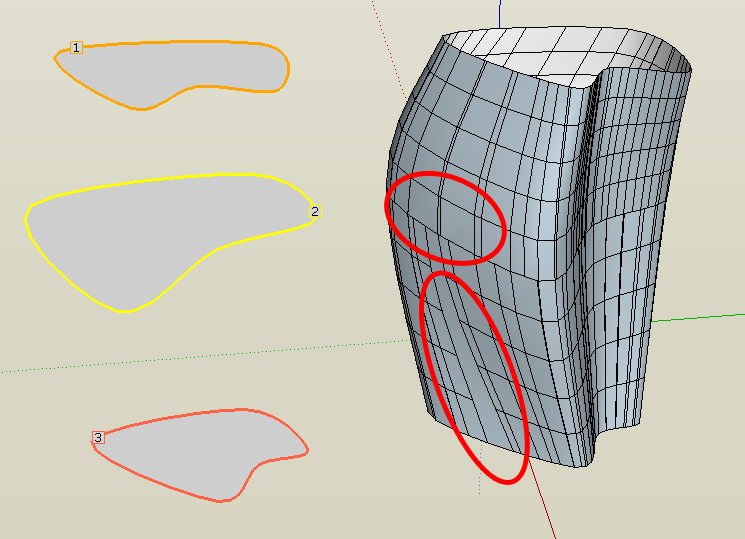

                              All 3 profiles curves have 30 segments but junction curves do not match up

                              1 條回覆 最後回覆 回覆 引用 0
                              • fredo6F 離線
                                fredo6
                                最後由 編輯

                                Joel,

                                Sections are computed idependently for the vertex matching, so if contours are very different, you may end up with the situation you describe.

                                So far, the only possibility is to use the Global F-spline options. It draws a mesh between the first and last contours trying to be as close as posible to the intermediate contours (but not matching their vertex).
                                This method is the first one of the group of two icons at the right of the Junction methods section in the palette.

                                Thanks to tell me if this option is useful (I included it just in case....)

                                Fredo

                                1 條回覆 最後回覆 回覆 引用 0
                                • I 離線
                                  ivreich
                                  最後由 編輯

                                  @unknownuser said:

                                  So far, the only possibility is to use the Global F-spline options. It draws a mesh between the first and last contours trying to be as close as posible to the intermediate contours (but not matching their vertex).
                                  This method is the first one of the group of two icons at the right of the Junction methods section in the palette.

                                  Thanks to tell me if this option is useful (I included it just in case....)

                                  Fredo

                                  Hi Fredo

                                  Thanks for your reply. yes i did try the global F-spline options and these are the only options which work. They are definitely very useful; thanks for including them!

                                  What I don't understand however is that the 3 profile curves shown in my example are very similar: they are actually three copies of the same uniform b-spline with slight adjustments to each. They have exactly same number of segments and the segments are all aligned approximately above each other, So I'm not sure why curviloft creates extra intermediate junction curves in some places?

                                  Is it possible for Curviloft to gauge when all the profile curves have the same number of segments and do direct vertex matching without the extra junction curves? The reason being that the most logical way/neatest way of doing a loft is to use Bezierspline to give each of the profile curves the same number of segments before lofting.

                                  Also, any idea about the second issue? the one where the quads are all merged into a single long face? Sorry if I'm a bit long winded, but I'm just very excited about the integration between Curviloft and Quad face tools...

                                  Cheers,

                                  Joel

                                  1 條回覆 最後回覆 回覆 引用 0
                                  • fredo6F 離線
                                    fredo6
                                    最後由 編輯

                                    Could you post the model so that I have a closer look

                                    Thanks

                                    Fredo

                                    1 條回覆 最後回覆 回覆 引用 0
                                    • jgbJ 離線
                                      jgb
                                      最後由 編輯

                                      @ivreich said:

                                      They have exactly same number of segments and the segments are all aligned approximately above each other, So I'm not sure why curviloft creates extra intermediate junction curves in some places?
                                      Joel

                                      I too have noticed (and remarked about a long time ago) CL's penchant for adding multiple vertexes where none should be logical.

                                      CL does a fantastic job of lofting, but often adds a lot of unnecessary lines that I spend a lot of time simplifying by simply deleting the redundant lines and triangulating the quad face. It is rarely a logical midpoint on a straight-line split, they seem to me to be almost random in generation, both position and number.

                                      I haven't tried the new version yet, and I won't have time for a while, as I only get less than an hour on the PC a day due to a temp. 12 hour a day job.


                                      jgb

                                      1 條回覆 最後回覆 回覆 引用 0
                                      • I 離線
                                        ivreich
                                        最後由 編輯

                                        @unknownuser said:

                                        Could you post the model so that I have a closer look

                                        Thanks

                                        Fredo

                                        Hi Fredo

                                        I've attached a model showing the problems I described. I've showed the exact steps i took and colour coded/labelled the problematic areas.

                                        Thanks so much for looking into this!

                                        Cheers,

                                        Joel
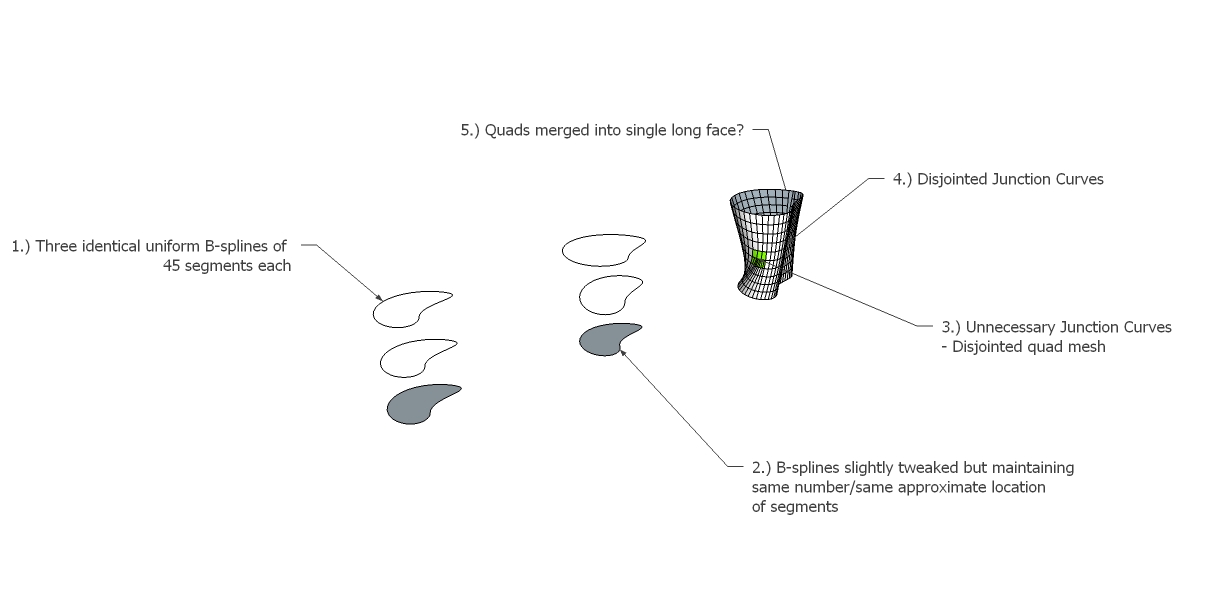

                                        Model Screenshot


                                        CL Test Model

                                        1 條回覆 最後回覆 回覆 引用 0
                                        • pilouP 離線
                                          pilou
                                          最後由 編輯

                                          Have you same result when you scale the B Splines *100 ?

                                          Frenchy Pilou
                                          Is beautiful that please without concept!
                                          My Little site :)

                                          1 條回覆 最後回覆 回覆 引用 0
                                          • fredo6F 離線
                                            fredo6
                                            最後由 編輯

                                            @ivreich said:

                                            I've attached a model showing the problems I described. I've showed the exact steps i took and colour coded/labelled the problematic areas.

                                            Joel,

                                            I had a look and there is definitely a problem in the vertex matching. Actually, even if the number of vertices are the same, thereare some which are very close and unequally spaced. This create issues with the current matching algorithm which still needs to be improved in case there is no 'sharp' edges to be used as a reference start point.
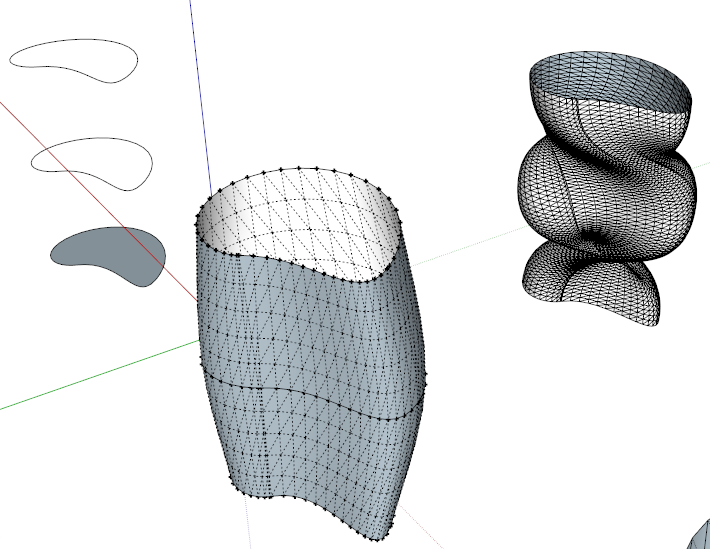
                                            Curviloft Matching vertices.png

                                            In addition, the problem of vertex matching makes the Global F-Spline method not really work. But I knew I had problem on this one.

                                            I am afraid that this cannot be fixed instantly. What I suggest is that you play with the vertex matchning by dragging the junction curves and eliminating the auto-pairs.

                                            Fredo

                                            1 條回覆 最後回覆 回覆 引用 0
                                            • 1
                                            • 2
                                            • 6
                                            • 7
                                            • 8
                                            • 9
                                            • 10
                                            • 65
                                            • 66
                                            • 8 / 66
                                            • 第一個貼文
                                              最後的貼文
                                            Buy SketchPlus
                                            Buy SUbD
                                            Buy WrapR
                                            Buy eBook
                                            Buy Modelur
                                            Buy Vertex Tools
                                            Buy SketchCuisine
                                            Buy FormFonts

                                            Advertisement