sketchucation logo sketchucation
    • 登入
    Oops, your profile's looking a bit empty! To help us tailor your experience, please fill in key details like your SketchUp version, skill level, operating system, and more. Update and save your info on your profile page today!
    🔌 Smart Spline | Fluid way to handle splines for furniture design and complex structures. Download

    [Plugin][$] Curviloft 2.0a - 31 Mar 24 (Loft & Skinning)


    已排程 已置頂 已鎖定 已移動 Plugins
    1.3k 貼文 299 Posters 2.5m 瀏覽 297 Watching
    正在載入更多貼文
    • 從舊到新
    • 從新到舊
    • 最多點贊
    回覆
    • 在新貼文中回覆
    登入後回覆
    此主題已被刪除。只有擁有主題管理權限的使用者可以查看。
    • C 離線
      cam youds
      最後由 編輯

      I must be slow in the head but I keep getting this msg

      Cannot load plugin Curviloft because the script cannot create DEFPARAM_Dir folder in:
      /Library/Application Support/Google SketchUp 7/SketchUp/Plugins

      Please create it manually, respecting the case

      What am I doing wrong?????????????????????????????????????????????????

      1 條回覆 最後回覆 回覆 引用 0
      • fredo6F 離線
        fredo6
        最後由 編輯

        @cam youds said:

        I must be slow in the head but I keep getting this msg

        Cannot load plugin Curviloft because the script cannot create DEFPARAM_Dir folder in:
        /Library/Application Support/Google SketchUp 7/SketchUp/Plugins

        Please create it manually, respecting the case

        What am I doing wrong?????????????????????????????????????????????????

        It may be that your system folder is protected by some security rules preventing to create folders there by program.
        So just create the folder DEFPARAM_Dir manually in the directory: /Library/Application Support/Google SketchUp 7/SketchUp/Plugins and this should work.

        Fredo

        1 條回覆 最後回覆 回覆 引用 0
        • C 離線
          cam youds
          最後由 編輯

          It works....Life changing!...no more rhino or soild works!!!!!!

          1 條回覆 最後回覆 回覆 引用 0
          • D 離線
            DIEGO-RODRIGUEZ
            最後由 編輯

            frequently, I have a little problem.
            does not generate the geometry.

            http://img94.imageshack.us/img94/2872/86299088.gif

            if I open the ruby console and run the plugins. Sketchup is labeled.
            and generate this error:

            http://img146.imageshack.us/img146/6030/sinttulo1yj.jpg


            skin test.skp

            1 條回覆 最後回覆 回覆 引用 0
            • fredo6F 離線
              fredo6
              最後由 編輯

              @diego-rodriguez said:

              frequently, I have a little problem.
              does not generate the geometry. if I open the ruby console and run the plugins. Sketchup is labeled.
              and generate this error:

              Diego,

              The two shapes in your attached file work fine by pre-selecting all contours.
              But I did not find the small shapes where you seem to have troubles (the one with color edges on your picture).

              For the warning in the Ruby console, do not worry. This is harmless and I have already fixed it for the next release.

              fredo

              1 條回覆 最後回覆 回覆 引用 0
              • D 離線
                DIEGO-RODRIGUEZ
                最後由 編輯

                hi fredo.
                thanks for your response.
                already solved the problem.
                Reinstall sketchup, in another partition of my hard disk and found that the problem is a file called MSVCRT-ruby18.dll

                upload the file.

                file size 853kb not works
                file size 792kb works


                file.rar

                1 條回覆 最後回覆 回覆 引用 0
                • pep75P 離線
                  pep75
                  最後由 編輯

                  Thanks Fredo! Brilliant update!! Thanks so much!!

                  grtzzz
                  Pep

                  1 條回覆 最後回覆 回覆 引用 0
                  • olisheaO 離線
                    olishea
                    最後由 編輯

                    this really is a different league of plugin!!

                    something i've been wanting for a LONG time. how come you don't charge? its amazing

                    oli

                    1 條回覆 最後回覆 回覆 引用 0
                    • mariochaM 離線
                      mariocha
                      最後由 編輯

                      Testing the beta, the skin command cannot complete this file, attached.
                      EEbyrails does it well tought.


                      No-skin.skp

                      %(#008000)[Mario C.
                      Every rule has exceptions, but some.]

                      1 條回覆 最後回覆 回覆 引用 0
                      • TIGT 離線
                        TIG Moderator
                        最後由 編輯

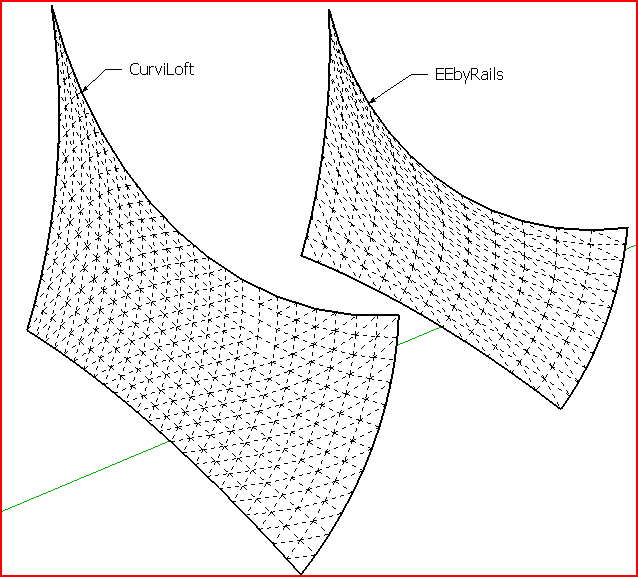
                        Both work for me... but there are more facets in CurviLoft's result...Capture.PNG

                        TIG

                        1 條回覆 最後回覆 回覆 引用 0
                        • mariochaM 離線
                          mariocha
                          最後由 編輯

                          Thanks TIG,
                          So I tried it on the PC side of my MAC, and it worked just fine.
                          frustrated me 😢
                          Strange, cause other curves were ok.

                          %(#008000)[Mario C.
                          Every rule has exceptions, but some.]

                          1 條回覆 最後回覆 回覆 引用 0
                          • fredo6F 離線
                            fredo6
                            最後由 編輯

                            @mariocha said:

                            Testing the beta, the skin command cannot complete this file, attached.
                            EEbyrails does it well tought.

                            Mariocha,

                            I think I know what it is and why it is specific to Mac. I'll publish a fix soon with a new release.

                            By the way, you can adjust the density of meshing by using the Interpoland OverSamplingboxes. If you deactivate both, then you get a mesh strictly built on the original contour vertices.
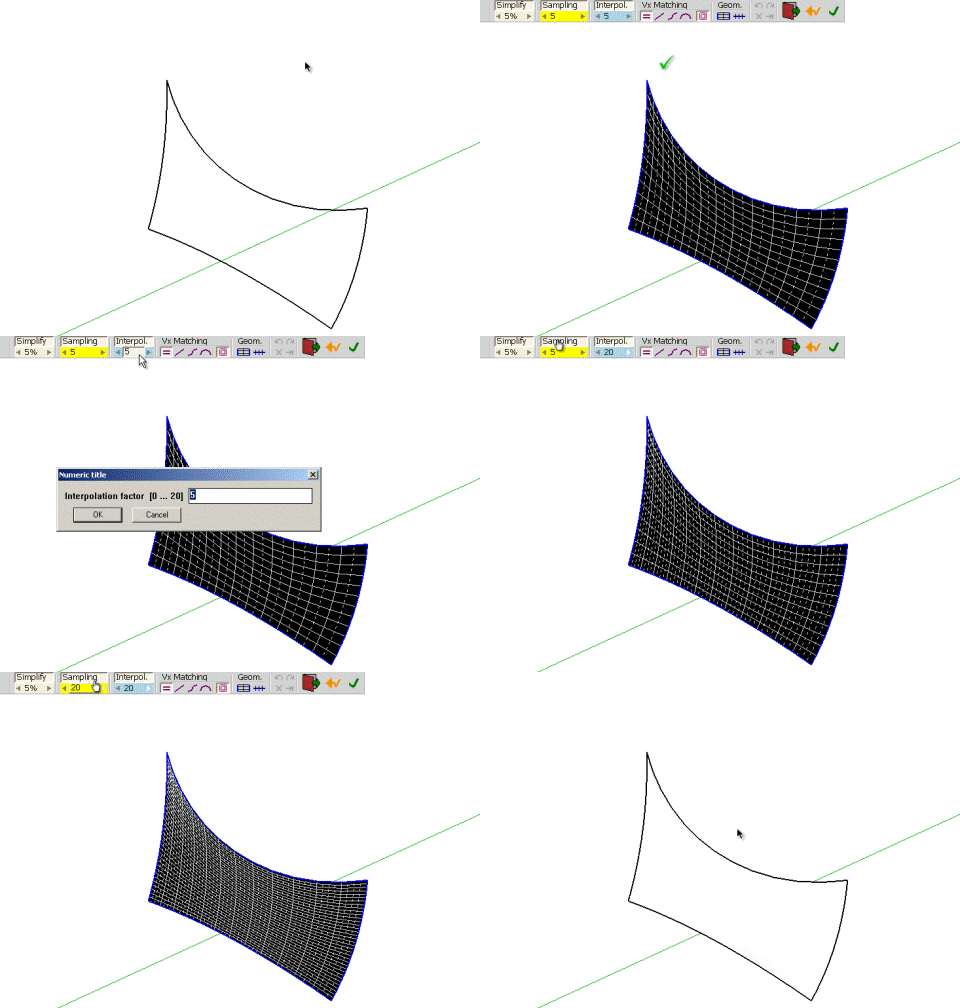
                            Curvi-sampling.gif

                            Fredo

                            1 條回覆 最後回覆 回覆 引用 0
                            • mariochaM 離線
                              mariocha
                              最後由 編輯

                              A new relase ? Great !! 👍 👍 👍
                              And Oversampling & Interpol will be so usefull for designing !
                              C'est vraiment super !
                              as I'm working on a tensile structure these days.

                              %(#008000)[Mario C.
                              Every rule has exceptions, but some.]

                              1 條回覆 最後回覆 回覆 引用 0
                              • cmeedC 離線
                                cmeed
                                最後由 編輯

                                help.
                                I see skinning videos posted within this thread but i can't get this shape to work. it seems so simple.....
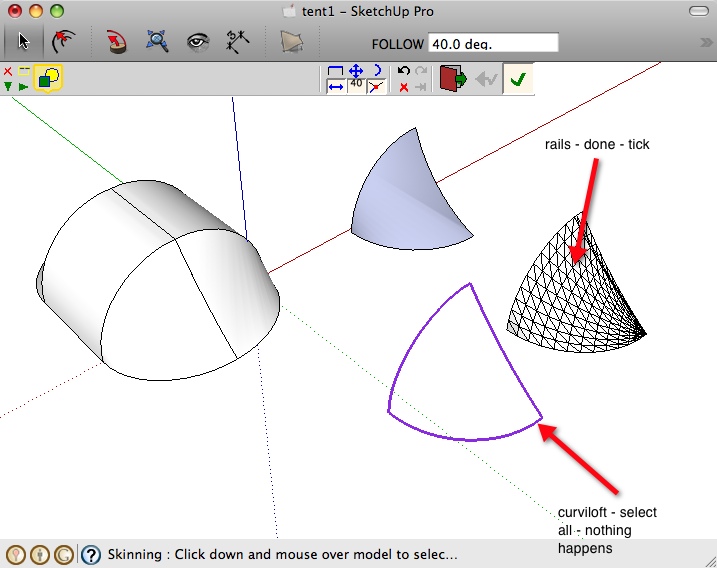
                                I click contours, click space, i then repeat until all three lines are coloured and click the tick button or open space. i get a PLEASE WAIT then nothing happens.
                                Am I doing something wrong, is it Because i'm on a mac?

                                the last picture is tig's rails but i have to make a 4th rail for it to work.
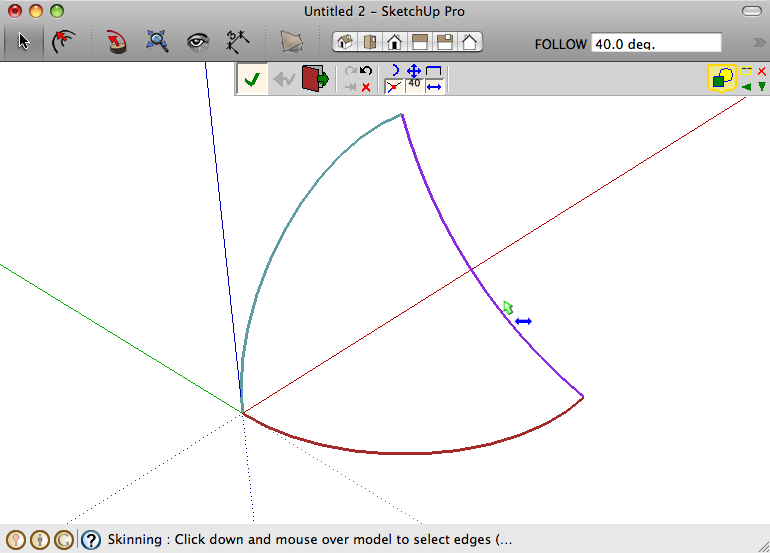

                                Skinning.jpg


                                Skinning2.jpg


                                Skinning3.jpg

                                1 條回覆 最後回覆 回覆 引用 0
                                • TIGT 離線
                                  TIG Moderator
                                  最後由 編輯

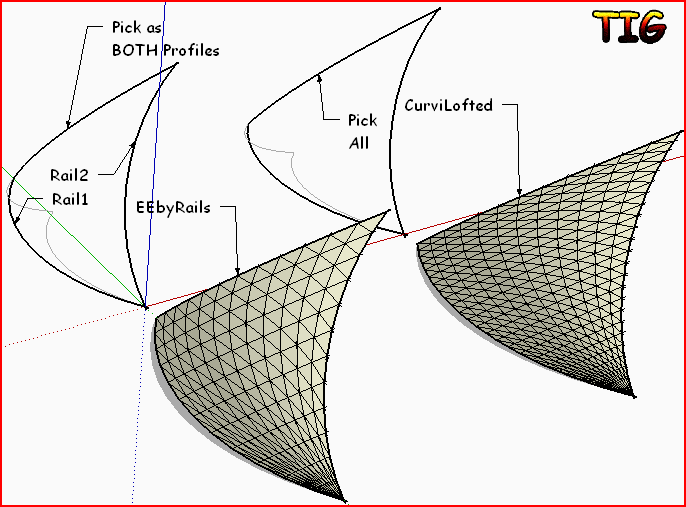
                                  Should work with the 3 curves in either Fredo's or mine. With EEbyRails Pick the curve as the profile then the 2 side rails and then re-pick the profile again as the melding-profile - it will end with a point and triangular faces opposite the profile's end, as desired...Capture.PNG

                                  TIG

                                  1 條回覆 最後回覆 回覆 引用 0
                                  • cmeedC 離線
                                    cmeed
                                    最後由 編輯

                                    Thank you for your speedy reply. Tig your plugin is working great (i didn't know about going back to my first curve to make three curves work, cheers)
                                    what i'm making is a field of 800 tents - the ones you can put up in 3 seconds. So i need a way of using the contours and keeping the the polys down.
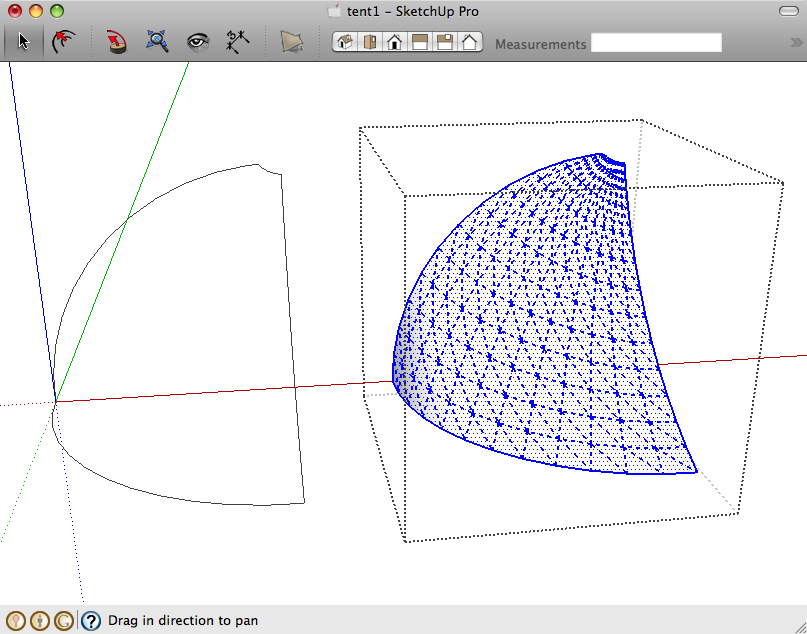
                                    see pic tent - I used the loft by spline to get this but its not that great, Skinning didn't work.
                                    i wanted to used fredos to get the polys down.


                                    Skinning4.jpg

                                    1 條回覆 最後回覆 回覆 引用 0
                                    • TIGT 離線
                                      TIG Moderator
                                      最後由 編輯

                                      Reduce the number of segments in the arcs for the profiles/rails for EEbyRails with Entity Info [before scaling or making a 'non-arc'] ?

                                      TIG

                                      1 條回覆 最後回覆 回覆 引用 0
                                      • cmeedC 離線
                                        cmeed
                                        最後由 編輯

                                        Thank you Tig. damn ! i knew that.... mmmm

                                        1 條回覆 最後回覆 回覆 引用 0
                                        • fredo6F 離線
                                          fredo6
                                          最後由 編輯

                                          @cmeed said:

                                          help.
                                          I see skinning videos posted within this thread but i can't get this shape to work. it seems so simple.....
                                          I click contours, click space, i then repeat until all three lines are coloured and click the tick button or open space. i get a PLEASE WAIT then nothing happens.
                                          Am I doing something wrong, is it Because i'm on a mac?

                                          the last picture is tig's rails but i have to make a 4th rail for it to work.
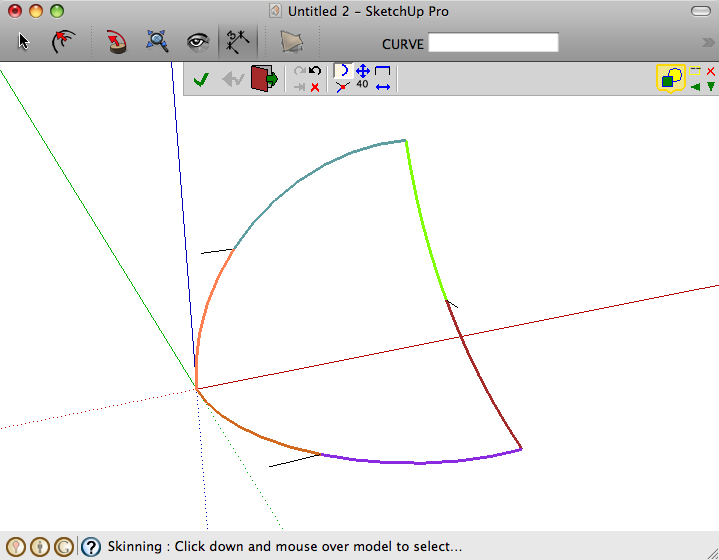
                                          COuld you please post your model so that I can have a look and see what is going wrong.

                                          Thanks

                                          fredo

                                          1 條回覆 最後回覆 回覆 引用 0
                                          • cmeedC 離線
                                            cmeed
                                            最後由 編輯

                                            Here you go...Thanks for looking...
                                            I am almost sure it will work for you. Its so simple a shape.


                                            tent1.skp

                                            1 條回覆 最後回覆 回覆 引用 0
                                            • 1
                                            • 2
                                            • 62
                                            • 63
                                            • 64
                                            • 65
                                            • 66
                                            • 65 / 66
                                            • 第一個貼文
                                              最後的貼文
                                            Buy SketchPlus
                                            Buy SUbD
                                            Buy WrapR
                                            Buy eBook
                                            Buy Modelur
                                            Buy Vertex Tools
                                            Buy SketchCuisine
                                            Buy FormFonts

                                            Advertisement