sketchucation logo sketchucation
    • 登入
    Oops, your profile's looking a bit empty! To help us tailor your experience, please fill in key details like your SketchUp version, skill level, operating system, and more. Update and save your info on your profile page today!
    🔌 Smart Spline | Fluid way to handle splines for furniture design and complex structures. Download

    [Plugin] Make Fur v.2.1.0(20140323)

    已排程 已置頂 已鎖定 已移動 Plugins
    650 貼文 255 Posters 1.1m 瀏覽 254 Watching
    正在載入更多貼文
    • 從舊到新
    • 從新到舊
    • 最多點贊
    回覆
    • 在新貼文中回覆
    登入後回覆
    此主題已被刪除。只有擁有主題管理權限的使用者可以查看。
    • U 離線
      urban journey
      最後由 編輯

      Hi guys,

      This plugin has absolutely changed my life with Sketchup being a landscape designer, i use it all the time.
      I do have a similar problem though to a previous poster and couldn't see a solution from reading through. Essentially, i select an area, a grass component and then generate and it throws components outside the selected area - see screenshot showing this and my Fur settings....
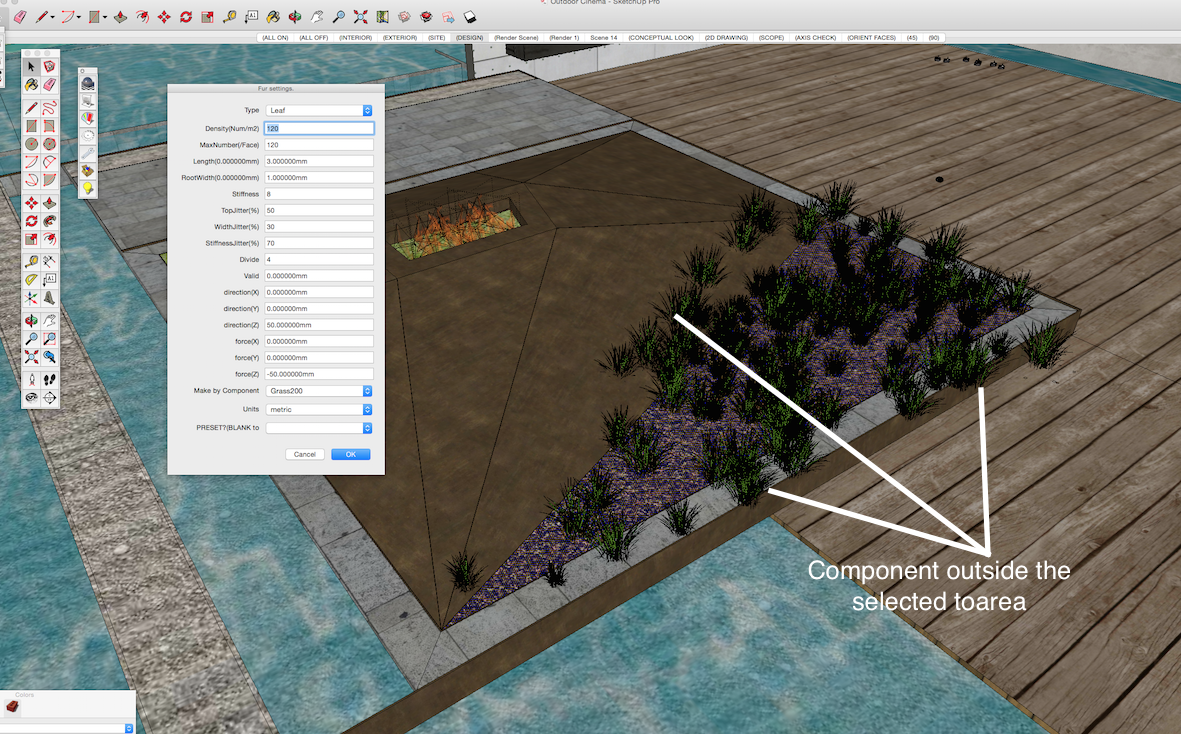
      Screen Shot 2015-05-19 at 8.37.29 pm.png

      1 條回覆 最後回覆 回覆 引用 0
      • T 離線
        TraxXx
        最後由 編輯

        Any suggestion concerning my problem ?

        1 條回覆 最後回覆 回覆 引用 0
        • TIGT 離線
          TIG Moderator
          最後由 編輯

          @traxxx said:

          Any suggestion concerning my problem ?
          Have you tried reading the usage notes.
          Perhaps you have a setting that ignores the selection ?
          Perhaps posting a screenshot or two would elicit more help...

          TIG

          1 條回覆 最後回覆 回覆 引用 0
          • T 離線
            TraxXx
            最後由 編輯

            I'm having the same issue as urban journey, this is pretty much what it looks like, but with grass

            1 條回覆 最後回覆 回覆 引用 0
            • cottyC 離線
              cotty
              最後由 編輯

              Maybe the component axes are misplaced?

              my SketchUp gallery

              1 條回覆 最後回覆 回覆 引用 0
              • T 離線
                TraxXx
                最後由 編輯

                Well I've checked the components axis but it seems normal. That wouldn't explain why they are dispatched all over the scene anyway... It seems like it's gonna stay a mistery ! 😞

                1 條回覆 最後回覆 回覆 引用 0
                • A 離線
                  AMANI1805
                  最後由 編輯

                  How do I install this to my Google SketchUp Plugin? I tried putting the file under my plugins folder but that doenst seem to work. Help please?

                  1 條回覆 最後回覆 回覆 引用 0
                  • TIGT 離線
                    TIG Moderator
                    最後由 編輯

                    @amani1805 said:

                    How do I install this to my Google SketchUp Plugin? I tried putting the file under my plugins folder but that doenst seem to work. Help please?
                    Please learn the SketchUp basics - like installing Plugins...
                    The RBZ is an archive containing the file[s] [and perhaps subfolders of support files] needed by a particular script.
                    Virtually all Plugins (and Extensions [just a more complex form of plugin]) come packaged in RBZ archives.
                    For example, those in the SketchUcation and ExtensionsWarehouse...
                    An RBZ does NOT belong in the Plugins folder - move it back into your Downloads folder...
                    Since the release of SketchUp v8M2 there has been a native tool provided to install these tools from their RBZ archives.
                    SketchUp menu, Window > Preferences > Extensions > Install... button
                    Find the RBZ and after answering in the affirmative to the installer's dialog[s], the Plugin is installed automatically for you into your Plugins folder, and it loads.
                    Thereafter, it will load whenever SketchUp starts.
                    If you have v8 and it refuses to install then you need to adjust your Permissions to the Plugins folder inside the SketchUp folder...
                    Properties > Security > Edit... ALL those listed need FULL permissions ticked... Apply/OK.

                    TIG

                    1 條回覆 最後回覆 回覆 引用 0
                    • Y 離線
                      yjinbs21
                      最後由 編輯

                      Where Fur for sketchup 2015 64bit?

                      1 條回覆 最後回覆 回覆 引用 0
                      • cottyC 離線
                        cotty
                        最後由 編輯

                        From the first post of this topic:

                        @tak2hata said:

                        DOWNLOAD HERE
                        Get the latest version from the PluginStore:
                        http://sketchucation.com/resources/pluginstore?pln=fur_en
                        or AutoInstall from within SketchUp using the SketchUcation Tools

                        This version is SU 2015-64 compatible...

                        my SketchUp gallery

                        1 條回覆 最後回覆 回覆 引用 0
                        • A 離線
                          alvro
                          最後由 編輯

                          Does the plugin work on windows 8.1? I tried to install several versions on SU14 and SU15 and always makes the same error: Error: #<Encoding::UndefinedConversionError: "\x81" to UTF-8 in conversion from Windows-1252 to UTF-8>

                          Any help?

                          1 條回覆 最後回覆 回覆 引用 0
                          • Z 離線
                            zcaalock
                            最後由 編輯

                            I have same problem as most of people here: when am using component as source the thing spreads out everywhere. I went through the whole threat and no solution, cannot see any flags to set it up and component axis are set same to rectangle where i want to place the grass.
                            Any help?

                            http://s16.postimg.org/unpg6eqdh/grass.png

                            1 條回覆 最後回覆 回覆 引用 0
                            • M 離線
                              muchomurka2
                              最後由 編輯

                              wow,thx!

                              1 條回覆 最後回覆 回覆 引用 0
                              • S 離線
                                Sejoe
                                最後由 編輯

                                This plugin doesn't working on version 2015 always giving error

                                1 條回覆 最後回覆 回覆 引用 0
                                • Dave RD 離線
                                  Dave R
                                  最後由 編輯

                                  @sejoe said:

                                  This plugin doesn't working on version 2015 always giving error

                                  It works for others with SketchUp 2015.

                                  Saying "always giving error" but not sharing the error message makes it impossible for anyone to help you if that's what you want. Share the error and you will get some assistance.

                                  Etaoin Shrdlu

                                  %

                                  (THERE'S NO PLACE LIKE)

                                  G28 X0.0 Y0.0 Z0.0

                                  M30

                                  %

                                  1 條回覆 最後回覆 回覆 引用 0
                                  • pilouP 離線
                                    pilou
                                    最後由 編輯

                                    Yes works fine for the 2015 & 2016! 😎

                                    fur.jpg
                                    fur_2016.jpg

                                    Frenchy Pilou
                                    Is beautiful that please without concept!
                                    My Little site :)

                                    1 條回覆 最後回覆 回覆 引用 0
                                    • S 離線
                                      Sejoe
                                      最後由 編輯

                                      This is my make fur error what can i do for this?I uninstalled program and installed two times but nothing changed,please help...
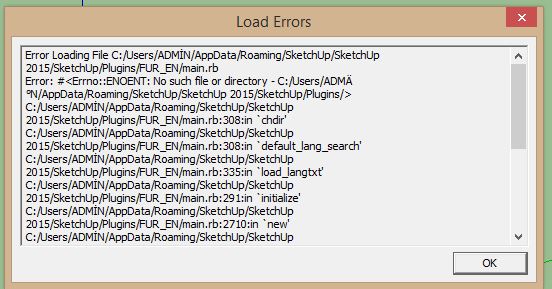

                                      my make fur error

                                      1 條回覆 最後回覆 回覆 引用 0
                                      • TIGT 離線
                                        TIG Moderator
                                        最後由 編輯

                                        This looks like a UTF8 issue with SketchUp's Ruby file-path reading...
                                        There are ways of sidestepping this in the newest Ruby - not always invoked.
                                        So these might not have been effected in this tool's code.
                                        Your Windows user-name seems to be "ADMİN" [I assume that's Turkish (Türk) with a dotted 'I' ?] rather than the immediately acceptable "ADMIN".
                                        Accented characters in user-names are very well known for causing issues like this...
                                        But newer Plugins, which ought to use the latest Ruby methods, can often sidestep these problem...

                                        TIG

                                        1 條回覆 最後回覆 回覆 引用 0
                                        • M 離線
                                          marcodallago
                                          最後由 編輯

                                          Hi,
                                          I have a problem.. I need to create grass in the green area of the image, so that will look the walkway emerge from the grass. But how can i do? With your plugin grass elements come out from the path and this is not what I want. Is there a workaround?
                                          Schermata 2016-09-14 alle 15.08.04.png

                                          Thanks

                                          1 條回覆 最後回覆 回覆 引用 0
                                          • majidM 離線
                                            majid
                                            最後由 編輯

                                            فایل آپدیت زبان فارسی
                                            Here is the updated Persian ( Farsi ) language file


                                            در مسیر فایلهای زبان پلاگین بریزید
                                            مثلا
                                            C:\Users"User name"\AppData\Roaming\SketchUp\SketchUp 2016\SketchUp\Plugin

                                            My inspiring A, B, Sketches book: https://sketchucation.com/shop/books/intermediate/2612-alphabet-inspired-sketches--inspiring-drills-for-architects--3d-artists-and-designers-

                                            1 條回覆 最後回覆 回覆 引用 0
                                            • 1
                                            • 2
                                            • 23
                                            • 24
                                            • 25
                                            • 26
                                            • 27
                                            • 32
                                            • 33
                                            • 25 / 33
                                            • 第一個貼文
                                              最後的貼文
                                            Buy SketchPlus
                                            Buy SUbD
                                            Buy WrapR
                                            Buy eBook
                                            Buy Modelur
                                            Buy Vertex Tools
                                            Buy SketchCuisine
                                            Buy FormFonts

                                            Advertisement