sketchucation logo sketchucation
    • Login
    Oops, your profile's looking a bit empty! To help us tailor your experience, please fill in key details like your SketchUp version, skill level, operating system, and more. Update and save your info on your profile page today!
    Mac User? | Join the Rayscaper Beta for Mac Learn More

    [Plugin] Make Fur v.2.1.0(20140323)

    Scheduled Pinned Locked Moved Plugins
    650 Posts 255 Posters 1.3m Views 254 Watching
    Loading More Posts
    • Oldest to Newest
    • Newest to Oldest
    • Most Votes
    Reply
    • Reply as topic
    Log in to reply
    This topic has been deleted. Only users with topic management privileges can see it.
    • C
      ChEBaNaNa
      last edited by

      This Plugin is probably the best Plugin i've ever seen....
      Big Thanks from Switzerland!!!!! 😃

      1 Reply Last reply
      Reply Quote 0
      • plot-parisP
        plot-paris
        last edited by

        Hey tak2hata,

        excellent plugin! It is fun to use and a great enhancement for SketchUp.

        However, sometimes I find it a bit difficult to master. Therefore I have two ideas:

        1. Some of the settings use units that are not very intuitive. The stiffness for example is measured in a undefined number. Or while the jitter options use percent, the direction and force options use meters (which can be difficult, so that one has to test a lot before achieving the right result).
          I think it might be better to have those as a percentage as well (0% no effect, 100% full effect). Like that one can see a linear increase of the effect, which makes it easier to understand.

        2. Some of the settings are not self-explanatory. Do you think it would be possible to add tooltips that show up, when you hover over the setting with your cursor for some time? You know, with a short description of what the setting does...

        Would be great to hear your opinion on this...

        1 Reply Last reply
        Reply Quote 0
        • B
          bb6
          last edited by

          谢谢!hebeijianke

          1 Reply Last reply
          Reply Quote 0
          • S
            Sharkyzero
            last edited by

            I don't seem to be getting the results everybody else is. I make a grass square and make it a component, then I try to use the crowd maker and it puts the grass everywhere else other than what I have selected. Anybody else have this problem? Also, how do you get so much grass? My comp is no slouch and it virtually crashes whenever I try to get more than a little bit in view.

            1 Reply Last reply
            Reply Quote 0
            • T
              tak2hata
              last edited by

              @sharkyzero said:

              I don't seem to be getting the results everybody else is. I make a grass square and make it a component, then I try to use the crowd maker and it puts the grass everywhere else other than what I have selected. Anybody else have this problem? Also, how do you get so much grass? My comp is no slouch and it virtually crashes whenever I try to get more than a little bit in view.

              Hi,Sharkyzero.

              I need to know your detail to help the problems.
              Please upload screenshot of your model and crownd maker dialog.
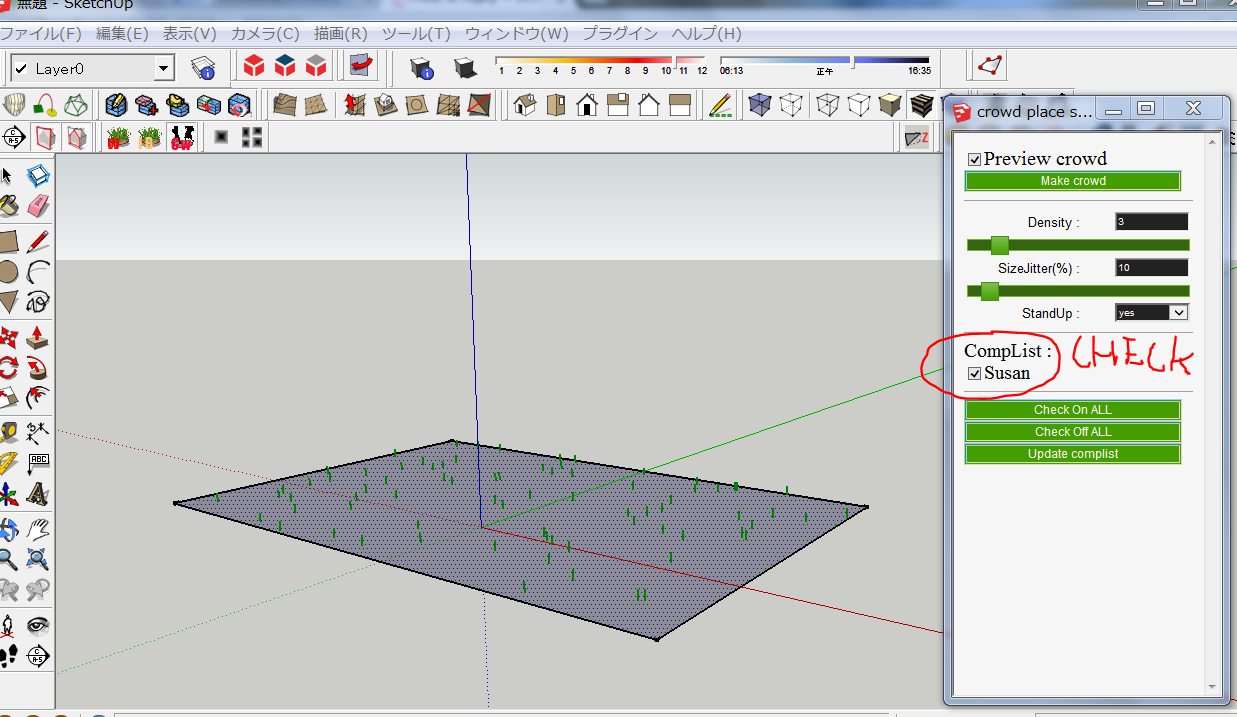
              crowdmaker
              Thanks.


              by TAK2HATA

              1 Reply Last reply
              Reply Quote 0
              • S
                Sharkyzero
                last edited by

                I just realized something, Tak. I think the fact that I'm not using instances of the grass components is screwing with everything. Let me fiddle around with it some more and I'll see if I can't get it working the way I think it should.

                1 Reply Last reply
                Reply Quote 0
                • T
                  tak2hata
                  last edited by

                  Hi,Sharkyzero.
                  Good luck for fiddle around with it.
                  Please ask me when you didn't get it working fine.

                  Thanks.


                  by TAK2HATA

                  1 Reply Last reply
                  Reply Quote 0
                  • C
                    chillotti
                    last edited by

                    Hi everybody, I have a problem, I can’t install the plugin Fur Maker, I put the file http://sketchucation.com/resources/pluginstore?pln=fur_en
                    And also the new icons
                    http://sketchucation.com/forums/viewtopic.php?f=323&t=28092&start=480
                    in the
                    C:\Program Files (x86)\SketchUp\SketchUp 2013\Plugins
                    Can you help me? Please

                    Thanks
                    Carlo

                    1 Reply Last reply
                    Reply Quote 0
                    • T
                      tak2hata
                      last edited by

                      @chillotti said:

                      Hi everybody, I have a problem, I can’t install the plugin Fur Maker, I put the file http://sketchucation.com/resources/pluginstore?pln=fur_en
                      And also the new icons
                      http://sketchucation.com/forums/viewtopic.php?f=323&t=28092&start=480
                      in the
                      C:\Program Files (x86)\SketchUp\SketchUp 2013\Plugins
                      Can you help me? Please

                      Thanks
                      Carlo

                      Hi,chillotti.
                      I guess you didn't use autoinstall from sketchupucation store tool.
                      You must unzip the rbz file when you manually install it.
                      Change the extenstion name "rbz" to "zip".and unzip it.
                      "fur_en.rb" and "fur_en" folder will be shown.
                      Copy both to plugin folder.
                      And New Icon file "fur_en.rar" must unzip ,also.
                      Copy the created png file to "fur_en" folder in plugins folder.

                      Thanks.


                      by TAK2HATA

                      1 Reply Last reply
                      Reply Quote 0
                      • S
                        SuperJesus
                        last edited by

                        This was working previously for me but there are certain components that dont seem to want to constrain the surface I select. The preview shows everything in the right place but then they appear randomly spread out in mid air over a huge area when I do it. Its only certain components with the same settings so I don't get it. Has anybody had this issue before?

                        1 Reply Last reply
                        Reply Quote 0
                        • T
                          tak2hata
                          last edited by

                          @superjesus said:

                          This was working previously for me but there are certain components that dont seem to want to constrain the surface I select. The preview shows everything in the right place but then they appear randomly spread out in mid air over a huge area when I do it. Its only certain components with the same settings so I don't get it. Has anybody had this issue before?

                          Hi,SuperJesus.
                          I guess your problem of fur.
                          watch video

                          Please Check the axis origin of the component.
                          Thanks.


                          by TAK2HATA

                          1 Reply Last reply
                          Reply Quote 0
                          • bulbaB
                            bulba
                            last edited by

                            thanks tak2hata..
                            this plugin is very useful

                            1 Reply Last reply
                            Reply Quote 0
                            • Y
                              Yoshi Ikeda
                              last edited by

                              Hy,

                              The fur plug in work for sketch up 8 Pro BUT it doesnot work in sketch up 2013 Pro,
                              Any advice?

                              Regards,
                              Yoshi Ikeda

                              1 Reply Last reply
                              Reply Quote 0
                              • TIGT
                                TIG Moderator
                                last edited by

                                It should work.
                                What is the problem ?
                                We need help here šŸ˜•
                                How can we help you, if you don't try to help us šŸ˜’

                                TIG

                                1 Reply Last reply
                                Reply Quote 0
                                • M
                                  mjursevs
                                  last edited by

                                  Hi, wondering if someone could please help me.

                                  I've been using make fur fine for the last while, but it has suddenly stopped working completely.

                                  I know how to use it, but now when I push the Make Fur button, nothing happens. No collecting faces, nothing. I'm at a loss. Has anyone ever experienced something like this?

                                  Any insights would be greatly appreciated.

                                  1 Reply Last reply
                                  Reply Quote 0
                                  • Dave RD
                                    Dave R
                                    last edited by

                                    Have you recently installed any new plugins that might be messing with this one? Maybe the Vray plugin or Sketchy Physics?

                                    Etaoin Shrdlu

                                    %

                                    (THERE'S NO PLACE LIKE)

                                    G28 X0.0 Y0.0 Z0.0

                                    M30

                                    %

                                    1 Reply Last reply
                                    Reply Quote 0
                                    • M
                                      mjursevs
                                      last edited by

                                      @dave r said:

                                      Have you recently installed any new plugins that might be messing with this one? Maybe the Vray plugin or Sketchy Physics?

                                      Nope, no new plugins as of late.

                                      Was working earlier this week, now won't work whatsoever, no new plugins installed since.

                                      Have tried everything I feel. Played with all the options, components, new sketchup files, restarting computer, blah.

                                      Any other suggestions?

                                      1 Reply Last reply
                                      Reply Quote 0
                                      • TIGT
                                        TIG Moderator
                                        last edited by

                                        If you try using it with the Ruby Console open are there any error messages ?
                                        Have you recently changed things that might have affected your Plugins folder's security permissions?
                                        Select its icon, right-click > context-menu > Properties > Security > Edit... make sure every user/group listed has FULL read/write permissions ticked.
                                        Apply/OK
                                        Also select the SketchUp.exe icon and similarly: right-click > context-menu > Properties > Compatibility > Check the box 'Always run as administrator' > Apply/OK...
                                        Restart SketchUp...
                                        If it still fails to work...
                                        In the ../Plugins/fur_en folder there's a file called fur_param3.ini, edit it with Notepad and delete all of the entries, then save it: now 'fur' should start on a SketchUp restart with its default settings...

                                        TIG

                                        1 Reply Last reply
                                        Reply Quote 0
                                        • T
                                          tak2hata
                                          last edited by

                                          Hi,ikeda and mjursevs.
                                          Please do as TIG says.

                                          Please tell me the detail of your problems,When still there were the problem.
                                          Open "Ruby Console" in sketchup "windows" menu.
                                          And Start "Fur".
                                          when there is any message includes "error",
                                          Please copy the all message and post here.

                                          I have no materials of the inference for your problems.
                                          Thanks.


                                          by TAK2HATA

                                          1 Reply Last reply
                                          Reply Quote 0
                                          • P
                                            platalay
                                            last edited by

                                            very great plugin šŸ˜

                                            Thank for your time

                                            https://fbcdn-sphotos-c-a.akamaihd.net/hphotos-ak-prn2/1462876_10201299501633110_1558182600_n.jpg

                                            1 Reply Last reply
                                            Reply Quote 0

                                            Hello! It looks like you're interested in this conversation, but you don't have an account yet.

                                            Getting fed up of having to scroll through the same posts each visit? When you register for an account, you'll always come back to exactly where you were before, and choose to be notified of new replies (either via email, or push notification). You'll also be able to save bookmarks and upvote posts to show your appreciation to other community members.

                                            With your input, this post could be even better šŸ’—

                                            Register Login
                                            • 1
                                            • 2
                                            • 3
                                            • 4
                                            • 5
                                            • 32
                                            • 33
                                            • 3 / 33
                                            • First post
                                              Last post
                                            Buy SketchPlus
                                            Buy SUbD
                                            Buy WrapR
                                            Buy eBook
                                            Buy Modelur
                                            Buy Vertex Tools
                                            Buy SketchCuisine
                                            Buy FormFonts

                                            Advertisement