sketchucation logo sketchucation
    • 登入
    Oops, your profile's looking a bit empty! To help us tailor your experience, please fill in key details like your SketchUp version, skill level, operating system, and more. Update and save your info on your profile page today!
    ⚠️ Important | Libfredo 15.6b introduces important bugfixes for Fredo's Extensions Update

    PointTool for Mac

    已排程 已置頂 已鎖定 已移動 Plugins
    25 貼文 8 Posters 2.2k 瀏覽 8 Watching
    正在載入更多貼文
    • 從舊到新
    • 從新到舊
    • 最多點贊
    回覆
    • 在新貼文中回覆
    登入後回覆
    此主題已被刪除。只有擁有主題管理權限的使用者可以查看。
    • M 離線
      mmyoung
      最後由 編輯

      This may have been covered, but I couldn't find another reference, so I apologize if this is (yawn) old news:

      I was never able to get Matt666's PointTool.rb to work on my Mac. I opened it in a text editor and removed the "=begin" and "=end" lines at the beginning and placed a "#" at the beginning of each comment.

      Now it runs on Mac. Fantastically useful tool for terrain modeling, glad to have this.

      Michael Young
      Albuquerque
      OSX; SketchUp, Vectorworks, and Wings3D
      (which play nicely together)

      1 條回覆 最後回覆 回覆 引用 0
      • R 離線
        rickgraham
        最後由 編輯

        Can you point me to where this plug in is? I'd love to try it out!

        Thanks!

        Rick

        1 條回覆 最後回覆 回覆 引用 0
        • EdsonE 離線
          Edson
          最後由 編輯

          michael,

          i have had no problems with the point tool. i use snow leopard but cannot recall any problems before upgrading either.

          edson mahfuz, architect| porto alegre • brasil
          http://www.mahfuz.arq.br

          1 條回覆 最後回覆 回覆 引用 0
          • M 離線
            mmyoung
            最後由 編輯

            Hi everyone,
            Was away from the office for a while and didn't check SCF.
            One of my friends had the same deal occur on his machine, with PointTool not loading. I've no idea why this worked, as "=begin" and "=end" work everywhere else. A small mystery. Maybe it only happens in New Mexico... it wouldn't be the first time.

            Michael Young
            Albuquerque
            OSX; SketchUp, Vectorworks, and Wings3D
            (which play nicely together)

            1 條回覆 最後回覆 回覆 引用 0
            • EdsonE 離線
              Edson
              最後由 編輯

              to tell you the truth, i have a small problem with this tool: it does not load at startup. i always have to go to View>Toolbars to open it.

              edson mahfuz, architect| porto alegre • brasil
              http://www.mahfuz.arq.br

              1 條回覆 最後回覆 回覆 引用 0
              • M 離線
                mmyoung
                最後由 編輯

                Yes, that is what was happening for me.
                When I changed it as shown, it loads. Does this edited version work for you?

                Michael Young
                Albuquerque
                OSX; SketchUp, Vectorworks, and Wings3D
                (which play nicely together)

                1 條回覆 最後回覆 回覆 引用 0
                • M 離線
                  mmyoung
                  最後由 編輯

                  Also, check out the construction point tool TIG wrote:
                  Plugins forum > subject: "Reports coordinates of a cpoint"

                  You can place a construction point at a specified (RED, GRN, BLU) location,

                  or if you select a group of construction points (a point cloud, for example, that you might be using for DTM), it will report the location of each according to the model precision set in Window > Model Info.

                  Very nice. It runs from the Ruby Console.

                  Michael Young
                  Albuquerque
                  OSX; SketchUp, Vectorworks, and Wings3D
                  (which play nicely together)

                  1 條回覆 最後回覆 回覆 引用 0
                  • EdsonE 離線
                    Edson
                    最後由 編輯

                    @mmyoung said:

                    Yes, that is what was happening for me.
                    When I changed it as shown, it loads. Does this edited version work for you?

                    michael,

                    i am always wary of making any changes to ruby scripts. i know nothing about it so all the times i tried to make changes to a script i ended up doing something wrong or forgetting some important thing. could you please post the changed script here so that i could try it?

                    edson mahfuz, architect| porto alegre • brasil
                    http://www.mahfuz.arq.br

                    1 條回覆 最後回覆 回覆 引用 0
                    • TIGT 離線
                      TIG Moderator
                      最後由 編輯

                      @edson said:

                      @mmyoung said:

                      Yes, that is what was happening for me.
                      When I changed it as shown, it loads. Does this edited version work for you?

                      michael,

                      i am always wary of making any changes to ruby scripts. i know nothing about it so all the times i tried to make changes to a script i ended up doing something wrong or forgetting some important thing. could you please post the changed script here so that i could try it?

                      Here's a version that might be Mac friendly...
                      Extract the .rb file and the subfolder+png-file into the Plugins folder...

                      TIG

                      1 條回覆 最後回覆 回覆 引用 0
                      • EdsonE 離線
                        Edson
                        最後由 編輯

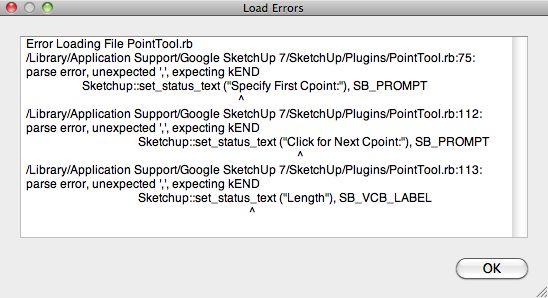
                        sorry, tig. it did not work. thanks.
                        pointool_error.png

                        edson mahfuz, architect| porto alegre • brasil
                        http://www.mahfuz.arq.br

                        1 條回覆 最後回覆 回覆 引用 0
                        • TIGT 離線
                          TIG Moderator
                          最後由 編輯

                          I now see the problem... here's a fix for that error ???Extract the .rb file and the subfolder+png-file into the Plugins folder...
                          Ruby on Mac is less forgiving about parenthesizing arguments - it takes dothis(aaa,bbb) or dothis aaa,bbb, but while on a PC dothis (aaa),bbb will work it kills a Mac ! Then I made it dothis((aaa),bbb) and it works however...

                          TIG

                          1 條回覆 最後回覆 回覆 引用 0
                          • EdsonE 離線
                            Edson
                            最後由 編輯

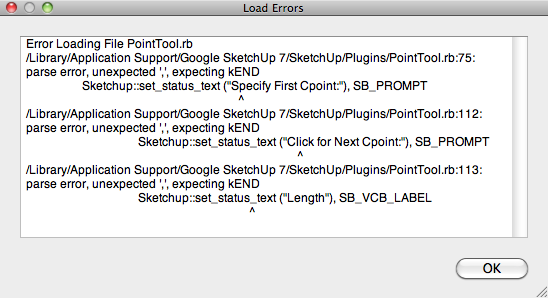
                            still not working.pointool_error2.png

                            edson mahfuz, architect| porto alegre • brasil
                            http://www.mahfuz.arq.br

                            1 條回覆 最後回覆 回覆 引用 0
                            • wind-borneW 離線
                              wind-borne
                              最後由 編輯

                              @edson said:

                              to tell you the truth, i have a small problem with this tool: it does not load at startup. i always have to go to View>Toolbars to open it.

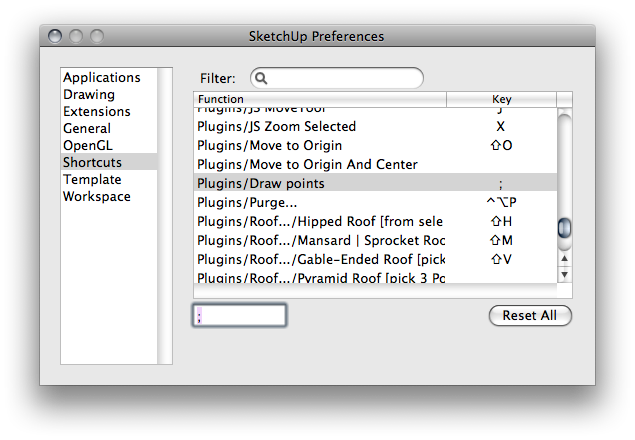
                              If the original tool itself works why not give it
                              (a) a keyboard shortcut
                              or
                              (b) put it in the customizable toolbar?

                              Either of these bypass the need for the Point Tool toolbar.

                              SketchUp Preferences.png


                              SketchUp.png

                              "To read between the lines was easier than to follow the text."OSX 10.11.6

                              %(#BF80BF)[SU 8 pro

                              1 條回覆 最後回覆 回覆 引用 0
                              • EdsonE 離線
                                Edson
                                最後由 編輯

                                @wind-borne said:

                                If the original tool itself works why not give it
                                (a) a keyboard shortcut
                                or
                                (b) put it in the customizable toolbar?

                                Either of these bypass the need for the Point Tool toolbar.

                                by all means, why not? thanks.

                                edson mahfuz, architect| porto alegre • brasil
                                http://www.mahfuz.arq.br

                                1 條回覆 最後回覆 回覆 引用 0
                                • TIGT 離線
                                  TIG Moderator
                                  最後由 編輯

                                  Edson

                                  That report is from the old version - the new one does not have those lines of code in it !
                                  Can you check that you don't have a duplicate loading from another Plugins folder ?
                                  Read the path in the error message and ensure that that file is this new one...
                                  I know there has been some Mac folder confusion in the past...

                                  TIG

                                  1 條回覆 最後回覆 回覆 引用 0
                                  • EdsonE 離線
                                    Edson
                                    最後由 編輯

                                    tig,

                                    you were right. i must have done something wrong before. no error messages this time. however, the problem remains the same: the toolbar is not loaded automatically when i start sketchup, as most do.

                                    edson mahfuz, architect| porto alegre • brasil
                                    http://www.mahfuz.arq.br

                                    1 條回覆 最後回覆 回覆 引用 0
                                    • TIGT 離線
                                      TIG Moderator
                                      最後由 編輯

                                      Try this adjusted versionPointTool.rb

                                      TIG

                                      1 條回覆 最後回覆 回覆 引用 0
                                      • EdsonE 離線
                                        Edson
                                        最後由 編輯

                                        the tool works fine, no error messages, but it does not load when i open sketchup.

                                        edson mahfuz, architect| porto alegre • brasil
                                        http://www.mahfuz.arq.br

                                        1 條回覆 最後回覆 回覆 引用 0
                                        • TIGT 離線
                                          TIG Moderator
                                          最後由 編輯

                                          THIS should load the toolbar - IF it were open the last time you closed SUp, if it doesn't open the toolbar then close SUp, reopen SUp and the toolbar should still be active ?PointTool.rb

                                          TIG

                                          1 條回覆 最後回覆 回覆 引用 0
                                          • EdsonE 離線
                                            Edson
                                            最後由 編輯

                                            IT WORKS!!! 👍 👍

                                            edson mahfuz, architect| porto alegre • brasil
                                            http://www.mahfuz.arq.br

                                            1 條回覆 最後回覆 回覆 引用 0
                                            • 1
                                            • 2
                                            • 1 / 2
                                            • 第一個貼文
                                              最後的貼文
                                            Buy SketchPlus
                                            Buy SUbD
                                            Buy WrapR
                                            Buy eBook
                                            Buy Modelur
                                            Buy Vertex Tools
                                            Buy SketchCuisine
                                            Buy FormFonts

                                            Advertisement