sketchucation logo sketchucation
    • Login
    Oops, your profile's looking a bit empty! To help us tailor your experience, please fill in key details like your SketchUp version, skill level, operating system, and more. Update and save your info on your profile page today!
    ⚠️ Important | Libfredo 15.6b introduces important bugfixes for Fredo's Extensions Update

    Colours to illustrate range

    Scheduled Pinned Locked Moved Developers' Forum
    13 Posts 4 Posters 1.2k Views 4 Watching
    Loading More Posts
    • Oldest to Newest
    • Newest to Oldest
    • Most Votes
    Reply
    • Reply as topic
    Log in to reply
    This topic has been deleted. Only users with topic management privileges can see it.
    • J Offline
      Jim
      last edited by

      Maybe Color.blend would help shorten up the code to 4 states?

      
      blue = Sketchup;;Color.new('blue')
      bluegreen = Sketchup;;Color.new(0, 255, 255)
      green = Sketchup;;Color.new('green')
      redgreen = Sketchup;;Color.new(255, 255, 0)
      red = Sketchup;;Color.new('red')
      # assuming v is (0..100)
      case v
      c = v / 100.0
      when (0..25)
        color = blue.blend(bluegreen, c)
      when (25..50)
        color = bluegreen.blend(green, c)
      when (50..75)
        color = green.blend(redgreen, c)
      when (75..100)
        color = redgreen.blend(red, c)
      
      end


      Hi

      1 Reply Last reply Reply Quote 0
      • thomthomT Offline
        thomthom
        last edited by

        ` def test_clr(value = 45, max = 100, min = 0)
        clr = []
        clr << Sketchup::Color.new(255,0,0)
        clr << Sketchup::Color.new(255,255,0)
        clr << Sketchup::Color.new(0,255,0)
        clr << Sketchup::Color.new(0,255,255)
        clr << Sketchup::Color.new(0,0,255)

        n = value / ( (max - min) / 5.0 )
        index = n.to_i
        ratio = n - index

        c1 = clr[index-1].blend(clr[index], ratio)
        def`

        Thomas Thomassen β€” SketchUp Monkey & Coding addict
        List of my plugins and link to the CookieWare fund

        1 Reply Last reply Reply Quote 0
        • thomthomT Offline
          thomthom
          last edited by

          hm... fails when given the max value... πŸ˜•

          Thomas Thomassen β€” SketchUp Monkey & Coding addict
          List of my plugins and link to the CookieWare fund

          1 Reply Last reply Reply Quote 0
          • thomthomT Offline
            thomthom
            last edited by

            This works - with out of range recovery.

            
            def test_clr(value = 45, max = 100, min = 0)
            	clr = []
            	clr << Sketchup;;Color.new(255,0,0)
            	clr << Sketchup;;Color.new(255,255,0)
            	clr << Sketchup;;Color.new(0,255,0)
            	clr << Sketchup;;Color.new(0,255,255)
            	clr << Sketchup;;Color.new(0,0,255)
            	clr << Sketchup;;Color.new(0,0,255)
            
            	value = [min, value].max
            	value = [max, value].min
            
            	n = value / ( (max - min) / 5.0 )
            	index = n.to_i
            	ratio = n - index
            
            	c1 = clr[index-1].blend(clr[index], ratio)
            end


            But a simple switch might still be neater... πŸ˜•

            Thomas Thomassen β€” SketchUp Monkey & Coding addict
            List of my plugins and link to the CookieWare fund

            1 Reply Last reply Reply Quote 0
            • thomthomT Offline
              thomthom
              last edited by

              And bugged when min is not 0. ... ok - I'm no making for an elegant solution. KISS calling?

              Thomas Thomassen β€” SketchUp Monkey & Coding addict
              List of my plugins and link to the CookieWare fund

              1 Reply Last reply Reply Quote 0
              • thomthomT Offline
                thomthom
                last edited by

                Ok - This one is the final deal. Easily extendible with other colour ranged by changing the array.

                
                def value_to_color(value = 0, max = 100, min = 0)
                	# Colours to translate to. First is max, last is bottom.
                	# NOTE; last must appear twice!
                	clr = []
                	clr << Sketchup;;Color.new(255,0,0)
                	clr << Sketchup;;Color.new(255,255,0)
                	clr << Sketchup;;Color.new(0,255,0)
                	clr << Sketchup;;Color.new(0,255,255)
                	clr << Sketchup;;Color.new(0,0,255)
                	clr << Sketchup;;Color.new(0,0,255)
                	# Cap value to range.
                	value = [min, value].max
                	value = [max, value].min
                	# Calculate what colours to blend between and the blending ratio.
                	n = (value-min) / ( (max-min) / (clr.length-1.0) )
                	index = n.to_i
                	ratio = n - index
                	#puts [n, index, ratio] # DEBUG
                	return clr[index-1].blend(clr[index], ratio)
                end


                Sketchup.active_model.selection[0].material = value_to_color(30, 60, 20)

                Thomas Thomassen β€” SketchUp Monkey & Coding addict
                List of my plugins and link to the CookieWare fund

                1 Reply Last reply Reply Quote 0
                • thomthomT Offline
                  thomthom
                  last edited by

                  weeeell, this is the really final deal! really!

                  
                  def self.value_to_color(value = 0, max = 100, min = 0)
                  	# Colours to translate to. First is max, last is bottom.
                  	clr = []
                  	clr << Sketchup;;Color.new(255,0,0)
                  	clr << Sketchup;;Color.new(255,255,0)
                  	clr << Sketchup;;Color.new(0,255,0)
                  	clr << Sketchup;;Color.new(0,255,255)
                  	clr << Sketchup;;Color.new(0,0,255)
                  	# Cap value to range.
                  	value = [min, value].max
                  	value = [max, value].min
                  	# Calculate what colours to blend between and the blending ratio.
                  	n = (value-min) / ( (max-min) / (clr.length-1.0) )
                  	index1 = n.to_i
                  	index2 = [index1+1, clr.length-1].min
                  	ratio = n - index1
                  	#puts [value, n, index, ratio].inspect # DEBUG
                  	return clr[index2].blend(clr[index1], ratio)
                  end


                  I had confused how the blend weighting worked. Fixed. +some cleaning up.
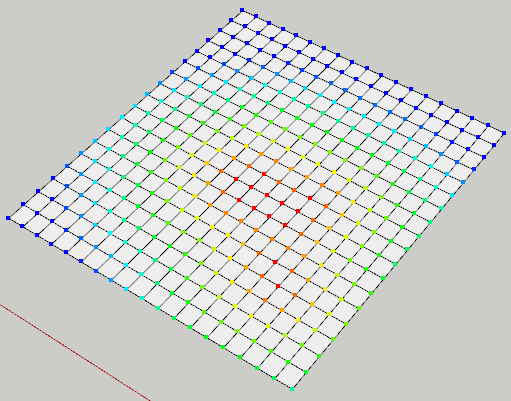

                  soft-select.png

                  Thomas Thomassen β€” SketchUp Monkey & Coding addict
                  List of my plugins and link to the CookieWare fund

                  1 Reply Last reply Reply Quote 0
                  • Chris FullmerC Offline
                    Chris Fullmer
                    last edited by

                    Very cool Thom, thanks for posting this. Its something that has crossed my mind recently. I'll be sure to look through your code,

                    Chris

                    Lately you've been tan, suspicious for the winter.
                    All my Plugins I've written

                    1 Reply Last reply Reply Quote 0
                    • Chris FullmerC Offline
                      Chris Fullmer
                      last edited by

                      I've got this snippet in a top secret little project I'm working (ok, well its top secret but I've shared it with quite a few other people, so its not that top secret). Anyhow, the code works great Thom, but I only just recently realized it does not cover the entire range of colors. To get it to come full swing back to red, one woul need to add the lines:

                      clr << Sketchup::Color.new(255,0,255) clr << Sketchup::Color.new(255,0,0)

                      to the end of the other similar lines so that it adds the magenta color to the array and finally back to red. Then you have a true full spectrum represented in this lovely gradient.

                      Thanks again Thom!

                      Chris

                      Lately you've been tan, suspicious for the winter.
                      All my Plugins I've written

                      1 Reply Last reply Reply Quote 0
                      • thomthomT Offline
                        thomthom
                        last edited by

                        πŸ˜„

                        Thomas Thomassen β€” SketchUp Monkey & Coding addict
                        List of my plugins and link to the CookieWare fund

                        1 Reply Last reply Reply Quote 0
                        • 1 / 1
                        • First post
                          Last post
                        Buy SketchPlus
                        Buy SUbD
                        Buy WrapR
                        Buy eBook
                        Buy Modelur
                        Buy Vertex Tools
                        Buy SketchCuisine
                        Buy FormFonts

                        Advertisement

