sketchucation logo sketchucation
    • 登入
    Oops, your profile's looking a bit empty! To help us tailor your experience, please fill in key details like your SketchUp version, skill level, operating system, and more. Update and save your info on your profile page today!
    🔌 Smart Spline | Fluid way to handle splines for furniture design and complex structures. Download

    [Plugin] Manifold v2.2

    已排程 已置頂 已鎖定 已移動 Plugins
    126 貼文 19 Posters 63.3k 瀏覽 19 Watching
    正在載入更多貼文
    • 從舊到新
    • 從新到舊
    • 最多點贊
    回覆
    • 在新貼文中回覆
    登入後回覆
    此主題已被刪除。只有擁有主題管理權限的使用者可以查看。
    • D 離線
      driven
      最後由 編輯

      Even Likes Curves, but they will slow it down.
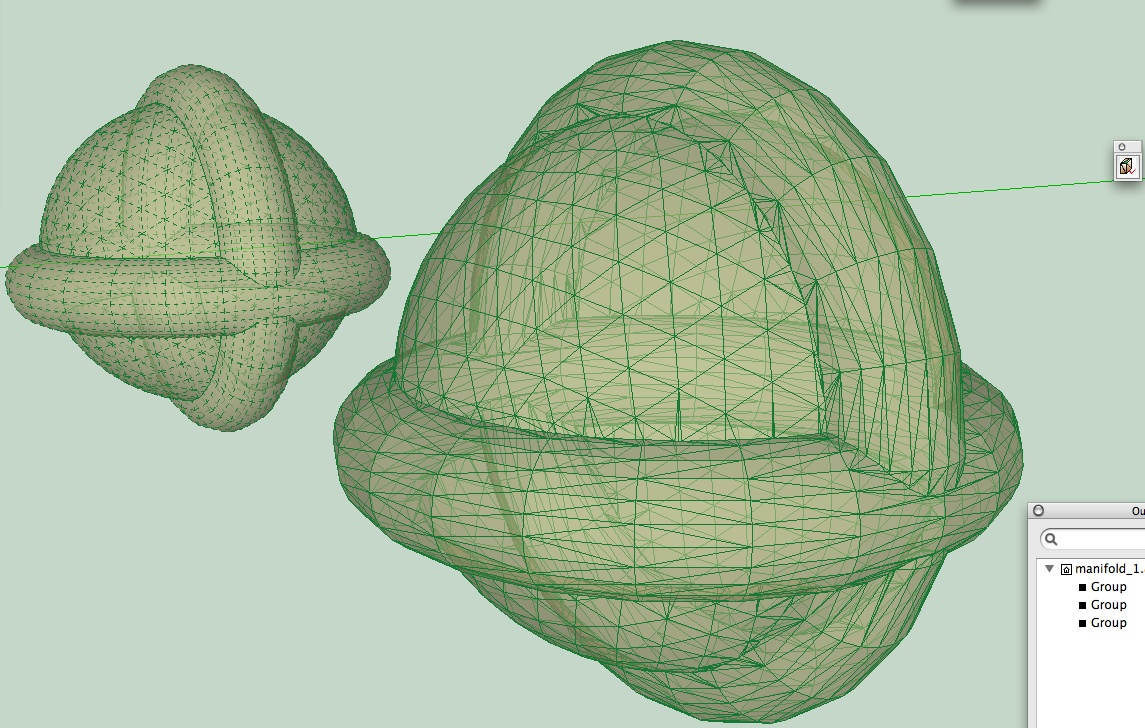
      seems a lot quicker than before on this sort of thing

      learn from the mistakes of others, you may not live long enough to make them all yourself...

      1 條回覆 最後回覆 回覆 引用 0
      • TIGT 離線
        TIG Moderator
        最後由 編輯

        Here's v2.0 http://forums.sketchucation.com/viewtopic.php?p=218691#p218691

        Glitch in health-check if very small edges in faces fixed...

        TIG

        1 條回覆 最後回覆 回覆 引用 0
        • thomthomT 離線
          thomthom
          最後由 編輯

          v2 ? is this a major or minor update?

          Thomas Thomassen — SketchUp Monkey & Coding addict
          List of my plugins and link to the CookieWare fund

          1 條回覆 最後回覆 回覆 引用 0
          • TIGT 離線
            TIG Moderator
            最後由 編輯

            @thomthom said:

            v2 ? is this a major or minor update?

            The tweaks were relatively minor - BUT as I am unlikely to make many more changes in the short-term I thought I'd mark it with '2.0'... 😉

            TIG

            1 條回覆 最後回覆 回覆 引用 0
            • pilouP 離線
              pilou
              最後由 編輯

              I have missed this new true gem! 😳

              Frenchy Pilou
              Is beautiful that please without concept!
              My Little site :)

              1 條回覆 最後回覆 回覆 引用 0
              • pilouP 離線
                pilou
                最後由 編輯

                When I use Manifold I obtain that ok
                But When I kill or move the group red repair
                I have the original copy with killed internal faces Yes ok ☀ , but always segments on the faces! 😮
                Does it normal? A simple box with 6 faces must be result ? No clean selection?
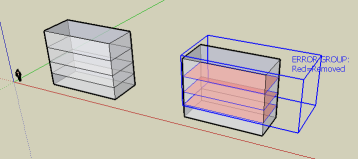
                bug.png

                Frenchy Pilou
                Is beautiful that please without concept!
                My Little site :)

                1 條回覆 最後回覆 回覆 引用 0
                • TIGT 離線
                  TIG Moderator
                  最後由 編輯

                  @unknownuser said:

                  When I use Manifold I obtain that ok
                  But When I kill or move the group red repair
                  I have the original copy with killed internal faces Yes ok ☀ , but always segments on the faces! 😮
                  Does it normal? A simple box with 6 faces must be result ? No clean selection?
                  [attachment=0:2jmg80n7]<!-- ia0 -->bug.png<!-- ia0 -->[/attachment:2jmg80n7]

                  This is correct.
                  The internal faces are removed by any edges they has forming part of the external envelope are kept.
                  If you want rid of then use one of the tools that removes coplanar edges...
                  It could seek to remove coplanar edges too ?

                  TIG

                  1 條回覆 最後回覆 回覆 引用 0
                  • TIGT 離線
                    TIG Moderator
                    最後由 編輯

                    Here's v2.1
                    http://forums.sketchucation.com/viewtopic.php?p=218691#p218691

                    It now has the option to remove coplanar edges before triangulation, this will minimize the number of faces -useful if for example internal faces have been removed and their old edges are not needed to keep the external 'manifold' skin intact...

                    TIG

                    1 條回覆 最後回覆 回覆 引用 0
                    • pilouP 離線
                      pilou
                      最後由 編輯

                      Cool now we have possibility or not to "clean" the model in the same time 😉

                      Frenchy Pilou
                      Is beautiful that please without concept!
                      My Little site :)

                      1 條回覆 最後回覆 回覆 引用 0
                      • pilouP 離線
                        pilou
                        最後由 編輯

                        2 volumes
                        copy move

                        for each selected (2 volumes) Intersect Selected
                        Group

                        for each "group" apply Manifold
                        with same answers : Yes for the first question (of course)
                        and No for the others questions

                        Curious result is not the same! 😮
                        Is that normal?
                        test.png


                        test.skp

                        Frenchy Pilou
                        Is beautiful that please without concept!
                        My Little site :)

                        1 條回覆 最後回覆 回覆 引用 0
                        • D 離線
                          driven
                          最後由 編輯

                          @Pilou,

                          tested your .skp on mac and got two different results? first time I opened SU from your download file, 2nd time I opened it from inside SU, but that was the only thing I changed, something odd??
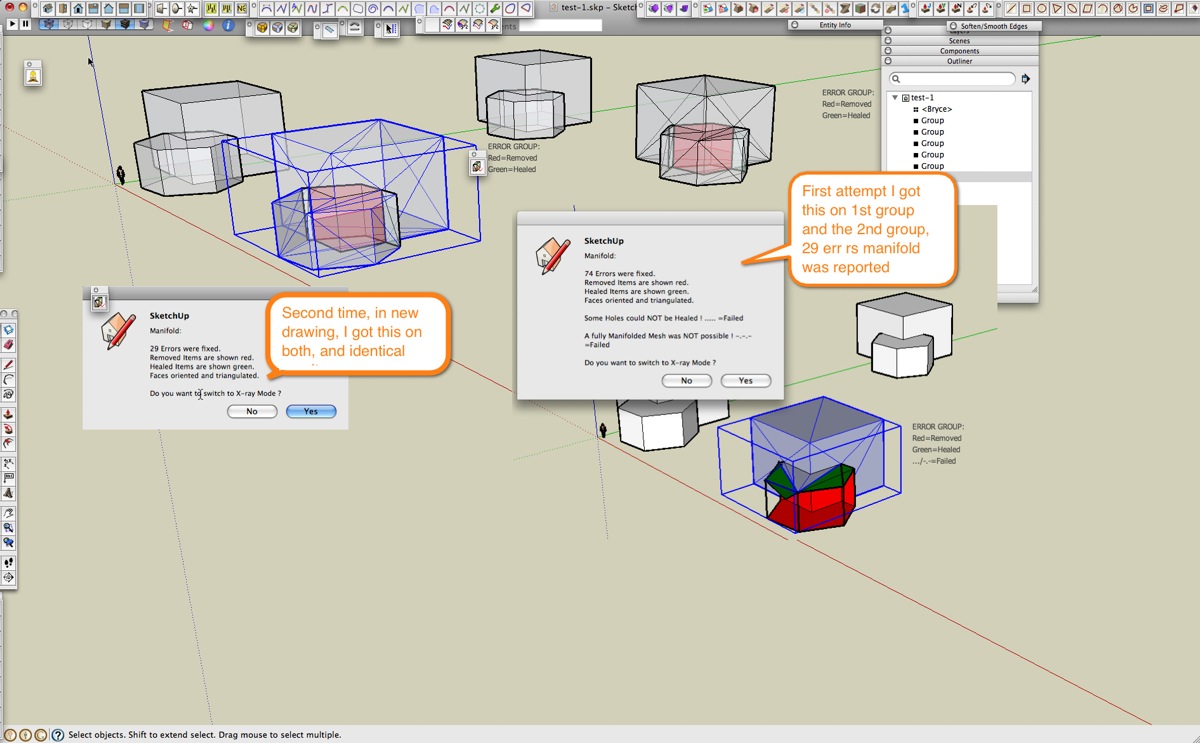
                          double check manifold.jpeg

                          learn from the mistakes of others, you may not live long enough to make them all yourself...

                          1 條回覆 最後回覆 回覆 引用 0
                          • TIGT 離線
                            TIG Moderator
                            最後由 編輯

                            Manifold has to start somewhere in its checking - the first entity it encounters might not always be the same so you get differing results if there's a big mess...

                            Manifold was written to do specific job - check that a group is 'manifold' and if not try to fix it - it is so that when you export your model - e.g. to 3D-printer software - it will work. As it says at the start 'give us break' and try and at least offer it a set of geometry you hope might be manifold - it is NOT a boolean tool to merge volumes - it tries to decide which is the face to keep but sometimes removing or healing something changes the form - hence the colored 'report' group.

                            Before using 'manifold' try manually to get rid of at least a few known internal faces etc [x-ray mode + hide is good for this] - then the processing is quicker and more consistent...

                            😒

                            TIG

                            1 條回覆 最後回覆 回覆 引用 0
                            • pilouP 離線
                              pilou
                              最後由 編輯

                              I well understand 😄
                              The only curious thing is that it not the same result for 2 similar groups inspected 😉

                              Frenchy Pilou
                              Is beautiful that please without concept!
                              My Little site :)

                              1 條回覆 最後回覆 回覆 引用 0
                              • M 離線
                                make.GQ.china
                                最後由 編輯

                                Thank you for your plug-ins! 😎 😍

                                1 條回覆 最後回覆 回覆 引用 0
                                • TIGT 離線
                                  TIG Moderator
                                  最後由 編輯

                                  Here's v2.2 - updated FR lingvo file [thanks to Didier Bur] and glitches with Tooltips and other strings deBabelizing now sorted...
                                  http://forums.sketchucation.com/viewtopic.php?p=218691#p218691

                                  TIG

                                  1 條回覆 最後回覆 回覆 引用 0
                                  • P 離線
                                    pdwyer
                                    最後由 編輯

                                    Does/should this work with SU 8?

                                    I'm not seeing any colours or new models created, even with the downloaded example but the example skp file is v7.

                                    I suspect v8 needs a plugin like this too. If there is some other way to find doubles/duplicates/manifolds etc I'd love to know

                                    Cheers

                                    1 條回覆 最後回覆 回覆 引用 0
                                    • TIGT 離線
                                      TIG Moderator
                                      最後由 編輯

                                      @pdwyer said:

                                      Does/should this work with SU 8?

                                      I'm not seeing any colours or new models created, even with the downloaded example but the example skp file is v7.

                                      I suspect v8 needs a plugin like this too. If there is some other way to find doubles/duplicates/manifolds etc I'd love to know

                                      Cheers

                                      In v8 there are 'manifold' functions built in...

                                      TIG

                                      1 條回覆 最後回覆 回覆 引用 0
                                      • P 離線
                                        pdwyer
                                        最後由 編輯

                                        Really? 😲

                                        What are they called?

                                        1 條回覆 最後回覆 回覆 引用 0
                                        • GaieusG 離線
                                          Gaieus
                                          最後由 編輯

                                          The new solid tools. Outer shell (available in the free version, too), should do (more or less) what manifold plugin would (unless I am completely mistaken as I have never used this plugin yet)

                                          Gai...

                                          1 條回覆 最後回覆 回覆 引用 0
                                          • J 離線
                                            Jim
                                            最後由 編輯

                                            Solid Tools. The Entity Info window will indicate "Solid Group" when a Group is manifold.

                                            http://www.dropmocks.com/iNOPR

                                            And here's a great plugin for trouble-shooting non-manifold Groups that should be:

                                            Solid Inspector by thomthom

                                            Hi

                                            1 條回覆 最後回覆 回覆 引用 0
                                            • 1
                                            • 2
                                            • 3
                                            • 4
                                            • 5
                                            • 6
                                            • 7
                                            • 1 / 7
                                            • 第一個貼文
                                              最後的貼文
                                            Buy SketchPlus
                                            Buy SUbD
                                            Buy WrapR
                                            Buy eBook
                                            Buy Modelur
                                            Buy Vertex Tools
                                            Buy SketchCuisine
                                            Buy FormFonts

                                            Advertisement