sketchucation logo sketchucation
    • 登入
    Oops, your profile's looking a bit empty! To help us tailor your experience, please fill in key details like your SketchUp version, skill level, operating system, and more. Update and save your info on your profile page today!
    🔌 Smart Spline | Fluid way to handle splines for furniture design and complex structures. Download

    [Plugin] ExtrudeTools - Full Set

    已排程 已置頂 已鎖定 已移動 Plugins
    636 貼文 178 Posters 792.5k 瀏覽 175 Watching
    正在載入更多貼文
    • 從舊到新
    • 從新到舊
    • 最多點贊
    回覆
    • 在新貼文中回覆
    登入後回覆
    此主題已被刪除。只有擁有主題管理權限的使用者可以查看。
    • chriC 離線
      chri
      最後由 編輯

      hello TIG

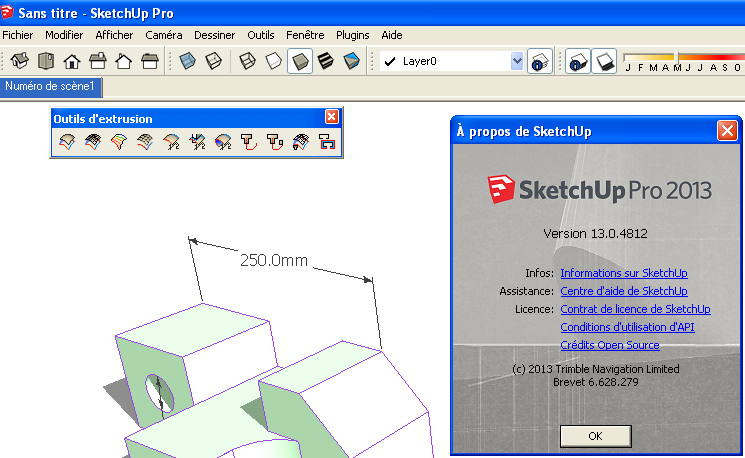
      I have SKETCHUP PRO 2013
      I installed the plugin ExtrudeTools V2.2
      it works fine.

      I installed SKETCHUP 2014 2 days ago to test this new version.
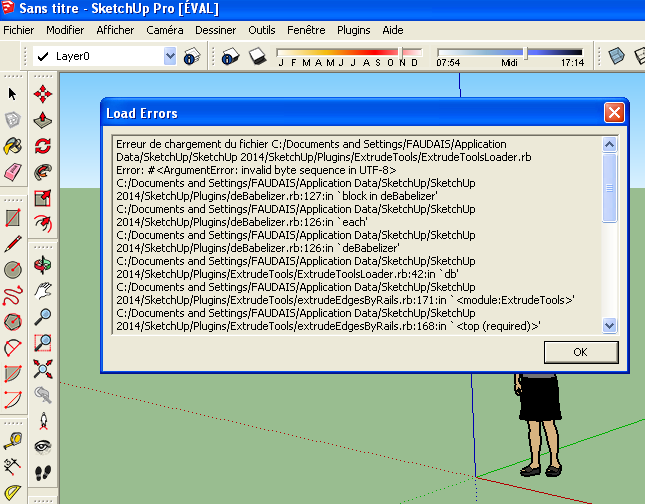
      Something does not work, can you, please take a look at the following pictures
      Perhaps the plugin is'nt up to date or there is something wrong with my machine !

      Chri
      Best Regards


      ExtrudeTools page 1.png


      ExtrudeTools page 2.png


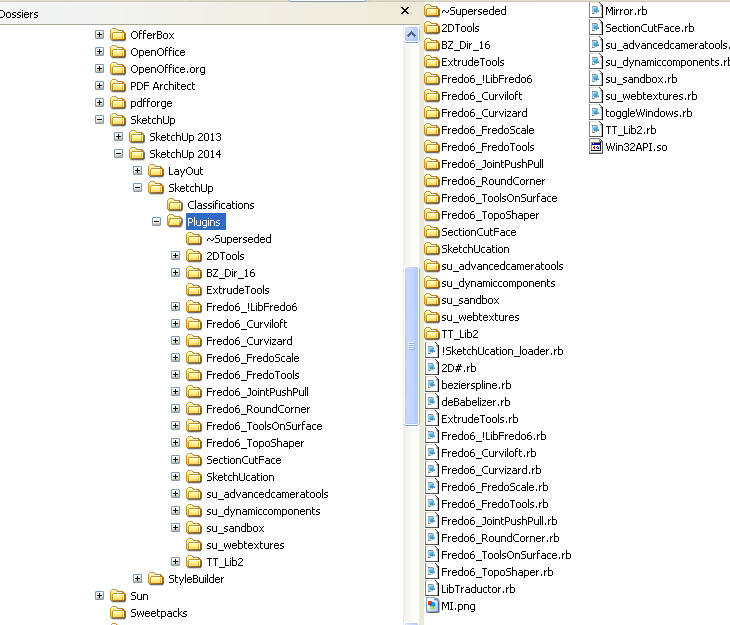
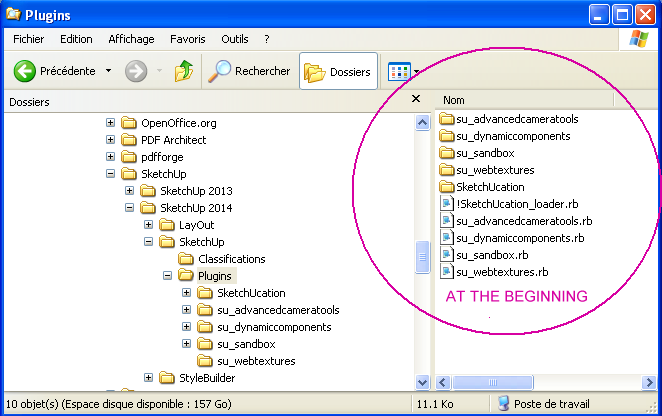
      ExtrudeTools page 3.png

      1 條回覆 最後回覆 回覆 引用 0
      • Dave RD 離線
        Dave R
        最後由 編輯

        Did you install a fresh copy of TIG's plugin? Or did you just drag the old copy over from the previous Plugins folder?

        Etaoin Shrdlu

        %

        (THERE'S NO PLACE LIKE)

        G28 X0.0 Y0.0 Z0.0

        M30

        %

        1 條回覆 最後回覆 回覆 引用 0
        • chriC 離線
          chri
          最後由 編輯

          @dave r said:

          Did you install a fresh copy of TIG's plugin? Or did you just drag the old copy over from the previous Plugins folder?

          hi DAVE
          i have install a fresh copy directly in SKETCHUP 2014 with the plugin store

          chri

          1 條回覆 最後回覆 回覆 引用 0
          • TIGT 離線
            TIG Moderator
            最後由 編輯

            @Chri

            If you get v2.2 of the tool's RBZ from the PluginStore and install it from the RBZ [i.e. don't drag+drop from an opened RBZ as if it were a ZIP file etc] you should then get fresh copies of all of the needed files [including the required helper "deBabelizer.rb"].
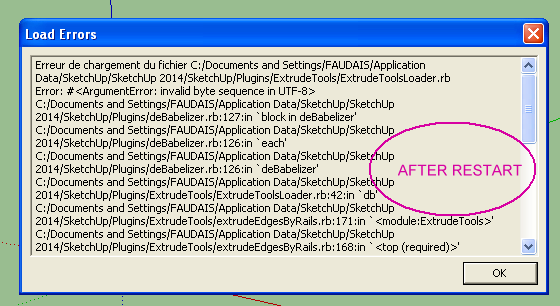
            The error you posted relates to an incompatible version of that file - old ANSI v new UTF8-without-BOM.
            The new version of Ruby used by SketchUp 2014 is less forgiving and cannot use that text file encoding.
            Most authors have updated their scripts to have the correct encoding, and thereby suit all versions of SketchUp.
            The files in this tool's latest PluginStore RBZ are all correctly encoded.
            To double check I have just reinstalled from a newly downloaded RBZ and it worked fine - the enclosed files are all correctly encoded - I checked 😕

            It looks like you copied an older one over from an earlier version's Plugins folder ?
            Reinstall properly, restart and retest...

            Or have you installed anything else including deBabelizer.rb ?
            The few RBZs that do include it should all be correctly encoded if the latest versions are downloaded and installed...
            An old version will cause issues...

            TIG

            1 條回覆 最後回覆 回覆 引用 0
            • TIGT 離線
              TIG Moderator
              最後由 編輯

              Here's v2.3
              A minor glitch [typo] is now fixed and it's compatible with v2014 once again 😒
              http://sketchucation.com/pluginstore?pln=ExtrudeTools

              TIG

              1 條回覆 最後回覆 回覆 引用 0
              • BoxB 離線
                Box
                最後由 編輯

                If you want confirmation, loft wasn't working for me in 2014 and now is. Thanks.

                1 條回覆 最後回覆 回覆 引用 0
                • TIGT 離線
                  TIG Moderator
                  最後由 編輯

                  The EEby Loft error was a strange one. 😒
                  A very silly typo, that I'd have expected to make it fail in ANY version seems to be glossed-over by the Ruby of earlier versions.
                  The "princess-pea-under-the mattress" miss-picky Ruby2.0 didn't like it...
                  It was easy to fix when I got my head around it...
                  🤓

                  TIG

                  1 條回覆 最後回覆 回覆 引用 0
                  • chriC 離線
                    chri
                    最後由 編輯

                    Hi TIG

                    I have tried once again .. and there is always something wrong .
                    what i have done

                    1 - Erasure of all new plugins
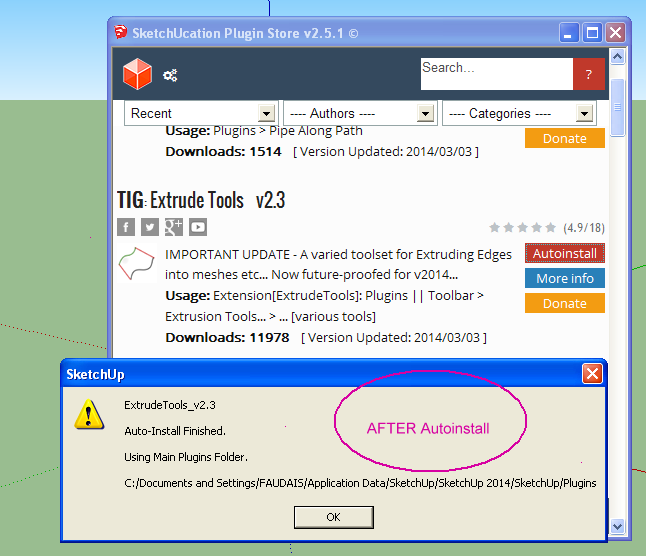
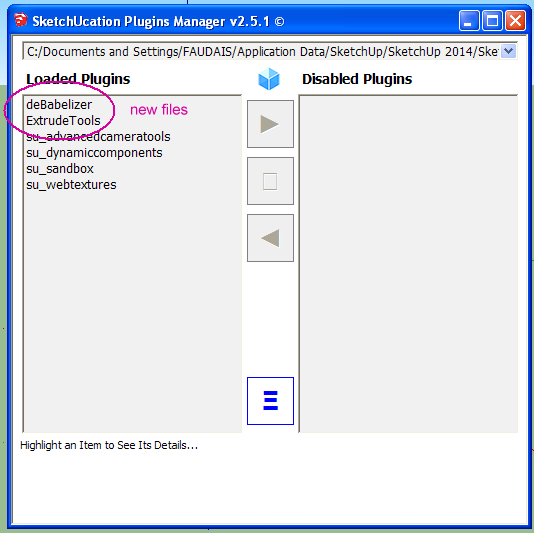
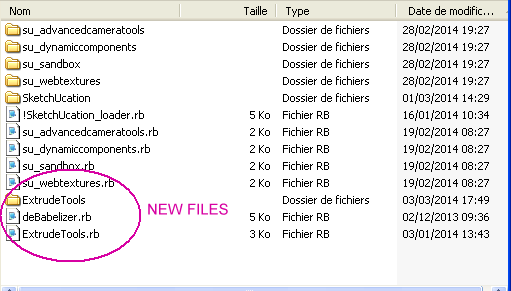
                    2 - Installation of plugin Extrude Tools 2.3 with plugin store + Autoinstall
                    3 - Closure and reboot

                    Chri
                    😞


                    Capture-1.png


                    Capture-2.png


                    Capture-3.png


                    Capture-4.png


                    Capture-5.png

                    1 條回覆 最後回覆 回覆 引用 0
                    • Dave RD 離線
                      Dave R
                      最後由 編輯

                      Why does the error message include "invalid byte sequence in UTF-8"?

                      French Windows and English SketchUp?

                      Etaoin Shrdlu

                      %

                      (THERE'S NO PLACE LIKE)

                      G28 X0.0 Y0.0 Z0.0

                      M30

                      %

                      1 條回覆 最後回覆 回覆 引用 0
                      • TIGT 離線
                        TIG Moderator
                        最後由 編輯

                        This is most strange. 😕
                        I have just repeated all of your steps...
                        It reinstalls and works fine after a restart [just in case something was adrift]...

                        That RBZ's version of deBabelizer.rb IS the newest, and therefore compatible - I converted it a few months ago...
                        BUT your file says 02/12/2013 AND that IS the current file ?

                        Try this known-to-work version [install from the attached RBZ]...
                        Restart SketchUp to retest...

                        If this fixes, then it the mystery deepens...
                        BUT at least you'll have a working version...


                        deBabelizer.rbz

                        TIG

                        1 條回覆 最後回覆 回覆 引用 0
                        • TIGT 離線
                          TIG Moderator
                          最後由 編輯

                          PS:
                          Can you attached your version of deBabelizer.rb that is raising the issue on your system, so I can compare it with the 'real' [working] one that you should have...

                          Can you also check that you have FULL security permissions to the Plugins folder...
                          It should be set automatically...

                          TIG

                          1 條回覆 最後回覆 回覆 引用 0
                          • chriC 離線
                            chri
                            最後由 編輯

                            @tig said:

                            PS:
                            Can you attached your version of deBabelizer.rb that is raising the issue on your system, so I can compare it with the 'real' [working] one that you should have...


                            deBabelizer.rb

                            1 條回覆 最後回覆 回覆 引用 0
                            • chriC 離線
                              chri
                              最後由 編輯

                              @tig said:

                              PS:
                              Can you also check that you have FULL security permissions to the Plugins folder...
                              It should be set automatically...

                              i dont know how to do this 😕

                              1 條回覆 最後回覆 回覆 引用 0
                              • TIGT 離線
                                TIG Moderator
                                最後由 編輯

                                That IS the correct file.
                                It should NOT raise a UTF8 error...
                                It is correctly encoded...
                                It works for me.
                                It works for others...

                                Weird...

                                Incidentally, don't confuse the subfolders containing some files that are shipped with SketchUp v2014, with the main Plugins folder that is now located in your Users account...

                                Security... http://sketchucation.com/resources/tutorials/36-intermediate/811-setting-security-permissions-in-sketchup

                                TIG

                                1 條回覆 最後回覆 回覆 引用 0
                                • chriC 離線
                                  chri
                                  最後由 編輯

                                  @tig said:

                                  Incidentally, don't confuse the subfolders containing some files that are shipped with SketchUp v2014, with the main Plugins folder that is now located in your Users account...

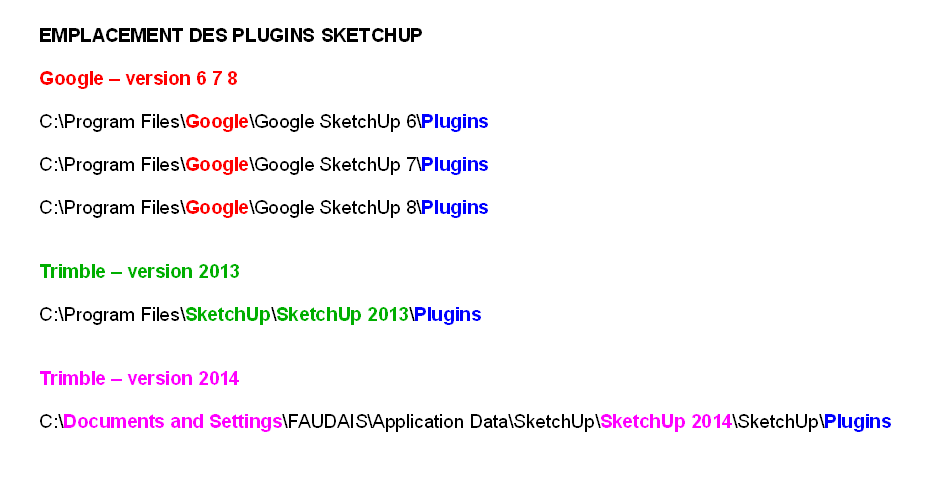
                                  I have seen this and make an announcement on the french forum
                                  here :
                                  http://sketchucation.com/forums/viewtopic.php?f=51%26amp;t=56469

                                  chri


                                  emplacement des plugins SKETCHUP page 2.png

                                  1 條回覆 最後回覆 回覆 引用 0
                                  • jiminy-billy-bobJ 離線
                                    jiminy-billy-bob
                                    最後由 編輯

                                    @chri said:

                                    I have seen this and make an announcement on the french forum
                                    here :
                                    http://sketchucation.com/forums/viewtopic.php?f=51%26amp;t=56469

                                    There's a french forum?!
                                    I don't have access to it, how can I?

                                    25% off Skatter for SketchUcation Premium Members

                                    1 條回覆 最後回覆 回覆 引用 0
                                    • BoxB 離線
                                      Box
                                      最後由 編輯

                                      In your user control panel go to the usergroups tab and select Francias.

                                      1 條回覆 最後回覆 回覆 引用 0
                                      • TIGT 離線
                                        TIG Moderator
                                        最後由 編輯

                                        @Chri et al

                                        The ' Application Data' Plugins folder-path is NOT the folder-path into which YOUR Plugins should normally 'go'. 😕
                                        You will not be able to install or manage these files, unless they have FULL security permissions to that folder-path [which is unlikely, as it's very limited by default, and also difficult to reset too]. 😲
                                        C:/Documents and Settings/USERNAME/Application Data/SketchUp/SketchUp 2014/SketchUp/Plugins

                                        There is a also a similar path, which is actually pointing to the same folder...
                                        C:/Documents and Settings/USERNAME/AppData/Roaming/SketchUp/SketchUp 2014/SketchUp/Plugins
                                        This path could also have restricted permissions... 😒

                                        BUT every user gets their own fully accessible Plugins folder-path. 😄
                                        Where you can install and manage your plugins files - you will automatically have FULL security permissions using that folder-path.
                                        That ' Users' Plugins folder is the default one...

                                        To find your very own Plugins folder use this in the Ruby Console:
                                        Sketchup.find_support_file('Plugins')
                                        It will return something like this:
                                        C:/Users/USERNAME/AppData/Roaming/SketchUp/SketchUp 2014/SketchUp/Plugins

                                        Although it is effectively the same folder as the Application Data || /Documents and Settings/../AppData ones again - using this path you automatically get proper FULL permissions...

                                        If you have tried to install Plugins into an alternative Plugins folder-path [even if in reality it is pointing at the same Plugins folder], in all likelihood you probably do not have FULL security permissions when approaching it down that folder-path... 😞
                                        So the chances are you have once again started the specter of the 'VirtualStore' / 'Compatibility Files' fiasco, which was meant to be avoided by the improved Users Plugins folder introduced in v2014... 😒

                                        So please use to the usual C:/Users/../Plugins path... 🤓

                                        TIG

                                        1 條回覆 最後回覆 回覆 引用 0
                                        • TIGT 離線
                                          TIG Moderator
                                          最後由 編輯

                                          Here's an update http://sketchucation.com/pluginstore?pln=ExtrudeTools
                                          v2.4 now includes ALL lingvo files in a v2014 compatible encoding.

                                          TIG

                                          1 條回覆 最後回覆 回覆 引用 0
                                          • chriC 離線
                                            chri
                                            最後由 編輯

                                            @tig said:

                                            Here's an update http://sketchucation.com/pluginstore?pln=ExtrudeTools
                                            v2.4 now includes ALL lingvo files in a v2014 compatible encoding.

                                            Hi TIG
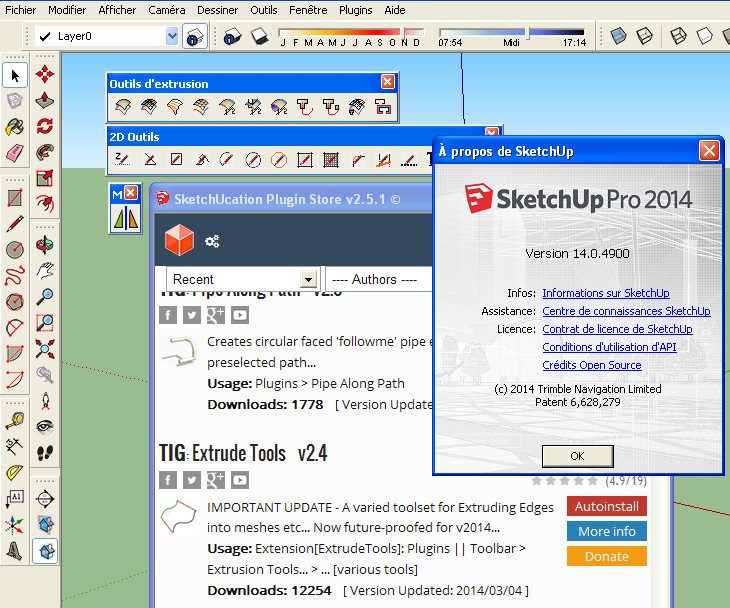
                                            Now , it works for me 👍
                                            Thanks a lot

                                            Chri


                                            OK TIG.png

                                            1 條回覆 最後回覆 回覆 引用 0
                                            • 1
                                            • 2
                                            • 9
                                            • 10
                                            • 11
                                            • 12
                                            • 13
                                            • 31
                                            • 32
                                            • 11 / 32
                                            • 第一個貼文
                                              最後的貼文
                                            Buy SketchPlus
                                            Buy SUbD
                                            Buy WrapR
                                            Buy eBook
                                            Buy Modelur
                                            Buy Vertex Tools
                                            Buy SketchCuisine
                                            Buy FormFonts

                                            Advertisement