sketchucation logo sketchucation
    • 登入
    Oops, your profile's looking a bit empty! To help us tailor your experience, please fill in key details like your SketchUp version, skill level, operating system, and more. Update and save your info on your profile page today!
    🔌 Smart Spline | Fluid way to handle splines for furniture design and complex structures. Download

    [Plugin] ExtrudeTools - Full Set

    已排程 已置頂 已鎖定 已移動 Plugins
    636 貼文 178 Posters 792.5k 瀏覽 175 Watching
    正在載入更多貼文
    • 從舊到新
    • 從新到舊
    • 最多點贊
    回覆
    • 在新貼文中回覆
    登入後回覆
    此主題已被刪除。只有擁有主題管理權限的使用者可以查看。
    • ArisA 離線
      Aris
      最後由 編輯

      That's weird!
      after I checked and unchecked it from the toolbars dialogue and moving around the other toolbars, it finaly appeared but without a frame, so I cannot move it!


      toolbar.jpg

      Not a native speaker, point out my spelling (or other) mistakes, I won't be offended!!!

      1 條回覆 最後回覆 回覆 引用 0
      • ArisA 離線
        Aris
        最後由 編輯

        yes, I told you, it is checked/visible everywhere

        plugins manager, plugins menu, preferences/extensions, toolbars dialogue
        it's only absent in the toolbar right click menu.

        Not a native speaker, point out my spelling (or other) mistakes, I won't be offended!!!

        1 條回覆 最後回覆 回覆 引用 0
        • BoxB 離線
          Box
          最後由 編輯

          Double click on it now you can see it and it will come loose.

          1 條回覆 最後回覆 回覆 引用 0
          • Rich O BrienR 線上
            Rich O Brien Moderator
            最後由 編輯

            @unknownuser said:

            Try this: Enable the toolbar in View>Toolbars. Pull all of the toolbars off the top rows. Does the Extrude Tool toolbar show up in the upper left corner? If so, you have now found it and can place it where you need but you really ought to install the current version of SU2013. there was a bug in the first release that caused new toolbars to appear under the existing ones. It was fixed though.

            Dave earlier mentioned this...

            To me it looks like this is related to the bug Dave flagged.

            What happens when you check for update under the Help menu?

            Download the free D'oh Book for SketchUp 📖

            1 條回覆 最後回覆 回覆 引用 0
            • ArisA 離線
              Aris
              最後由 編輯

              Sometimes giving up helps!
              I reverted to the old plugins folder, relaunched SU and every toolbar appeared undocked, including ET!!!
              I relaunched it a couple of times and now it seems stable.
              finally to enjoy it (it's a great plugin).

              Not a native speaker, point out my spelling (or other) mistakes, I won't be offended!!!

              1 條回覆 最後回覆 回覆 引用 0
              • ArisA 離線
                Aris
                最後由 編輯

                Doesn't installing it from plugin store guarantee that it's the latest version?

                Not a native speaker, point out my spelling (or other) mistakes, I won't be offended!!!

                1 條回覆 最後回覆 回覆 引用 0
                • BoxB 離線
                  Box
                  最後由 編輯

                  He means the newest version of Sketchup itself, your problem suggests you have an old version.

                  1 條回覆 最後回覆 回覆 引用 0
                  • ArisA 離線
                    Aris
                    最後由 編輯

                    sorry, my bad. I thought you were referring to the plugin version all this time, I'm downloading latest sketchup right now. Thanks for bearing with me.

                    Not a native speaker, point out my spelling (or other) mistakes, I won't be offended!!!

                    1 條回覆 最後回覆 回覆 引用 0
                    • Rich O BrienR 線上
                      Rich O Brien Moderator
                      最後由 編輯

                      Easy to miss out.

                      Glad it works

                      Download the free D'oh Book for SketchUp 📖

                      1 條回覆 最後回覆 回覆 引用 0
                      • Dave RD 離線
                        Dave R
                        最後由 編輯

                        Yes. I wrote "...install the current version of SU2013." because I meant the current version of SketchUp.

                        Etaoin Shrdlu

                        %

                        (THERE'S NO PLACE LIKE)

                        G28 X0.0 Y0.0 Z0.0

                        M30

                        %

                        1 條回覆 最後回覆 回覆 引用 0
                        • T 離線
                          thegoodguy
                          最後由 編輯

                          HI,

                          Great set of tools. Thanks.

                          A two-part question:

                          About the "edges by face" and "edges by faces" tools. Is it possible to specify which point on the face(s) the edge endpoint aligns with? E.g. can you start the extrusion from the one of the pointed tips of a star-shape instead of the centre of the centre of the face?

                          About the "edges by faces" tool. Is it possible to specify which endpoints on the starting face align/match-up with which endpoints on the ending face?

                          I hope these questions make sense. I've attached an image to show what I mean. Shape (A) was produced using the tool. Shape (B) I did manually by choosing which endpoints are matched and then using a curve-stitching tool.

                          Thanks again.


                          extrude-edge-face.jpg

                          1 條回覆 最後回覆 回覆 引用 0
                          • J 離線
                            jefecito
                            最後由 編輯

                            The toolbar not load, is it normal in SU 2013?

                            1 條回覆 最後回覆 回覆 引用 0
                            • Dave RD 離線
                              Dave R
                              最後由 編輯

                              The toolbar displays just fine in SU2013 unless you installed the plugin incorrectly or perhaps don't have sufficient privileges set for the Plugins folder. What operating system? (please update your profile), how did you install the plugin? Do you have sufficient privileges?

                              Etaoin Shrdlu

                              %

                              (THERE'S NO PLACE LIKE)

                              G28 X0.0 Y0.0 Z0.0

                              M30

                              %

                              1 條回覆 最後回覆 回覆 引用 0
                              • P 離線
                                pgarmyn
                                最後由 編輯

                                I use your excellent Extrude-tool in another thread 👍 👍
                                (http://sketchucation.com/forums/viewtopic.php?f=323%26amp;t=55072)) )

                                I'm afraid that I have to report a small bug.
                                With the Extrude-by-rails (I didn't test the others).
                                I have almost always an unexpected result if the [highlight=#ffff00:367zdzqn]profile turns exactly 180°[/highlight:367zdzqn] around Z (didn' test for the other axes). It could be a 'division by (almost) zero' (tangent).
                                Extude-edges-by-rails-bug.png

                                I also used Jim's drawhelix14 plugin 👍
                                helix-extrude-bug.skp

                                1 條回覆 最後回覆 回覆 引用 0
                                • TIGT 離線
                                  TIG Moderator
                                  最後由 編輯

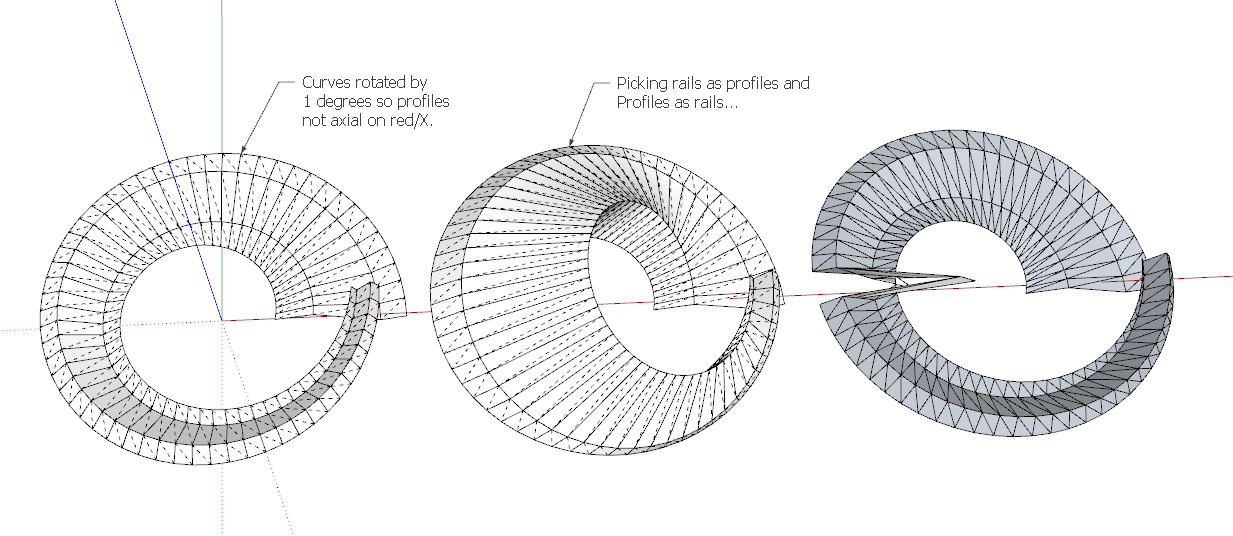
                                  If you pick the obvious profiles and rails you get your result.

                                  However, if you pick a 'sweeping rail' as the first profile, then the two 'end' curves as the rails, and the other 'sweeping rail' as the melding profile, then it works... The 'direction' of the form might twist unexpectedly.

                                  Another solution is to rotate the 4 curves [temporarily] by say 1 degree, then it works as I think you had hoped - no 'twisting' etc...

                                  See the screen-grab...

                                  It's not so much trigonometry, more having to decide in which direction the mesh goes, obviously if it's a 50:50 chance with axial alignments it can guess wrong... 😕


                                  Capture.PNG

                                  TIG

                                  1 條回覆 最後回覆 回覆 引用 0
                                  • P 離線
                                    pgarmyn
                                    最後由 編輯

                                    @tig said:

                                    However, if you pick a 'sweeping rail' as the first profile, then the two 'end' curves as the rails, and the other 'sweeping rail' as the melding profile, then it works...

                                    Yes, the result is also logic, but not the one i wanted.

                                    @tig said:

                                    Another solution is to rotate the 4 curves [temporarily] by say 1 degree, then it works as I think you had hoped - no 'twisting' etc...

                                    I can live with it. 😄
                                    Thanks for the 'research' and the explanation. 👍

                                    1 條回覆 最後回覆 回覆 引用 0
                                    • TIGT 離線
                                      TIG Moderator
                                      最後由 編輯

                                      Here's a new future-proofed update.
                                      http://sketchucation.com/forums/viewtopic.php?p=217663#p217663

                                      TIG

                                      1 條回覆 最後回覆 回覆 引用 0
                                      • Y 離線
                                        yhchen
                                        最後由 編輯

                                        Hi,

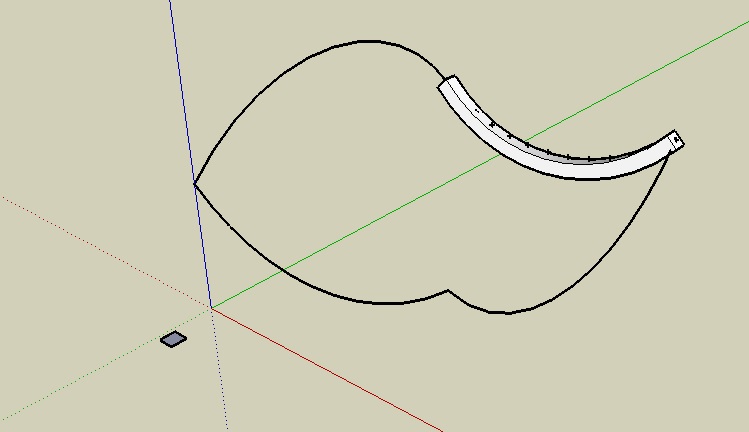
                                        I have a problem. I tried to use the extrude edges by rails by face function. But the was one one component form on the profile section. I don't understand why.

                                        Below there is 2 attached jpg files, it is the print screen of the process and the outcome.

                                        Please help me!!!! Thank you

                                        Yhchen
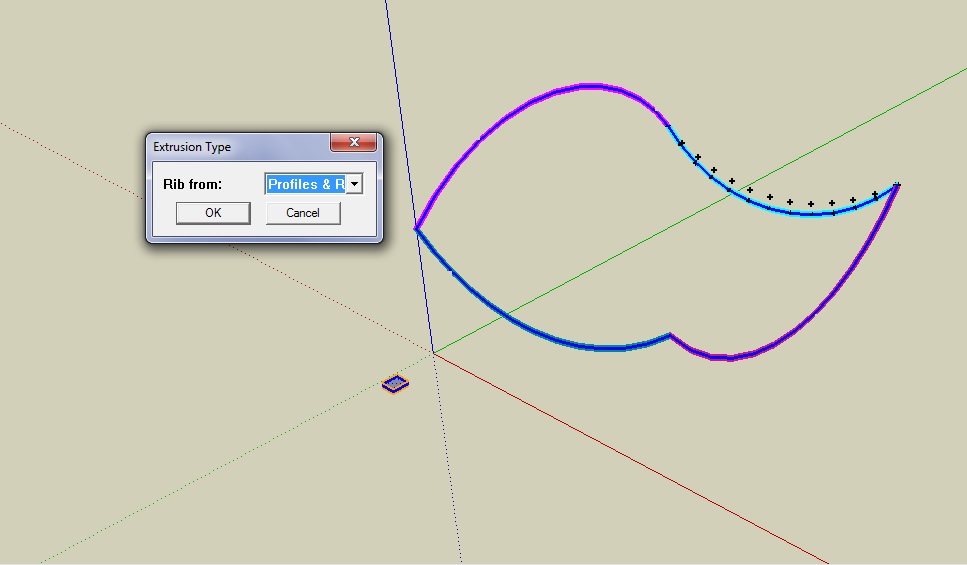

                                        how I do it


                                        the result

                                        1 條回覆 最後回覆 回覆 引用 0
                                        • TIGT 離線
                                          TIG Moderator
                                          最後由 編輯

                                          @yhchen

                                          If you run it with the Ruby Console open are there any error messages ?
                                          Is the geometry very small ?
                                          Try it with the profile face reversed - it should work either way but who knows ?

                                          Can you attach a SKP containing the 4 curves and the face so we can look at it...

                                          TIG

                                          1 條回覆 最後回覆 回覆 引用 0
                                          • Y 離線
                                            yhchen
                                            最後由 編輯

                                            Dear TIG,

                                            Thank you for ur quick response.

                                            I have tried to run it with Ruby Console, n I found lots of error occur, which I do not understand why.

                                            Regards,
                                            Yhchen
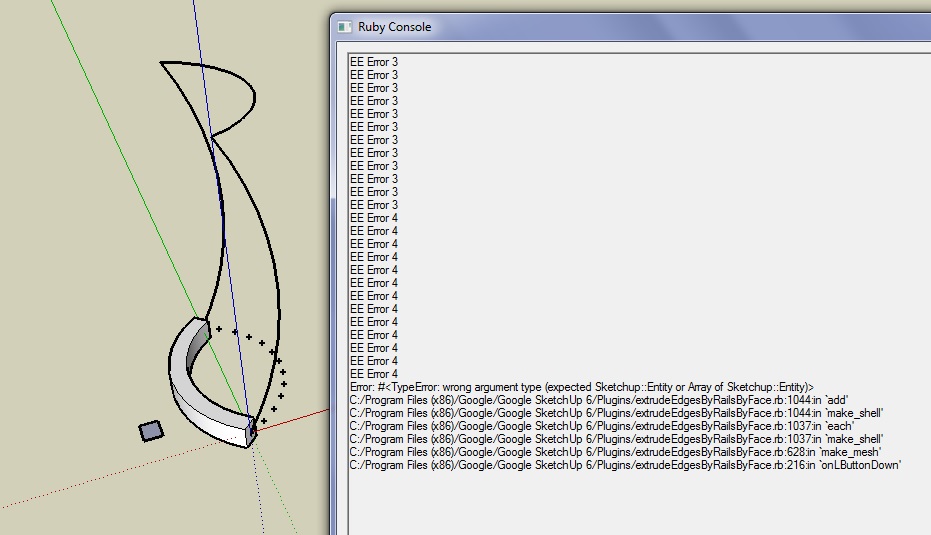

                                            Ruby Console (EE Error)


                                            sketchup file

                                            1 條回覆 最後回覆 回覆 引用 0
                                            • 1
                                            • 2
                                            • 18
                                            • 19
                                            • 20
                                            • 21
                                            • 22
                                            • 31
                                            • 32
                                            • 20 / 32
                                            • 第一個貼文
                                              最後的貼文
                                            Buy SketchPlus
                                            Buy SUbD
                                            Buy WrapR
                                            Buy eBook
                                            Buy Modelur
                                            Buy Vertex Tools
                                            Buy SketchCuisine
                                            Buy FormFonts

                                            Advertisement