sketchucation logo sketchucation
    • Login
    Oops, your profile's looking a bit empty! To help us tailor your experience, please fill in key details like your SketchUp version, skill level, operating system, and more. Update and save your info on your profile page today!
    Mac User? | Join the Rayscaper Beta for Mac Learn More

    [Plugin] ExtrudeTools - Full Set

    Scheduled Pinned Locked Moved Plugins
    636 Posts 178 Posters 1.0m Views 175 Watching
    Loading More Posts
    • Oldest to Newest
    • Newest to Oldest
    • Most Votes
    Reply
    • Reply as topic
    Log in to reply
    This topic has been deleted. Only users with topic management privileges can see it.
    • Rich O BrienR
      Rich O Brien Moderator
      last edited by

      Error on startup...

      Error Loading File extrudeEdgesByRails.rb
      C;/Program Files (x86)/Google/Google SketchUp 8/Plugins/extrudeEdgesByRails.rb;163; syntax error, unexpected '='
      

      Download the free D'oh Book for SketchUp 📖

      1 Reply Last reply
      Reply Quote 0
      • TIGT
        TIG Moderator
        last edited by

        @unknownuser said:

        Error on startup...

        Error Loading File extrudeEdgesByRails.rb
        > C;/Program Files (x86)/Google/Google SketchUp 8/Plugins/extrudeEdgesByRails.rb;[b]163[/b]; syntax error, unexpected '='
        

        😒 I somehow managed to duplicate a line below '=end' in the guidance notes as I saved the file...
        Here's the updated version http://forums.sketchucation.com/viewtopic.php?p=217663#p217663
        Sorry 😳 ... but the 8 of you who downloaded it so far do need to do it again 😲
        More haste, less speed... as the English proverb goes...

        TIG

        1 Reply Last reply
        Reply Quote 0
        • TIGT
          TIG Moderator
          last edited by

          Here's a maintenance update which includes new ES lingvo files by deFisto with minor idiom corrections etc, and a minor 'db' correction to EEbyLathe to include the start_operation name...
          http://forums.sketchucation.com/viewtopic.php?p=217663#p217663

          TIG

          1 Reply Last reply
          Reply Quote 0
          • Rich O BrienR
            Rich O Brien Moderator
            last edited by

            thank you 👍

            Download the free D'oh Book for SketchUp 📖

            1 Reply Last reply
            Reply Quote 0
            • TIGT
              TIG Moderator
              last edited by

              Here's another update...
              http://forums.sketchucation.com/viewtopic.php?p=217663#p217663
              It now only smooths mesh edges with more than one face in EEbyLathe/..Faces/..Loft and ..Rail

              TIG

              1 Reply Last reply
              Reply Quote 0
              • srxS
                srx
                last edited by

                Thanks! Nice to see you working as a team 😄 👍

                www.saurus.rs

                1 Reply Last reply
                Reply Quote 0
                • TIGT
                  TIG Moderator
                  last edited by

                  Here's an update http://forums.sketchucation.com/viewtopic.php?p=217663#p217663
                  EEbyLathe v3.5 Fixed Picked-Angle's messy undo; Smoothed-edges now stop @90º.

                  TIG

                  1 Reply Last reply
                  Reply Quote 0
                  • jeff hammondJ
                    jeff hammond
                    last edited by

                    oops 😳

                    i forgot to say thanks earlier for this update..
                    much better !
                    thank you!

                    dotdotdot

                    1 Reply Last reply
                    Reply Quote 0
                    • TIGT
                      TIG Moderator
                      last edited by

                      Here's an update http://forums.sketchucation.com/viewtopic.php?p=217663#p217663
                      EEbyRails and EEbyLoft have been updated so that the 'Quad Faces' option meets Thomthom's updated spec for this type of face...

                      TIG

                      1 Reply Last reply
                      Reply Quote 0
                      • P
                        PeterF
                        last edited by

                        I've just installed the collection but it isn't working properly. The toolbar doesn't appear and the EbyEdges tool doesn't work. I haven't tried the others out yet. Is this just me? I've installed it by putting the .rb files in the main plugins folder and the tigtools folder in there as well. Is that right?

                        1 Reply Last reply
                        Reply Quote 0
                        • TIGT
                          TIG Moderator
                          last edited by

                          Yes. 😕
                          This is what should be in your Plugins folderCapture.PNG
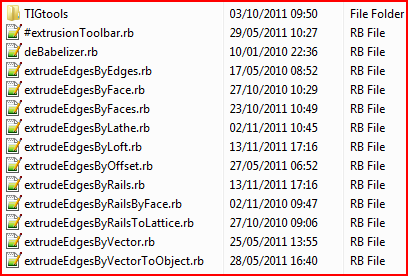
                          The TIGtools folder contains lots of support files too.
                          Are you sure all of the files are properly inside Plugins ?
                          No 'Compatibility Files' issues ??
                          The one starting with # is needed to make the toolbar etc.
                          You must activate the toolbar from View > Toolbars the first time it's loaded...

                          TIG

                          1 Reply Last reply
                          Reply Quote 0
                          • A
                            altab
                            last edited by

                            Hi, thanks aagain for this excellent tools

                            Is it possible to use extrude edge by loft by using lines and curves instead of curves exclusively,
                            If it is not possible how can I recreate the line using a curve ?

                            1 Reply Last reply
                            Reply Quote 0
                            • P
                              PeterF
                              last edited by

                              Ok, I've got the toolbar, but when I try to use the EbyEdge tool, for about 15 - 20mins nothing happens. My computer is normally quite fast - is it meant to take that long?

                              1 Reply Last reply
                              Reply Quote 0
                              • TIGT
                                TIG Moderator
                                last edited by

                                @peterf said:

                                Ok, I've got the toolbar, but when I try to use the EbyEdge tool, for about 15 - 20mins nothing happens. My computer is normally quite fast - is it meant to take that long?

                                Run it with the Ruby Console open and post any error messages.
                                Are you sure you want to use this too?
                                It has quite specific results.
                                Perhaps EEbyRails might be what you want... 😕

                                TIG

                                1 Reply Last reply
                                Reply Quote 0
                                • TIGT
                                  TIG Moderator
                                  last edited by

                                  @unknownuser said:

                                  Hi, thanks aagain for this excellent tools
                                  Is it possible to use extrude edge by loft by using lines and curves instead of curves exclusively,
                                  If it is not possible how can I recreate the line using a curve ?

                                  Fredo's CurviLoft might work with plain edges... BUT most of my EEby... tools usually require 'Curves' to be selected... to make a collection of edges into a 'curve' use weld.rb, it's freely available from Smustard.com...

                                  TIG

                                  1 Reply Last reply
                                  Reply Quote 0
                                  • A
                                    altab
                                    last edited by

                                    I've ended using curviloft, the weld tool couldn't manage to get my lines into curves

                                    1 Reply Last reply
                                    Reply Quote 0
                                    • M
                                      Meisterdrow
                                      last edited by

                                      Hi,
                                      I have the toolbar, but nothing happens if i want to use a function except the popup-windows.
                                      I am getting the following error from Ruby-Console:

                                      Error: #<TypeError: reference to deleted Group>
                                      C:/Program Files (x86)/Google/Google SketchUp 8/Plugins/extrudeEdgesByFaces.rb:626:in entities' C:/Program Files (x86)/Google/Google SketchUp 8/Plugins/extrudeEdgesByFaces.rb:626:in make_mesh'
                                      C:/Program Files (x86)/Google/Google SketchUp 8/Plugins/extrudeEdgesByFaces.rb:286:in `onLButtonDown

                                      Can anyone help me? Thanks in advance!

                                      1 Reply Last reply
                                      Reply Quote 0
                                      • TIGT
                                        TIG Moderator
                                        last edited by

                                        @unknownuser said:

                                        Hi,
                                        I have the toolbar, but nothing happens if i want to use a function except the popup-windows.
                                        I am getting the following error from Ruby-Console:

                                        Error: #<TypeError: reference to deleted Group>
                                        C:/Program Files (x86)/Google/Google SketchUp 8/Plugins/extrudeEdgesByFaces.rb:626:in entities' C:/Program Files (x86)/Google/Google SketchUp 8/Plugins/extrudeEdgesByFaces.rb:626:in make_mesh'
                                        C:/Program Files (x86)/Google/Google SketchUp 8/Plugins/extrudeEdgesByFaces.rb:286:in `onLButtonDown

                                        Can anyone help me? Thanks in advance!
                                        The error you show is when you choose to intersect the mesh with itself. What happens if you don't do that [say No!]...
                                        Can you post the SKP that's causing the issue and some instructions on the steps you are taking to get the error, which I can't reproduce... 😕

                                        TIG

                                        1 Reply Last reply
                                        Reply Quote 0
                                        • M
                                          Meisterdrow
                                          last edited by

                                          Hi TIG,
                                          thank you for your fast answer! I will give a more detailed description: I had to reinstall Sketchup and because of that also your plugin. Since that reinstallation the whole plugin is not working anymore and I can’t figure out why (because I installed it the same way as before). No matter which function of the plugin I use, I get no result.
                                          I get the error message I posted every time when I press “intersect with mesh”. When I press anything else nothing happens at all (no matter which of the functions I use). When I use the function “Extrude edges by rails” for example I get another error message:

                                          EEE
                                          undefined method `transform!' for nil:NilClass

                                          I added two screenshots, I don’t know if that helps.
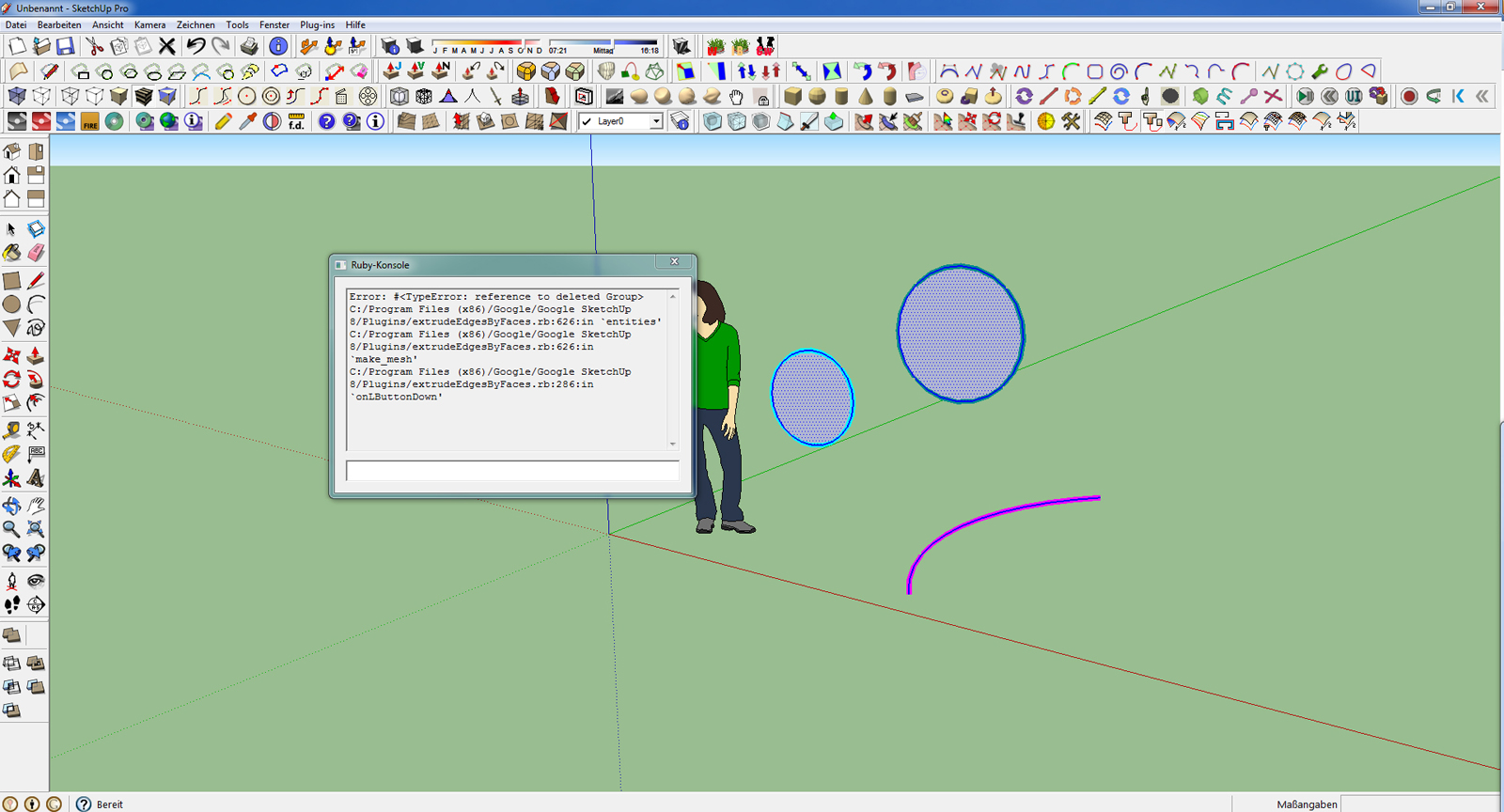

                                          Desktop.jpg

                                          1 Reply Last reply
                                          Reply Quote 0
                                          • majidM
                                            majid
                                            last edited by

                                            dear Tig
                                            I installed this set on a fresh copy of Su but some tool are not working with no error message! just it highlights ( and recolor) curves!
                                            Majid

                                            My inspiring A, B, Sketches book: https://sketchucation.com/shop/books/intermediate/2612-alphabet-inspired-sketches--inspiring-drills-for-architects--3d-artists-and-designers-

                                            1 Reply Last reply
                                            Reply Quote 0

                                            Hello! It looks like you're interested in this conversation, but you don't have an account yet.

                                            Getting fed up of having to scroll through the same posts each visit? When you register for an account, you'll always come back to exactly where you were before, and choose to be notified of new replies (either via email, or push notification). You'll also be able to save bookmarks and upvote posts to show your appreciation to other community members.

                                            With your input, this post could be even better 💗

                                            Register Login
                                            • 1
                                            • 2
                                            • 22
                                            • 23
                                            • 24
                                            • 25
                                            • 26
                                            • 31
                                            • 32
                                            • 24 / 32
                                            • First post
                                              Last post
                                            Buy SketchPlus
                                            Buy SUbD
                                            Buy WrapR
                                            Buy eBook
                                            Buy Modelur
                                            Buy Vertex Tools
                                            Buy SketchCuisine
                                            Buy FormFonts

                                            Advertisement