sketchucation logo sketchucation
    • 登入
    Oops, your profile's looking a bit empty! To help us tailor your experience, please fill in key details like your SketchUp version, skill level, operating system, and more. Update and save your info on your profile page today!
    🔌 Smart Spline | Fluid way to handle splines for furniture design and complex structures. Download

    [Plugin] ExtrudeTools - Full Set

    已排程 已置頂 已鎖定 已移動 Plugins
    636 貼文 178 Posters 792.4k 瀏覽 175 Watching
    正在載入更多貼文
    • 從舊到新
    • 從新到舊
    • 最多點贊
    回覆
    • 在新貼文中回覆
    登入後回覆
    此主題已被刪除。只有擁有主題管理權限的使用者可以查看。
    • TIGT 離線
      TIG Moderator
      最後由 編輯

      I suspect that you have made a similar mistake to the one you've quoted.
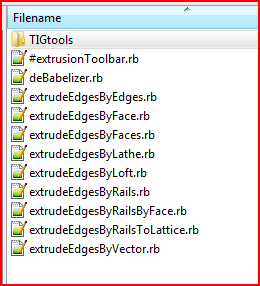
      I suggest that you remove all of the files that you have just put into the ../Plugins/ folder; to see a list of these read the contents of the zip file and its subfolders. Files that should be in the ../Plugins/TIGtools/ subfolder should never be put into the main folder...

      Now... extract the contents of that zip file into a temporary folder somewhere - e.g. ../Desktop/ExtrusionTools/ keeping all of the files that are already in a subfolder in those subfolders - the main subfolder is called 'TIGtools'.
      Now move all of these extracted files and subfolders keeping the files within them [i.e. /TIGtools/] into the ../Plugins/ folder.

      Now it should work with a restart...

      You will find that many complex tools have a subfolder with support files in it.
      Often there will be one or two .rb files to go into ../Plugins/ that kick off the tool, and the rest of the files are in a subfolder or perhaps even subfolders within a subfolder!
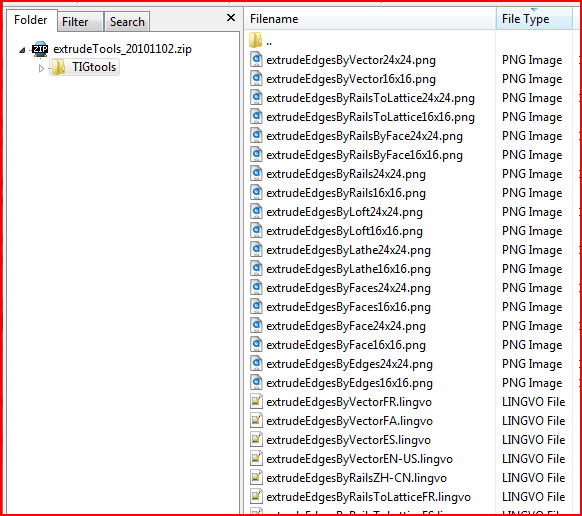
      In the case of the ExtrusionTools, because they are a compilation over time, there are several tools with .rb tool-files and a 'loader' .rb file in ../Plugins/. The 'deBabelizer.rb' tool is required to do language translations: the .lingvo files are the translations it uses [and these must be inside ../Plugins/TIGtools/]. The .png files inside the TIGtools folder are the image-files used for the toolbar button-icons [that's why I 'know' they are not in the right folder - otherwise you wouldn't have this problem!!] 😒

      Please let me know how you fare and if you need any more help please post here...Capture.PNGCapture1.PNG

      TIG

      1 條回覆 最後回覆 回覆 引用 0
      • L 離線
        linco
        最後由 編輯

        Finally -- problem solved! Followed your directions and it still wasn't quite right - then I noticed that my Unarchive was putting everything into one big folder without your TIGtools subfolder. Used a different program to Unzip and now it all works!

        thanks!

        Lin

        1 條回覆 最後回覆 回覆 引用 0
        • TIGT 離線
          TIG Moderator
          最後由 編輯

          @linco said:

          Finally -- problem solved! Followed your directions and it still wasn't quite right - then I noticed that my Unarchive was putting everything into one big folder without your TIGtools subfolder. Used a different program to Unzip and now it all works!

          thanks!

          Lin

          Aha! ALWAYS ensure the files stay inside their subfolders when you install ANY Plugin.; clearly there needs to be a .rb or .rbs file to use those BUT also note that some support files [like Fredo's LIBs all stay inside their supplied folder.

          TIG

          1 條回覆 最後回覆 回覆 引用 0
          • W 離線
            Wildchild
            最後由 編輯

            TIG, I know this might sound silly 😒 , but what's the difference between curviloft and the extrude tools? For what I know they're pretty similar aren't they? can you (or anyone else) point out some cases where is best to use one insted of the other? thanks

            Eternity is very long, especially towards the end. Woody Allen

            1 條回覆 最後回覆 回覆 引用 0
            • TIGT 離線
              TIG Moderator
              最後由 編輯

              Fredo's tools are quite a lot newer than mine.
              Some of the tools are very similar, like EEbyRails and EEbyLoft - BUT there are several in the Extrusion toolset that are NOT - like 'EEby.. Lathe, Vector, Lattice, Face etc...
              I have both toolsets and I use mine more, simply because I am used to it...
              Fredo's do have a prettier UI and there are extra options to dynamically adjust the mesh etc, and they can work better in some circumstances - like with lofting closed-loop profiles, they might make complex messes a little faster too...
              So use what you find works best for you in each instance... 😄

              TIG

              1 條回覆 最後回覆 回覆 引用 0
              • W 離線
                wibeon
                最後由 編輯

                Hi,

                The plugin doesn't appears in tools menu. I put .rb in the plugin folder but it doesn't work.

                Can somebody help me ?

                Thanks

                1 條回覆 最後回覆 回覆 引用 0
                • TIGT 離線
                  TIG Moderator
                  最後由 編輯

                  @wibeon said:

                  Hi,
                  The plugin doesn't appears in tools menu. I put .rb in the plugin folder but it doesn't work.
                  Can somebody help me ?
                  Thanks
                  You should have several .rb files in the ../Plugins/ folder and several extra files in the ../Plugins/TIGtools/ subfolder ??
                  This is a screen-grab of what the contents of the zip file look like. Capture.PNG The new files/subfolder+files should be replicated exactly as this after you've extracted everything...
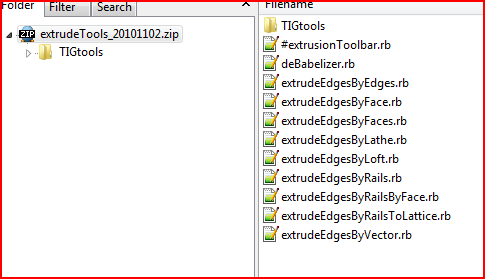
                  When you restart Sketchup there should be a drop-down submenu early in the 'Plugins' menu [Note that it's NOT in the 'Tools' menu 😒 - reread the tools' instructions] - this submenu is called 'Extrusion Tools...' and it has nine items each relating to a different tool; to activate the equivalent toolbar you must use View > Toolbars > 'Extrusion Tools'...

                  TIG

                  1 條回覆 最後回覆 回覆 引用 0
                  • TIGT 離線
                    TIG Moderator
                    最後由 編輯

                    Here's a new version http://forums.sketchucation.com/viewtopic.php?p=217663#p217663
                    It has an additional tool ExtrudeEdgesByVectorToObject... see here for more details of the new tool... http://forums.sketchucation.com/viewtopic.php?p=331059#p331059

                    TIG

                    1 條回覆 最後回覆 回覆 引用 0
                    • jeff hammondJ 離線
                      jeff hammond
                      最後由 編輯

                      oh nice! that's a great addition.

                      [it also shows hints of a sweet trim tool plugin - sort of like solid booleans without the solids part.. in rhino, it works like: select cutting object(s) then pick the parts of the intersecting geometry you'd like to delete.. in eeVO, it automatically picks the side to delete on the opposite side of the cutting object of where the vector extrusion started.. in this hypothetical trim tool, you would be able to pick which side to delete... i dunno, just ideas in case you get bored one day 😄)

                      dotdotdot

                      1 條回覆 最後回覆 回覆 引用 0
                      • P 離線
                        prismcnd
                        最後由 編輯

                        just wanted to say thank you for your amazing efforts.

                        “Whatever the mind of man can conceive and believe, it can achieve.” -W.Clement Stone (American best selling Author and Founder of Combined Insurance Co (now a part of Aon Corp.), 1902-2002)

                        1 條回覆 最後回覆 回覆 引用 0
                        • C 離線
                          costa
                          最後由 編輯

                          you are really great!!! fantastic work, thank you

                          1 條回覆 最後回覆 回覆 引用 0
                          • TIGT 離線
                            TIG Moderator
                            最後由 編輯

                            Here's an updated set http://forums.sketchucation.com/viewtopic.php?p=217663#p217663
                            A new tool ' ExtrudeEdgesByOffset' has been added.
                            Its details are found here http://forums.sketchucation.com/viewtopic.php?p=331303#p331303

                            TIG

                            1 條回覆 最後回覆 回覆 引用 0
                            • D 離線
                              d12dozr
                              最後由 編輯

                              Wow, TIG, a tool a day? 😄 Thank you for these!

                              3D Printing with SketchUp Book
                              http://goo.gl/f7ooYh

                              1 條回覆 最後回覆 回覆 引用 0
                              • TIGT 離線
                                TIG Moderator
                                最後由 編輯

                                Here's an updated set http://forums.sketchucation.com/viewtopic.php?p=217663#p217663
                                The 'Extrude Edges By Vector To Object' tool has been improved considerably:-
                                A new algorithm has been added for the intersecting with objects: now walls extend to soffits with additional apex vertices and so on so it extrudes fully to the faces/edges.
                                'Ghost' extrusions now show intersections as red dots.
                                The original selection is kept, unless the is group exploded.

                                Some ES lingvos updated by Defisto [thanks].

                                TIG

                                1 條回覆 最後回覆 回覆 引用 0
                                • TIGT 離線
                                  TIG Moderator
                                  最後由 編輯

                                  Here's another update http://forums.sketchucation.com/viewtopic.php?p=217663#p217663
                                  The 'Extrude Edges By Vector To Object' tool has additional traps added for rare glitches when a faced edge-selection was used.

                                  TIG

                                  1 條回覆 最後回覆 回覆 引用 0
                                  • TIGT 離線
                                    TIG Moderator
                                    最後由 編輯

                                    Here's yet another update http://forums.sketchucation.com/viewtopic.php?p=217663#p217663
                                    The 'Extrude Edges By Vector To Object' tool has had a glitch fixed with 'undo' if you'd reversed faces etc...

                                    TIG

                                    1 條回覆 最後回覆 回覆 引用 0
                                    • TIGT 離線
                                      TIG Moderator
                                      最後由 編輯

                                      Here's yet another update http://forums.sketchucation.com/viewtopic.php?p=217663#p217663
                                      The 'Extrude Edges By Vector To Object' tool has had glitches fixed with 'commit' and extruding faces inside groups to objects outside...

                                      TIG

                                      1 條回覆 最後回覆 回覆 引用 0
                                      • W 離線
                                        Wildchild
                                        最後由 編輯

                                        DUUUDE! Exactly what I was talking about!

                                        Here's a few tests:
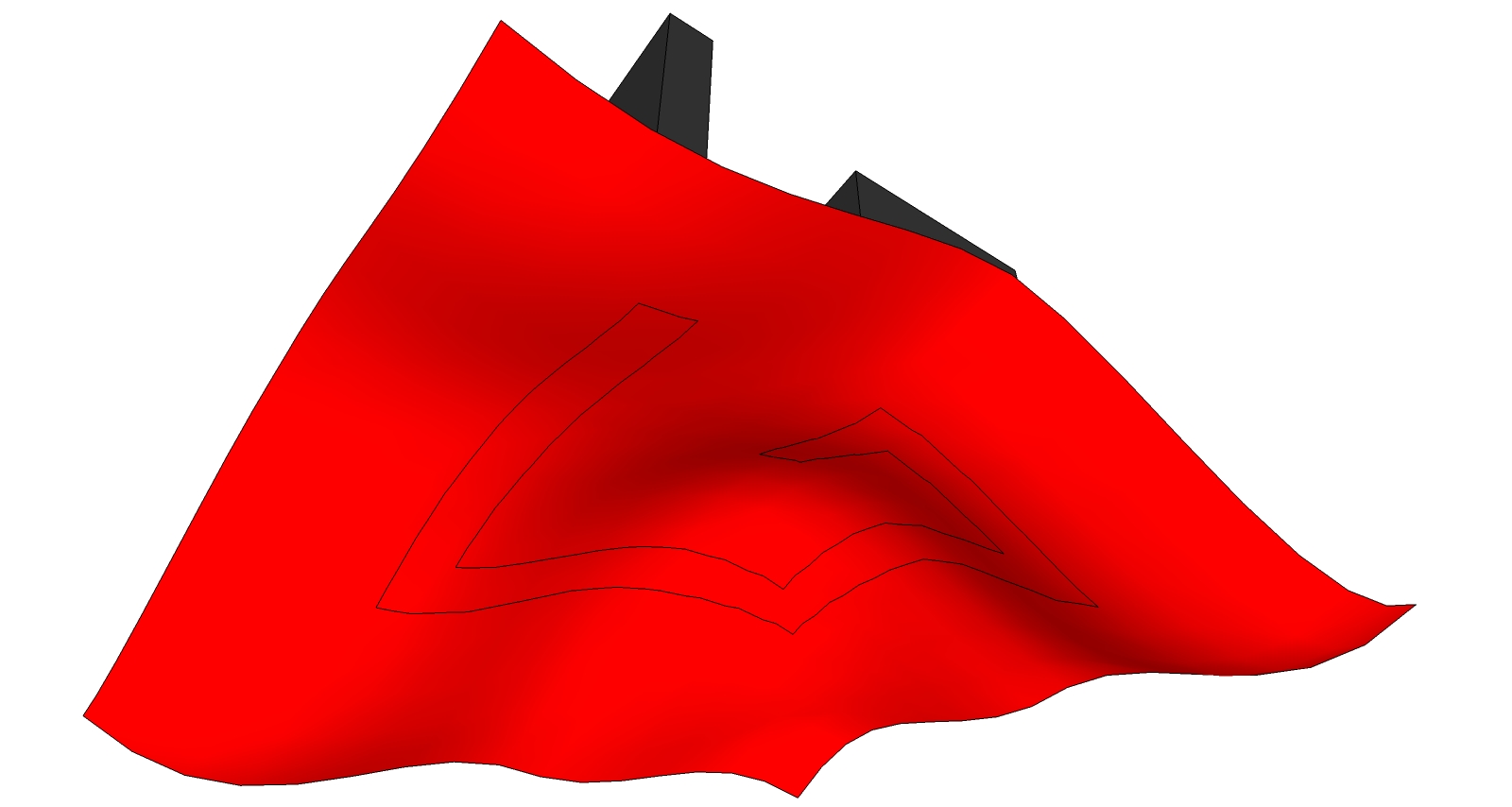
                                        et1.jpget2.jpget3.jpget4.jpgThis last one took a little bit to work it out but then it did it just fine

                                        I have a couple more tiny requests to ask, but now i don't have time! 😆

                                        Eternity is very long, especially towards the end. Woody Allen

                                        1 條回覆 最後回覆 回覆 引用 0
                                        • U 離線
                                          unclex
                                          最後由 編輯

                                          [Plugin] ExtrudeTools - Zipped Set 20110525 Installed
                                          [Plugin] Shape Bender Beta v0.55 Can't work...
                                          Need Help !!!
                                          ThanX

                                          1 條回覆 最後回覆 回覆 引用 0
                                          • H 離線
                                            hebeijianke
                                            最後由 編輯

                                            @tig said:

                                            ....

                                            I translate All the plugins in ExtrudeTools into chinese
                                            This is the translation file


                                            chinesetranslation.zip

                                            1 條回覆 最後回覆 回覆 引用 0
                                            • 1
                                            • 2
                                            • 16
                                            • 17
                                            • 18
                                            • 19
                                            • 20
                                            • 31
                                            • 32
                                            • 18 / 32
                                            • 第一個貼文
                                              最後的貼文
                                            Buy SketchPlus
                                            Buy SUbD
                                            Buy WrapR
                                            Buy eBook
                                            Buy Modelur
                                            Buy Vertex Tools
                                            Buy SketchCuisine
                                            Buy FormFonts

                                            Advertisement