[Plugin] ExtrudeTools - Full Set
-
Thankyou for sharing.

-
New updated set available here... http://forums.sketchucation.com/viewtopic.php?p=217663#p217663
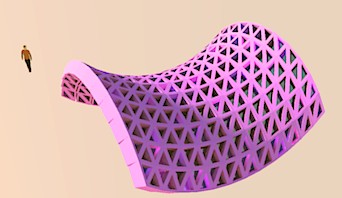
Brand new tool ExtrudeEdgesByRailsToLattice added.
[It has basic EN-US/FR/ES lingvo files...] http://forums.sketchucation.com/viewtopic.php?p=242239#p242239Replacement ES lingvo files for all tools included [from Defisto]; and some new FA lingvo files for some tools added [through Majid] - Thanks to them!

Minor adjustments:
EEbyEdges tool now exits gracefully.
A few scripts have had the missing "require 'deBableizer.rb'" added.
RickW's 'offset.rb' method-only script is now included in the set - because it's needed by EEbyRailsToLattice...
-
Again, TIG:
Thank you for your talents and contributions. -
Dear TIG,
You appear to be using version 1.0 of offset.rb. There is a later version, V2.1 (see the attached). Is it okay to use the later version with your scripts?
Regards,
Bob
-
@watkins said:
Dear TIG,
You appear to be using version 1.0 of offset.rb. There is a later version, V2.1 (see the attached). Is it okay to use the later version with your scripts?
Regards,
BobDon't know how I'm still using that old one !
Finger on the pulse, and all that....
Anyway... it doesn't matter, v1 or v2.1 both work fine when I've tested...
I'll package the new version with any future updates...
Meanwhile, if users already have the newer version then I recommend that they don't overwrite it with the older zipped one until the zipped update catches up...
Sorry for any confusion... -
Here's a new version http://forums.sketchucation.com/viewtopic.php?p=217663#p217663
EEbyRailsToLattice has been updated with the latest version of 'offset.rb' and trapped to rescue its 'fails', also some glitches with display of selected curves etc is fixed...
-
I have reissued a new version again today http://forums.sketchucation.com/viewtopic.php?p=217663#p217663
The single change is a temporarily fixedoffset.rb[awaiting its author's input, RickW ]...
After I updated fromoffset.rbv1 to v2.1 in my zipped set earlier today, I discovered that it had then broken RickW's ownWindowizer4.rb .
None of this affects my tools - they only need theFace::offset()method !
In this tweaked version I have included the olderArray::offset()AND the newerArray::offsetPoints()methods found inoffset.rbv1 AND v2.1 respectively; and so it should now work withWindowizer4.rband also any tools that might rely on the newer version...

-
Here's another version http://forums.sketchucation.com/viewtopic.php?p=217663#p217663
An updated FR lingvo for EEbyRailsToLattice - a compilation of Pilou and Didier's suggestions/corrections
[note that "accents" are not used in text within the inputbox dialogs to avoid problems...]
Thanks... -
thumbs up....this is hot...thanks a lot for sharing
-
Here is today's update http://forums.sketchucation.com/viewtopic.php?p=217663#p217663
EEbyRailsToLattice has some new /updated lingvo files, minor text corrections and flat faces at z=0 are now auto-reversed. See it's thread for more info...
-
Here is an updated zipped set http://forums.sketchucation.com/viewtopic.php?p=217663#p217663
EEbyRailsToLattice is updated to give back faces of panes the color too and the panes' 'face.offset' method no longer relies on 3rd party offset.rb - it has been incorporated into the class-methods and made more robust. -
Works fine now

-
 TO Tig ,I can't say anymore
 -
Here is an updated set.
EEbyRailsToLattice now also has a 'Diagonals' option for the Lines...
Reverse the order of picking the rails to swap the diagonals' direction.
Make two diagonal groups overlaid to get a 'diamond mesh' etc...
The lingvo files have be updated to match.
http://forums.sketchucation.com/viewtopic.php?p=217663#p217663 -
Here's a new zipped set http://forums.sketchucation.com/viewtopic.php?p=217663#p217663
EEbyRailsToLattice has been updated to fix glitches with the Line work lattices' grouping - which affected all types, but was only noticed when the 'diagonal' option was added... -
Dear TIG,
Does one still need offset.rb? I notice that it is missing from the zipped folder.
Regards,
Bob -
Bob
No, as was explained in earlier release notes, to avoid the problems with newer versions of offset's incompatibility with Windowizer etc I changed the way
EEbyRailsToLatticemakes its lattice offsets by building the method into the code in a slightly different way...
You can use any version ofoffset.rbyou want - it is no longer needed by my tools... -
Thanks TIG.
great work -
Dear TIG,
I understand from what you wrote that windowizer.rb has problems with offset.rb V2.1. Is that correct? I have overwritten my copy of V1.0 and I have windowizer.rb installed. Could you post a copy of V1.0 please?
Thanks,
Bob -
Dear TIG,
Forget that last request. I've just checked and I have V3.0 of windowizer.rb. I downloaded it again and it had offset.rb V1.0 in the folder, so no worries.
Regards,
Bob



Hello! It looks like you're interested in this conversation, but you don't have an account yet.
Getting fed up of having to scroll through the same posts each visit? When you register for an account, you'll always come back to exactly where you were before, and choose to be notified of new replies (either via email, or push notification). You'll also be able to save bookmarks and upvote posts to show your appreciation to other community members.
With your input, this post could be even better 💗
Register Login


Advertisement