sketchucation logo sketchucation
    • 登入
    Oops, your profile's looking a bit empty! To help us tailor your experience, please fill in key details like your SketchUp version, skill level, operating system, and more. Update and save your info on your profile page today!
    🔌 Smart Spline | Fluid way to handle splines for furniture design and complex structures. Download

    [Plugin] Edge Tools

    已排程 已置頂 已鎖定 已移動 Plugins
    211 貼文 74 Posters 283.6k 瀏覽 74 Watching
    正在載入更多貼文
    • 從舊到新
    • 從新到舊
    • 最多點贊
    回覆
    • 在新貼文中回覆
    登入後回覆
    此主題已被刪除。只有擁有主題管理權限的使用者可以查看。
    • guanjinG 離線
      guanjin
      最後由 編輯

      The first tool, if the offset of the linear, such as CAD
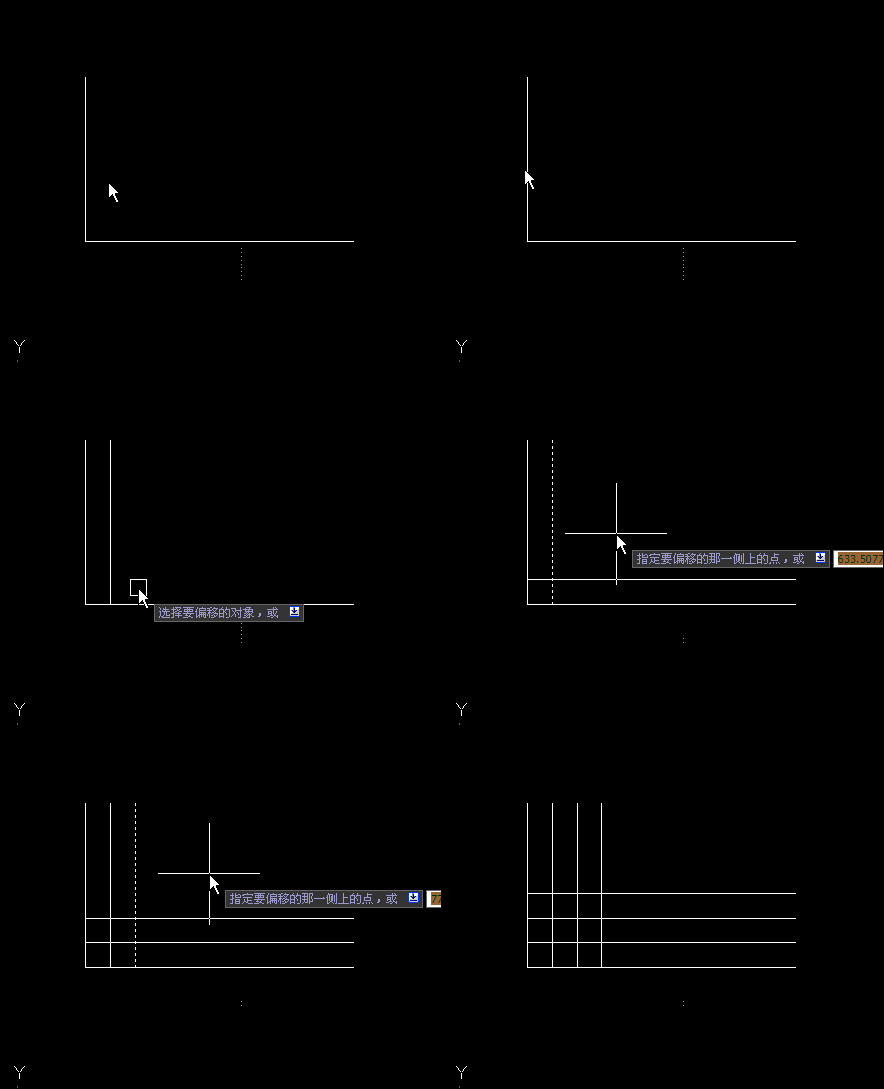
      CAD.gifPowerful, can change? Perhaps my request is too much! ! 😄

      I come from China, is to learn

      1 條回覆 最後回覆 回覆 引用 0
      • thomthomT 離線
        thomthom
        最後由 編輯

        That you can do with the native Move - using the copy array modifier.

        Thomas Thomassen — SketchUp Monkey & Coding addict
        List of my plugins and link to the CookieWare fund

        1 條回覆 最後回覆 回覆 引用 0
        • guanjinG 離線
          guanjin
          最後由 編輯

          @thomthom said:

          That you can do with the native Move - using the copy array modifier.

          Not quite understand,Can only offset the surface line,As above, and CAD functions.I'm just too greedy,Tool itself is very strong
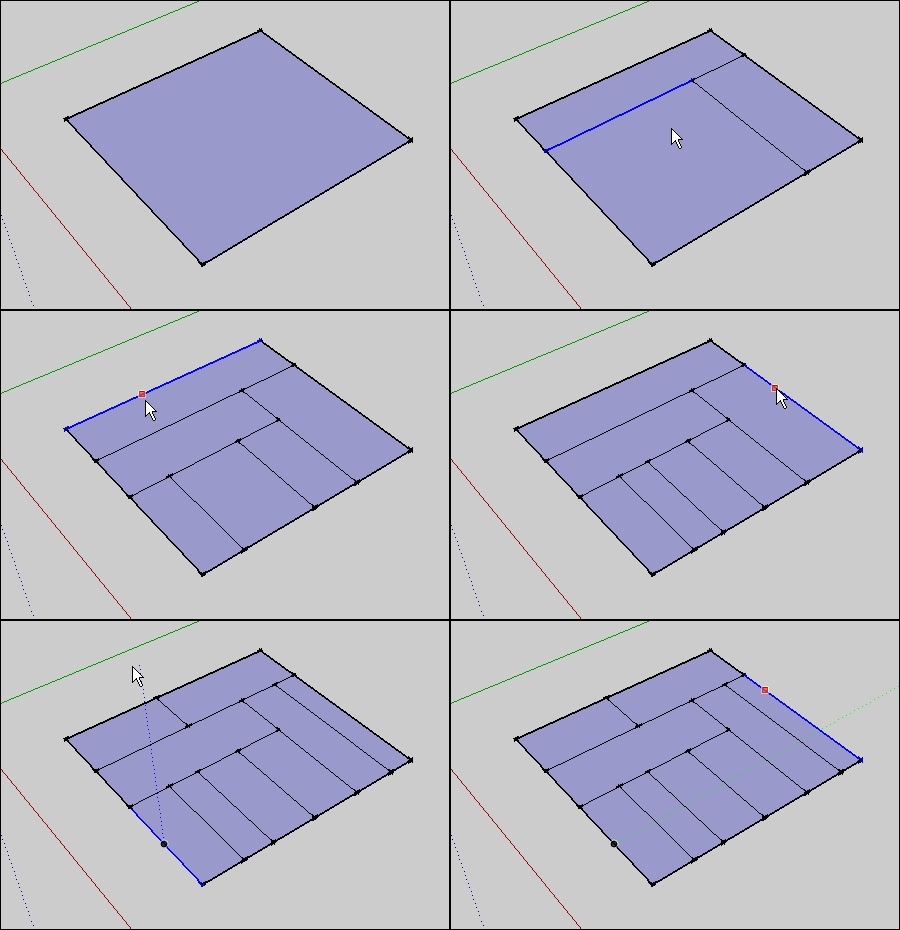
          painyi.gif

          I come from China, is to learn

          1 條回覆 最後回覆 回覆 引用 0
          • thomthomT 離線
            thomthom
            最後由 編輯

            SketchUp's Move Tool
            http://support.google.com/sketchup/bin/answer.py?hl=en&answer=94867

            You just need to do a linear array to do what you showed in the CAD animation.

            Thomas Thomassen — SketchUp Monkey & Coding addict
            List of my plugins and link to the CookieWare fund

            1 條回覆 最後回覆 回覆 引用 0
            • guanjinG 離線
              guanjin
              最後由 編輯

              @thomthom said:

              SketchUp's Move Tool
              http://support.google.com/sketchup/bin/answer.py?hl=en&answer=94867

              You just need to do a linear array to do what you showed in the CAD animation.

              Thank you thom thom
              This is very complex, 😄 😄

              I come from China, is to learn

              1 條回覆 最後回覆 回覆 引用 0
              • brookefoxB 離線
                brookefox
                最後由 編輯

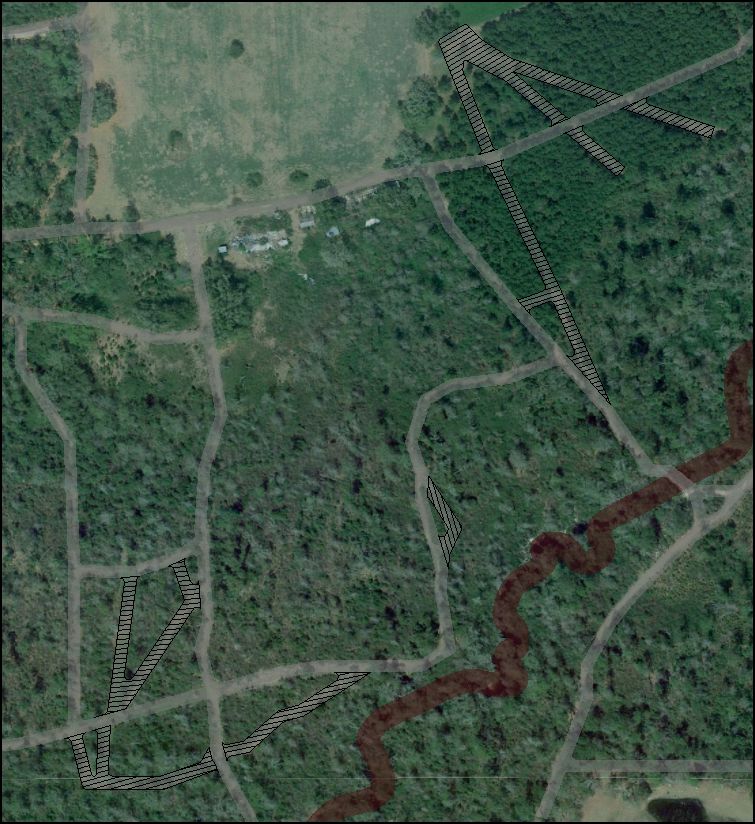
                Please see the image for a use of 'face divide' for quickly uniformly hatching a face. It works very well for this as I understand it: click an edge, move to the farthest edge to check distance (and alternatively input a distance), then divide by a number which will result in the size hatch you want.

                Thank you.

                FORGET THIS: Any chance for a mod so it can be used like copy multiple, thereby saving a step, or is this already possible? I see up above that you say it is... I guess your way only takes two steps, just like copy multiple. So, yeah, forget it.edge tools -1.JPG
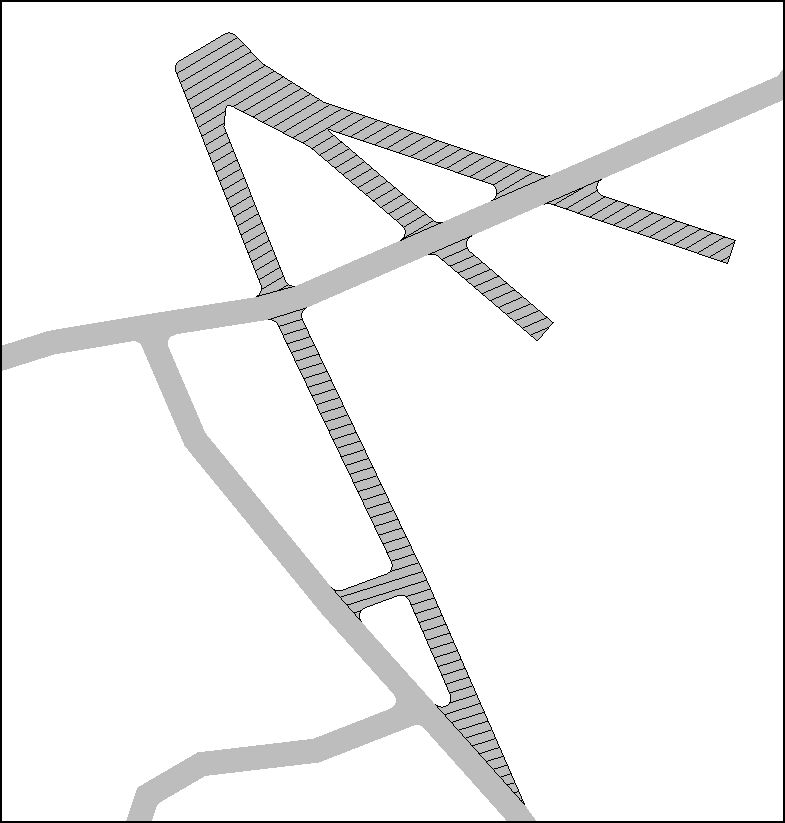
                With this hatch roads to be abandoned are indicated. The potential transparency of such edge hatches reads much better than textures, IMO. Yes, I agree, it is surely not the best way to do this, creating as it does 500 or so new edges.edge tools -2.JPG
                ~ Brooke

                1 條回覆 最後回覆 回覆 引用 0
                • F 離線
                  function
                  最後由 編輯

                  Hi, I updated to ttLib 2.6 and the new edge tool and it no longer gives me thr heads up display or red circles 😞

                  1 條回覆 最後回覆 回覆 引用 0
                  • thomthomT 離線
                    thomthom
                    最後由 編輯

                    @function said:

                    Hi, I updated to ttLib 2.6 and the new edge tool and it no longer gives me thr heads up display or red circles 😞

                    Any errors in the Ruby Console?

                    Are you sure you installed the updates correctly?

                    Thomas Thomassen — SketchUp Monkey & Coding addict
                    List of my plugins and link to the CookieWare fund

                    1 條回覆 最後回覆 回覆 引用 0
                    • F 離線
                      function
                      最後由 編輯

                      Ill have to look when I get home. I installed fredos multi directory at the time, and since it wasnt working I installed it back to root plug folder.. Maybe it is the division of the lib in different directories

                      1 條回覆 最後回覆 回覆 引用 0
                      • R 離線
                        rv1974
                        最後由 編輯

                        I'm really missing 'divide face' tool working with multiple (connected) edges. 😒

                        1 條回覆 最後回覆 回覆 引用 0
                        • thomthomT 離線
                          thomthom
                          最後由 編輯

                          @rv1974 said:

                          I'm really missing 'divide face' tool working with multiple (connected) edges. 😒

                          Wouldn't Tools on Surface do what you want there?

                          Thomas Thomassen — SketchUp Monkey & Coding addict
                          List of my plugins and link to the CookieWare fund

                          1 條回覆 最後回覆 回覆 引用 0
                          • R 離線
                            rv1974
                            最後由 編輯

                            @thomthom said:

                            @rv1974 said:

                            I'm really missing 'divide face' tool working with multiple (connected) edges. 😒

                            Wouldn't Tools on Surface do what you want there?

                            doh! I forgot TOS offset works non-curves. thanks!

                            1 條回覆 最後回覆 回覆 引用 0
                            • R 離線
                              rv1974
                              最後由 編輯

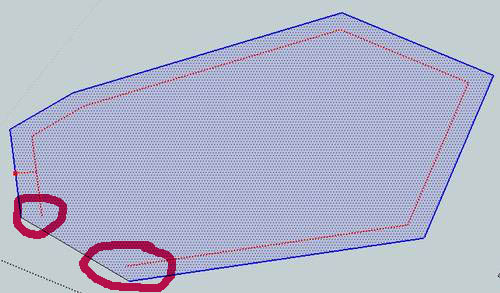
                              I re-found why TOS offset is no good for me. Can one make it to extend the resulted curve to the face border?

                              33.JPG

                              1 條回覆 最後回覆 回覆 引用 0
                              • Dave RD 離線
                                Dave R
                                最後由 編輯

                                It is doing what it should do and it it mathematically correct. You can extend those line segments with the Line tool. You could also try using Matt666's ExtendTool.

                                Etaoin Shrdlu

                                %

                                (THERE'S NO PLACE LIKE)

                                G28 X0.0 Y0.0 Z0.0

                                M30

                                %

                                1 條回覆 最後回覆 回覆 引用 0
                                • R 離線
                                  rv1974
                                  最後由 編輯

                                  @dave r said:

                                  It is doing what it should do and it it mathematically correct. You can extend those line segments with the Line tool. You could also try using Matt666's ExtendTool.

                                  Yes captain I realize that it's undoubtedly correct behavior. Initially I just asked Thomthom to extend his 'divide tool' (by accepting multiple edges)

                                  1 條回覆 最後回覆 回覆 引用 0
                                  • thomthomT 離線
                                    thomthom
                                    最後由 編輯

                                    @rv1974 said:

                                    @dave r said:

                                    It is doing what it should do and it it mathematically correct. You can extend those line segments with the Line tool. You could also try using Matt666's ExtendTool.

                                    Yes captain I realize that it's undoubtedly correct behavior. Initially I just asked Thomthom to extend his 'divide tool' (by accepting multiple edges)

                                    The key concept of the Divide Tool was that you didn't pre-pick edges. It was to allow you to quickly pick a reference edge and make a split. Multiple edges would be a completely different tool.

                                    Thomas Thomassen — SketchUp Monkey & Coding addict
                                    List of my plugins and link to the CookieWare fund

                                    1 條回覆 最後回覆 回覆 引用 0
                                    • R 離線
                                      rv1974
                                      最後由 編輯

                                      @thomthom said:

                                      @rv1974 said:

                                      @dave r said:

                                      It is doing what it should do and it it mathematically correct. You can extend those line segments with the Line tool. You could also try using Matt666's ExtendTool.

                                      Yes captain I realize that it's undoubtedly correct behavior. Initially I just asked Thomthom to extend his 'divide tool' (by accepting multiple edges)

                                      The key concept of the Divide Tool was that you didn't pre-pick edges. It was to allow you to quickly pick a reference edge and make a split. Multiple edges would be a completely different tool.

                                      ..would be completely different amazingtool 😉

                                      1 條回覆 最後回覆 回覆 引用 0
                                      • pilouP 離線
                                        pilou
                                        最後由 編輯

                                        Put file In V6 😉
                                        It's better for everybody! 😄
                                        An image ist sufficient! 🤓

                                        Frenchy Pilou
                                        Is beautiful that please without concept!
                                        My Little site :)

                                        1 條回覆 最後回覆 回覆 引用 0
                                        • R 離線
                                          rumcajs
                                          最後由 編輯

                                          Thanks to great plugin. It is something that i looked for, just it misses something.

                                          I have a REQ to update/upgrade.

                                          This is what I did:

                                          http://i47.tinypic.com/6sqpnd.png

                                          (the light red lines are original locations of the diagonals, which I tried to remove. You can see I succeed to removed only two).

                                          I had a scull which contains triangles and I wanted to reduce the triangles, so that I want to remove the diagonal of the rectangle shape area. Therefor I select two lines which are nearly parallel and the diagonal. Then I clicked the green colinear icon. It works to flat the edges onto one plane, so I can delete the diagonal. But if I want to correct the next area, then the previous area will generate diagonal... Here I am where I was on the start. Could it be possible to define the area (select faces), which is already fine and I won't be touched? So the edges of that face won't be touched?

                                          This is the point what I miss. A possibility to limit the edges to move (=forbid some edges/faces to move) and/or possibility to define angle, in which it can be moved.
                                          My original idea, before I found this thread was to have a definition plane, such as it is in the Fredo Scale tools (the Stretching with orientation of scaling box). So if you would have such orientation plane, you could define, where the plane should be moved (angle& position). Purpose of such plane is to define position and angle of the plane. Something like Fredo already did in his great Fredo Scale tools (they are good for control, and that is what I like and therefor mention here as good example). The plane needs only one direction to move, and this would define axis perpendicularly to the plane. I expect that the angle possibilities are defined by the selected tool and the differences between selected edges (so in my case, when I have 3 edges, only two angles are possible to infer - just an assumption).


                                          head 17 middle line corrected on eye center .skp

                                          1 條回覆 最後回覆 回覆 引用 0
                                          • R 離線
                                            rumcajs
                                            最後由 編輯

                                            OK I attached file to previous post of mine. But I think the image is sufficient, and if you think it is not, then install fredo Scale tool, because the Stretching tool + twist tool, is enough to get inspiration.


                                            1 條回覆 最後回覆 回覆 引用 0
                                            • 1
                                            • 2
                                            • 7
                                            • 8
                                            • 9
                                            • 10
                                            • 11
                                            • 9 / 11
                                            • 第一個貼文
                                              最後的貼文
                                            Buy SketchPlus
                                            Buy SUbD
                                            Buy WrapR
                                            Buy eBook
                                            Buy Modelur
                                            Buy Vertex Tools
                                            Buy SketchCuisine
                                            Buy FormFonts

                                            Advertisement