[Plugin] Heightmap from model
-
@unknownuser said:
Where does it write these to?
It writes images at the same location than the SKP is.
@unknownuser said:
it crashes SUp BEFORE you try to do anything - just by loading it
That's what is really strange. I don't overwrite built-in methods, don't do any 'require' or something that involve other files.
Would you please test this version and tell me if the problem persists ?

-
Still crashes instantly while loading SU. Now on Windows 7 64bit. SU 7.1.
-
it still crashes while loading SU.
Karlheinz
-
Test file = instant Bugsplat.
Didier - why not PM or email the 'uncompiled' script to one of us for debugging - you can trust me ...
...
You know that I hack into your encrypted rb files all of the time, but the rbs ones are a bit harder... just easier if you supply it unencrypted...
It must be simple to fix... -
Slightly off topic here: Is there a plugin that does the exact opposite of this one? That is creating a terrain from an greyscale image (.jpg or anything else)? Thank you. G
-
There is, Didier wrote a script that imports a heightmap image into SU. I forget what its called, but it was written by didier bur and should be posted here on the forum somewhere....
Chris
-
Nice work!
-
Did anybody find some solution for instant BugSplat upon starting SU when using this plugin?
-
I was going to look at the code, but it is encrypted. So it would require Didier to look at it.
Sometimes if the script calls the active_model before the model is initialized by SU it can cause problems. But I can't see if the script is possibly doing anything like that.
-
Chris,
Is it possible to use your Color by Z- plugin for creating a heightmap from model? I would need to create heightmap from Sketchup model and take it into Unity 3D for creating a terrain (just like Heightmap plugin was supposed to do).
http://forums.sketchucation.com/viewtopic.php?f=180&t=16660 -
Look at the technicque used in this post:
The idea is to make your terrain, then apply a gradient image to the entire terrain. It will make a much smoother gradient than my color by Z and the gradient will be more accurate.
You can try using the attached gradient image. That will give you a greyscale heightmap. I don't know what file format you need, but I am hoping you can export a black and white image from SU and find a way to get it into the correct format.
Let me know if this works, if you are still missing a piece to the puzzle.
Chris

-
ohh, hmm. I think perhaps this does something different than I thought. What are you trying to achieve? You already have a greyscale terrain and want to turn it into 3d geometry? If so, that is very different than what my color by z does. It would not be able to be tweaked to do that.
-
Hi all,
A new version of the script has been uploaded May 5th 2010 (no more instant bugsplat).
Find it here: http://forums.sketchucation.com/viewtopic.php?p=209935#p209935
The scrambler still puzzles me... -
Thanks, now working perfectly...

-
Thank you Didier!
-
This is a great plugin!
I'd love to be able to customize this code for use with a project I am working on. Any chance you will be releasing the code?
Things that would GREATLY help my project include:
- Making Black a background color
- Making square output images (my heightmap importer only accepts square images.)
- The ability to scale the output images to any size I need.
-
really impressive plugin, very nice for render purposes!
But could it be possible to enable it also in perspective view so we could have a depth map for postprocessing a sketchupview?
anyway, thank you very much for this plugin didier!
-
This is indeed very useful for rendering purposes
-- I would second the idea that being able to generate the image at whatever resolution needed would be great.In regards to the previous post, you can do a quick version of what you want using fog:
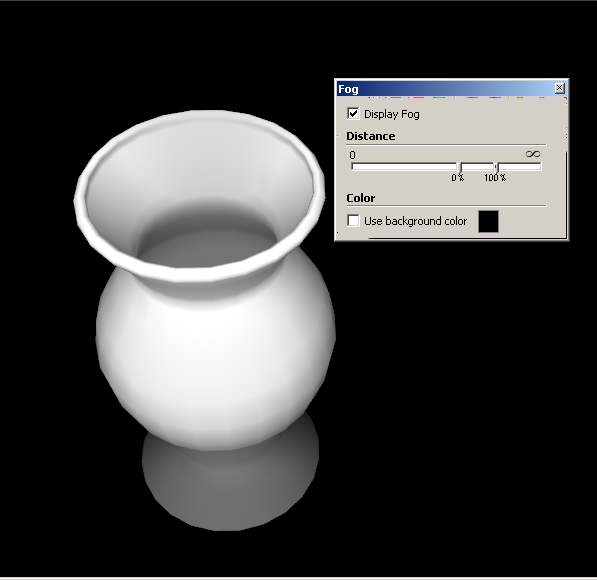
Best,
Jason. -
Interesting way jason_maranto, thanks for that, will try it!
-
Hey Didier! Trying to get google terrain into UDK and tought this plugin was just what i needed. Got a problem though.
First off, 18700016 rays to shoot? Thats a bit much, why does that number get so large? The model is just a small section of terrain.
After the export when i open the raw file in Photoshop it does not show up as heightmap, but more like a grey mess.Any suggestions? I've got the plane version of sketchup pro and your plugin is the only one installed. Do i need additional plugins installed or something?
Pardon my noobiness!
Cheers!






Hello! It looks like you're interested in this conversation, but you don't have an account yet.
Getting fed up of having to scroll through the same posts each visit? When you register for an account, you'll always come back to exactly where you were before, and choose to be notified of new replies (either via email, or push notification). You'll also be able to save bookmarks and upvote posts to show your appreciation to other community members.
With your input, this post could be even better 💗
Register Login


Advertisement