[Plugin] UVTools 0.2 Pro (Beta) (Updated for SU6)
-
@paolo said:
 Whaat thanks for your quick reply, it works manually dividing face into quads although is a bit of a pain... I wonder if your SketchUV plugin will do the job 'automatically'.
Sorry, although SketchUV has a nice triangulation feature that will split all faces into triangles, it has a bit of trouble with faces that have 'holes'
-
Thanks, lets try it!
-
thank you
-
@gaieus said:
@zunkian said:
...I then right click on the model, selected the UV tools plugin and selected spherical map...
This is the wrong topic then. That's UVTools 1:
http://forums.sketchucation.com/viewtopic.php?t=10404

And yes, sometimes that plugin does not work perfectly. Can you attach the model?
Hy Gav! I need help!!! SketchUP 8 crashes because of UV tool 1 when I want to mapp a texture(I want to model planet Jupiter).Sometimes works sometimes crashes, but now...it crashes!
 Hope to find a solution!Here is my model
Here are my models on 3D warehouse:http://sketchup.google.com/3dwarehouse/cldetails?mid=ded937a45a821f58178b53c3b6bafa41
-
Hi guys..
I add specific code for launch RoadKill from menu option.For option dialog..
if( not file_loaded?("UVtools.rb") )

	menu = UI.menu("Plugins").add_submenu("UV Tools")
	menu.add_item("Export UVs to OBJ")  { UVtools.start_bridge()}
	menu.add_item("Launch RoadKill")  { UVtools.runroad()} # add RoadKill option
	menu.add_item("Import UVs from OBJ ") { UVtools.return_bridge() }

	UI.add_context_menu_handler {|menu|
		ents=Sketchup.active_model.selection
		sel=Sketchup.active_model.selection.first
		sub=menu.add_submenu("UV Tools")
		sub.add_item("Spherical Map") {(UVtools.new.spherical_map(ents))}
		sub.add_item("Cylindrical Map") {(UVtools.new.cylindrical_map(ents))}
	}
end
..for launch Roadkill.
## povman; add code for launch RoadKill from the 'menu' option
	def self.runroad()
		# Roadkill arguments ( from RoadKill for Softimage);
		# -lscm or -abf
		# -fillholes or -notfillholes
		# -live or -notlive
		# a tipically command line;
		# "C;\RoadKill\RoadKill.exe" "obj_path,edge_path,-abf,-nofillholes,-live"
		obj_path=self.get_obj_path
		#TODO; create option dialog for arguments..
		roadpath=UI.openpanel("Path to RoadKill", "c;\\", ".exe")
		#
		command_line = "\"#{roadpath}\" \"#{obj_path},,-lscm,-nofillholes,-live\""
		# for debug..
		puts command_line
		# run RoadKill..
		system(command_line)
	end
Greetings..
-
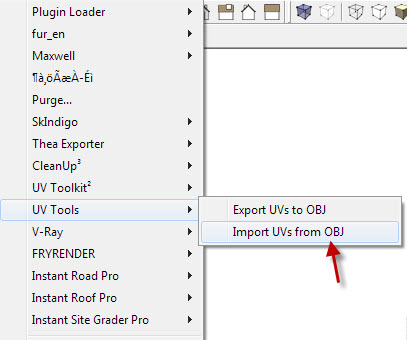
Hi guys where can I download the plugin => imp/exp for obj for SU8 ?

-
@povmaniac said:
Hi guys..
I add specific code for launch RoadKill from menu option...for launch Roadkill.
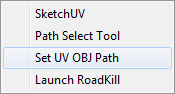
Hi povmaniac. Can you explain how to use your code for add this functionality?
I would like to use same function into Sketchuv but i don't know where more edit the code.I changed the path to roadkill but nothing happen.
My SketchUp is 2014.
-
Hi, I run into this small problem. Running Sketchup Pro 2014 on both my machines, my old good PC (Windows 8.1) and a MacBook Pro (running Windows 8.1SP on bootcamp). On PC, i can export the object and import and export UV into OBJ with no problem. However, on the bootcamp SketchUp, it simply got this error message "Unable to export UVs".
May I know what will be the problem? Will it be the permission for the folder the UVTools exporting the objects? Can we manually edit the folder where the plugin will export to and import from for the obj with UVs corrected?
Please forgive me for my poor english as it is not my main language. Thank you.
Regards,
Petrus
-
Hi, use this one. It's better.
-
@Massimo, Thank you for your kind suggestion
It is surely a great plugin -
You're welcome.

-
Great bridge, but the uv map is imported distorted((



Hello! It looks like you're interested in this conversation, but you don't have an account yet.
Getting fed up of having to scroll through the same posts each visit? When you register for an account, you'll always come back to exactly where you were before, and choose to be notified of new replies (either via email, or push notification). You'll also be able to save bookmarks and upvote posts to show your appreciation to other community members.
With your input, this post could be even better 💗
Register Login


Advertisement