sketchucation logo sketchucation
    • Login
    Oops, your profile's looking a bit empty! To help us tailor your experience, please fill in key details like your SketchUp version, skill level, operating system, and more. Update and save your info on your profile page today!
    Mac User? | Join the Rayscaper Beta for Mac Learn More

    [Plugin] UVTools 0.2 Pro (Beta) (Updated for SU6)

    Scheduled Pinned Locked Moved Plugins
    198 Posts 73 Posters 187.6k Views 73 Watching
    Loading More Posts
    • Oldest to Newest
    • Newest to Oldest
    • Most Votes
    Reply
    • Reply as topic
    Log in to reply
    This topic has been deleted. Only users with topic management privileges can see it.
    • D
      DIEGO-RODRIGUEZ
      last edited by

      thank you very much for sharing.
      excellent plugins


      a question, naive.
      can make plugins to map from sketchup?
      it work as well as UVtools.rb

      1 Reply Last reply
      Reply Quote 0
      • K
        Khai
        last edited by

        if it works with UVmapper Classic, it should work with Pro.. I'll test that for you later on. (I've been using Pro for years)

        1 Reply Last reply
        Reply Quote 0
        • R
          remus
          last edited by

          Any tips on opening the .obj in blender 2.5? ive tried just straight file->import but i cant see anything afterwards...

          http://remusrendering.wordpress.com/

          1 Reply Last reply
          Reply Quote 0
          • K
            Khai
            last edited by

            Works fine with UVmapper Pro πŸ˜„

            1 Reply Last reply
            Reply Quote 0
            • K
              Khai
              last edited by

              oh MAN
              I love this already!!!!!!!!!

              1 Reply Last reply
              Reply Quote 0
              • W
                Whaat
                last edited by

                @remus said:

                Any tips on opening the .obj in blender 2.5? ive tried just straight file->import but i cant see anything afterwards...

                I haven't used version 2.5 yet. With my older version, I had to go the menu item 'File->Import->Wavefront OBJ' and then browse for the file.

                Depending on the scale and location of the object, it might not be immediately visible in the Blender 3D view. Is there a command in Blender to 'Fit the view to the scene'?

                SketchUp Plugins for Professionals

                1 Reply Last reply
                Reply Quote 0
                • pilouP
                  pilou
                  last edited by

                  Seems a new true gem β˜€
                  @Remus: you have Blender 2.5? 😲

                  Frenchy Pilou
                  Is beautiful that please without concept!
                  My Little site :)

                  1 Reply Last reply
                  Reply Quote 0
                  • pilouP
                    pilou
                    last edited by

                    Blender Shortcuts πŸ˜‰
                    Seems it's Home

                    Frenchy Pilou
                    Is beautiful that please without concept!
                    My Little site :)

                    1 Reply Last reply
                    Reply Quote 0
                    • K
                      Khai
                      last edited by

                      testing it now.. but it looks like as a sideline, you've created a good OBJ exporter.....

                      ok. you've created as a sideline, a almost perfect OBJ exporter for Sketchup. (just the naming / save location)

                      hot damn. UVmapping and OBJ exporting.... you should see the grin on my face!

                      1 Reply Last reply
                      Reply Quote 0
                      • R
                        remus
                        last edited by

                        Pilou, you can get the latest builds (pre beta at the moment) from here: http://www.graphicall.org/builds/

                        Whaat, i'll give 2.49 a try this evening and let you know how it goes.

                        http://remusrendering.wordpress.com/

                        1 Reply Last reply
                        Reply Quote 0
                        • K
                          Khai
                          last edited by

                          ok been playing with this today and I consider it a must have already...

                          1 Reply Last reply
                          Reply Quote 0
                          • jeff hammondJ
                            jeff hammond
                            last edited by

                            khai - you have to sell it man!
                            let's see some pictures of what you've come up with πŸ˜„

                            dotdotdot

                            1 Reply Last reply
                            Reply Quote 0
                            • K
                              Khai
                              last edited by

                              lol sorry

                              the bugbears I've had is UVmapping and OBJ export..and this solves both in one shot.. I'm kinda excited lol

                              1 Reply Last reply
                              Reply Quote 0
                              • W
                                Whaat
                                last edited by

                                @unknownuser said:

                                khai - you have to sell it man!
                                let's see some pictures of what you've come up with πŸ˜„

                                Yeah...let's see some pictures of what you guys can do with this! πŸ˜„

                                SketchUp Plugins for Professionals

                                1 Reply Last reply
                                Reply Quote 0
                                • StinkieS
                                  Stinkie
                                  last edited by

                                  Thanks, Dale. Will try this with Modo.

                                  1 Reply Last reply
                                  Reply Quote 0
                                  • EarthMoverE
                                    EarthMover
                                    last edited by

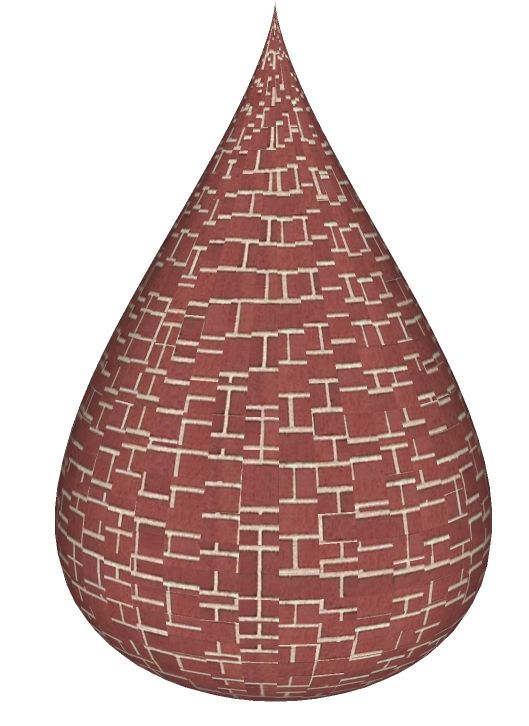
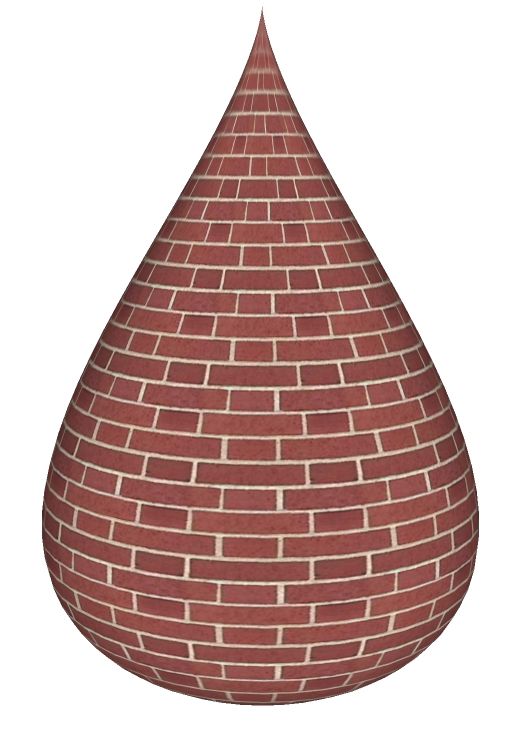
                                    Dale, tested with 3ds Max and it worked flawlessly on this teardrop shape using the Unwrap UVW modifier. Thanks for the plugin. It will fix a lot of headaches!!

                                    One of the issues is that once a UV is imported, it does not "stick" to the geometry it was assigned to. For example if I did not like this brick and wanted to replace it with another material, the UV's become scrambled again. Also when I try to undo after importing the UV's, I get a SU crash.
                                    UV Plug test.jpg


                                    UV plug test_max.jpg

                                    3D Artist at Clearstory 3D Imaging
                                    Guide Tool at Winning With Sketchup
                                    Content Creator at Skapeup

                                    1 Reply Last reply
                                    Reply Quote 0
                                    • W
                                      Whaat
                                      last edited by

                                      @earthmover said:

                                      Dale, tested with 3ds Max and it worked flawlessly on this teardrop shape using the Unwrap UVW modifier. Thanks for the plugin. It will fix a lot of headaches!!

                                      Great! Another app to add to the list! Thanks for testing πŸ˜„

                                      @unknownuser said:

                                      One of the issues is that once a UV is imported, it does not "stick" to the geometry it was assigned to. For example if I did not like this brick and wanted to replace it with another material, the UV's become scrambled again. Also when I try to undo after importing the UV's, I get a SU crash.
                                      Yeah, I hate that SketchUp does not keep UVs when switching materials. I'll look into that crash, too. Thanks!

                                      SketchUp Plugins for Professionals

                                      1 Reply Last reply
                                      Reply Quote 0
                                      • N
                                        NewOne
                                        last edited by

                                        @whaat said:

                                        @earthmover said:

                                        Dale, tested with 3ds Max and it worked flawlessly on this teardrop shape using the Unwrap UVW modifier. Thanks for the plugin. It will fix a lot of headaches!!

                                        Great! Another app to add to the list! Thanks for testing πŸ˜„

                                        @unknownuser said:

                                        One of the issues is that once a UV is imported, it does not "stick" to the geometry it was assigned to. For example if I did not like this brick and wanted to replace it with another material, the UV's become scrambled again. Also when I try to undo after importing the UV's, I get a SU crash.
                                        Yeah, I hate that SketchUp does not keep UVs when switching materials. I'll look into that crash, too. Thanks!

                                        Can you write the UV data in an attribute? And using it from there... It would increase the size of the file, I think... for each face to write separate UV. But it can be a way.

                                        1 Reply Last reply
                                        Reply Quote 0
                                        • W
                                          Whaat
                                          last edited by

                                          @newone said:

                                          Can you write the UV data in an attribute? And using it from there... It would increase the size of the file, I think... for each face to write separate UV. But it can be a way.

                                          Yes, you can. I use that method in SkIndigo but I have not yet added the feature to UVTools.

                                          SketchUp Plugins for Professionals

                                          1 Reply Last reply
                                          Reply Quote 0
                                          • N
                                            NewOne
                                            last edited by

                                            @whaat said:

                                            @newone said:

                                            Can you write the UV data in an attribute? And using it from there... It would increase the size of the file, I think... for each face to write separate UV. But it can be a way.

                                            Yes, you can. I use that method in SkIndigo but I have not yet added the feature to UVTools.

                                            When using Oscar's UV mapping and tried to render with Maxwellrender I noticed that it exported a bitmap for each face and made a copy of used material for each exported bitmap. So, I had situations when I had 1000 materials just for one object πŸ˜•
                                            This is strange... I was eexpecting that the bitmap to be folded around object.

                                            1 Reply Last reply
                                            Reply Quote 0

                                            Hello! It looks like you're interested in this conversation, but you don't have an account yet.

                                            Getting fed up of having to scroll through the same posts each visit? When you register for an account, you'll always come back to exactly where you were before, and choose to be notified of new replies (either via email, or push notification). You'll also be able to save bookmarks and upvote posts to show your appreciation to other community members.

                                            With your input, this post could be even better πŸ’—

                                            Register Login
                                            • 1
                                            • 2
                                            • 3
                                            • 4
                                            • 5
                                            • 6
                                            • 7
                                            • 8
                                            • 9
                                            • 10
                                            • 5 / 10
                                            • First post
                                              Last post
                                            Buy SketchPlus
                                            Buy SUbD
                                            Buy WrapR
                                            Buy eBook
                                            Buy Modelur
                                            Buy Vertex Tools
                                            Buy SketchCuisine
                                            Buy FormFonts

                                            Advertisement