[Plugin] CleanUp
-
-
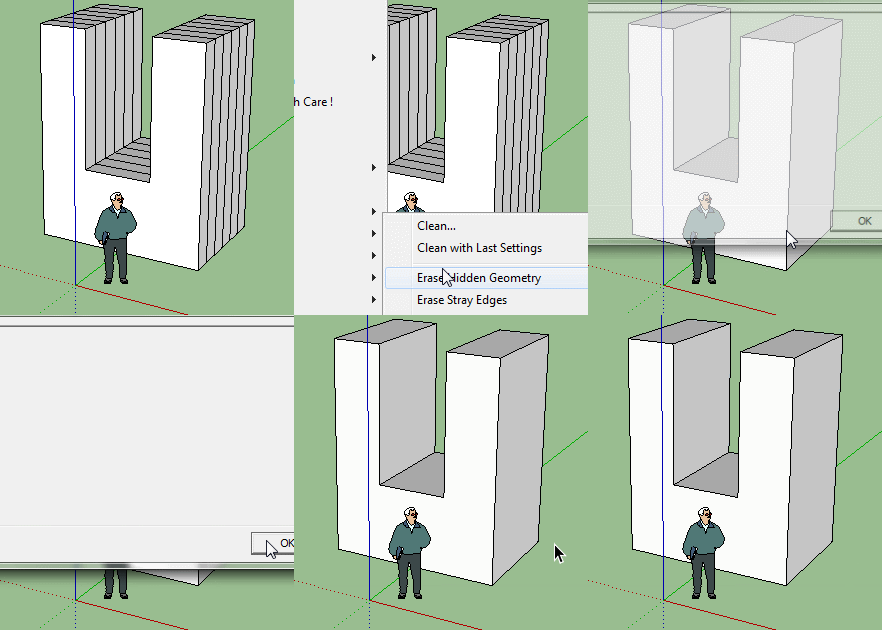
because they belong to faces inside - it always worked that way
-
Thanks!

So that works after use the Remove inner faces by Wiiki!
-
yes, or some good solidsolvers..
-
It seems it can´t UN-SMOOTH the models?
I have this model with a ridiculous amount of groups and subgroups. And it's all softened, although it should not be softned at all.
It´s impossible to unsoften by hand because of the amount of groups, and I also don´t want to ungroup them all (because I might have to move the groups around)
But setting the SOFTEN to 0 degrees does not unsoften the groups and subgroups, unlike the Soften Edges Panel...
-
That would be nice. I notice a group can be unsoftened /softened but not a nested group (without first opening the parent group). That's with the Soften/Smooth dialog.
-
Use with care !
Copy+Paste into the Ruby Console + <enter>.m=Sketchup.active_model; m.start_operation("Un...",true); es=m.entities.grep(Sketchup;;Edge); m.definitions.each{|d|next if d.image?; es<<d.entities.grep(Sketchup;;Edge)}; es.flatten.each{|e|e.soft=false;e.smooth=false}; m.commit_operationYou can also do
e.hidden=falsetoo...
To process a selection...m=Sketchup.active_model; s=m.selection; m.start_operation("Un...",true); es=s.grep(Sketchup;;Edge); s.grep(Sketchup;;Group).each{|g|es<<g.entities.grep(Sketchup;;Edge)};; s.grep(Sketchup;;ComponentInstance).each{|i|es<<i.definition.entities.grep(Sketchup;;Edge)}; es.flatten.each{|e|e.soft=false;e.smooth=false}; m.commit_operation -
Thanks a million Thomthom, though i was going to throw my computer away, downloaded CleanUp its magic.
Scenes that took minutes to open now not even time to say "thank you Thomthom..."and the scene is open.
Made my day or actually my late night ! -
wow thank you so much for this, was told I would have to optimize with a different program and learn that... this saves me so much time , I love it...need it for my objects in game engines... I've only had one issue where I lost a part of my project but I fixed it and is all good.. you do great work, you are awesome!!!

-
for me is not working
 is only deleting max 15 and when i click to show hidden geometry is not showing nothing
 -
After the SUbD rising and other quad-based modeling helpers in SketchUp, maybe some fixes to the CleanUp plugin would be in order. And frankly, I would be very happy if we would have some fixes (i may even send you a cookie
 )
)So, what I'm thinking:
1.option to cleanup with preserving the quads (there are still plenty of faces to merge and messy geometry to clean) - as now it will clean absolutely everything.
2.add the possibility to save presets. There are already some presets in the menu, but many times special combinations of settings are required. Would be awesome to save those as presets for quick use (and even adding kb shortcuts to them, if is not too much to ask )
)Thank you very much.
-
Good suggestions. I filed it in the issue tracker: https://bitbucket.org/thomthom/cleanup/issues/10/preserve-quads
-
Hello! Your extension is very useful!
I'd like to know if there is a way to automate this plugin via ruby script? I need to import a 3ds file, run this extension, save as .skp, and repeat about 1500 times
Is this possible? Thank you!
-
Great plug-in! Thanks a lot TT.
Also here for a question, in case anybody got to it already: What would be the recommended settings of the CleanUp plug-in so it doesn't kill the proxy materials??
In my experience it has taken down the "linked" materials used in proxies, someone else had the same trouble?
-
@sasasaps said:
Great plug-in! Thanks a lot TT.
Also here for a question, in case anybody got to it already: What would be the recommended settings of the CleanUp plug-in so it doesn't kill the proxy materials??
In my experience it has taken down the "linked" materials used in proxies, someone else had the same trouble?
Sorry, I forgot to explain that I use proxies in Vray 2.0 (in SKP2016).
Thanks,
-
For the most part I love this plugin, but I'm having an issue with the "smooth by angle" feature. I'm running SketchUp 2015, with CleanUp3 (3.3.1).
It seems like the CleanUp plugin is "seeing" the lines that it could fix, and claims to be doing so, but isn't actually fixing anything.
Steps to reproduce:
- Select the geometry (building outlines that have several line segments that are almost but not quite parallel)
- Run CleanUp3, with Smooth Edges by Angle set to 5.0.
- It runs, and says "Edges reduced: 1500", and the validity check is showing no problems.
- BUT, then I still have the same number of edges in my model (8417) that I had at the beginning. Looking at the outlines in detail, the offending lines are still there.
I've tried both with faces included and faces deleted.
Any ideas?
Thanks,
Shannon -
@sasasaps said:
Great plug-in! Thanks a lot TT.
Also here for a question, in case anybody got to it already: What would be the recommended settings of the CleanUp plug-in so it doesn't kill the proxy materials??
In my experience it has taken down the "linked" materials used in proxies, someone else had the same trouble?
I'm not sure how the proxy materials are stored. You might want to make CleanUp not ignore attributes for materials - to avoid materials merging unless also the attributes are identical.
Then it could be that some materials used are not applied in the model - then you want to avoid purging materials. -
Hi Thom! You see, I have some trouble loading the plugin, I already uninstalled it a couple of times, and replaced everything with the latest version to no avail. Here's the error log that appears every time I fire up SketchUp. Hope you can help me.
Thanks.Something when wrong trying to load C:/Users/UsuarioBMA/AppData/Roaming/SketchUp/SketchUp 2014/SketchUp/Plugins/TT_CleanUp/vendor/error-handler/error_reporter.rb.
Please copy this message and forward it to the developer.
Load error:
Error: #<NameError: undefined local variable or methoderror' for main:Object> C:/Users/UsuarioBMA/AppData/Roaming/SketchUp/SketchUp 2014/SketchUp/Plugins/TT_CleanUp/vendor/error-handler/error_reporter.rb:483:inrescue in <top (required)>'
C:/Users/UsuarioBMA/AppData/Roaming/SketchUp/SketchUp 2014/SketchUp/Plugins/TT_CleanUp/vendor/error-handler/error_reporter.rb:12:in<top (required)>' C:/Users/UsuarioBMA/AppData/Roaming/SketchUp/SketchUp 2014/SketchUp/Plugins/tt_cleanup/bootstrap.rb:8:inrequire'
C:/Users/UsuarioBMA/AppData/Roaming/SketchUp/SketchUp 2014/SketchUp/Plugins/tt_cleanup/bootstrap.rb:8:in<top (required)>' C:/PROGRA~1/SketchUp/SKETCH~1/Tools/extensions.rb:197:inrequire'
C:/PROGRA~1/SketchUp/SKETCH~1/Tools/extensions.rb:197:inload' C:/Users/UsuarioBMA/AppData/Roaming/SketchUp/SketchUp 2014/SketchUp/Plugins/tt_cleanup.rb:40:inregister_extension'
C:/Users/UsuarioBMA/AppData/Roaming/SketchUp/SketchUp 2014/SketchUp/Plugins/tt_cleanup.rb:40:in<module:CleanUp>' C:/Users/UsuarioBMA/AppData/Roaming/SketchUp/SketchUp 2014/SketchUp/Plugins/tt_cleanup.rb:15:inmodule:Plugins'
C:/Users/UsuarioBMA/AppData/Roaming/SketchUp/SketchUp 2014/SketchUp/Plugins/tt_cleanup.rb:14:in<module:TT>' C:/Users/UsuarioBMA/AppData/Roaming/SketchUp/SketchUp 2014/SketchUp/Plugins/tt_cleanup.rb:13:in<top (required)>'
C:/PROGRA~1/SketchUp/SKETCH~1/Tools/sketchup.rb:85:inrequire' C:/PROGRA~1/SketchUp/SKETCH~1/Tools/sketchup.rb:85:inblock in require_all'
C:/PROGRA~1/SketchUp/SKETCH~1/Tools/sketchup.rb:85:ineach' C:/PROGRA~1/SketchUp/SKETCH~1/Tools/sketchup.rb:85:inrequire_all'
eval:1:in `<main>' -
This is probably my most used extension, but there's one option I'd love to see added; removing the terrain layer.
I use the location snapshot on probably 95% of my models for placing ground mounts or having an easy reference to real world objects, but only about 1% of my models actually use the terrain. (For the most part, that's left to the installers to deal with on site.) That can end up being a huge amount of extra data. Currently, I end up having to turn snapshot off, turn terrain on, unlock and delete each imagery section, then delete the layer and turn snapshot back on. Having it happen automatically in an extension I run on every model anyway would save some time and eliminate those times when I just plain forget to do it and leave 2-3 extra MB of unused data in a model of, for example, an apartment complex or shopping center. Foregoing "clean with last settings" and unchecking the option on the rare occasion I actually want the terrain would be a small price to pay. -
Can you file that feature request in the issue tracker please?
https://bitbucket.org/thomthom/cleanup/issues?status=new%26amp;status=open








Hello! It looks like you're interested in this conversation, but you don't have an account yet.
Getting fed up of having to scroll through the same posts each visit? When you register for an account, you'll always come back to exactly where you were before, and choose to be notified of new replies (either via email, or push notification). You'll also be able to save bookmarks and upvote posts to show your appreciation to other community members.
With your input, this post could be even better 💗
S'inscrire Se connecter


Advertisement