sketchucation logo sketchucation
    • 登入
    Oops, your profile's looking a bit empty! To help us tailor your experience, please fill in key details like your SketchUp version, skill level, operating system, and more. Update and save your info on your profile page today!
    🔌 Smart Spline | Fluid way to handle splines for furniture design and complex structures. Download

    [Plugin] CleanUp

    已排程 已置頂 已鎖定 已移動 Plugins
    974 貼文 217 Posters 863.8k 瀏覽 217 Watching
    正在載入更多貼文
    • 從舊到新
    • 從新到舊
    • 最多點贊
    回覆
    • 在新貼文中回覆
    登入後回覆
    此主題已被刪除。只有擁有主題管理權限的使用者可以查看。
    • S 離線
      saucerful
      最後由 編輯

      It works! Thank you so much. This plugin is extremely useful for our workflow at Open Source Ecology (see here).

      Any idea when 2.9.9 will be pushed to the extension warehouse?

      1 條回覆 最後回覆 回覆 引用 0
      • tt_suT 離線
        tt_su
        最後由 編輯

        @saucerful said:

        It works!

        Huh! How about that! Stab in the dark!
        Glad it worked. 😄
        I'll upload to EW right now. Not sure when it goes live, depends on the moderation queue.

        1 條回覆 最後回覆 回覆 引用 0
        • tt_suT 離線
          tt_su
          最後由 編輯

          So, I'm making a guess here: Wine calls Linux's file functions which returns the files in a different order - revealing a dependency bug that isn't visible in Windows or OSX.

          Can you try this version attached:
          (Deleted file as it's now been uploaded to Extension Warehouse, Plugin Store and GitHub.)

          1 條回覆 最後回覆 回覆 引用 0
          • A 離線
            Asloric
            最後由 編輯

            Hello i have a problem: useless faces in models (per exemple a face in a cube) doesnt erase with the plugin . could it be possible to add please? or explain how to do if there is yet

            here is a screen if you don't understand what i mean
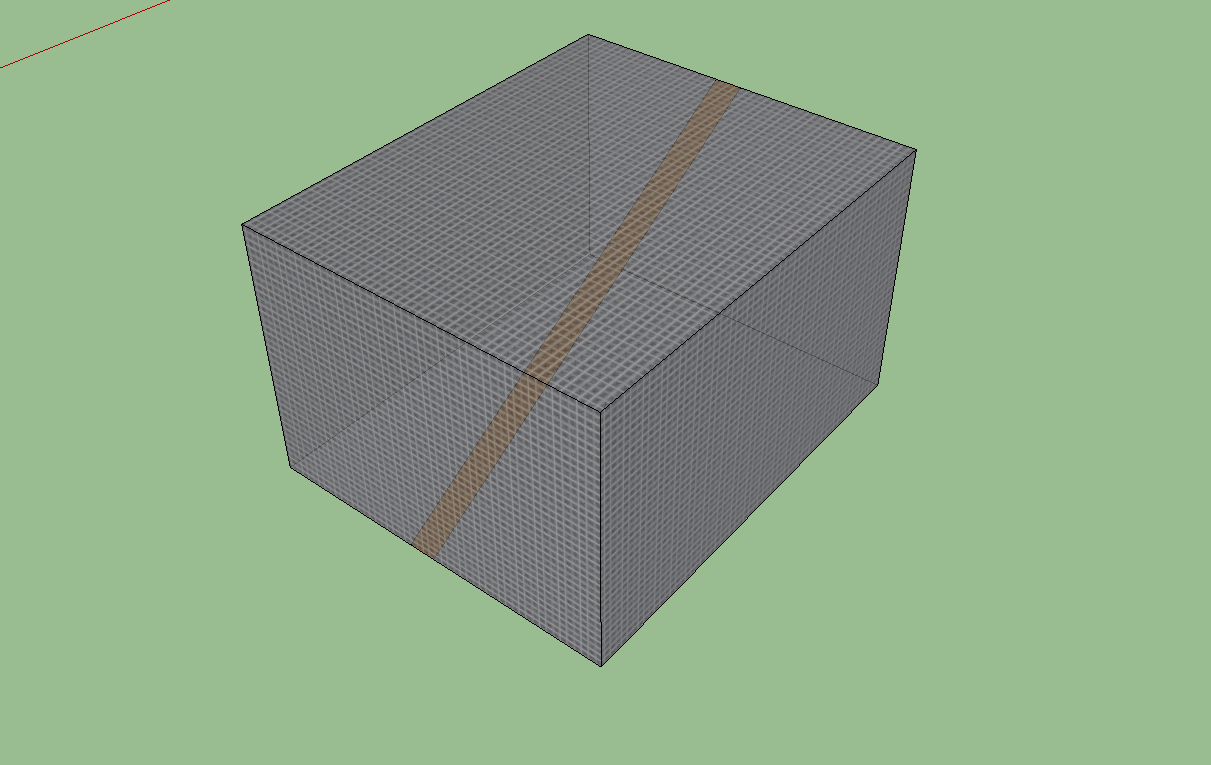
            the wood face in the cube doesn't erase

            PS: thanks a lot for this usefull plugin 😄

            1 條回覆 最後回覆 回覆 引用 0
            • TIGT 離線
              TIG Moderator
              最後由 編輯

              If it's the one occurrence, then can't you cut a temporary section to give access to the inner unwanted face and erase it/its edges that way ?
              Some tools like my SolidSolver will remove inner partitions/flaps if the 'box' [group] is intended to be a 'solid'...

              TIG

              1 條回覆 最後回覆 回覆 引用 0
              • A 離線
                Asloric
                最後由 編輯

                thanks.i've erase all useless faces 😄 .but i thinks it's a bit buggy with my model ( it erase most part of my project sometimes)

                1 條回覆 最後回覆 回覆 引用 0
                • thomthomT 離線
                  thomthom
                  最後由 編輯

                  Does your model have many very small faces/edges? Like ~1mm?

                  Thomas Thomassen — SketchUp Monkey & Coding addict
                  List of my plugins and link to the CookieWare fund

                  1 條回覆 最後回覆 回覆 引用 0
                  • A 離線
                    Asloric
                    最後由 編輯

                    yes beacause a lot of detail for much immersion ( i use the playup plugin to export it to crysis2)

                    1 條回覆 最後回覆 回覆 引用 0
                    • Dave RD 離線
                      Dave R
                      最後由 編輯

                      If you are trying to create tiny faces (less than 1mm) you are going to have problems unless you work at a larger scale. This has nothing to do with CleanUp, it's just a fact of using SketchUp.

                      Etaoin Shrdlu

                      %

                      (THERE'S NO PLACE LIKE)

                      G28 X0.0 Y0.0 Z0.0

                      M30

                      %

                      1 條回覆 最後回覆 回覆 引用 0
                      • thomthomT 離線
                        thomthom
                        最後由 編輯

                        SketchUp's internal precision is 1/1000th of an inch. When things get close to that vertices begin to be treated as having the same position and edges and faces might not create - or be lost when you modify them.

                        One workaround is to scale up the actual geometry, the edges and faces by a factor of say 100 - then scale down the instance/group to counter-weight it. That way the definition of the geometry it large enough, but the instance's scale make it appear in correct size.

                        Thomas Thomassen — SketchUp Monkey & Coding addict
                        List of my plugins and link to the CookieWare fund

                        1 條回覆 最後回覆 回覆 引用 0
                        • frankflafyF 離線
                          frankflafy
                          最後由 編輯

                          hi
                          thanx for the plug in. really love this.

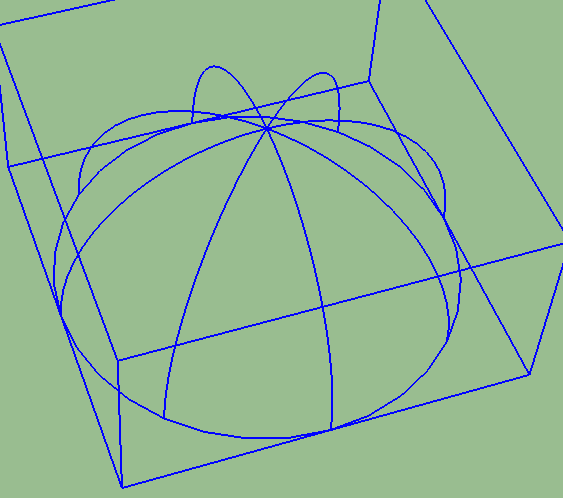
                          i have one problem. its Vray dome light
                          when i ran this with vray dome light on screen, the vray dome light deleted.

                          how i fix this?

                          thanx

                          1 條回覆 最後回覆 回覆 引用 0
                          • thomthomT 離線
                            thomthom
                            最後由 編輯

                            What does it look like this VRay dome?
                            This plugin isn't aware of "special" objects that other extensions create - it treats everything as regular edges and faces.

                            Thomas Thomassen — SketchUp Monkey & Coding addict
                            List of my plugins and link to the CookieWare fund

                            1 條回覆 最後回覆 回覆 引用 0
                            • jiminy-billy-bobJ 離線
                              jiminy-billy-bob
                              最後由 編輯

                              It's two arcs and a circle, without any face. So no surprise Cleanup deletes these edges.

                              25% off Skatter for SketchUcation Premium Members

                              1 條回覆 最後回覆 回覆 引用 0
                              • tt_suT 離線
                                tt_su
                                最後由 編輯

                                Anyone got a sample model?

                                1 條回覆 最後回覆 回覆 引用 0
                                • frankflafyF 離線
                                  frankflafy
                                  最後由 編輯

                                  Vray dome light is like this


                                  Vray Dome Light

                                  1 條回覆 最後回覆 回覆 引用 0
                                  • C 離線
                                    Charles502
                                    最後由 編輯

                                    so many thanks, is too very useful plugin for my model 3d and my time, thanks for sharing. thomthom

                                    1 條回覆 最後回覆 回覆 引用 0
                                    • utilerU 離線
                                      utiler
                                      最後由 編輯

                                      Hi Thom, hope you're doing well. 👍

                                      Between your CleanUp Tools and Edge Tools I'm wondering if you have thought about adding an option to move all verticies to Z=0. I often import dwg files that for some reason some lines are just that tiny bit off Z which causes all sorts of issues in finding out what is and isn't flattened....

                                      What do you think?

                                      Love your work!

                                      Just Curious...

                                      1 條回覆 最後回覆 回覆 引用 0
                                      • thomthomT 離線
                                        thomthom
                                        最後由 編輯

                                        @utiler said:

                                        I'm wondering if you have thought about adding an option to move all verticies to Z=0. I often import dwg files that for some reason some lines are just that tiny bit off Z which causes all sorts of issues in finding out what is and isn't flattened....

                                        "There's an extension for that!": Architect Tools (Look for the big weight-icon that will flatten everything like the Hulk)

                                        Thomas Thomassen — SketchUp Monkey & Coding addict
                                        List of my plugins and link to the CookieWare fund

                                        1 條回覆 最後回覆 回覆 引用 0
                                        • A 離線
                                          antonio.calvo
                                          最後由 編輯

                                          Thanks so much for your plugins, enjoy the cookie. I'm pretty new posting on this forum althought I have been following all of you guys and your fantastic work for a long time. Recently I'm working in a large model and your plugin is givin me a couple of errors of the model.

                                          Results of Validity Check.

                                          CLoop (1154934) does not reference CFace (1161656) - fixed
                                          The plane equation for CFace (4395989) is not valid - fixed

                                          Both of then never seem to be fixed after running the plugin. Also straight after closing Sketchup, it will create a bug splat! Is driving me mad 😕 and can't find which part of the model is doing it. Any help will be great. Thank you

                                          1 條回覆 最後回覆 回覆 引用 0
                                          • cottyC 離線
                                            cotty
                                            最後由 編輯

                                            @antonio.calvo said:

                                            ...and can't find which part of the model is doing it.

                                            Without having a look at the model no one else will be able to find it too...

                                            my SketchUp gallery

                                            1 條回覆 最後回覆 回覆 引用 0
                                            • 1
                                            • 2
                                            • 41
                                            • 42
                                            • 43
                                            • 44
                                            • 45
                                            • 48
                                            • 49
                                            • 43 / 49
                                            • 第一個貼文
                                              最後的貼文
                                            Buy SketchPlus
                                            Buy SUbD
                                            Buy WrapR
                                            Buy eBook
                                            Buy Modelur
                                            Buy Vertex Tools
                                            Buy SketchCuisine
                                            Buy FormFonts

                                            Advertisement