sketchucation logo sketchucation
    • Login
    Oops, your profile's looking a bit empty! To help us tailor your experience, please fill in key details like your SketchUp version, skill level, operating system, and more. Update and save your info on your profile page today!
    ⚠️ Update | Sketchucation Tools 5.0.8 released with licensing improvements and bugfixes Download

    [Plugin] CleanUp

    Scheduled Pinned Locked Moved Plugins
    974 Posts 217 Posters 1.2m Views 217 Watching
    Loading More Posts
    • Oldest to Newest
    • Newest to Oldest
    • Most Votes
    Reply
    • Reply as topic
    Log in to reply
    This topic has been deleted. Only users with topic management privileges can see it.
    • thomthomT
      thomthom
      last edited by

      @aceshigh said:

      @thomthom said:

      @aceshigh said:

      why arent these coplanar faces (from two different GoogleEarth imported meshes) merged?

      Can you post the model?
      Also, what are your settings? Remember that CleanUp has options to take into account face normals, material and UV mapping when merging.

      Also, that image seem to illustrate faces occupying the same plane...?

      no need to upload the model. It happens with any model, when importing several GoogleEarth meshes which overlap.

      Well, I don't see the behaviour, so if I am to check this out I need something to work with.

      And these meshes, do you merge them into one group?

      Thomas Thomassen — SketchUp Monkey & Coding addict
      List of my plugins and link to the CookieWare fund

      1 Reply Last reply
      Reply Quote 0
      • A
        AcesHigh
        last edited by

        @thomthom said:

        @aceshigh said:

        @thomthom said:

        @aceshigh said:

        why arent these coplanar faces (from two different GoogleEarth imported meshes) merged?

        Can you post the model?
        Also, what are your settings? Remember that CleanUp has options to take into account face normals, material and UV mapping when merging.

        Also, that image seem to illustrate faces occupying the same plane...?

        no need to upload the model. It happens with any model, when importing several GoogleEarth meshes which overlap.

        Well, I don't see the behaviour, so if I am to check this out I need something to work with.

        sorry ThomThom, it had happened in every experiment I did before, so I wrongly assumed it would happen in every one. But I did one try with two small pieces and nothing happened (although there were some lost textures in the process)

        So I will upload a SKP file. Thanks for the patience and hard work.

        @unknownuser said:

        And these meshes, do you merge them into one group?

        yup. Merge them into one group, then explode the meshes inside the group. Then CleanUp them. In the file I am sending you, not only some faces were lost when using CleanUp, as some coplanar faces were not merged, so you can see some texture flickering when rotating around.


        experimento2.skp

        1 Reply Last reply
        Reply Quote 0
        • thomthomT
          thomthom
          last edited by

          Also, what are your settings?

          Thomas Thomassen — SketchUp Monkey & Coding addict
          List of my plugins and link to the CookieWare fund

          1 Reply Last reply
          Reply Quote 0
          • thomthomT
            thomthom
            last edited by

            That model is after CleanUp is run? You got the original?

            Thomas Thomassen — SketchUp Monkey & Coding addict
            List of my plugins and link to the CookieWare fund

            1 Reply Last reply
            Reply Quote 0
            • A
              AcesHigh
              last edited by

              @thomthom said:

              Also, what are your settings?

              what settings ThomThom? The ones from CleanUp³?

              everything selected except Geometry to Layer 0, Merge Identical Materials (its two different materials, a bitmap for each imported mesh), so I saw no reason to use it) and Erase Stray Edges.

              sorry, I didnt keep the original imported meshes. But I will try again with new imported meshes.

              1 Reply Last reply
              Reply Quote 0
              • thomthomT
                thomthom
                last edited by

                Looking at the one you sent, I selected everything and intersected it with itself a few times. CleanUp doesn't clean up faces that partially overlaps. Only faces that fully cover the exact same space as another. After intersecting and then cleaning there was no overlapping.

                Thomas Thomassen — SketchUp Monkey & Coding addict
                List of my plugins and link to the CookieWare fund

                1 Reply Last reply
                Reply Quote 0
                • A
                  AcesHigh
                  last edited by

                  here... I copied the two meshes and joined them in a group, exploded them, and used Cleanup. No lost triangles this time, but there are plenty of overlapping triangles. (sometimes they dont appear when viewing in the textured mode, but when you used SHADED mode you will see the overlapping triangles...)

                  of course, the problem gets worse when you have to import even more mesh pieces, as sometimes you have over 3 meshes overlapping.


                  experimento3.skp

                  1 Reply Last reply
                  Reply Quote 0
                  • A
                    AcesHigh
                    last edited by

                    @thomthom said:

                    Looking at the one you sent, I selected everything and intersected it with itself a few times. CleanUp doesn't clean up faces that partially overlaps. Only faces that fully cover the exact same space as another. After intersecting and then cleaning there was no overlapping.

                    I will try that, thanks... however... how can I intersect if they are not solids?

                    ps: I am trying to solve, with CleanUp, about the same problem that made me ask for the "GoogleEarth Meshes boolean subtract" plugin at the topic http://forums.sketchucation.com/viewtopic.php?f=323&t=40555

                    1 Reply Last reply
                    Reply Quote 0
                    • thomthomT
                      thomthom
                      last edited by

                      @aceshigh said:

                      @thomthom said:

                      Looking at the one you sent, I selected everything and intersected it with itself a few times. CleanUp doesn't clean up faces that partially overlaps. Only faces that fully cover the exact same space as another. After intersecting and then cleaning there was no overlapping.

                      I will try that, thanks... however... how can I intersect if they are not solids?

                      ps: I am trying to solve, with CleanUp, about the same problem that made me ask for the "GoogleEarth Meshes boolean subtract" plugin at the topic http://forums.sketchucation.com/viewtopic.php?f=323&t=40555

                      Not intersecting with Solid Tools, but the regular intersect that's been in SU since, ever..? From the context menu, there is Intersect Faces menu item.

                      Thomas Thomassen — SketchUp Monkey & Coding addict
                      List of my plugins and link to the CookieWare fund

                      1 Reply Last reply
                      Reply Quote 0
                      • A
                        AcesHigh
                        last edited by

                        @thomthom said:

                        @aceshigh said:

                        @thomthom said:

                        Looking at the one you sent, I selected everything and intersected it with itself a few times. CleanUp doesn't clean up faces that partially overlaps. Only faces that fully cover the exact same space as another. After intersecting and then cleaning there was no overlapping.

                        I will try that, thanks... however... how can I intersect if they are not solids?

                        ps: I am trying to solve, with CleanUp, about the same problem that made me ask for the "GoogleEarth Meshes boolean subtract" plugin at the topic http://forums.sketchucation.com/viewtopic.php?f=323&t=40555

                        Not intersecting with Solid Tools, but the regular intersect that's been in SU since, ever..?

                        since ever, but I had never seen or used it before 😆

                        anyway, however, intersected it with itself several times, and when I used cleanup³, several triangles were lost, and got some error messages 😢

                        1 Reply Last reply
                        Reply Quote 0
                        • thomthomT
                          thomthom
                          last edited by

                          @aceshigh said:

                          and got some error messages 😢

                          What where the error message?

                          Thomas Thomassen — SketchUp Monkey & Coding addict
                          List of my plugins and link to the CookieWare fund

                          1 Reply Last reply
                          Reply Quote 0
                          • A
                            AcesHigh
                            last edited by

                            @thomthom said:

                            @aceshigh said:

                            and got some error messages 😢

                            What where the error message?

                            something along these lines (not exactly the same because I had to test again, with new Earth imported meshes, so different triangles disappeared, etc)

                            Results of Validity Check.

                            CEdge (4234) and CEdge (7926) connect the same 2 vertices - fixed
                            The plane equation for CFace (4767) is not valid - fixed

                            35 errors occurred. Please report the error and sample model to the author.

                            35 - Face merge resulted in lost geometry!

                            1 Reply Last reply
                            Reply Quote 0
                            • sumasterS
                              sumaster
                              last edited by

                              Dear Thomthom Sir,

                              here you are launch your new Cleanup (3.1.8) — 06 October 2011
                              • Whats new features you are added ❓

                              and one problem can you solve in new version

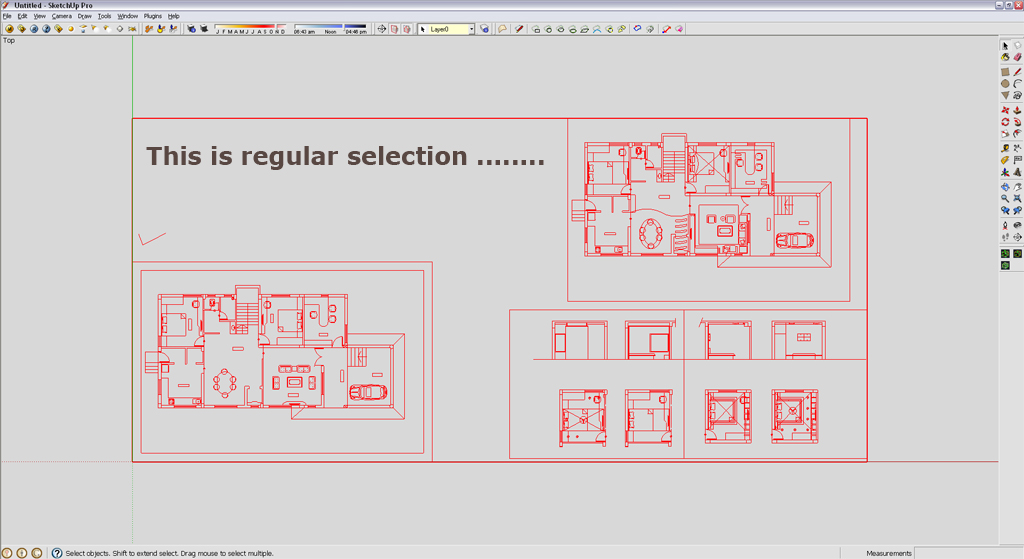
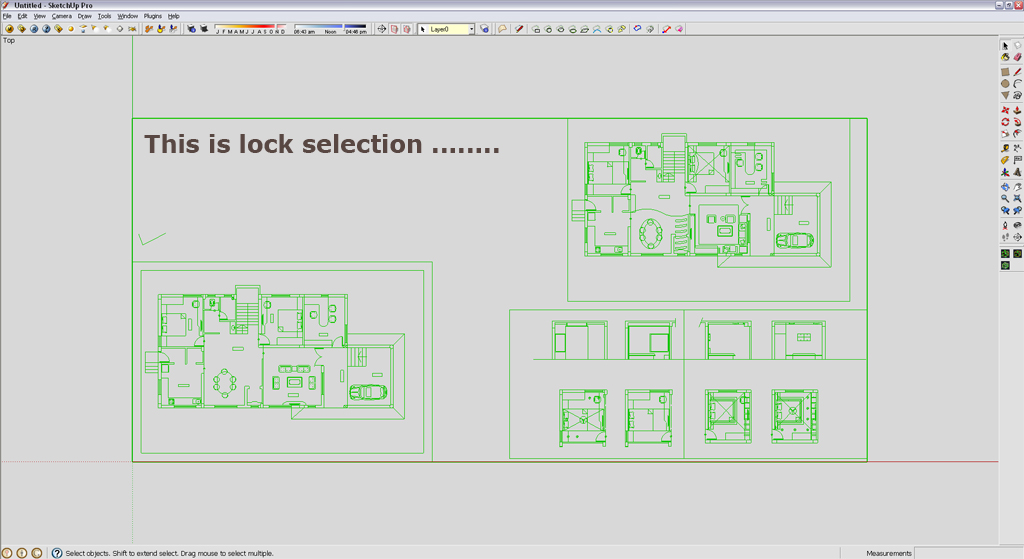
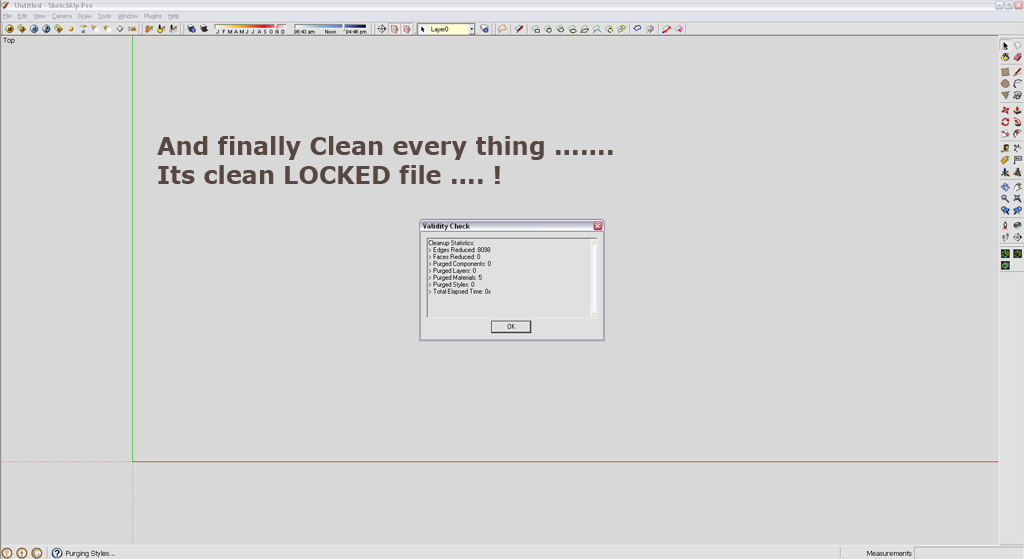
                              I'm architectural student and import CAD drawing and lock that drawing in sketchup viewport
                              but when i play / start " Clean With Last Setting " he also cleanup viewport with lock group/component 😮

                              See here ......

                              Regular selection

                              Lock selection

                              Finally clean every thing .....

                              And thank you for this tool its very best for me or ever one ...... 😄 😉

                              I'm very happy with this tool ......

                              Thank you,
                              SUmaster

                              1 Reply Last reply
                              Reply Quote 0
                              • thomthomT
                                thomthom
                                last edited by

                                The way CleanUp traverses the model it's tricky to know what is part of a locked group or not. But I'll put it down for investigation.

                                Thomas Thomassen — SketchUp Monkey & Coding addict
                                List of my plugins and link to the CookieWare fund

                                1 Reply Last reply
                                Reply Quote 0
                                • sumasterS
                                  sumaster
                                  last edited by

                                  Yes thank you .....

                                  Thank you,
                                  SUmaster

                                  1 Reply Last reply
                                  Reply Quote 0
                                  • dereiD
                                    derei
                                    last edited by

                                    @thomthom said:

                                    The way CleanUp traverses the model it's tricky to know what is part of a locked group or not. But I'll put it down for investigation.

                                    You can use ruby to check if is locked or not
                                    http://code.google.com/apis/sketchup/docs/ourdoc/group.html#locked?
                                    http://code.google.com/apis/sketchup/docs/ourdoc/componentinstance.html#locked?

                                    DESIGNER AND ARTIST DEREI.UK

                                    1 Reply Last reply
                                    Reply Quote 0
                                    • thomthomT
                                      thomthom
                                      last edited by

                                      @unknownuser said:

                                      @thomthom said:

                                      The way CleanUp traverses the model it's tricky to know what is part of a locked group or not. But I'll put it down for investigation.

                                      You can use ruby to check if is locked or not
                                      http://code.google.com/apis/sketchup/docs/ourdoc/group.html#locked?
                                      http://code.google.com/apis/sketchup/docs/ourdoc/componentinstance.html#locked?

                                      I know, but, I traverse the model by model.definitions.each - which means that I do not know if the parent for the instances I traverse are locked. I could be checking a sub-group of a locked group and .locked? will return false.

                                      Thomas Thomassen — SketchUp Monkey & Coding addict
                                      List of my plugins and link to the CookieWare fund

                                      1 Reply Last reply
                                      Reply Quote 0
                                      • T
                                        Tahesco
                                        last edited by

                                        Hi ThomThom,

                                        We imported a 100mb model from ARCHICAD into SU (in fbx format). This goes slow but it works.

                                        The problem is the same material gives different uvw_sizes on my components. The same brick material is 1 cm on a component while it's neigbour component has bricks of 20 cm ?!?.

                                        Is there a way to reset all components to the same scale, so my bricks are uniform on all objects/ components? (like reset xform in 3dsmax)

                                        Thanks for all the usefull work!

                                        TTion

                                        1 Reply Last reply
                                        Reply Quote 0
                                        • bagateloB
                                          bagatelo
                                          last edited by

                                          Another thing to do would be also interesting can recursively set all groups and components to "scale definition."

                                          @tahesco said:

                                          Hi ThomThom,

                                          We imported a 100mb model from ARCHICAD into SU (in fbx format). This goes slow but it works.

                                          The problem is the same material gives different uvw_sizes on my components. The same brick material is 1 cm on a component while it's neigbour component has bricks of 20 cm ?!?.

                                          Is there a way to reset all components to the same scale, so my bricks are uniform on all objects/ components? (like reset xform in 3dsmax)

                                          Thanks for all the usefull work!

                                          TTion

                                          While the cat's away, the mice will play

                                          1 Reply Last reply
                                          Reply Quote 0
                                          • thomthomT
                                            thomthom
                                            last edited by

                                            @bagatelo said:

                                            Another thing to do would be also interesting can recursively set all groups and components to "scale definition."

                                            And how would you handle scenarios where one definition has instances of different scale... ?

                                            Thomas Thomassen — SketchUp Monkey & Coding addict
                                            List of my plugins and link to the CookieWare fund

                                            1 Reply Last reply
                                            Reply Quote 0

                                            Hello! It looks like you're interested in this conversation, but you don't have an account yet.

                                            Getting fed up of having to scroll through the same posts each visit? When you register for an account, you'll always come back to exactly where you were before, and choose to be notified of new replies (either via email, or push notification). You'll also be able to save bookmarks and upvote posts to show your appreciation to other community members.

                                            With your input, this post could be even better 💗

                                            Register Login
                                            • 1
                                            • 2
                                            • 11
                                            • 12
                                            • 13
                                            • 14
                                            • 15
                                            • 48
                                            • 49
                                            • 13 / 49
                                            • First post
                                              Last post
                                            Buy SketchPlus
                                            Buy SUbD
                                            Buy WrapR
                                            Buy eBook
                                            Buy Modelur
                                            Buy Vertex Tools
                                            Buy SketchCuisine
                                            Buy FormFonts

                                            Advertisement