sketchucation logo sketchucation
    • 登入
    Oops, your profile's looking a bit empty! To help us tailor your experience, please fill in key details like your SketchUp version, skill level, operating system, and more. Update and save your info on your profile page today!
    🔌 Smart Spline | Fluid way to handle splines for furniture design and complex structures. Download

    [Plugin] CleanUp

    已排程 已置頂 已鎖定 已移動 Plugins
    974 貼文 217 Posters 864.5k 瀏覽 217 Watching
    正在載入更多貼文
    • 從舊到新
    • 從新到舊
    • 最多點贊
    回覆
    • 在新貼文中回覆
    登入後回覆
    此主題已被刪除。只有擁有主題管理權限的使用者可以查看。
    • thomthomT 離線
      thomthom
      最後由 編輯

      This is strange. When I compare the dot product of various faces, I find an overlap in the return value for faces where you can erase the connecting edge:

      
      	# Not coplanar
      	# 0.999999999898786
      	# 0.999999999901467
      	# 0.99999999992968
      	# 0.99999999995352
      	# 0.999999999959393
      	# 0.999999999974808
      	#
      	# Coplanar
      	# 0.999999999917881
      	# 0.999999999918562
      	# 0.999999999984962
      	# 0.999999999999148
      	# 0.999999999999408


      Thomas Thomassen — SketchUp Monkey & Coding addict
      List of my plugins and link to the CookieWare fund

      1 條回覆 最後回覆 回覆 引用 0
      • thomthomT 離線
        thomthom
        最後由 編輯

        @ecuadorian said:

        Thanks! I think I now remember what the problem might be, also. The model is scaled a lot. 😕

        I did notice that - but I exploded it and it still occurs...

        Thomas Thomassen — SketchUp Monkey & Coding addict
        List of my plugins and link to the CookieWare fund

        1 條回覆 最後回覆 回覆 引用 0
        • Chris FullmerC 離線
          Chris Fullmer
          最後由 編輯

          Could you take the edge, find its connected faces. Then get the object id for those faces, and get all their vertices positions. Then delete the edge if it is planar. Then test to see if those faces still exist. If they do, move on. If they do not, then rebuild them using their vertices' positions? Painful yes, but maybe useful?

          Chris

          Lately you've been tan, suspicious for the winter.
          All my Plugins I've written

          1 條回覆 最後回覆 回覆 引用 0
          • thomthomT 離線
            thomthom
            最後由 編輯

            @chris fullmer said:

            Could you take the edge, find its connected faces. Then get the object id for those faces, and get all their vertices positions. Then delete the edge if it is planar. Then test to see if those faces still exist. If they do, move on. If they do not, then rebuild them using their vertices' positions? Painful yes, but maybe useful?

            Chris

            I did that kind of stuff in my previous version, prior to 7.1 - wasn't stable. So many cases to take into account. Faces with inner holes etc...

            Thomas Thomassen — SketchUp Monkey & Coding addict
            List of my plugins and link to the CookieWare fund

            1 條回覆 最後回覆 回覆 引用 0
            • thomthomT 離線
              thomthom
              最後由 編輯

              I think I might have misunderstood this whole DOT product from vectors... will have to look deeper into it.

              Thomas Thomassen — SketchUp Monkey & Coding addict
              List of my plugins and link to the CookieWare fund

              1 條回覆 最後回覆 回覆 引用 0
              • Chris FullmerC 離線
                Chris Fullmer
                最後由 編輯

                Can you hit ctrl-z in ruby? 😄

                Lately you've been tan, suspicious for the winter.
                All my Plugins I've written

                1 條回覆 最後回覆 回覆 引用 0
                • R 離線
                  remus
                  最後由 編輯

                  @thomthom said:

                  I think I might have misunderstood this whole DOT product from vectors... will have to look deeper into it.

                  What do you think is not working? from my quick browse of your script the dot product should do what you want.

                  http://remusrendering.wordpress.com/

                  1 條回覆 最後回覆 回覆 引用 0
                  • thomthomT 離線
                    thomthom
                    最後由 編輯

                    @chris fullmer said:

                    Can you hit ctrl-z in ruby? 😄

                    Yea, http://code.google.com/intl/nb/apis/sketchup/docs/ourdoc/sketchup.html#undo
                    But that would ruin any kind of possibility to undo the whole erase coplanar operation.

                    Thomas Thomassen — SketchUp Monkey & Coding addict
                    List of my plugins and link to the CookieWare fund

                    1 條回覆 最後回覆 回覆 引用 0
                    • thomthomT 離線
                      thomthom
                      最後由 編輯

                      ...could create a temp group and use that to replicate the two faces (when within a range where we can't be certain.)

                      but I'd still try to avoid that if I can calculate this.

                      Thomas Thomassen — SketchUp Monkey & Coding addict
                      List of my plugins and link to the CookieWare fund

                      1 條回覆 最後回覆 回覆 引用 0
                      • honoluludesktopH 離線
                        honoluludesktop
                        最後由 編輯

                        Hi Thomas, I lost a texture from a face in a 61k faces model. BTW what happens when you have coplaner faces with different textures, or images placed on textured faces (say a run on a wood floor). Didn't read all the post, so sorry if already covered.

                        1 條回覆 最後回覆 回覆 引用 0
                        • thomthomT 離線
                          thomthom
                          最後由 編輯

                          @honoluludesktop said:

                          Hi Thomas, I lost a texture from a face in a 61k faces model. BTW what happens when you have coplaner faces with different textures, or images placed on textured faces (say a run on a wood floor).

                          At the moment it doesn't take into account materials. Only geometry.

                          Images? You mean an actual Image entity (It says "Image" in Entity Info when you select it?)

                          Thomas Thomassen — SketchUp Monkey & Coding addict
                          List of my plugins and link to the CookieWare fund

                          1 條回覆 最後回覆 回覆 引用 0
                          • thomthomT 離線
                            thomthom
                            最後由 編輯

                            @honoluludesktop said:

                            Well, I often import images (as images, not textures), and place them on textured faces.
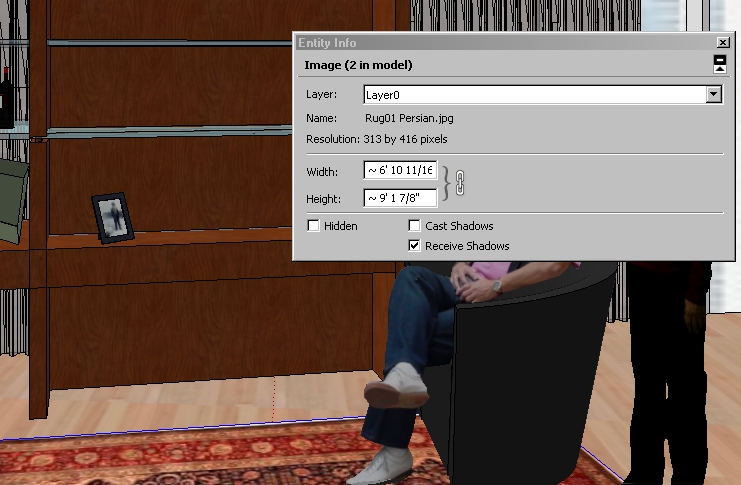
                            They would be ignored.
                            However, I do plan on adding an option for it to respect the material of the geometry. Just got to sort out some other issue first.

                            Thomas Thomassen — SketchUp Monkey & Coding addict
                            List of my plugins and link to the CookieWare fund

                            1 條回覆 最後回覆 回覆 引用 0
                            • honoluludesktopH 離線
                              honoluludesktop
                              最後由 編輯

                              Well, I often import images (as images, not textures), and place them on textured faces.


                              Temp01.jpg

                              1 條回覆 最後回覆 回覆 引用 0
                              • honoluludesktopH 離線
                                honoluludesktop
                                最後由 編輯

                                Opps, added image after your post.

                                1 條回覆 最後回覆 回覆 引用 0
                                • pilouP 離線
                                  pilou
                                  最後由 編輯

                                  Seems another very useful plug ☀
                                  About the Ecuadorian file
                                  Why not scale the file *10, apply the plug, then scale 1/10 ? 😉

                                  Frenchy Pilou
                                  Is beautiful that please without concept!
                                  My Little site :)

                                  1 條回覆 最後回覆 回覆 引用 0
                                  • thomthomT 離線
                                    thomthom
                                    最後由 編輯

                                    @unknownuser said:

                                    Seems another very useful plug ☀
                                    About the Ecuadorian file
                                    Why not scale the file *10, apply the plug, then scale 1/10 ? 😉

                                    The scale isn't the issue.

                                    Thomas Thomassen — SketchUp Monkey & Coding addict
                                    List of my plugins and link to the CookieWare fund

                                    1 條回覆 最後回覆 回覆 引用 0
                                    • C 離線
                                      chango70
                                      最後由 編輯

                                      This works very well. I have made Ctrl Shift C short cut for it. Thank you!

                                      1 條回覆 最後回覆 回覆 引用 0
                                      • thomthomT 離線
                                        thomthom
                                        最後由 編輯

                                        @jim said:

                                        Ack! it doesn't look at materials?
                                        Oh, and thank you! 👍

                                        @honoluludesktop said:

                                        Hi Thomas, I lost a texture from a face in a 61k faces model. BTW what happens when you have coplaner faces with different textures, or images placed on textured faces (say a run on a wood floor). Didn't read all the post, so sorry if already covered.

                                        Option to respect materials applied added. On by default.

                                        Ecuadorian:
                                        I adjusted the tolerance so it shouldn't loose any geometry on the model you sent me. Hopefully it won't loose anything in other models either.
                                        But there is some cases where which can be removed is left behind. I hope to address this. I figured it's best to be defensive than aggressive.

                                        Thomas Thomassen — SketchUp Monkey & Coding addict
                                        List of my plugins and link to the CookieWare fund

                                        1 條回覆 最後回覆 回覆 引用 0
                                        • E 離線
                                          Ecuadorian
                                          最後由 編輯

                                          Sounds nice, Thom!
                                          Perhaps you could give the user two or three threshold options.

                                          -Miguel Lescano
                                          Subscribe to my house plans YouTube channel! (30K+ subs)

                                          1 條回覆 最後回覆 回覆 引用 0
                                          • thomthomT 離線
                                            thomthom
                                            最後由 編輯

                                            @ecuadorian said:

                                            Sounds nice, Thom!
                                            Perhaps you could give the user two or three threshold options.

                                            I added an debug option which you can use for now. You can see it in the screenshot.
                                            The closer to 1.0 the stricter it is.

                                            Thomas Thomassen — SketchUp Monkey & Coding addict
                                            List of my plugins and link to the CookieWare fund

                                            1 條回覆 最後回覆 回覆 引用 0
                                            • 1
                                            • 2
                                            • 19
                                            • 20
                                            • 21
                                            • 22
                                            • 23
                                            • 48
                                            • 49
                                            • 21 / 49
                                            • 第一個貼文
                                              最後的貼文
                                            Buy SketchPlus
                                            Buy SUbD
                                            Buy WrapR
                                            Buy eBook
                                            Buy Modelur
                                            Buy Vertex Tools
                                            Buy SketchCuisine
                                            Buy FormFonts

                                            Advertisement


