sketchucation logo sketchucation
    • 登入
    Oops, your profile's looking a bit empty! To help us tailor your experience, please fill in key details like your SketchUp version, skill level, operating system, and more. Update and save your info on your profile page today!
    🔌 Smart Spline | Fluid way to handle splines for furniture design and complex structures. Download

    [Plugin] 2D Tools

    已排程 已置頂 已鎖定 已移動 Plugins
    791 貼文 178 Posters 522.8k 瀏覽 177 Watching
    正在載入更多貼文
    • 從舊到新
    • 從新到舊
    • 最多點贊
    回覆
    • 在新貼文中回覆
    登入後回覆
    此主題已被刪除。只有擁有主題管理權限的使用者可以查看。
    • G 離線
      ghostanywhere
      最後由 編輯

      Hello, I can't find the zip version for download, pls help

      1 條回覆 最後回覆 回覆 引用 0
      • cottyC 離線
        cotty
        最後由 編輯

        @ghostanywhere said:

        Hello, I can't find the zip version for download, pls help

        In the first post you will find a link to the plugin store where you can download the rbz-file. If you need a zip-file, you can rename it to zip-ending, but it is recommended to use the extension installation button or even better the sketchucation tools for installation.

        my SketchUp gallery

        1 條回覆 最後回覆 回覆 引用 0
        • P 離線
          pohlovec
          最後由 編輯

          Hi,
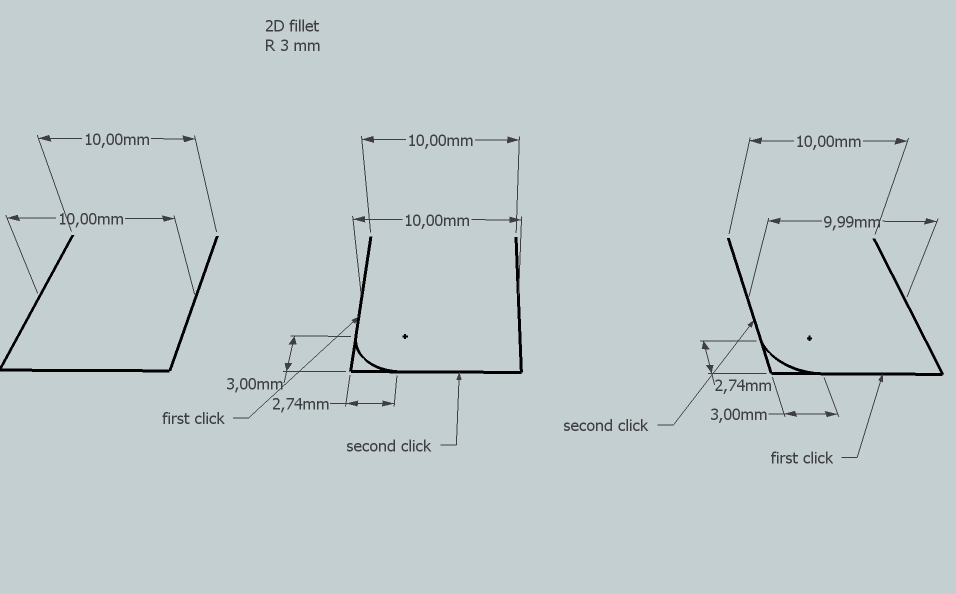
          about 2D Fillet Tool

          I would like to change the default count of segment from 18 to 6.
          Can I somehow modify the file 2DfilletTool.rb?

          I tried it, but without result.

          Is there any option???
          Thx

          1 條回覆 最後回覆 回覆 引用 0
          • TIGT 離線
            TIG Moderator
            最後由 編輯

            You change the setting when activating the tool - by typing 6s [+<enter>] - as well as then say 100 [+<enter>] for the radius... then both of those settings are remembered with the model on a save, and reused across sessions.

            IF you want to change the script's coding...
            Use a plain-text editor - say Notepad/Notepad++ or TextWrangler[for MAC] - never a wordprocessor!
            Edit the file: ../Plugins/2DTools/2DfilletTool.rb
            Then find the following two lines: #70
            @segs=**18** if not @segs
            which becomes: @segs=**6** if not @segs
            and then #89
            @segs=Sketchup.active_model.get_attribute("2Dtools","fillet_segments",**18**)
            which becomes: @segs=Sketchup.active_model.get_attribute("2Dtools","fillet_segments",**6**)
            [TIP: If your text-editor has no line-numbering then you can search/find for the two occurrences of " @segs="...]
            Now when opening a brand new model the default 2DfilletTool's segmentation is always 6s - although of course you can reset it to say 18s or whatever you desire on a per model basis. by typing the new value into the VCB, such settings are remembered with each model on save - here as the attribute 2Dtools : fillet_segments...
            🤓

            TIG

            1 條回覆 最後回覆 回覆 引用 0
            • robertWanR 離線
              robertWan
              最後由 編輯

              How to avoid this error? After the fillet lines are not parallel.
              2D Fillet

              Robert


              2DFillet.skp

              1 條回覆 最後回覆 回覆 引用 0
              • TIGT 離線
                TIG Moderator
                最後由 編輯

                @RobertWan

                I think this is down to tiny geometry again.
                SketchUp tolerance is ~1/1000"
                3mm is approaching that for the tiny facet sizes and their end points being considered equivalent...
                When the fillet tool rounds a corner like that there should be no residual lines anyway!
                The faceted arc has a first/last section at such a shallow angle to the side that the point is confused.
                If you delete the two edges and redraw them, being sure to snap to the ends of the fillet-arc, then they will be 3mm long and dimension correctly.
                See the zoomed view attached...
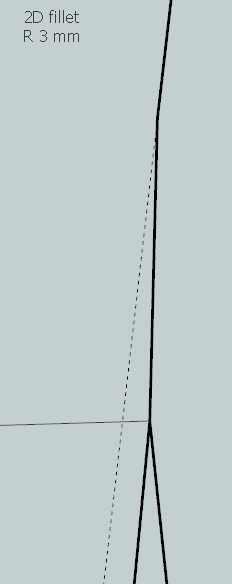

                Capture.PNG

                TIG

                1 條回覆 最後回覆 回覆 引用 0
                • J 離線
                  jzar_kobi
                  最後由 編輯

                  Having trouble with the textures....just don't fill. I've picked the texture from the scene and used the bucket tool....worked that way but not from the 2d hatching tool. The 2d line tool....love it. It did jump it's xyz position when it when over a 3D object. Moved in the positive z direction to float above the cube. I'll post some of my experiments if you'd like them.

                  1 條回覆 最後回覆 回覆 引用 0
                  • T 離線
                    trackbuilder
                    最後由 編輯

                    I am new to installing Plugins for SU, so I downloaded the Plugin from SketchUcation and it installed correctly. I downloaded the 2D Tools plugin from TIG and it appeared to load properly. However, once it was installed, this message came up...

                    Permission denied - C:/Program Files/SketchUp/SketchUp 2013/Plugins/2Dtools/2Dtidied.txt
                    Error Loading File 2D#.rb
                    Permission denied - C:/Program Files/SketchUp/SketchUp 2013/Plugins/2Dtools/2Dtidied.txt

                    Is this a setting conflict with my PC or what? Please help...

                    I've installed SU Pro v 2013, on OS Windows 7

                    1 條回覆 最後回覆 回覆 引用 0
                    • Dave RD 離線
                      Dave R
                      最後由 編輯

                      @trackbuilder said:

                      I am new to installing Plugins for SU, so I downloaded the Plugin from SketchUcation and it installed correctly.

                      Actually, you didn't quite get it installed correctly. Before installing it you need to go in to the Security setting for the Plugins folder and set permissions for your log in to All so there's full access. Do that and reinstall it. Best would be to install the SCF Plugin Store and automatically install other plugins from there.

                      Etaoin Shrdlu

                      %

                      (THERE'S NO PLACE LIKE)

                      G28 X0.0 Y0.0 Z0.0

                      M30

                      %

                      1 條回覆 最後回覆 回覆 引用 0
                      • jim smithJ 離線
                        jim smith
                        最後由 編輯

                        @dave r said:

                        @trackbuilder said:

                        I am new to installing Plugins for SU, so I downloaded the Plugin from SketchUcation and it installed correctly.

                        Actually, you didn't quite get it installed correctly. Before installing it you need to go in to the Security setting for the Plugins folder and set permissions for your log in to All so there's full access. Do that and reinstall it. Best would be to install the SCF Plugin Store and automatically install other plugins from there.

                        I was receiving the same message as trackbuilder on just some of the plugins and only on su 2013. My SU8 never had the problem. I redid the security setting as suggested and can now load more plugins. 2D is a favorite, now I can start to migrate with confidence, but hanging on to 8 for a while..... Thanks for the clue Dave!

                        "Out of clutter find simplicity,
                        from discord find harmony,
                        In the middle of difficulty lies opportunity"
                        Albert Einstein

                        1 條回覆 最後回覆 回覆 引用 0
                        • Dave RD 離線
                          Dave R
                          最後由 編輯

                          Hi Jim,

                          I'm glad that helped. Some plugins need to be able to write to a file for changes you might make in the VCB or a window that opens. The files generally end up in the Plugins folder so having privileges will be important.

                          Etaoin Shrdlu

                          %

                          (THERE'S NO PLACE LIKE)

                          G28 X0.0 Y0.0 Z0.0

                          M30

                          %

                          1 條回覆 最後回覆 回覆 引用 0
                          • TIGT 離線
                            TIG Moderator
                            最後由 編輯

                            That temp file is a throwback.
                            I'll remove it and update.
                            It's there to record if ye olde format of the 2dTools installation has already been tidied up...

                            However, you do need to ensure FULL permissions to your Plugins folder as several tools do still write temporary files there...

                            TIG

                            1 條回覆 最後回覆 回覆 引用 0
                            • T 離線
                              trackbuilder
                              最後由 編輯

                              TIG, Dave and Jim,

                              Thank you for all of your help!!!!! I adjusted the security settings, and found the 2D Tools plug-in in the Draw menu.

                              1 條回覆 最後回覆 回覆 引用 0
                              • Clayton49C 離線
                                Clayton49
                                最後由 編輯

                                Help to anyone,

                                This tool will be a life saver, however for some reason it won't let me install it. I get an the error message below:-


                                Permission denied - C:/Program Files (x86)/SketchUp/SketchUp 2013/Plugins/2Dtools/2Dtidied.txt
                                Error Loading File 2D#.rb
                                Permission denied - C:/Program Files (x86)/SketchUp/SketchUp 2013/Plugins/2Dtools/2Dtidied.txt

                                Not had anything like this before on any extensions, what gives with this extension...

                                I wish this extension was available through SketchUP's own Extension Warehouse, I might get it loaded that way.

                                Not too sure if this is related to the SKETCHUCATION PLUGIN STORE V2.0 as having some problems with that as well...

                                When I click on the blue icon (SKETCHUCATION PLUGINS MANAGER) I get error message saying "no security permission to manage any plugins folder in the $LOAD_PATH. FULL Read/write Permissions are needed to manage Plugins within this Plugins Folders.."

                                Just not my day I guess.. 😞

                                Any help will be most appreciated.

                                Over & out,
                                Clayton.
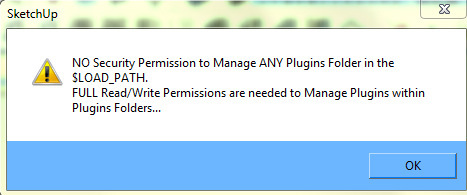

                                SU error message 01.jpg

                                Over & out,
                                Clayton.

                                %(#008000)[Trotman & Taylor
                                Architectural Consultants]

                                1 條回覆 最後回覆 回覆 引用 0
                                • Dave RD 離線
                                  Dave R
                                  最後由 編輯

                                  This has been covered a number of times here. In fact, just five posts above. You need to set the permissions for the Plugins folder so you have full administrative rights under your log in. Go to the Plugins folder, right click on it and choose Properties. Then click on the Security tab and the Edit button. Select your log in and tick all of the boxes for "Allow." Then OK and close out of that. Reinstall the plugin and it should work fine.

                                  Etaoin Shrdlu

                                  %

                                  (THERE'S NO PLACE LIKE)

                                  G28 X0.0 Y0.0 Z0.0

                                  M30

                                  %

                                  1 條回覆 最後回覆 回覆 引用 0
                                  • TIGT 離線
                                    TIG Moderator
                                    最後由 編輯

                                    Somehow the issue that was meant to be resolved with v5.6 messed up in the recent upload.
                                    The latest v5.7 [hopefully] avoids this 'temp-file-in-plugins-folder' issue all together...
                                    http://sketchucation.com/resources/pluginstore?pln=2Dtools

                                    BUTthis does not sidestep the issue that you MUST have FULL security permissions to your Plugins folder both to AutoInstall Plugins from the PluginStore... AND subsequently 'manage' them... 😒

                                    TIG

                                    1 條回覆 最後回覆 回覆 引用 0
                                    • TIGT 離線
                                      TIG Moderator
                                      最後由 編輯

                                      Here's a future-proofed update.
                                      http://sketchucation.com/forums/viewtopic.php?p=185760#p185760

                                      TIG

                                      1 條回覆 最後回覆 回覆 引用 0
                                      • OxerO 離線
                                        Oxer
                                        最後由 編輯

                                        Thanks TIG for the update, the v5.9 works fine on Mac OSX 10.9 & SU2013 but a minor problem, the icons of the tools cursor don't show.

                                        "The result is the end what is important is the process" by Oxer
                                        http://www.oxervision.blogspot.com/

                                        1 條回覆 最後回覆 回覆 引用 0
                                        • TIGT 離線
                                          TIG Moderator
                                          最後由 編輯

                                          I confirm that I too get no custom-cursors with the MAC version [PC is still fine!] - there are no error messages...

                                          I'm investigating... 😕

                                          Any advice from others who've seen this kind of thing would be appreciated... 😒

                                          TIG

                                          1 條回覆 最後回覆 回覆 引用 0
                                          • Dave RD 離線
                                            Dave R
                                            最後由 編輯

                                            I just installed 2D Tools on my Mac again from the Plugin Store. the tools show just fine on the toolbar for me.
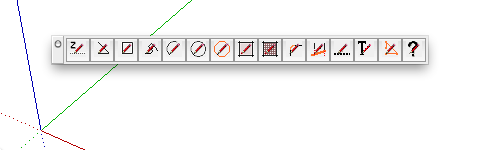

                                            2013-12-20_05-58-24.png

                                            Etaoin Shrdlu

                                            %

                                            (THERE'S NO PLACE LIKE)

                                            G28 X0.0 Y0.0 Z0.0

                                            M30

                                            %

                                            1 條回覆 最後回覆 回覆 引用 0
                                            • 1
                                            • 2
                                            • 3
                                            • 4
                                            • 5
                                            • 6
                                            • 7
                                            • 39
                                            • 40
                                            • 5 / 40
                                            • 第一個貼文
                                              最後的貼文
                                            Buy SketchPlus
                                            Buy SUbD
                                            Buy WrapR
                                            Buy eBook
                                            Buy Modelur
                                            Buy Vertex Tools
                                            Buy SketchCuisine
                                            Buy FormFonts

                                            Advertisement