sketchucation logo sketchucation
    • Login
    Oops, your profile's looking a bit empty! To help us tailor your experience, please fill in key details like your SketchUp version, skill level, operating system, and more. Update and save your info on your profile page today!
    Mac User? | Join the Rayscaper Beta for Mac Learn More

    [Plugin] 2 Faces + Path ver. 1.5.

    Scheduled Pinned Locked Moved Plugins
    72 Posts 48 Posters 80.1k Views 48 Watching
    Loading More Posts
    • Oldest to Newest
    • Newest to Oldest
    • Most Votes
    Reply
    • Reply as topic
    Log in to reply
    This topic has been deleted. Only users with topic management privileges can see it.
    • H
      hsjzyangbin
      last edited by

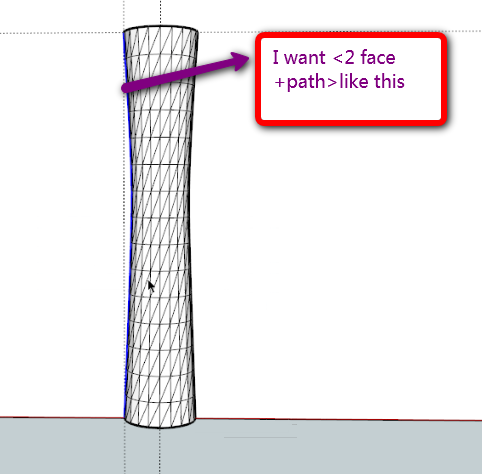
      Hi,ken28875,I want 2 face+path give path just like this:

      gogo.png

      1 Reply Last reply
      Reply Quote 0
      • ken28875K
        ken28875
        last edited by

        @hsjzyangbin said:

        Hi,ken28875,I want 2 face+path give path just like this:

        Hi hsjyangbin,

        I think you meant to ask Kirill. He's the one who wrote the plugin.

        I have no idea about code. lol

        _KN

        Follow Your Dreams.

        1 Reply Last reply
        Reply Quote 0
        • R
          romain210
          last edited by

          thanks a lot

          1 Reply Last reply
          Reply Quote 0
          • pilouP
            pilou
            last edited by

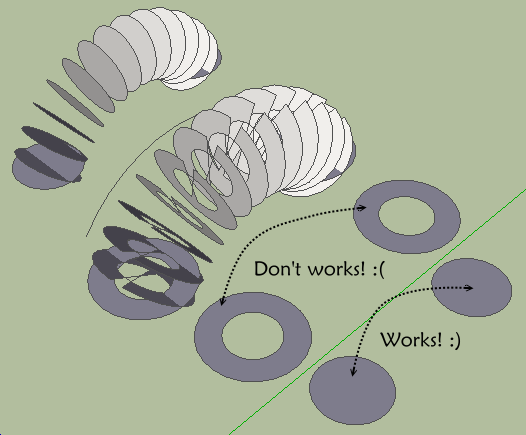
            Seems there is a little glitch ! 😮
            Don't works for all these sort of "pierced faces" !
            CLick if scrollbars

            dworks.png

            Frenchy Pilou
            Is beautiful that please without concept!
            My Little site :)

            1 Reply Last reply
            Reply Quote 0
            • B
              balloon
              last edited by

              Thank you very much!

              1 Reply Last reply
              Reply Quote 0
              • M
                museummaker
                last edited by

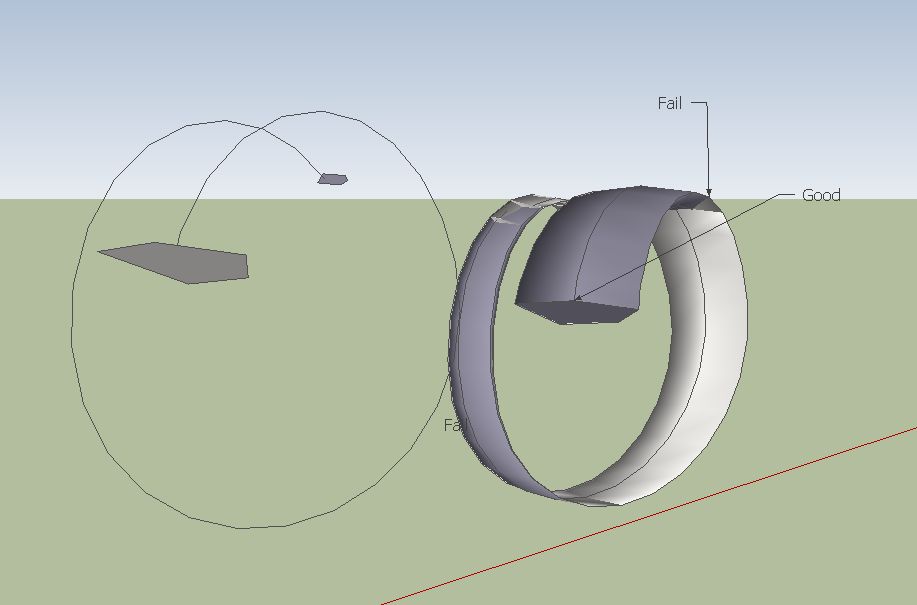
                I am having some difficulty with this shape. It is a spiral with a shape, and it tapers as it it travels down the spiral.

                I thought this plug would work but I am getting odd results.

                Any ideas?

                Thank you for all,

                tryagain.skp


                2facesonepath.JPG

                1 Reply Last reply
                Reply Quote 0
                • pilouP
                  pilou
                  last edited by

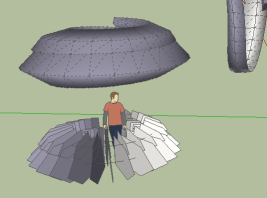
                  Use the Perpendicular face tool by Chris Fullmer for put your 2 faces at the extremities of the curve!
                  Don't take care of their positions explode the groups select all
                  and launch 2 faces + path 😉
                  works.png

                  Frenchy Pilou
                  Is beautiful that please without concept!
                  My Little site :)

                  1 Reply Last reply
                  Reply Quote 0
                  • M
                    museummaker
                    last edited by

                    Hi Frenchy,

                    I used that when I set up the model. Also tried flipping the normals on the shaped ends, various options in the dialog box, its not behaving like I thought. Driving me crazy

                    1 Reply Last reply
                    Reply Quote 0
                    • pilouP
                      pilou
                      last edited by

                      Maybe it's your curve! I have drawn a new one 😉
                      With spiral 1.3

                      Frenchy Pilou
                      Is beautiful that please without concept!
                      My Little site :)

                      1 Reply Last reply
                      Reply Quote 0
                      • M
                        museummaker
                        last edited by

                        I was guessing it may be that the spiral was precisely formed.

                        I'm trying but I still can't get it.

                        1 Reply Last reply
                        Reply Quote 0
                        • M
                          museummaker
                          last edited by

                          I got it! ☀

                          Used Shape Bender instead!


                          got it.JPG

                          1 Reply Last reply
                          Reply Quote 0
                          • brookefoxB
                            brookefox
                            last edited by

                            Thank you much, Kirill.

                            I'm trying to get up to speed. Not being a ruby cooker, I am ignorant of why a straight 'curve' is needed rather than an edge, multi- segmented or not, though you clearly state that a curve path is what is required. I wish error messages could be generated to help users, say if they make selection errors. Or perhaps that the plug be made to work with edge paths, so slow-witted users wouldn't need error messages.... So much.

                            ~ Brooke

                            1 Reply Last reply
                            Reply Quote 0
                            • K
                              kirill2008
                              last edited by

                              @brookefox said:

                              I wish error messages could be generated to help users, say if they make selection errors. Or perhaps that the plug be made to work with edge paths, so slow-witted users wouldn't need error messages.... So much.

                              You may try new version of 'LSS Toolbar' instead of '2 Faces + Path' plugin.
                              New version of 'LSS Toolbar' is still under construction, but fortunately '2 faces + path' tool is already implemented and work even more stable, than '2 Faces + Path ver. 1.5' stand-alone plugin.
                              You may take a look at demonstration video at https://sites.google.com/site/lssoft2011/home/lss-toolbar


                              lss_toolbar_2_0_pre_alpha.zip

                              1 Reply Last reply
                              Reply Quote 0
                              • Dave RD
                                Dave R
                                last edited by

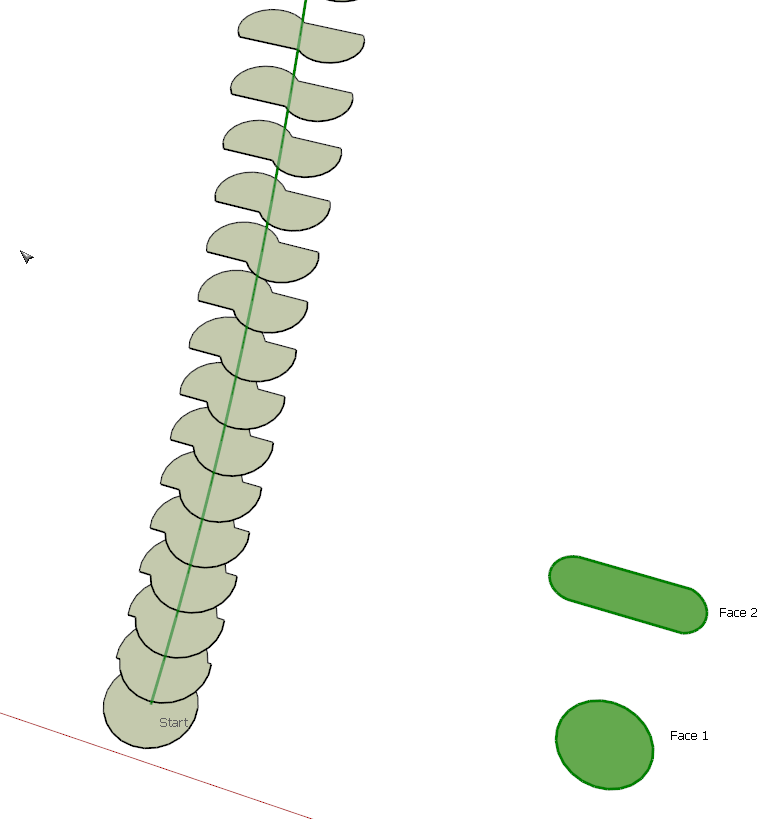
                                Interesting, Kirill. The first try gave me this result. I would expect a smoother transition from the circle to the lozenge shape. Any suggestions on a way to make the transition correctly?

                                LSS.png

                                Etaoin Shrdlu

                                %

                                (THERE'S NO PLACE LIKE)

                                G28 X0.0 Y0.0 Z0.0

                                M30

                                %

                                1 Reply Last reply
                                Reply Quote 0
                                • K
                                  kirill2008
                                  last edited by

                                  @dave r said:

                                  Interesting, Kirill. The first try gave me this result. I would expect a smoother transition from the circle to the lozenge shape. Any suggestions on a way to make the transition correctly?

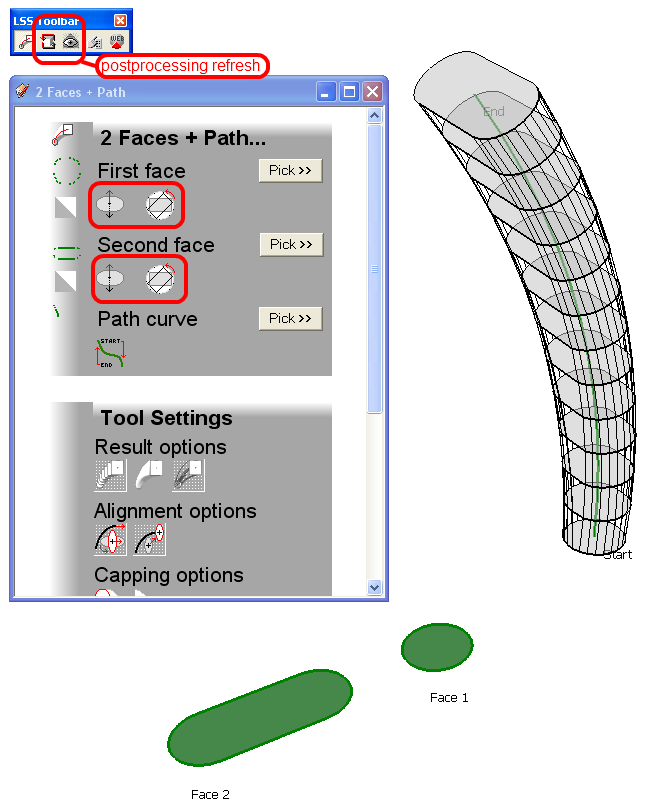
                                  Yes you can use 2 command buttons within '2 Faces + Path' section of web-dialog:

                                  • Flip face normal
                                  • Rotate face to dock vertices with other face
                                    It is also possible to fix the situation after 'pathface entity' generation: you can rotate any of two faces manually and refresh 'pathface entity'.
                                    dock_n_flip_buttons.png
                                    I promise, that I'll write some manuals after 'LSS Toolbar' functionality update completion.
                                  1 Reply Last reply
                                  Reply Quote 0
                                  • irwanwrI
                                    irwanwr
                                    last edited by

                                    looks and sounds good.
                                    been waiting for the new LSS Toolbar.
                                    thank you kirill.

                                    1 Reply Last reply
                                    Reply Quote 0

                                    Hello! It looks like you're interested in this conversation, but you don't have an account yet.

                                    Getting fed up of having to scroll through the same posts each visit? When you register for an account, you'll always come back to exactly where you were before, and choose to be notified of new replies (either via email, or push notification). You'll also be able to save bookmarks and upvote posts to show your appreciation to other community members.

                                    With your input, this post could be even better 💗

                                    Register Login
                                    • 1
                                    • 2
                                    • 3
                                    • 4
                                    • 2 / 4
                                    • First post
                                      Last post
                                    Buy SketchPlus
                                    Buy SUbD
                                    Buy WrapR
                                    Buy eBook
                                    Buy Modelur
                                    Buy Vertex Tools
                                    Buy SketchCuisine
                                    Buy FormFonts

                                    Advertisement