[Locked] 2D Toolset - Use Newer Version Link
-
I took a few hours to get the first code out - look at the early exchanges with Jim -I based it on several pre-existing ideas... it then grew 'like topsy'... So far it's taken a couple of days to get where we are, on and off - I was away this weekend 'resting' and had T some better ideas for v2 that will be out soonest...

-
TIG,
I have wished for these tools since like the first day of using SketchUp!
Now SU can be an illustration tool too (I use it for this sometimes, logo design, etc.)
But now also I can trace these freaky CAD plans that look like they are flat but they are not, etc.THANKS A MILLION... you are a legend in your own time.
-
Hi TIG, downloaded the latest 2Dtoolset and having a play....
I noticed a few things that you may wish to review:- 2D Polyline doesn't acknowledge when it is on an axis. [change to green or red and tooltip to say "On Green axis"]
- 2D Arc doesn't reference axises at all.
- 2D circle doesn't acknowledge when it is on an axis either. [as per 2D polyline]
Wishlist
- Arc to recognize tangents
- Can 2D rectangle produce a closed entity?
Well done, mate, this is a great addition to GSU!!!
-
@utiler said:
Hi TIG, downloaded the latest 2Dtoolset and having a play....
I noticed a few things that you may wish to review:- 2D Polyline doesn't acknowledge when it is on an axis. [change to green or red and tooltip to say "On Green axis"]
- 2D Arc doesn't reference axises at all.
- 2D circle doesn't acknowledge when it is on an axis either. [as per 2D polyline]
Wishlist
- Arc to recognize tangents
- Can 2D rectangle produce a closed entity?
Well done, mate, this is a great addition to GSU!!!
Your items are already on the list for v2, as is wish 1. Wish 2 - we could make it a modifier key - e.g. raw rectangle is lines, with alt key it's a loop...
-
Or Ctrl key for the loop; not sure what is the 'norm' for use of shift/Alt/Ctrl keys when it comes to GSU....
I just find the physical location of Ctrl is easier to get used to than Atl; even considering Alt implies alternative...Anyway, glad it is on the radar.

-
@utiler said:
Or Ctrl key for the loop; not sure what is the 'norm' for use of shift/Alt/Ctrl keys when it comes to GSU....
I just find the physical location of Ctrl is easier to get used to than Atl; even considering Alt implies alternative...Anyway, glad it is on the radar.
I said Alt because it's an 'Alt'ernative to the normal that you'd toggle between [?] and I was thinking of using Ctrl for some other things like toggling between real_lines and Construction_guide_lines or for Arcs with Alt = Alternatives to reverse A-rc_direction and then Ctrl = make by_Center rather than 3_point ? Also Ctrl with Circle is to tooggle between 3_point and center+radius whilst Alt toggles between Radius or Diameter ?
-
Hi Tig
Maybe this code wil be helpfull: http://old.blog.edu.cn/user2/autool/archives/2006/1604892.shtml
Greetings, Bep
-
Thanks for the ideas...
-
I had the same thought about 2D radius - extracting the 2D radius/chamfer ; extend/trim lines from k-tools was on my shortlist of things to do. But it would fit in well in your 2D Tools.
Also, I am modifying my automatic centerpoints plugin so it will work with the circles and arcs created with this (or any other) ruby tools. As long as you continue to use
add_circle,add_arc, oradd_ngon(etc) jf_autocenterpoint should work. -
Hi TIG : I got an error message perhaps you can help me with. I downloaded the 2d Toolset to the downloads folder (Win 7 with SU8), then extracted everything directly to Google>Sketchup8>Plugins. When I restarted SU I got this:
Error Loading File 2D#.rb
C:/Program Files (x86)/Google/Google SketchUp 8/Plugins/2DlineTool.rb:33: syntax error, unexpected ',', expecting kEND
Sketchup::set_status_text ("Length"), SB_VCB_LABEL
^
C:/Program Files (x86)/Google/Google SketchUp 8/Plugins/2DlineTool.rb:71: syntax error, unexpected ',', expecting kEND
..."2D Line: Select Second End"), SB_PROMPT
^Error Loading File 2DarcTool.rb
C:/Program Files (x86)/Google/Google SketchUp 8/Plugins/2DlineTool.rb:33: syntax error, unexpected ',', expecting kEND
Sketchup::set_status_text ("Length"), SB_VCB_LABEL
^
C:/Program Files (x86)/Google/Google SketchUp 8/Plugins/2DlineTool.rb:71: syntax error, unexpected ',', expecting kEND
..."2D Line: Select Second End"), SB_PROMPT
^Error Loading File 2DcircleTool.rb
C:/Program Files (x86)/Google/Google SketchUp 8/Plugins/2DcircleTool.rb:37: syntax error, unexpected ',', expecting kEND
Sketchup::set_status_text ("Radius"), SB_VCB_LABEL
^
C:/Program Files (x86)/Google/Google SketchUp 8/Plugins/2DcircleTool.rb:83: syntax error, unexpected ',', expecting kEND
...ircle: Select Point on Side"), SB_PROMPT
^Error Loading File 2DfacemakerTool.rb
C:/Program Files (x86)/Google/Google SketchUp 8/Plugins/2DfacemakerTool.rb:53: syntax error, unexpected ',', expecting kEND
...inside a Loop to Add a Face"), SB_PROMPT
^
C:/Program Files (x86)/Google/Google SketchUp 8/Plugins/2DfacemakerTool.rb:61: syntax error, unexpected ',', expecting kEND
...inside a Loop to Add a Face"), SB_PROMPT
^Error Loading File 2DhatchingTool.rb
C:/Program Files (x86)/Google/Google SketchUp 8/Plugins/2DhatchingTool.rb:74: syntax error, unexpected ',', expecting kEND
... Loop to Add a Hatched Face"), SB_PROMPT
^
C:/Program Files (x86)/Google/Google SketchUp 8/Plugins/2DhatchingTool.rb:88: syntax error, unexpected ',', expecting kEND
... Loop to Add a Hatched Face"), SB_PROMPT
^Error Loading File 2DlineTool.rb
C:/Program Files (x86)/Google/Google SketchUp 8/Plugins/2DlineTool.rb:33: syntax error, unexpected ',', expecting kEND
Sketchup::set_status_text ("Length"), SB_VCB_LABEL
^
C:/Program Files (x86)/Google/Google SketchUp 8/Plugins/2DlineTool.rb:71: syntax error, unexpected ',', expecting kEND
..."2D Line: Select Second End"), SB_PROMPT
^Error Loading File 2DpolylinecurveTool.rb
C:/Program Files (x86)/Google/Google SketchUp 8/Plugins/2DpolylinecurveTool.rb:39: syntax error, unexpected ',', expecting kEND
Sketchup::set_status_text ("Length"), SB_VCB_LABEL
^
C:/Program Files (x86)/Google/Google SketchUp 8/Plugins/2DpolylinecurveTool.rb:87: syntax error, unexpected ',', expecting kEND
...ne Curve: Select Next Point"), SB_PROMPT
^
C:/Program Files (x86)/Google/Google SketchUp 8/Plugins/2DpolylinecurveTool.rb:121: syntax error, unexpected ',', expecting kEND
...ne Curve: Select Next Point"), SB_PROMPT
^Error Loading File 2DpolylineTool.rb
C:/Program Files (x86)/Google/Google SketchUp 8/Plugins/2DpolylineTool.rb:39: syntax error, unexpected ',', expecting kEND
Sketchup::set_status_text ("Length"), SB_VCB_LABEL
^
C:/Program Files (x86)/Google/Google SketchUp 8/Plugins/2DpolylineTool.rb:87: syntax error, unexpected ',', expecting kEND
... Polyine: Select Next Point"), SB_PROMPT
^
C:/Program Files (x86)/Google/Google SketchUp 8/Plugins/2DpolylineTool.rb:121: syntax error, unexpected ',', expecting kEND
...Polyline: Select Next Point"), SB_PROMPT
^I see you said something about "The 2D#.rb needs to load before the others to make the sub-menu and toolbar..." but I don't know how to force that, if that is the problem. My plugin folder looks like this now:
Thanks for any help.
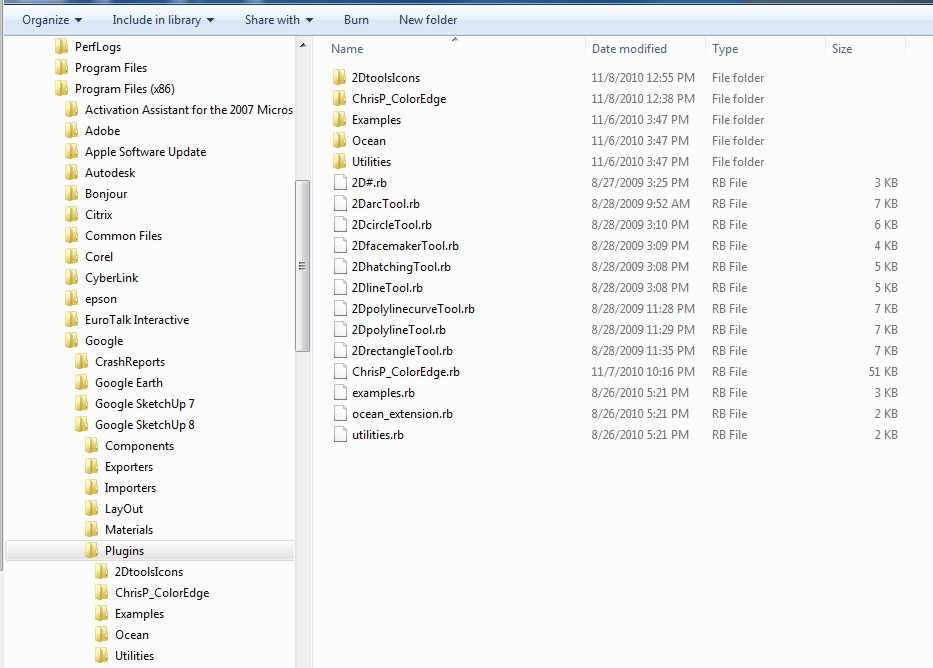
-
This is the know 'problem' with v8 that is very intolerant of un-parenthesized arguments that used to work fine in v7...

I thought I had them all trapped - I revisited the code...

I've just realized that this is a very old version here's the latest set [v5]... http://forums.sketchucation.com/viewtopic.php?p=185760#p185760
Please download these and retry - I'll 'block' the older version... -
Hello Tig. I'm a little confused about the difference between these two threads, as they both are related to a 2d Toolset.
http://forums.sketchucation.com/viewtopic.php?f=323&t=22091
and this thread.
Is this 2d Toolset different than the set in the first thread? Or is it simply the latest version. I downloaded the set in the first thread. If I download the set in this thread, will it update the first one? Or am I simply confused...which wouldn't be the first time.
confusingly
fitZ -
The OTHER thread is where you can download the latest toolset - from the first post.
This old thread is just hanging around !
A new thread was made when there was a major seed change in the toolset ~2 years ago...
I have previously edited the first post in this thread [ http://forums.sketchucation.com/viewtopic.php?p=180259#p180259 ] to link you to the latest version...
One clue is in the titles... this one says 20090829 and the other one says 20111201 - making it far newer!
Use the OTHER ONE ! -
tig how are you and thanks for your help !! do you know how to make wiring in 2d and 3d in sketchup , you know like in autocad the doted line??
-
@betod said:
tig how are you and thanks for your help !! do you know how to make wiring in 2d and 3d in sketchup , you know like in autocad the doted line??
Please post in the active thread http://forums.sketchucation.com/viewtopic.php?p=185760#p185760
I've now locked this topic to force people to use the correct one...
The LineStyle tool allows you to make dotted/dashed lines of different thicknesses and color etc in 3d as well as 2d. However for considerable styled line work why not use Layout available with Pro which adds many of the functions of 2d CAD drafting to linked SKP views etc... -
Sorry for coming late to the party, but what a fastastic plugin !
This tool has the potential to be developed to a fullworthy 2D CAD plugin for Sketchup.
My wish list:
-user can place of the 2D plane, like for elevations, aligned to surfaces, etc
-dimensjons in 2D plane
-annotation text with leader line





Advertisement