sketchucation logo sketchucation
    • 登入
    Oops, your profile's looking a bit empty! To help us tailor your experience, please fill in key details like your SketchUp version, skill level, operating system, and more. Update and save your info on your profile page today!
    🔌 Smart Spline | Fluid way to handle splines for furniture design and complex structures. Download

    [Plugin] SectionCutFace

    已排程 已置頂 已鎖定 已移動 Plugins
    565 貼文 170 Posters 375.8k 瀏覽 169 Watching
    正在載入更多貼文
    • 從舊到新
    • 從新到舊
    • 最多點贊
    回覆
    • 在新貼文中回覆
    登入後回覆
    此主題已被刪除。只有擁有主題管理權限的使用者可以查看。
    • JQLJ 離線
      JQL
      最後由 編輯

      @otb designworks said:

      Thanks TIG!!

      Without doubt, my SU experience would suck a whole lot without Section Cut Face and Mirror. Indispensable and greatly appreciated.

      Without the automatisms of other more sophisticated section plugins yet it was this plugin, along with Layout, that allowed me to ditch away CAD.

      I draw every section detail on a SectionCutFace that only updates on demand.

      Amazing possibilities!

      www.casca.pt
      Visit us on facebook!

      1 條回覆 最後回覆 回覆 引用 0
      • ntxdaveN 離線
        ntxdave
        最後由 編輯

        If I select/apply a color to the cut, is there a way to go back and changed the color?

        I have looked at the documentation but did not understand from it how to change the color.

        Press F1...thank me later

        1 條回覆 最後回覆 回覆 引用 0
        • JQLJ 離線
          JQL
          最後由 編輯

          The color is just a material applied to the section. You can leave it as Default and apply your own material or you can choose a material and then replace the material that has been applied by your own.

          The section cut is no more than a group with faces and edges...

          www.casca.pt
          Visit us on facebook!

          1 條回覆 最後回覆 回覆 引用 0
          • ntxdaveN 離線
            ntxdave
            最後由 編輯

            @jql said:

            The color is just a material applied to the section. You can leave it as Default and apply your own material or you can choose a material and then replace the material that has been applied by your own.

            The section cut is no more than a group with faces and edges...

            OK, I set it to <Default> but I do not see how to change it. I tried using the paint bucket.

            What the heck am I missing?

            OH HOW STUPID - I just figured it out. If you want to change something, you need to UNLOCK it. 😎

            Press F1...thank me later

            1 條回覆 最後回覆 回覆 引用 0
            • JQLJ 離線
              JQL
              最後由 編輯

              you can unlock it on the first place by using settings...

              www.casca.pt
              Visit us on facebook!

              1 條回覆 最後回覆 回覆 引用 0
              • JQLJ 離線
                JQL
                最後由 編輯

                TIG,

                I've tested it to the extent I could and I found a problem with old models.

                It seems the settings of old Section Cut Faces persist to new ones and I get some that don't assume the section's layer's name into the Section Cut Face Layer.

                This is what happens:

                1 - SectionCutFace Created with previous plugin version:
                1.1 - Made that original SectionCutFace with "On Demand" option;
                1.2 - Section group on was set to an existing layer at the time like "Layer X";
                1.3 - Group Name auto defined as SCUT-54345.

                2 - Remaking SectionCutFace with new plugin after reorganizing layers
                2.1 - Reorganize sections and put that Original Section from "Layer X" into layer "X CL C":
                2.2 - Remake Section Cut Face;
                2.3 - Section group layer switches to "Layer 0"
                2.4 - Section's group name redefines itself to "X CL C"

                3 - Erasing original Section and Make New SectionCutFace
                3.1 - Erased that section cut face and "Make SectionCutFace"
                3.2 - Switch options to "NO" Autoupdate.
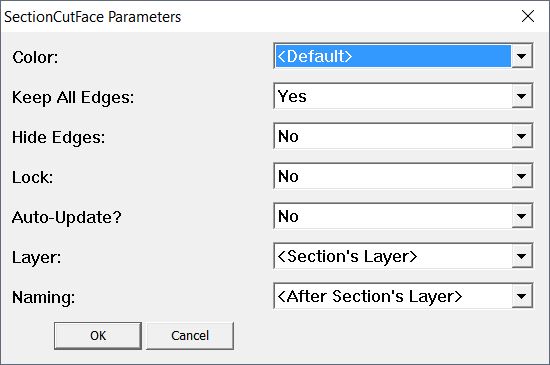
                Section Cuf Face.JPG

                3.3 - Section Group layer stays switches to "Layer 0"
                3.4 - Section Group Name Get's correct as "X CL C"

                The funny thing is that after creating a SectionCutFace group with the new plugin I can select it BUT it doesn't show on Entity Info (The info there is from the section itself, not the SectionCutFace group).
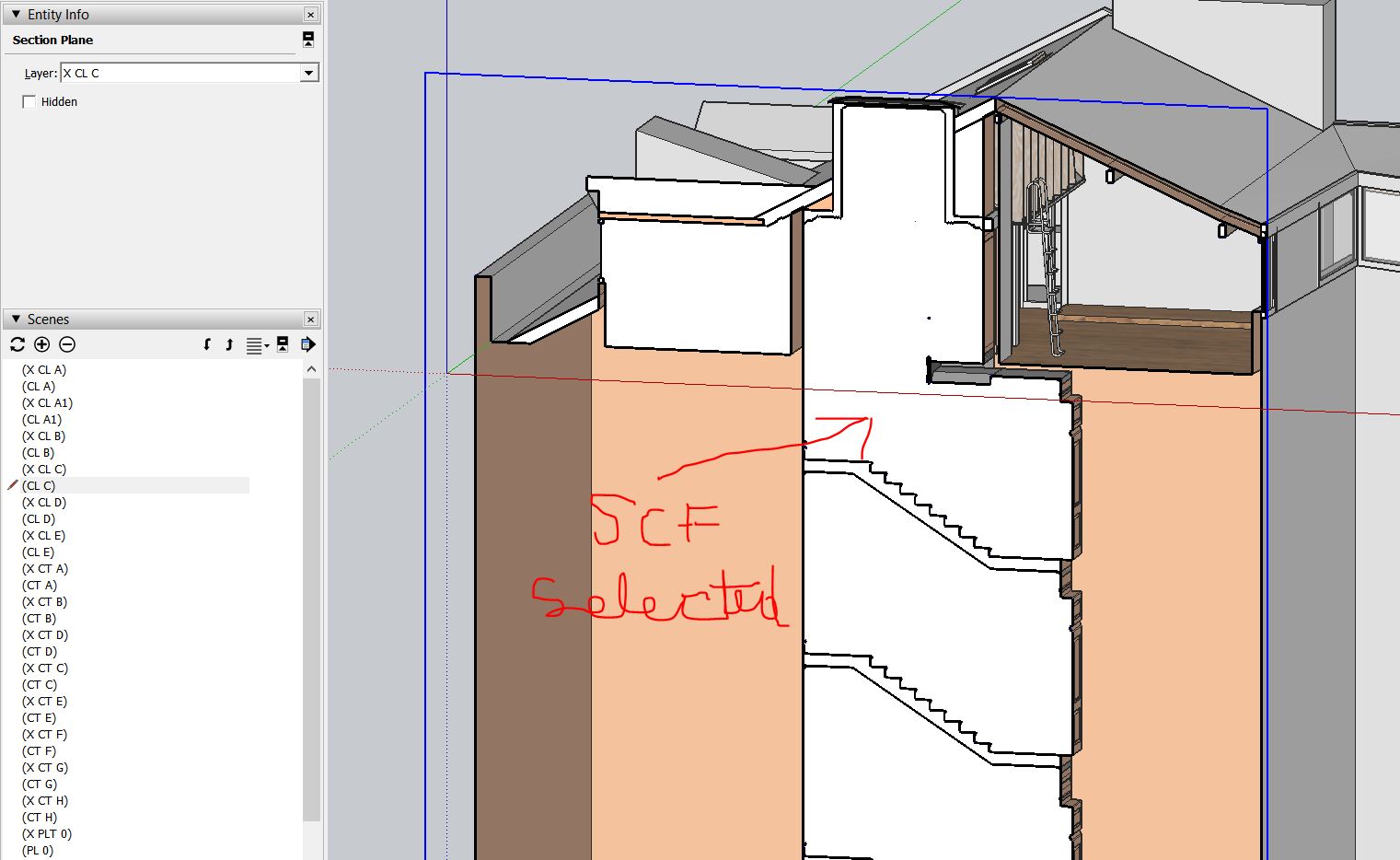
                SCF Selected.JPG

                If I double click on the SCF group, I can edit it, but once I get out of it, it's in Layer 0. "Not X CL C"
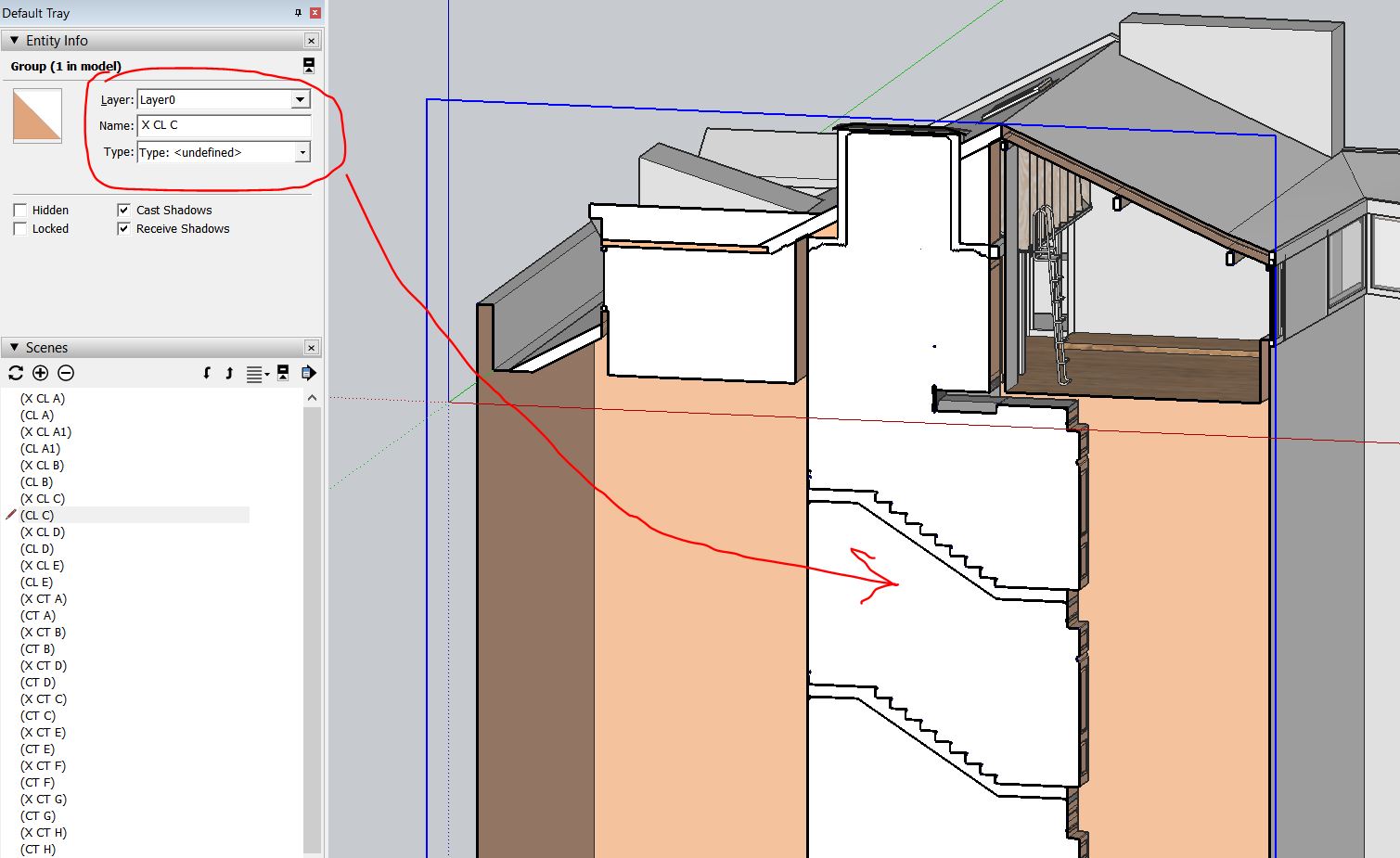
                SCF After edit.JPG

                If I would guess, I'd say some old observer from "ONDEMAND" is overriding the new settings... It's an uneducated guess from reading stuff here and there about observers being the things that you guys use for memorizing plugin actions...

                I hope it's easily fixable and thanks once again for this update!

                www.casca.pt
                Visit us on facebook!

                1 條回覆 最後回覆 回覆 引用 0
                • N I C ON 離線
                  N I C O
                  最後由 編輯

                  @tig said:

                  @N I C O

                  It should be compatible with earlier SketchUp versions [like v2015].
                  What is the "error that occurs" ?
                  Please supply the details.
                  We can't help with such vague reports...
                  So please supply the FULL error-message.

                  Yes I was expecting that it would be compatible with Sketchup Pro 2015. I think there's something wrong. Thank you for your reply.

                  Here's the error message.

                  Error Loading File SectionCutFace_loader.rb
                  Error: #<NameError: uninitialized constant TIG::SectionCutFace::DEFAULT>
                  C:/Users/USER/AppData/Roaming/SketchUp/SketchUp 2015/SketchUp/Plugins/SectionCutFace_loader.rb:18:in <module:SectionCutFace>' C:/Users/USER/AppData/Roaming/SketchUp/SketchUp 2015/SketchUp/Plugins/SectionCutFace_loader.rb:12:in module:TIG'
                  C:/Users/USER/AppData/Roaming/SketchUp/SketchUp 2015/SketchUp/Plugins/SectionCutFace_loader.rb:10:in `<top (required)>'

                  1 條回覆 最後回覆 回覆 引用 0
                  • N I C ON 離線
                    N I C O
                    最後由 編輯

                    @tig said:

                    @N I C O

                    It should be compatible with earlier SketchUp versions [like v2015].
                    What is the "error that occurs" ?
                    Please supply the details.
                    We can't help with such vague reports...
                    So please supply the FULL error-message.

                    Thank you again for your reply, i already fixed the error and installed the plug-in successfully. Thank you so much.

                    Best regards!

                    1 條回覆 最後回覆 回覆 引用 0
                    • TIGT 離線
                      TIG Moderator
                      最後由 編輯

                      @JQL

                      Thanks for the bug report.

                      I found and fixed the issues...

                      Now, when you update a SectionCutFace - i.e. it's one which is set as either 'on_demand' or 'auto_update' - then its group.layer will change to match its section-plane's layer, unless its layer is already set to be 'Customized', in which case its layer is left unchanged...

                      The group.name also updates to match the group.layer.name, unless its name is already set to be 'Customized', in which case its name is left unchanged...

                      Here's v5.1 http://sketchucation.com/pluginstore?pln=SectionCutFace

                      TIG

                      1 條回覆 最後回覆 回覆 引用 0
                      • JQLJ 離線
                        JQL
                        最後由 編輯

                        @tig said:

                        @JQL

                        Thanks for the bug report.

                        You're more than welcome, thanks for the quick fix. I'll test this asap!

                        www.casca.pt
                        Visit us on facebook!

                        1 條回覆 最後回覆 回覆 引用 0
                        • A 離線
                          antoinelepoutre
                          最後由 編輯

                          Is it supposed to update with the model ?

                          1 條回覆 最後回覆 回覆 引用 0
                          • JQLJ 離線
                            JQL
                            最後由 編輯

                            It has 3 Auto-Update options:

                            • No - which never updates unless you make a new Section Cut Face;
                            • Yes - which is supposed to update with the model;
                            • On Demand - which only updates when you right click, and choose Remake section cut face.

                            If your model is correctly modeled and creates a closed loop that SectionCutFace can figure out, it auto updates with model. Click the Gif:

                            SCF Autoupdate.gif

                            www.casca.pt
                            Visit us on facebook!

                            1 條回覆 最後回覆 回覆 引用 0
                            • A 離線
                              architect
                              最後由 編輯

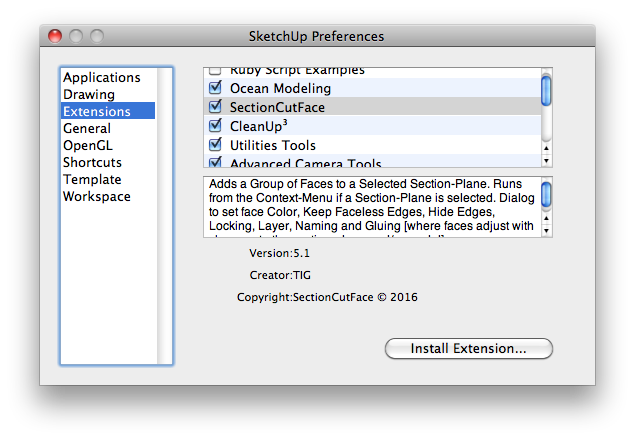
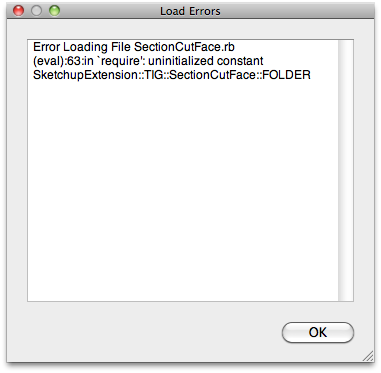
                              Screen shot 2016-02-04 at 8.49.46 AM.pngScreen shot 2016-02-04 at 8.46.52 AM.pngSectionCutFace loaded from preferences - extensions. Shows up there but does nothing and I get a load error after shutdown and restart. Plugins folder has "SectionCutFace.rb" file and "SectionCutFace" folder.

                              1 條回覆 最後回覆 回覆 引用 0
                              • Dave RD 離線
                                Dave R
                                最後由 編輯

                                @architect said:

                                [attachment=1]SectionCutFace loaded from preferences - extensions. Shows up there but does nothing and I get a load error after shutdown and restart. Plugins folder has "SectionCutFace.rb" file and "SectionCutFace" folder.

                                Are you still using SketchUp 8 as indicated in your profile?

                                Etaoin Shrdlu

                                %

                                (THERE'S NO PLACE LIKE)

                                G28 X0.0 Y0.0 Z0.0

                                M30

                                %

                                1 條回覆 最後回覆 回覆 引用 0
                                • TIGT 離線
                                  TIG Moderator
                                  最後由 編輯

                                  While v8 is no longer supported by Trimble, and it's regarded as pretty much obsolete, I have loaded the latest version of SectionCutFace into v8 and it loads and works just fine...

                                  So something is wrong...
                                  Close SketchUp.
                                  Find the SectionCutFace.rb file and SectionCutFace subfolder within v8's Plugins folder - and delete them.
                                  Then reinstall SectionCutFace from its latest RBZ.

                                  I suspect you somehow have some older legacy files loading.
                                  This plugin tries to delete any such files in the subfolder, but if your v8 Plugins folder security-permissions are not set to FULL for every one listed in its Properties dialog, then it might be failing...
                                  By manually removing the loader and subfolder... and reinstalling from new you should get a clean installation.

                                  As I said - it works for me in all versions from v8 up to v2016, on both PC and MAC...
                                  So something is wrong at your end...

                                  TIG

                                  1 條回覆 最後回覆 回覆 引用 0
                                  • A 離線
                                    architect
                                    最後由 編輯

                                    Tried everything suggested and still get the same load error - time to enter the 21st century and upgrade from 8 Pro. Have you guys chased all the gremlins out of v2016 yet?

                                    1 條回覆 最後回覆 回覆 引用 0
                                    • Dave RD 離線
                                      Dave R
                                      最後由 編輯

                                      @architect said:

                                      Have you guys chased all the gremlins out of v2016 yet?

                                      There are a lot more gremlins in SU8 than in SU2016. 😉

                                      Etaoin Shrdlu

                                      %

                                      (THERE'S NO PLACE LIKE)

                                      G28 X0.0 Y0.0 Z0.0

                                      M30

                                      %

                                      1 條回覆 最後回覆 回覆 引用 0
                                      • TIGT 離線
                                        TIG Moderator
                                        最後由 編輯

                                        Have you actually removed the related file/subfolder as I suggested, and then reinstalled the RBZ ?
                                        I have it working fine on v8, so you should be able to too ??

                                        TIG

                                        1 條回覆 最後回覆 回覆 引用 0
                                        • F 離線
                                          faust07
                                          最後由 編輯

                                          Same problem for me in SU8-Pro and Windows. Tested all variants of installation...
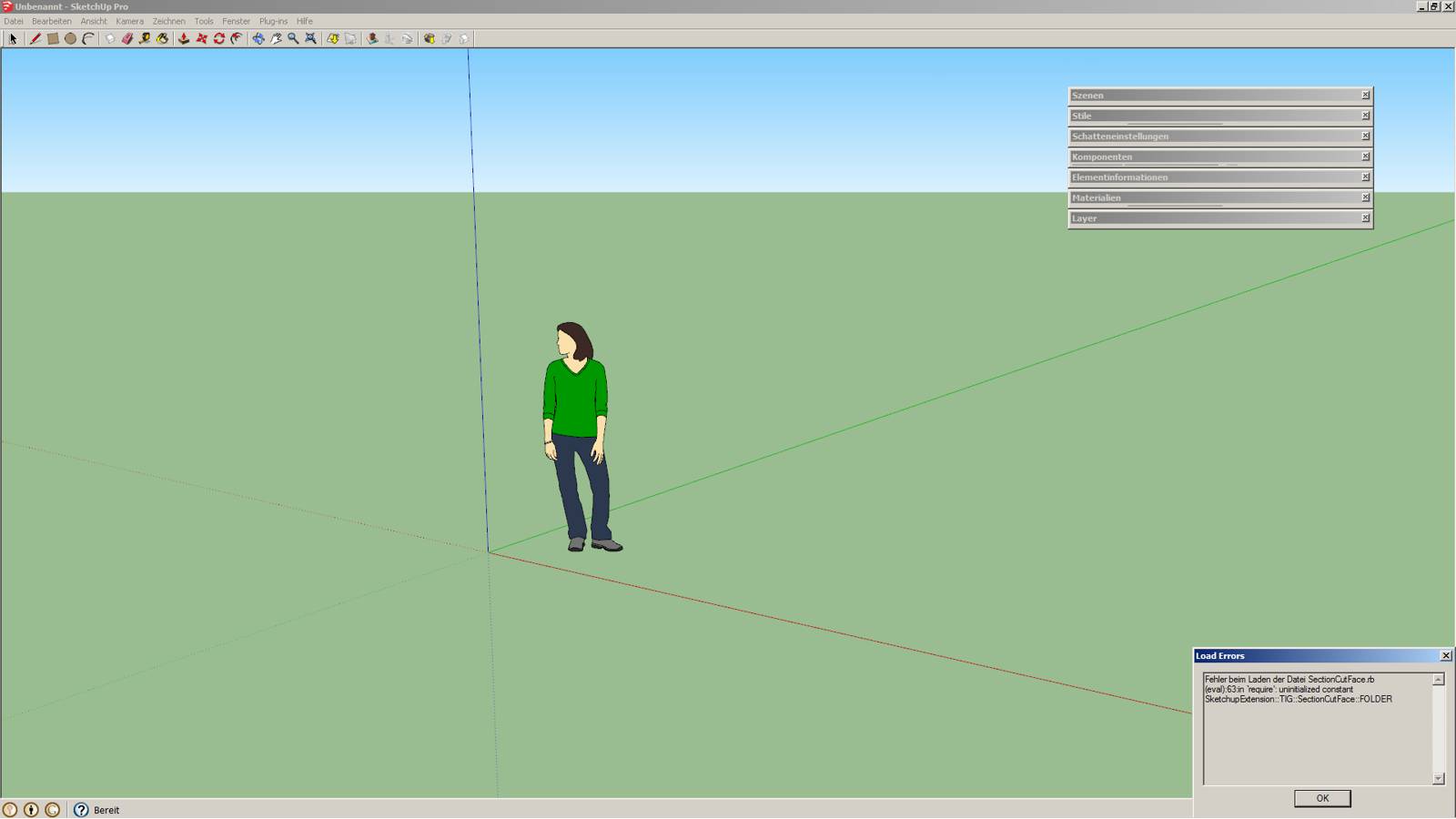

                                          LoadErrorSectionCutFace-1.jpg

                                          1 條回覆 最後回覆 回覆 引用 0
                                          • TIGT 離線
                                            TIG Moderator
                                            最後由 編輯

                                            Have you also tried manually deleting the rb file and the matching subfolder relating to SectionCutFace, then reinstalling a fresh version from the latest RBZ ?
                                            AND editing your v8 Plugins folder's security permissions [as an admin] to be FULL for everyone listed ?

                                            I have the latest version working just fine in v8, so you should be able to too !

                                            TIG

                                            1 條回覆 最後回覆 回覆 引用 0
                                            • 1
                                            • 2
                                            • 3
                                            • 4
                                            • 5
                                            • 6
                                            • 7
                                            • 28
                                            • 29
                                            • 5 / 29
                                            • 第一個貼文
                                              最後的貼文
                                            Buy SketchPlus
                                            Buy SUbD
                                            Buy WrapR
                                            Buy eBook
                                            Buy Modelur
                                            Buy Vertex Tools
                                            Buy SketchCuisine
                                            Buy FormFonts

                                            Advertisement