[Plugin] SectionCutFace
-
hi! i downloaded the file but the extention is .rbz...i can't see nothing new in my sketchup, neither in the plugin window...i caan't use sketchup so well, where can I find the plugin in the program, when i open it? i have to change the extention??? help!
-
No! Don't change the extension. .RBZ is perfect. Go to Window>Preferences>Extensions. Click on Install Extension. Navigate to where you saved the downloaded file and choose it.
For future plugins, you should download and install the Sketchucation Plugin Store. It will make installation even easier.
-
Here's an update v3.8...
A glitch with the observers [used for Gluing] when new model started now resolved.
See the tool's main page... http://sketchucation.com/forums/viewtopic.php?p=172583#p172583
and then auto-install or download it from the SketchUcation PluginStore... -
Hello Mr Tig,
Iam being having trouble installing this and other plugins onto SKUP v8. I am not be connection onto internet via SKUP standalone computer. So I do drop files into plugin folder but it is not visible. Is perhaps not correct metthod or perhaps not correct version for SKUP no.8 or perhaps?
Many thank for advises
SS -
RBZ files are NOT the same as RB files.
You cannot simply put them into your Plugins folder and hope they'll load.RBZ files are actually a ZIP archive with a different file suffix.
If you have the latest version of SketchUp v8 you should have a button in the Window > Preferences > Extensions dialog named something like 'Install from archive...' [i.e. an RBZ file]
If so then click on that... and then navigate to the RBZ file, choose it, and its contents are automatically extracted, installed and loaded using the main Plugins folder.If you have a very early version of v8 or even earlier you won't get the button to install the RBZ...
In that case add .ZIP to the end of the file-name.
Then use your own ZIP tool to extract its contents into a temporary folder, and then move the extracted files and subfolders into the Plugins folder.
It is VERY important to keep all files within the same subfolders as they are inside the ZIP/RBZ archive... otherwise the tool won't find its supporting files inside its subfolder, as it expects... -
Thanks a Lott
-
Crashes consistently with Sketch Up Pro 2013. worked for Sketch UP 8. Anybody has the same problem?
-
It works fine in SU2013 for me. Perhaps there's a conflict cause by some other plugin. Do you have any of the known problem plugins like Vray installed?
-
Actually I was using it on superellipsoid plug in...Have to investigate more with other shapes/versions. I was thinking myself that it's a conflict between plug-ins...
-
If you have a made a mesh surface with very very tiny facets [either one that's over all very very small or that is overly detailed with thousands of facets]... then like many such operations in SketchUp the SectionCutFce tool will sometimes fail to make full intersections - e.g. when the points at the start/end of an intersected line are so near to one another that SketchUp says they are in fact coincident and does make the tiny edge needed to complete the face and therefore the face will fail to form... It's a tolerance issue when performing operations on very small geometry...
You get this with several tools - try the native FollowMe on a very tight radius path 'elbow' and a very segmented circle profile - some tiny triangular facets in the crook of the elbow will fail to be made...
However, SectionCutFace ought to just 'not make the face' [as its loop is not complete] - it would perhaps leave incomplete edge loops if you have it set to keep ALL edges in options... It should not splat/crash!
Could you post a simple example of what's failing so we can all test it ?
-
Superellipsoid Plugin
Version: Superellipsoid 1.0
Release Date: July 1, 2010
Requirements: SketchUp 6.0+
I have it as a tool under "draw". The form comes in as a component. When I try to use a section cutface, it crashes the Sketch up. Tried to use sectioncutface with other solid forms and it's fine. It's really not that crucial:)))
Thank you for all your plugins. -
@gigi500 said:
Superellipsoid Plugin
Version: Superellipsoid 1.0
Release Date: July 1, 2010
Requirements: SketchUp 6.0+
I have it as a tool under "draw". The form comes in as a component. When I try to use a section cutface, it crashes the Sketch up. Tried to use sectioncutface with other solid forms and it's fine. It's really not that crucial:)))
Thank you for all your plugins.
I have just been testing SectionCutFace on a Superellipsoid - it worked fine - no splats at all, faces formed properly etc.
I used the default parameters...
What setting do you have that might cause issues ?
Is the 'cut' located outside or inside this component?? [makes no difference in my testing!]
As I said before very tiny facets could cause failure when forming the face - but a splat is unlikelyHave you tried making a simple box component and cutting that ?
If it crashes too you have something watching component-instances and instigating a crashWhat other plugins do you have loading? - some rogues are known to cause splats [actually it is they that splats, when a legit tool does an action that they interfere with or react to wrongly, via one of their observer etc, or they interfere with native classes/methods...]

The Vray-beta, various half-baked BIM tools, current SketchyPhysics... and a few others are on this "danger-list"... -
Dear Mr Tig
re your kind reply to me on Mon Jul 29, 2013 5:27 pm. i would like to say sincerely thank you
for all your hard works and also for taking time to being reply to my question. I am doing as you say and it is sectioning perfectly. Many Many thanks and god bless. SS -
I just installed the latest version of Section Cut Face and the Glue option is not working. I selected yes in the glue option yet when I move the section plane the cut face disappears and it looks like an ordinary section plane view.
What am I doing wrong?
P.S.
SU 8pro
This is on my laptop with limited graphics.
Installed thru plugin store. -
Can you post a simple SKP where it isn't working with three section-planes, one glued, one glued-on-demand and the other not glued at all [there are three options].
We can then test it...
-
TIG
This is the file I was practicing on. It is nothing special.
Thanks in advance for your interest in helping.
SFTO1
-
Are you sure you have version 3.8 installed ?
Its Extension's description will show it...Assuming you have it... then it should work.
I ran you test SKP - it worked fine.
There was no section-plane to test, but I added a new one on the end where you have left an 'orphaned' sectioncutface-group [which I deleted].
Because you had deleted the original plane I can't check its attributes etcI tested the SKP in v8 AND v2013 and it worked fine every time with both Glue and Glue-on-demand.
When you change a model - say by moving the section-plane or some geometry - then the Glued sectioncutface-group is auto-regenerated to suit the new circumstances, but only when you go on to the next tool, so using 'move' on the plane leaves the cut-group behind momentarily until your 'move' tool becomes something else - say 'select'. To recreate the group 'dynamically' for every tool you might use is too much of an overhead on the processing. Also remember that if your cut moves out of the geometry then no cut will be visible, as it's not made...
-
I do have v3.8 and with your helpful explanation, I now realize that the cut face does not dynamically follow the section cut. It does in fact create the "glued" face when I switch to a different tool. I was not switching to a different tool.
Thanks for such a creative and useful tool.
-
Hi Tig,
I have successfully load the section cut face .rzb plugin into my sku8 via changed the file extension from .rzb to .zip then unzip it, it works fine with my sku8 pro.
Come to the sketch up vray render stage, i have create a section plane as image 1 shows,
but every time I render it, it still render it as a whole model as image 2 shows. The section cut face disappeared.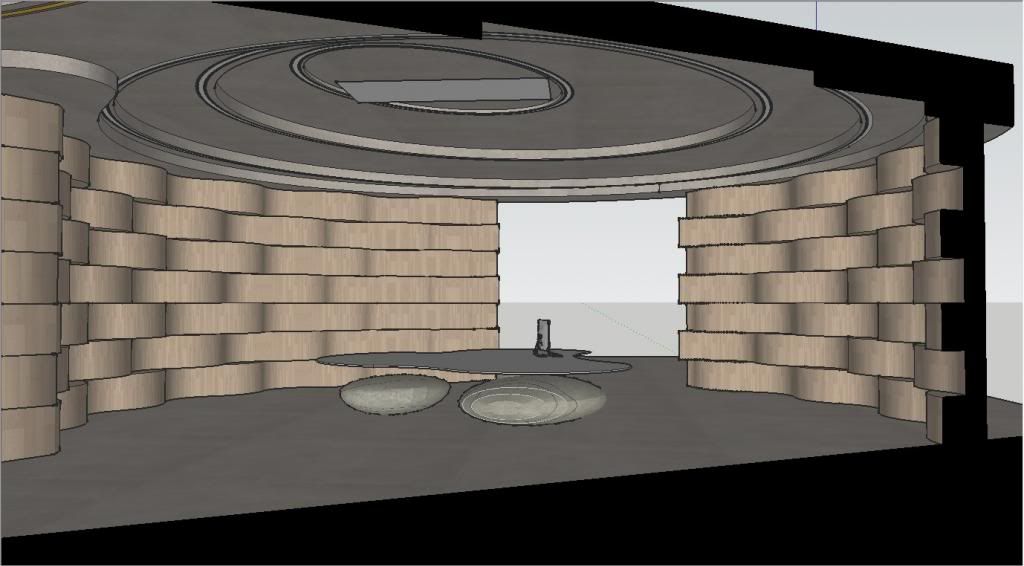
Image1
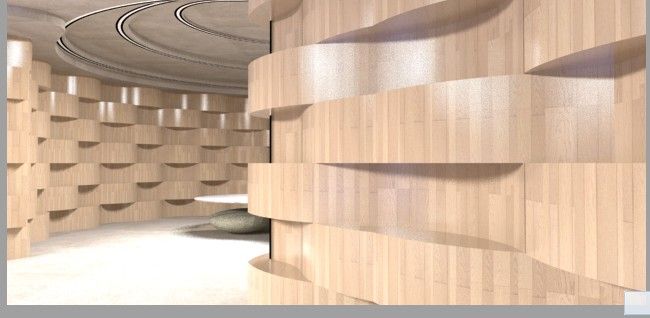
Image2
how can I fix this problem?
Thank you for ur patience to answer my question.
Best regard,
Frank -
I think the renderer must support section cuts and it isn't a problem of the plugin. If so, you can save a copy of your model and use the "Slice Model at Section" option from Zorro2 (?) to delete the rest of the model for the render.






Advertisement