[Plugin] SectionCutFace
-
Hi. First of all, thank you! I've always used this plugin, and it's just wonderful!
Since last update, though, everytime i try to use it my SketchUp crashes.
I don't know what to do...
Any suggestions?Thanks!
-
@humbertoanastasia said:
Hi. First of all, thank you! I've always used this plugin, and it's just wonderful!
Since last update, though, everytime i try to use it my SketchUp crashes.
I don't know what to do...
Any suggestions?Thanks!
See the post just before yours http://forums.sketchucation.com/viewtopic.php?p=401294#p401294
You must have installed something making rogue changes to base-classes/methods... -
I like this plugin great job TIG I have a small question. When applying section cut face it fills in faces where no faces should be, still can't figure what I'm doing wrong
-
@mwm5053 said:
I like this plugin great job TIG I have a small question. When applying section cut face it fills in faces where no faces should be, still can't figure what I'm doing wrong
it will sometimes do that depending on how complicated the geometry it has to cut. it happens to me 10% of the time when doing full building sections with framing, floors, timber, steel, etc.
edit the group, and select the major area that needs to be removed. it will usually take a few clicks to clean it up.
-
If your section cut is through non-solid objects or overlapping ones, its algorithm isn't clairvoyant - it makes a best guess at what is what. If you choose to keep unfaced edges it makes a manual repair quick and easy.
A simple example is to make two cube groups and overlap them in 3d and cut a section through them...
How is any tool going to double-guess what you expect to be filled in solid and what to leave as a void if your objects are no pure separated solids?
This one very simple version of two overlapping cubes has eight or more possibilities - here are a few [adding more intersecting objects simply exacerbates the complexities and permutations...
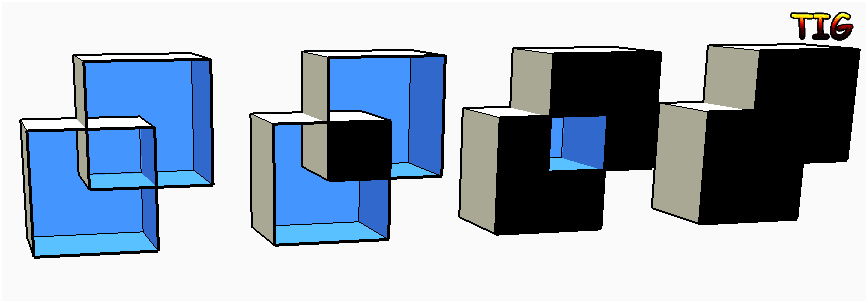
-
That makes total sense
Thanks TIG
-
Thank you so so much !!!!
-
Hey guys, I'm trying to use this plugin but I'm not getting any result, when I move/copy the object after making adding Section-CutFace I get the same one complete without the Section I've made, can anyone help me with this??, thanks.
-
I think you're expecting something this plugin doesn't do nor is it intend to do. This plugin doesn't modify the existing entity it just creates a new one which is the face on the section plane. If you expect to end up with the entity actually cut, you need Zorro instead.
-
@dave r said:
I think you're expecting something this plugin doesn't do nor is it intend to do. This plugin doesn't modify the existing entity it just creates a new one which is the face on the section plane. If you expect to end up with the entity actually cut, you need Zorro instead.
Thank you Dave, that worked almost perfectly for me, the only bad thing is that I have to fill every wall to get a black filled effect when I uses de Section Cut, and also when I do a manual cut the SketchUp crash, I don't know why...

-
Not without seeing your model.
-
awsome!
-
Hi, I love this tool however I occasionally get a problem when trying to add section cut face. It will sometimes only fill in the faces of a few of the objects, and then some faces are left open. Is this a glitch? has anyone else experienced this and does anyone know a workaround.
Thanks
Luke
-
If you are having intersecting objects it can't always double-guess which should be solid and which should be void.
This was discussed not so long ago. http://forums.sketchucation.com/viewtopic.php?p=406295#p406295
It'd be impossible to have an algorithm that'd be right 100% because what you see as solid might be more logically void and vice versa...
If you leave the option ON to keep all edges a manual fix is relatively straight forward.
Sometimes tiny or gigantic objects cause intersection issues too, but that's rare... -
I have a question, sometimes when using this plugin I take the section view into Layout and when I try and Dimension the section the Dimension tool will not snap to any points around where there is a cut face. Am I doing something wrong?
-
There are no edges on a native Section-cut, so you can't snap to anything.
The SectionCutFace tool adds edges/faces to the selected Section-cut, but by default unfaced edges will be removed - so set 'Keep Un-Faced Edges'==Yes to keep them.
Also all edges are 'hidden' by default, so they are not there to snap to either - so set 'Hide Edges'==No so you can see them.
Then you should have some edges to snap on to in the Section-cut...
-
Thanks TIG, This just saved a colleague a ton of time.
-
Thanks TIG for this excellent plugin.
I have a section in my drawing that creates two separate closed shapes. You could imagine a plane sectioning a donut. SectionCutFace creates the section face for only one of these shapes. The other one is left alone. I was wondering if there were any options or workarounds to get the other shape filled in with a face.
Thanks,
John -
@jorocco said:
Thanks TIG for this excellent plugin.
I have a section in my drawing that creates two separate closed shapes. You could imagine a plane sectioning a donut. SectionCutFace creates the section face for only one of these shapes. The other one is left alone. I was wondering if there were any options or workarounds to get the other shape filled in with a face.
Thanks,
John
I must imagine the form.. if you have two overlapping shapes the tool has to decide which parts are solid and which are void.
There's a discussion and example images in an earlier post in this thread.
Sometimes it guessing wrong when there are several possibilities.
If your forms don't overlap, or are properly intersected solids without ambiguous 'internal partitions' then you won't get this.
However, it is relative simple to fix in a post process...
Set the options to include unfaced edges, show edges etc.
After the section-face is made temporarily set your view to Monochrome mode; then edit its container [group] and remove any unwanted faces by selecting them + delete OR to add missing faces over-draw an edge to auto-form a face etc where it's wanted. Because all of the edges are coplanar they should all potentially auto-face with an edge-over-draw... but sometimes SketchUp can't cope with complex outlines and you'll have to add temporary 'diagonal lines' across the required face outline to form several facets; when you have all of the face pieces made you can erase the unwanted coplanar temporary edges to merge them back into a single face. -
@tig said:
@jorocco said:
Thanks TIG for this excellent plugin.
I have a section in my drawing that creates two separate closed shapes. You could imagine a plane sectioning a donut. SectionCutFace creates the section face for only one of these shapes. The other one is left alone. I was wondering if there were any options or workarounds to get the other shape filled in with a face.
Thanks,
John
I must imagine the form.. if you have two overlapping shapes the tool has to decide which parts are solid and which are void.
There's a discussion and example images in an earlier post in this thread.
Sometimes it guessing wrong when there are several possibilities.
If your forms don't overlap, or are properly intersected solids without ambiguous 'internal partitions' then you won't get this.
However, it is relative simple to fix in a post process...
Set the options to include unfaced edges, show edges etc.
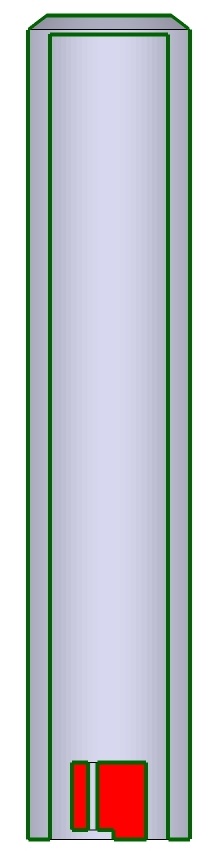
After the section-face is made temporarily set your view to Monochrome mode; then edit its container [group] and remove any unwanted faces by selecting them + delete OR to add missing faces over-draw an edge to auto-form a face etc where it's wanted. Because all of the edges are coplanar they should all potentially auto-face with an edge-over-draw... but sometimes SketchUp can't cope with complex outlines and you'll have to add temporary 'diagonal lines' across the required face outline to form several facets; when you have all of the face pieces made you can erase the unwanted coplanar temporary edges to merge them back into a single face.Well, my donut example was maybe not the best because I created such a shape as a test, and the sections were added perfectly. I have attached my actual drawing. There are three closed shapes in this section, and the plugin has correctly filled two in red. However the shape that's like an upside down 'U' has not been filled in. I will experiment with the instructions you've given in your reply (I'm having a little trouble following it but maybe with some practice...) but wanted to clarify the problem.
Thanks,
John





Advertisement