sketchucation logo sketchucation
    • 登入
    Oops, your profile's looking a bit empty! To help us tailor your experience, please fill in key details like your SketchUp version, skill level, operating system, and more. Update and save your info on your profile page today!
    🔌 Smart Spline | Fluid way to handle splines for furniture design and complex structures. Download

    [Plugin] SectionCutFace

    已排程 已置頂 已鎖定 已移動 Plugins
    565 貼文 170 Posters 375.8k 瀏覽 169 Watching
    正在載入更多貼文
    • 從舊到新
    • 從新到舊
    • 最多點贊
    回覆
    • 在新貼文中回覆
    登入後回覆
    此主題已被刪除。只有擁有主題管理權限的使用者可以查看。
    • A 離線
      ayik37
      最後由 編輯

      thanks sir,that plugin working very well in my sketchup 👍

      1 條回覆 最後回覆 回覆 引用 0
      • P 離線
        petroulac
        最後由 編輯

        Thanks!!!

        1 條回覆 最後回覆 回覆 引用 0
        • I 離線
          ilaliberte
          最後由 編輯

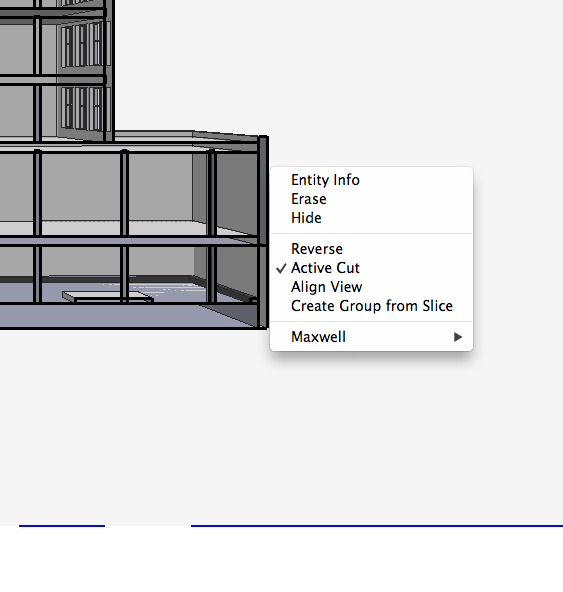
          Hello! I've downloaded this pluggin several times and just did again with this version, and it just won't work: I don't get the context menu option at all!

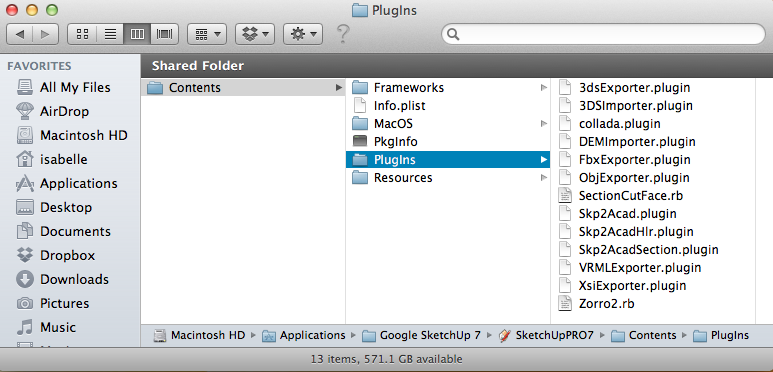
          My friends at uni are using it on the same version of SketchUp Pro (7.1.6859) without a problem... Here are some screenshots to try to explain. The context menu screenshot is from when I clicked on the section cut plane - there isn' anything missing from that menu, I only cut the screenshot a bit too close.

          Does it make a difference that I am still on the trial version of V-Ray?

          many thanks.
          Best wishes
          Isabelle

          Screen Shot 2012-03-28 at 12.31.27.png


          Screen Shot 2012-03-28 at 11.57.39.png

          1 條回覆 最後回覆 回覆 引用 0
          • Dave RD 離線
            Dave R
            最後由 編輯

            Looks like you've got your plugins in the incorrect folder. Plugins for SketchUp should be in Macintosh HD/Library/Application Support/Google SketchUp 7/SketchUp/Plugins.

            If I had to guess, I'd say Zorro 2 doesn't work either.

            Etaoin Shrdlu

            %

            (THERE'S NO PLACE LIKE)

            G28 X0.0 Y0.0 Z0.0

            M30

            %

            1 條回覆 最後回覆 回覆 引用 0
            • I 離線
              ilaliberte
              最後由 編輯

              Thank you so much for this, it works now! How embarrassing - but it's good that it was this easy to solve. Thank you, thank you, thank you!!!

              (And yes, of course Zorro wasn't working either!)

              1 條回覆 最後回覆 回覆 引用 0
              • C 離線
                chalky
                最後由 編輯

                I'm sorry but am I the only one having problems..?
                seems like everytime I run the plugin SU freezes, tried on various projects and simple cube..same thing
                SU8 Pro Lion 10.7.3 latest version of plugin, any suggestions?

                1 條回覆 最後回覆 回覆 引用 0
                • TIGT 離線
                  TIG Moderator
                  最後由 編輯

                  @chalky said:

                  I'm sorry but am I the only one having problems..?
                  seems like everytime I run the plugin SU freezes, tried on various projects and simple cube..same thing
                  SU8 Pro Lion 10.7.3 latest version of plugin, any suggestions?

                  I know of no issues causing 'freezing'...
                  Open the Ruby Console.
                  Run the tool.
                  Any error messages in the Console or otherwise ?
                  Report back...
                  😕

                  TIG

                  1 條回覆 最後回覆 回覆 引用 0
                  • C 離線
                    chalky
                    最後由 編輯

                    Tried what you said but no messages in ruby console reported. ❓ ❓

                    1 條回覆 最後回覆 回覆 引用 0
                    • TIGT 離線
                      TIG Moderator
                      最後由 編輯

                      I see you are on v7 with Lion.
                      I know there were some fixes with v8M2 to address problems with Lion, perhaps that's the issue 😕
                      So... any Lion users out there [with v7/v8] who are getting error free use from this tool ??

                      I'm also now wondering if you have one of the problem scripts loading that can affect core class/methods ill-advisedly - these include SketchyPhysics, DrivingDimensions, MatchBox and some 'Solar' tool I cant bring to mind... Although some of these are PC only I think... This tool should workaround potential pitfalls made in its legitimate code by these files, but there might still be a trip-up somewhere. If you have any of these other scripts try to disable them and restart [move the .rb/.rbs files out of the Plugins folder temporarily].
                      Does this do anything better ?

                      TIG

                      1 條回覆 最後回覆 回覆 引用 0
                      • C 離線
                        chalky
                        最後由 編輯

                        Sorry wrong info in profile i'm running v8
                        double checked if had those plugs and I don't

                        1 條回覆 最後回覆 回覆 引用 0
                        • TIGT 離線
                          TIG Moderator
                          最後由 編輯

                          Do you have the latest v8 = v8M2 ?
                          This specifically addressed some issues with Lion...

                          TIG

                          1 條回覆 最後回覆 回覆 引用 0
                          • C 離線
                            chalky
                            最後由 編輯

                            problem solved 😄

                            1 條回覆 最後回覆 回覆 引用 0
                            • TIGT 離線
                              TIG Moderator
                              最後由 編輯

                              @chalky said:

                              problem solved 😄
                              How? WE would like to know 😕

                              TIG

                              1 條回覆 最後回覆 回覆 引用 0
                              • A 離線
                                artsnot
                                最後由 編輯

                                I am new to this forum and seem to be experiencing a Sketchup crash every time I try to use section cut face. I am using Sketchup Pro 8 on a MacBook Pro i7 2.0 GHz with 8 MB RAM. I am not sure what the problem is. Has anyone else experience this?

                                1 條回覆 最後回覆 回覆 引用 0
                                • TIGT 離線
                                  TIG Moderator
                                  最後由 編輯

                                  What MAC OS are you using ?
                                  OSX ?

                                  TIG

                                  1 條回覆 最後回覆 回覆 引用 0
                                  • bmikeB 離線
                                    bmike
                                    最後由 編輯

                                    @artsnot said:

                                    I am new to this forum and seem to be experiencing a Sketchup crash every time I try to use section cut face. I am using Sketchup Pro 8 on a MacBook Pro i7 2.0 GHz with 8 MB RAM. I am not sure what the problem is. Has anyone else experience this?

                                    Running fine on mine:
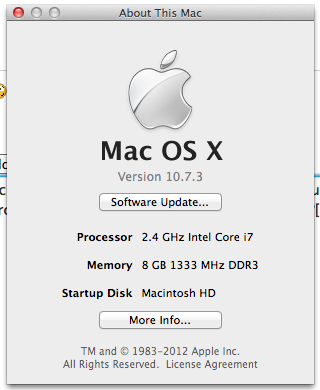

                                    Screen Shot 2012-04-05 at 1.55.06 PM.png

                                    mike beganyi design + consulting llc

                                    1 條回覆 最後回覆 回覆 引用 0
                                    • A 離線
                                      artsnot
                                      最後由 編輯

                                      I am running Snow Leopard 10.6.8.

                                      1 條回覆 最後回覆 回覆 引用 0
                                      • TIGT 離線
                                        TIG Moderator
                                        最後由 編輯

                                        SUFractal has reported a clash/crash with SectionCutFace [and some other scripts] if BIMtools is installed - we suspect that new tool might be inadvertently messing with native class/methods used correctly by other scripts, OR it has faulty observers that are messing with things like group creation...
                                        Do any of you experiencing problems have BIMtools installed ?
                                        If so, try disabling it and retry/report back...

                                        TIG

                                        1 條回覆 最後回覆 回覆 引用 0
                                        • A 離線
                                          artsnot
                                          最後由 編輯

                                          How does one do that? Sorry, I am totally new and have no idea what that means. I appreciate your help.

                                          1 條回覆 最後回覆 回覆 引用 0
                                          • TIGT 離線
                                            TIG Moderator
                                            最後由 編輯

                                            Well... first have you [recently] installed BIMtools?
                                            If not don't worry.
                                            BUT if you did, then find the file you installed in Plugins - look inside the original 'zip' file to see what these were. There should be 'bim-tools.rb' and its folder of other files that it uses.
                                            So disabling 'bim-tools.rb' in Plugins will stop it auto-loading.
                                            You can either move that file out of the Plugins folder temporarily so Sketchup doesn't then find it when starting, so it is not auto-loaded; OR you could leave it where it is and rename it 'bim-tools.rb!' - only file-types '.rb' and '.rbs' are auto-loaded.

                                            If you restart and try SectionCutFace now does it work...
                                            If so we have the culprit...

                                            If you want to restore a disabled tool later on, then either move its file[s] back into Plugins, or if you have adopted the other approach, rename the file[s] back as 'xxx.rb' etc...


                                            TIG

                                            1 條回覆 最後回覆 回覆 引用 0
                                            • 1
                                            • 2
                                            • 12
                                            • 13
                                            • 14
                                            • 15
                                            • 16
                                            • 28
                                            • 29
                                            • 14 / 29
                                            • 第一個貼文
                                              最後的貼文
                                            Buy SketchPlus
                                            Buy SUbD
                                            Buy WrapR
                                            Buy eBook
                                            Buy Modelur
                                            Buy Vertex Tools
                                            Buy SketchCuisine
                                            Buy FormFonts

                                            Advertisement