sketchucation logo sketchucation
    • Login
    Oops, your profile's looking a bit empty! To help us tailor your experience, please fill in key details like your SketchUp version, skill level, operating system, and more. Update and save your info on your profile page today!
    Mac User? | Join the Rayscaper Beta for Mac Learn More

    Rounded Cubes

    Scheduled Pinned Locked Moved SketchUp Tutorials
    sketchup
    12 Posts 8 Posters 6.3k Views 8 Watching
    Loading More Posts
    • Oldest to Newest
    • Newest to Oldest
    • Most Votes
    Reply
    • Reply as topic
    Log in to reply
    This topic has been deleted. Only users with topic management privileges can see it.
    • GaieusG
      Gaieus
      last edited by

      Cool tutorial and obviously you are along the right ideas. 👍

      Certainly however, a couple of steps could be made easier. Just a tip (as an example); you seem to have problems with aligning things when moving them around the place (you also "mentioned" this in the video). When starting to move something, hit the left/right/up(or down) arrow keys on your keypad to lock the movement along a specific axis.
      OR when you finally succeed to get the movement along any desired direction (this doesn't have to be an axis), use the Shift key to lock the movement.

      Gai...

      1 Reply Last reply
      Reply Quote 0
      • simon le bonS
        simon le bon
        last edited by

        Hi pcberdwin,

        As usual with SketchUp, plenty of different solutions. (Dave one is really cool!!)
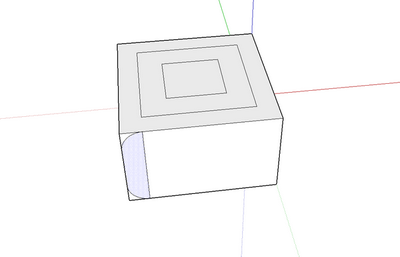
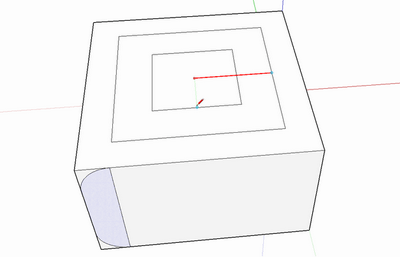
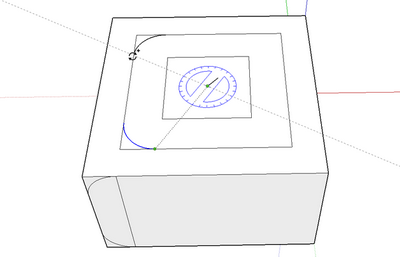
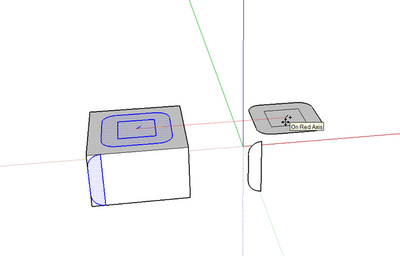
        This one, but i can tell others:
        (Re the Center square is for nothing here. It was for another purpose when I made those screenshots)
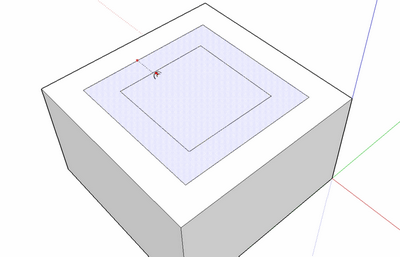
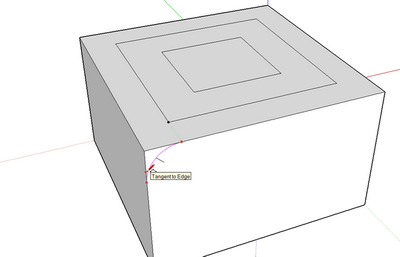
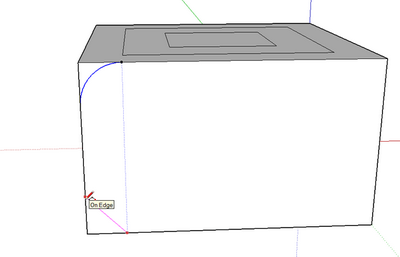
        http://i274.photobucket.com/albums/jj245/Spendauballet/SketchUp/BarSoapA_01_400x257.png

        http://i274.photobucket.com/albums/jj245/Spendauballet/SketchUp/BarSoapA_02_400x257.png

        http://i274.photobucket.com/albums/jj245/Spendauballet/SketchUp/BarSoapA_03_400x257.png

        http://i274.photobucket.com/albums/jj245/Spendauballet/SketchUp/BarSoapA_04_400x257.png

        http://i274.photobucket.com/albums/jj245/Spendauballet/SketchUp/BarSoapA_05_400x257.png

        Rotate+Copy(Ctrl) x3

        http://i274.photobucket.com/albums/jj245/Spendauballet/SketchUp/BarSoapA_06_400x257.png

        Select, Move a Copy (Ctrl)

        http://i274.photobucket.com/albums/jj245/Spendauballet/SketchUp/BarSoapA_07_400x257.png

        http://i274.photobucket.com/albums/jj245/Spendauballet/SketchUp/BarSoapA_08_400x257.png

        http://i274.photobucket.com/albums/jj245/Spendauballet/SketchUp/BarSoapA_09_400x257.png

        http://i274.photobucket.com/albums/jj245/Spendauballet/SketchUp/BarSoapA_10_400x257.png

        😉 simon

        PS: and just like this to take a look: [Tutorial] Rounded Rectangle

        1 Reply Last reply
        Reply Quote 0
        • Dave RD
          Dave R
          last edited by

          Interesting method. As Gai mentions, locking Move and Line directions will make things much easier.

          It does seem like a hard way to achieve a simple cube with rounded edges. You might also find the copy function of the Move tool interesting. It makes it easier to accurately place copies of a selection.

          Here's an alternative way.

          http://farm3.static.flickr.com/2482/3720053691_799cf0538b.jpg

          Draw a square to the finished size of the cube. Add a guideline (or even a guide point) to help set the corner radii.

          http://farm3.static.flickr.com/2537/3720053739_aafa4fedf2.jpg

          Use the Arc tool to draw the rounded corners. Start at the intersection of the guideline and the edge. Drag along the adjoing edge until the line turns magenta. Click and drag back along the edge toward the corner until the arc turns magenta. Click.

          http://farm4.static.flickr.com/3494/3720866048_4a55aacff5.jpg

          The other two corners can be done by inferencing off the first. Hover over the end point of the arc and slide the tool to the opposite side. Note the black dot at the end of the arc on the upper left corner.

          http://farm3.static.flickr.com/2630/3720866082_52e25cd701.jpg

          After completing the corner arcs, delete the unwanted part and the guideline.

          http://farm4.static.flickr.com/3453/3720866118_f0fed63143.jpg

          Select the rounded square and its edges (double click of selection tool) and get the Move tool. Hit Ctrl (Option on Mac) and copy the rounded square straight up.

          http://farm3.static.flickr.com/2618/3720866148_8d23c528e3.jpg

          Get the Rotate tool and rotate the copy into the vertical position. Orbit low if needed to get the required orientation. Note the red protractor color.

          http://farm4.static.flickr.com/3049/3720053903_631198df5c.jpg

          Make sure the rotated shape doesn't intersect with the original. Get the Move tool.

          http://farm3.static.flickr.com/2475/3720053939_dce6aba189.jpg

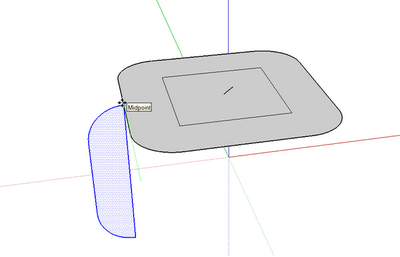
          Move the vertical face and its edges to the center of the horizontal face's edge. Once you start the move, in the green direction in this example, hold the Shift key to lock the direction. Or use the cursor keys to do that.

          Note: If I had moved the copy far enough up, I could have rotated it to the vertical position about the center of the edge. This would have eliminated the need to Move the face after rotating it.

          http://farm4.static.flickr.com/3274/3720054001_1a25cd3f58.jpg

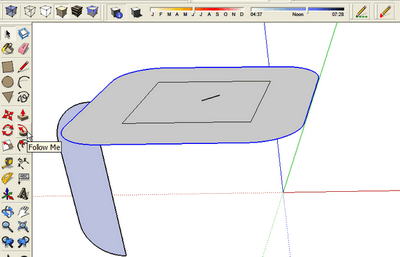
          Get the selection tool and double click on the horizontal face. then get the Follow Me tool and click on the vertical face.

          http://farm3.static.flickr.com/2456/3720054025_a57ff16377.jpg

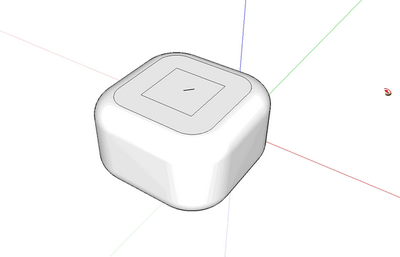
          Correct the face orientation if needed and delete the horizontal face. Done!

          With this method there are no edges to soften because the arcs were never exploded nor are there extraneous lines to remove.

          Of course now there's a plugin that can do this automatically after you've made a simple cube.

          Etaoin Shrdlu

          %

          (THERE'S NO PLACE LIKE)

          G28 X0.0 Y0.0 Z0.0

          M30

          %

          1 Reply Last reply
          Reply Quote 0
          • simon le bonS
            simon le bon
            last edited by

            Well!!

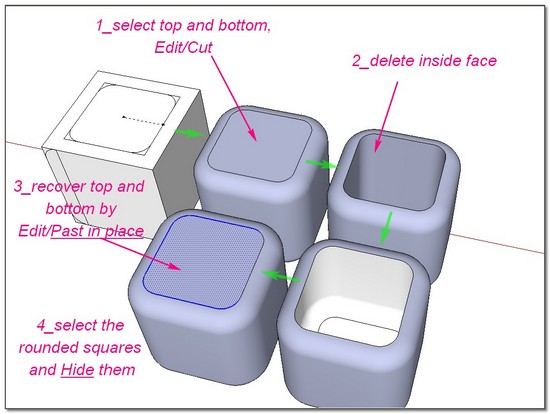
            If you don't need a remaining square geometry , Dave's solution is very much faster and easy (and clever 😆 ). Because in mine you have to do cleaning work for unwanted inside faces and hide unwanted rounded square lines!!

            In case, I end the job like this: 😄


            http://lh3.ggpht.com/_ZMwXIS0611s/Sl2sb9UOMgI/AAAAAAAAA2k/r2PJ17YsxiU/s800/Square_Ending_550.jpg

            simon

            1 Reply Last reply
            Reply Quote 0
            • david_hD
              david_h
              last edited by

              There's a ruby that does all of this automatically. you can get it here.

              fillet 3d blocks

              Hope this helps.

              If I make it look easy...It is probably easy

              1 Reply Last reply
              Reply Quote 0
              • Dave RD
                Dave R
                last edited by

                I also alluded to a plugin that does it. You can get it here on SCF.

                Etaoin Shrdlu

                %

                (THERE'S NO PLACE LIKE)

                G28 X0.0 Y0.0 Z0.0

                M30

                %

                1 Reply Last reply
                Reply Quote 0
                • Y
                  Yanman
                  last edited by

                  Good tips. Thank you. 👍 👍

                  1 Reply Last reply
                  Reply Quote 0
                  • S
                    Starling75
                    last edited by

                    There is Fredos RoundCorner universal plugin for filleting edges...

                    http://forums.sketchucation.com/viewtopic.php?f=180&t=20485&st=0&sk=t&sd=a&hilit=roundcorner

                    http://www.starlingarch.cz

                    1 Reply Last reply
                    Reply Quote 0
                    • Dave RD
                      Dave R
                      last edited by

                      Thanks Starling. It's the same as my link a couple of posts up. Very handy plugin, isn't it?

                      Etaoin Shrdlu

                      %

                      (THERE'S NO PLACE LIKE)

                      G28 X0.0 Y0.0 Z0.0

                      M30

                      %

                      1 Reply Last reply
                      Reply Quote 0
                      • S
                        Starling75
                        last edited by

                        @dave r said:

                        Thanks Starling. It's the same as my link a couple of posts up. Very handy plugin, isn't it?

                        Yes, very handy indeed. Fredos plugins are jewels.

                        http://www.starlingarch.cz

                        1 Reply Last reply
                        Reply Quote 0
                        • M
                          mambo.harts.u
                          last edited by

                          wow! very helpful!

                          1 Reply Last reply
                          Reply Quote 0

                          Hello! It looks like you're interested in this conversation, but you don't have an account yet.

                          Getting fed up of having to scroll through the same posts each visit? When you register for an account, you'll always come back to exactly where you were before, and choose to be notified of new replies (either via email, or push notification). You'll also be able to save bookmarks and upvote posts to show your appreciation to other community members.

                          With your input, this post could be even better 💗

                          Register Login
                          • First post
                            Last post
                          Buy SketchPlus
                          Buy SUbD
                          Buy WrapR
                          Buy eBook
                          Buy Modelur
                          Buy Vertex Tools
                          Buy SketchCuisine
                          Buy FormFonts

                          Advertisement