sketchucation logo sketchucation
    • 登入
    Oops, your profile's looking a bit empty! To help us tailor your experience, please fill in key details like your SketchUp version, skill level, operating system, and more. Update and save your info on your profile page today!
    🔌 Smart Spline | Fluid way to handle splines for furniture design and complex structures. Download

    [Plugin][$] RoundCorner - v3.4a - 31 Mar 24


    已排程 已置頂 已鎖定 已移動 Plugins
    1.5k 貼文 473 Posters 3.4m 瀏覽 472 Watching
    正在載入更多貼文
    • 從舊到新
    • 從新到舊
    • 最多點贊
    回覆
    • 在新貼文中回覆
    登入後回覆
    此主題已被刪除。只有擁有主題管理權限的使用者可以查看。
    • pilouP 離線
      pilou
      最後由 編輯

      Maybe you wil be more lucky with this!

      Now there is a sort of integration of it inside Join PusPushPull Interactive!

      Frenchy Pilou
      Is beautiful that please without concept!
      My Little site :)

      1 條回覆 最後回覆 回覆 引用 0
      • TIGT 離線
        TIG Moderator
        最後由 編輯

        @antonius43 said:

        Just do not understand, do I need to pay for this plugin to work? After following the instructions I cannot find the toolbar? What a waste!!!
        It is free to download, install and use [but of course you are free to donate to authors]...
        If you have installed the Plugin properly [and how did you do that?]... then you might need to restart SketchUp and activate the it under Preferences > Extensions... and then activate its Toolbar...

        Also having read the Plugin's installation instructions... you will be aware that you also need to have 'LibFredo' downloaded and installed to make this work [that's free too 😉 ]
        😒

        TIG

        1 條回覆 最後回覆 回覆 引用 0
        • S 離線
          synthkim1
          最後由 編輯

          Thank u so much,,,it's amazing

          1 條回覆 最後回覆 回覆 引用 0
          • Z 離線
            ZRaupp
            最後由 編輯

            took me a few minutes to get it working, had to run Sketchup as administrator..

            1 條回覆 最後回覆 回覆 引用 0
            • Dave RD 離線
              Dave R
              最後由 編輯

              @zraupp said:

              took me a few minutes to get it working, had to run Sketchup as administrator..

              Why? Where and how did you install the plugin?

              Etaoin Shrdlu

              %

              (THERE'S NO PLACE LIKE)

              G28 X0.0 Y0.0 Z0.0

              M30

              %

              1 條回覆 最後回覆 回覆 引用 0
              • Z 離線
                ZRaupp
                最後由 編輯

                @dave r said:

                @zraupp said:

                took me a few minutes to get it working, had to run Sketchup as administrator..

                Why? Where and how did you install the plugin?

                I installed plug-ins before i followed the steps and it works... .. ..

                1 條回覆 最後回覆 回覆 引用 0
                • Dave RD 離線
                  Dave R
                  最後由 編輯

                  Whatever works, I guess, but you didn't really answer the question.
                  You shouldn't have to run SketchUp 2014 as administrator to get plugins to work unless you aren't installing them in the correct location.

                  Etaoin Shrdlu

                  %

                  (THERE'S NO PLACE LIKE)

                  G28 X0.0 Y0.0 Z0.0

                  M30

                  %

                  1 條回覆 最後回覆 回覆 引用 0
                  • Z 離線
                    ZRaupp
                    最後由 編輯

                    @dave r said:

                    Whatever works, I guess, but you didn't really answer the question.
                    You shouldn't have to run SketchUp 2014 as administrator to get plugins to work unless you aren't installing them in the correct location.

                    There is only one place to install plugins and its in the plugins folder ...

                    1 條回覆 最後回覆 回覆 引用 0
                    • bsusalaB 離線
                      bsusala
                      最後由 編輯

                      Hi Fredo, folks, thanks for this very useful plugin.

                      I am asking from a rendering perspective. And woodworking, where straight rectangular edges are very common.

                      • would RC in a future version work on multiple groups selection? For a furniture piece with many parts, that would be a real time-saver.
                      • would RC in a future version allow for native undo-ing (not SU's undo) Maybe even with some form of Ghost integration.
                      1 條回覆 最後回覆 回覆 引用 0
                      • G 離線
                        gizmotoy
                        最後由 編輯

                        Has anyone else had trouble with edges of planes that have had RoundCorner applied? I have a model that I unfortunately need to temporarily undo the rounded corner in order to make other modifications to the plane. I thought it would be as easy at re-drawing the corner and using Push/Pull to apply that across the whole edge, but Sketchup refuses to redraw the corner correctly.

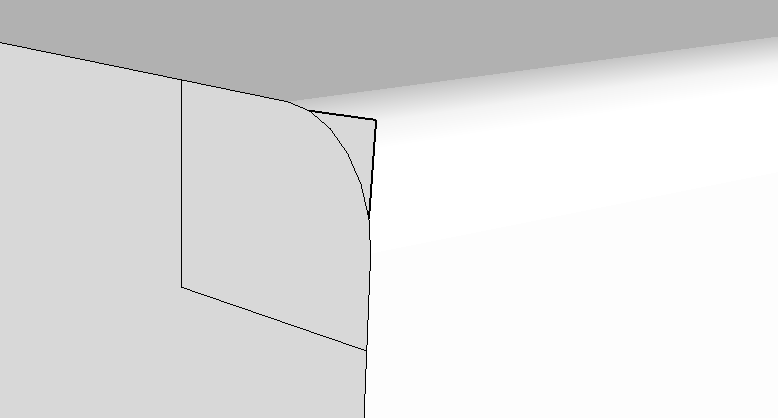
                        Take the following images, for example. Here I attempt to use the rectangle tool to create a nice new corner. However, as soon as I click to create the rectangle, the lines I need are distorted. The same occurs if I create guides and use simple lines. It appears to be impossible to redraw the corner!

                        Any ideas on what I can do?
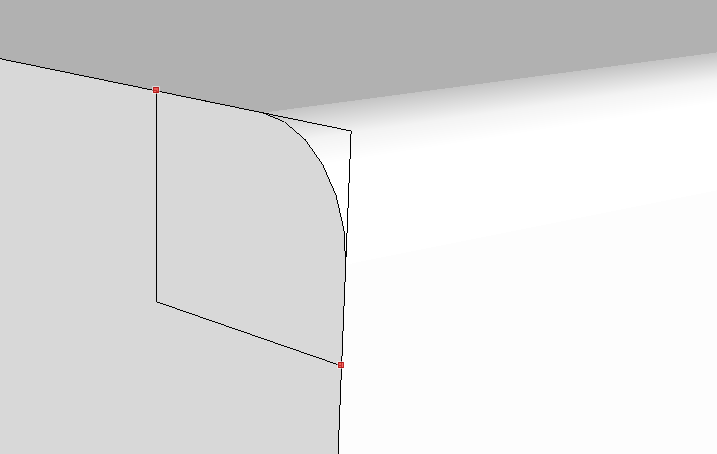
                        Preparing to draw the rectangle - looks good

                        Rectangle drawn - but it got mangled!

                        1 條回覆 最後回覆 回覆 引用 0
                        • Dave RD 離線
                          Dave R
                          最後由 編輯

                          I've seen this sort of thing before but it has nothing specifically to do with this plugin. The same sort of thing might happen if you use a simple arc to do the roundover. This must be a pretty tiny radius corner and it appears you are running up against SketchUp's tolerance settings. One option would be to scale the geometry up by a factor of 10 or 100 and proceed with what you're trying to do. The other would be to delete the curves at the end of the roundover and draw in the lines to complete the corner.

                          Etaoin Shrdlu

                          %

                          (THERE'S NO PLACE LIKE)

                          G28 X0.0 Y0.0 Z0.0

                          M30

                          %

                          1 條回覆 最後回覆 回覆 引用 0
                          • G 離線
                            gizmotoy
                            最後由 編輯

                            @dave r said:

                            I've seen this sort of thing before but it has nothing specifically to do with this plugin. The same sort of thing might happen if you use a simple arc to do the roundover. This must be a pretty tiny radius corner and it appears you are running up against SketchUp's tolerance settings. One option would be to scale the geometry up by a factor of 10 or 100 and proceed with what you're trying to do. The other would be to delete the curves at the end of the roundover and draw in the lines to complete the corner.

                            Thank you. I had not considered that. I suppose I should have posted this elsewhere, then. It is a small part. Those planes are 1mm thick, and the corner has a radius of 0.25mm. I'll try scaling it up and back as suggested. Thanks again!

                            1 條回覆 最後回覆 回覆 引用 0
                            • N 離線
                              n8mills
                              最後由 編輯

                              Pretty interesting, but for all the effort to create a login here, download the library, the plugin and install manually I find that I am getting this kind of thing over and over

                              http://i.imgur.com/tnTKG7D.png

                              Not a single rounded corner. It probably needs some auto-detection of the commonly desired parameters. My concern is that when the shortcut is more work than learning to do it myself then it is not worthwhile.

                              I'll be uninstalling now.

                              1 條回覆 最後回覆 回覆 引用 0
                              • Dave RD 離線
                                Dave R
                                最後由 編輯

                                It works fine if you use it correctly. Unfortunately there's no plugin to read your mind to know what radius you want for the roundovers. You have to enter them manually in the box provided. A few moments actually learning how to use the tool would go a long way. Too bad you can't be bothered to learn how to use it. 😒

                                Etaoin Shrdlu

                                %

                                (THERE'S NO PLACE LIKE)

                                G28 X0.0 Y0.0 Z0.0

                                M30

                                %

                                1 條回覆 最後回覆 回覆 引用 0
                                • bsusalaB 離線
                                  bsusala
                                  最後由 編輯

                                  Sorry n8, lots of people are using it just fine. For the sake of receiving something worth hundreds of hours (= a free useful plugin), at least don't be an *&#%hole. A thankyou must be more appropiate. And some apologies, btw.

                                  1 條回覆 最後回覆 回覆 引用 0
                                  • B 離線
                                    bjlinville1
                                    最後由 編輯

                                    Amazing plug in! Thanks so much to the creators! I've run into a snag and have spent to much time failing to figure it out myself, so I thought I'd just come here and ask for help. Could someone demonstrate how to round the corners on this model, or direct me to a tutorial that can show me how? https://3dwarehouse.sketchup.com/model.html?id=ue5c599f2-8f9c-48e5-9951-e235b062aca7

                                    I want to put a .25" Radius on a .75" thick piece of plywood (we have small children and need very smooth edges!) and every time I run the plug in, both the rounded corners and the pointed ends of curves come out with incongruous faces. Its very likely that others have already solved this problem, but I haven't found it anywhere. If so, by all means just post a link to the forum or video and I'll check it out. Thanks for your help, and Thank you so much for this plug in!

                                    1 條回覆 最後回覆 回覆 引用 0
                                    • Dave RD 離線
                                      Dave R
                                      最後由 編輯

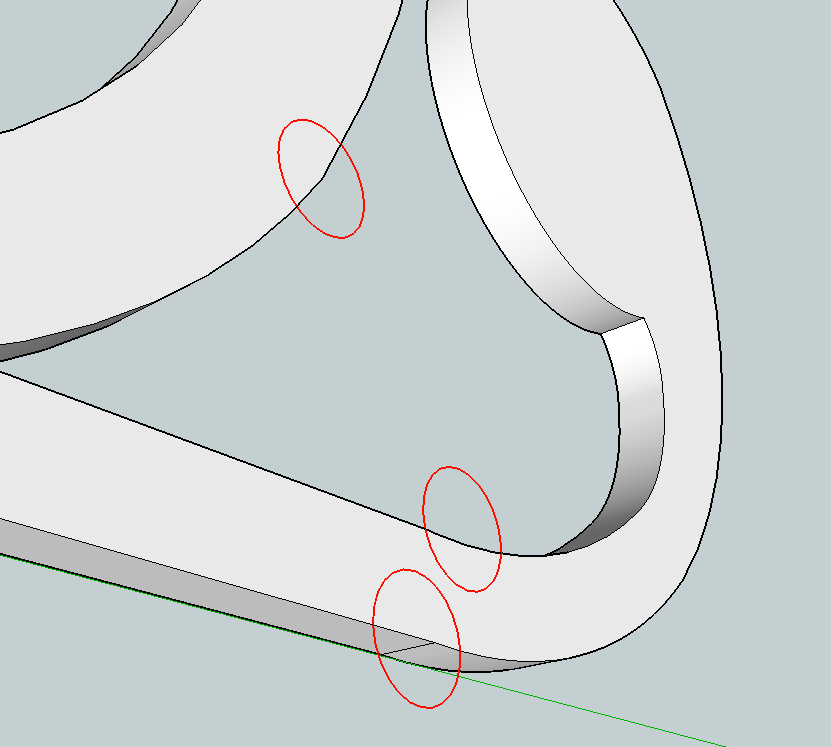
                                      How many segments are you using for the rounding? You might find it better to take care of the points in one step and rounding the edges in another. Also, I would scale the component up by a factor of 100 or 1000 and do the rounding on it there. I expect you'll get cleaner results. If the radius of the round over is greater than the radius of the "corner" you're going around, you'll have problems too. You might want to think about that with the point at the end of the loop and the sharp corners on the insides. You'd have a similar problem rounding over that corner with a router in real material, too, though.

                                      Before you get to rounding, though, do you really want these curves as you've drawn them? The curves aren't tangent to their neighbors. that might create some problems when it comes time to cut this thing out for real. There are more of these spots than the few I indicated.
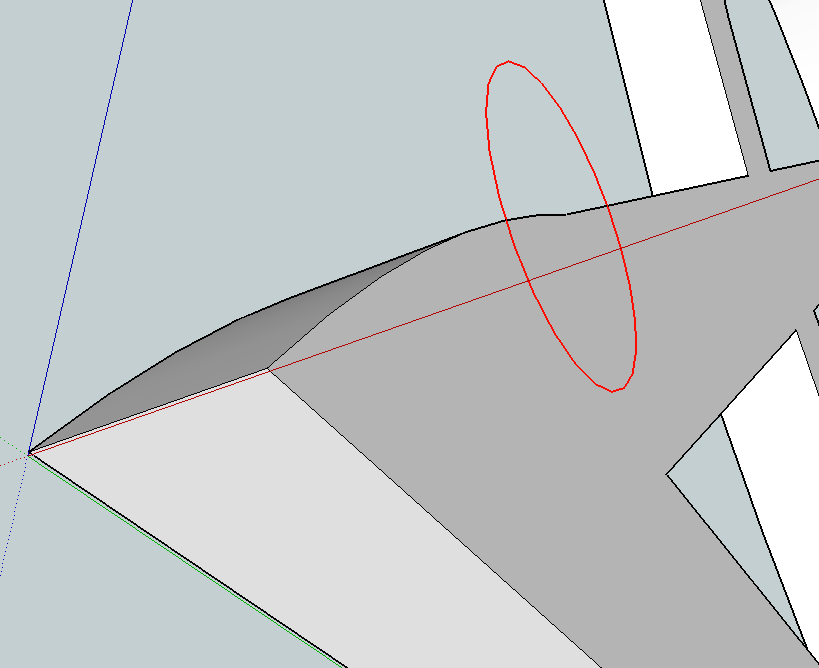
                                      Screenshot - 4_30_2014 , 4_27_25 AM.png
                                      Screenshot - 4_30_2014 , 4_26_36 AM.png

                                      Another thing you might find helpful is to weld some of the edges together.

                                      Etaoin Shrdlu

                                      %

                                      (THERE'S NO PLACE LIKE)

                                      G28 X0.0 Y0.0 Z0.0

                                      M30

                                      %

                                      1 條回覆 最後回覆 回覆 引用 0
                                      • S 離線
                                        sophia2662
                                        最後由 編輯

                                        i cant download the ROUNDCORNER.

                                        1 條回覆 最後回覆 回覆 引用 0
                                        • Dave RD 離線
                                          Dave R
                                          最後由 編輯

                                          Why not? How are you trying to download it? If you want some help you have to give us some useful information. Make it possible for us to help you.

                                          Etaoin Shrdlu

                                          %

                                          (THERE'S NO PLACE LIKE)

                                          G28 X0.0 Y0.0 Z0.0

                                          M30

                                          %

                                          1 條回覆 最後回覆 回覆 引用 0
                                          • P 離線
                                            PapaBear60
                                            最後由 編輯

                                            I love Sketchup - well, did love it. But I'm finding that it's not wise to upgrade every time a new version comes out. Take these extensions, for example. I went to SU14 and now can't for the life of me figure out how to install (or even if I can install) this extension. For me, SU14 is pretty useless without it. I can't even find the Plugins root directory in SU14. What gives?


                                            1 條回覆 最後回覆 回覆 引用 0
                                            • 1
                                            • 2
                                            • 52
                                            • 53
                                            • 54
                                            • 55
                                            • 56
                                            • 73
                                            • 74
                                            • 54 / 74
                                            • 第一個貼文
                                              最後的貼文
                                            Buy SketchPlus
                                            Buy SUbD
                                            Buy WrapR
                                            Buy eBook
                                            Buy Modelur
                                            Buy Vertex Tools
                                            Buy SketchCuisine
                                            Buy FormFonts

                                            Advertisement