sketchucation logo sketchucation
    • 登入
    Oops, your profile's looking a bit empty! To help us tailor your experience, please fill in key details like your SketchUp version, skill level, operating system, and more. Update and save your info on your profile page today!
    🔌 Smart Spline | Fluid way to handle splines for furniture design and complex structures. Download

    [Plugin][$] RoundCorner - v3.4a - 31 Mar 24


    已排程 已置頂 已鎖定 已移動 Plugins
    1.5k 貼文 473 Posters 3.4m 瀏覽 472 Watching
    正在載入更多貼文
    • 從舊到新
    • 從新到舊
    • 最多點贊
    回覆
    • 在新貼文中回覆
    登入後回覆
    此主題已被刪除。只有擁有主題管理權限的使用者可以查看。
    • Dave RD 離線
      Dave R
      最後由 編輯

      Subtle. I couldn't see those lines on my Mac but now that I'm home from work I can see them.

      Etaoin Shrdlu

      %

      (THERE'S NO PLACE LIKE)

      G28 X0.0 Y0.0 Z0.0

      M30

      %

      1 條回覆 最後回覆 回覆 引用 0
      • jeff hammondJ 離線
        jeff hammond
        最後由 編輯

        @dave r said:

        Subtle. I couldn't see those lines on my Mac but now that I'm home from work I can see them.

        really? mac at work - windows at home?
        that's opposite of the norm for people using both systems.

        (re: the topic- it's hard to tell if those are just some sort of layout lines down below or if they're also on the object which has been roundCorner_ed.. hence the request for the file)

        dotdotdot

        1 條回覆 最後回覆 回覆 引用 0
        • Dave RD 離線
          Dave R
          最後由 編輯

          @jeff hammond said:

          @dave r said:

          Subtle. I couldn't see those lines on my Mac but now that I'm home from work I can see them.

          really? mac at work - windows at home?
          that's opposite of the norm for people using both systems.

          I use my MacBook Pro at work more than at home. I mostly use my PC at home but both have SU Pro so I can go back and forth between them.

          @jeff hammond said:

          (re: the topic- it's hard to tell if those are just some sort of layout lines down below or if they're also on the object which has been roundCorner_ed.. hence the request for the file)
          [/quote][/quote]

          Agreed.

          Etaoin Shrdlu

          %

          (THERE'S NO PLACE LIKE)

          G28 X0.0 Y0.0 Z0.0

          M30

          %

          1 條回覆 最後回覆 回覆 引用 0
          • N 離線
            nwarner33
            最後由 編輯

            Thanks for the quick responses!
            I had it scaled up largely. I figured it must have been that the radiuses were too large for the size, however it didnt appear to be. The typography needs to be exactly as is. Ive attached the file to see if anyone can have another crack at it. Thanks again.


            logo 3d.skp

            1 條回覆 最後回覆 回覆 引用 0
            • mitcorbM 離線
              mitcorb
              最後由 編輯

              Hi.
              If you need this in a hurry, I suggest the following:
              Select the flat face of the 5, copy to the side. Harden the edges. Delete the flat face, leaving the outline of the 5. Create your 150mm arc with 4 segments, or some other number. Make a quarter round face/profile. Set it in position. Select the profile as a path. Use the FollowMe tool.
              In spite of all the vagaries of the figure, I got a clean result.

              I take the slow, deliberate approach in my aimless wandering.

              1 條回覆 最後回覆 回覆 引用 0
              • gillesG 離線
                gilles
                最後由 編輯

                Give as at least a V8 .skp please, not everybody run 2013.

                " c'est curieux chez les marins ce besoin de faire des phrases "

                1 條回覆 最後回覆 回覆 引用 0
                • mitcorbM 離線
                  mitcorb
                  最後由 編輯

                  Actually, it is possible to take your result with the corner wings, make a selection only of the intersecting faces, right click intersect selection, erase the concealing faces, draw lines where intersection didn't complete, then erase the wings. This is more tedious, obviously, and you will need to do it for each of those sharp corners. Also, when I performed the rounding, the offset preview showed overlapping of the offset at the corners. The offset that got a clean preview profile was a mere 30mm. Not really what you wanted.
                  Also, when I downloaded your skp I noticed that the bottom of the figure was a closed face. You need to delete the face or you get rounding of the bottom and the wings.

                  None of my business, but what are those diamonds and trapezoids about on the underside of the 5?

                  I take the slow, deliberate approach in my aimless wandering.

                  1 條回覆 最後回覆 回覆 引用 0
                  • M 離線
                    michelleyeo
                    最後由 編輯

                    Dear Fredo,

                    I have followed your instructions to place the plugin into Sketchup plugin folder. (mac version sketchup2013)

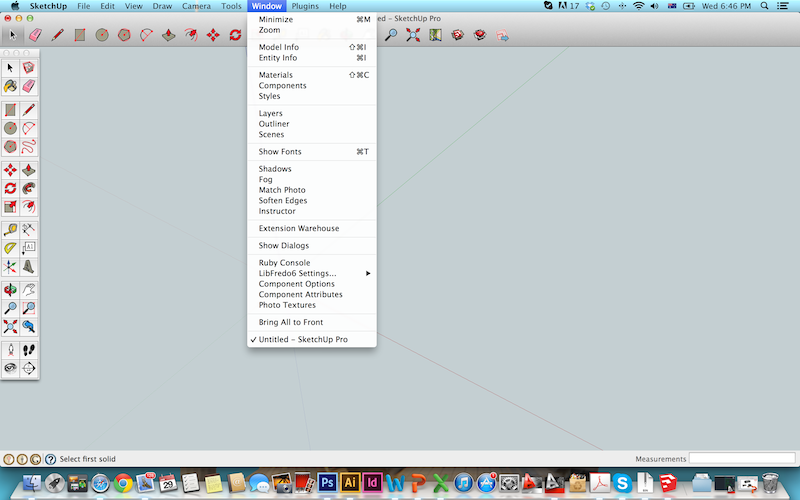
                    However, in the window i do find the libFredo6 setting but no tool bar or anything else to be found in my sketch up.

                    Please help

                    Michelle

                    1 條回覆 最後回覆 回覆 引用 0
                    • M 離線
                      michelleyeo
                      最後由 編輯

                      please see attached file

                      I m not sure if I have installed it properly or not as the is no tool bar or any sign of rounder corner but libFredo6 setting.

                      Please help.

                      Screen Shot 2014-01-29 at 6.46.06 PM.png

                      1 條回覆 最後回覆 回覆 引用 0
                      • OxerO 離線
                        Oxer
                        最後由 編輯

                        If you have installed correctly the plugin in User/Library/Applications Support/Sketchup 2013/Sketchup/ Plugins, go to View Menu/Toolbars/..... and mark the Round Corner to see its toolbar.

                        "The result is the end what is important is the process" by Oxer
                        http://www.oxervision.blogspot.com/

                        1 條回覆 最後回覆 回覆 引用 0
                        • TIGT 離線
                          TIG Moderator
                          最後由 編輯

                          Also ensure that it is enabled [checked] under Preferences > Extensions...
                          Otherwise its Toolbar isn't available...

                          TIG

                          1 條回覆 最後回覆 回覆 引用 0
                          • M 離線
                            michelleyeo
                            最後由 編輯

                            Dear TIG and Oxer,

                            Many thanks for your reply.

                            I've installed correctly and enabled the extensions however no sign for Roundcorner.

                            Please helpppp
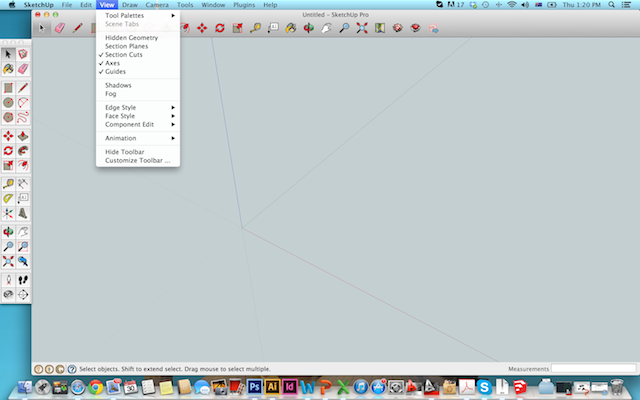

                            Screen Shot 2014-01-30 at 1.20.08 PM.png


                            Screen Shot 2014-01-30 at 1.19.37 PM.png

                            1 條回覆 最後回覆 回覆 引用 0
                            • BoxB 離線
                              Box
                              最後由 編輯

                              Are you saying that if you put your mouse on the words "Tool Palettes" you don't get round corner in the list that pops up? or haven't you found that list of toolbars yet.

                              1 條回覆 最後回覆 回覆 引用 0
                              • M 離線
                                michelleyeo
                                最後由 編輯

                                Yes, I don't get the round corner in the list

                                1 條回覆 最後回覆 回覆 引用 0
                                • jeff hammondJ 離線
                                  jeff hammond
                                  最後由 編輯

                                  @michelleyeo said:

                                  Dear TIG and Oxer,

                                  Many thanks for your reply.

                                  I've installed correctly and enabled the extensions however no sign for Roundcorner.

                                  Please helpppp
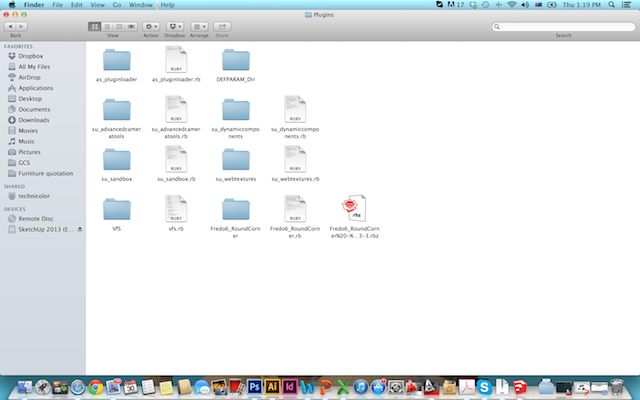
                                  according to your second picture, you haven't installed it correctly.. you're missing libFredo files.

                                  you can get that here:
                                  http://sketchucation.com/forums/viewtopic.php?t=17947

                                  (download the .rbz version underneath the word DOWNLOAD in the first post)

                                  to install it, go Sketchup (menu)-> Preferences-> Extensions..
                                  click the 'Install Extensions' button at the bottom then navigate to the libFredo .rbz file... it will be placed in the proper location for you..

                                  dotdotdot

                                  1 條回覆 最後回覆 回覆 引用 0
                                  • W 離線
                                    wisar
                                    最後由 編輯

                                    Great tool but I am wondering if I can undo the rounded corners if I want to revisit a design and make some changes like pushing and pulling a face?

                                    Cheers,
                                    W

                                    1 條回覆 最後回覆 回覆 引用 0
                                    • mitcorbM 離線
                                      mitcorb
                                      最後由 編輯

                                      Hi:
                                      You can undo the rounded corners while in the same session, but you cannot undo the round corners tomorrow.
                                      If you were using Blender you could simply switch it off, because rounded corners would be a modifier "channel"(?).
                                      In Sketchup, do the rounding on a separate copy, group or unique component of the original geometry.
                                      You could then save these copies out of your working file if you wish.

                                      I take the slow, deliberate approach in my aimless wandering.

                                      1 條回覆 最後回覆 回覆 引用 0
                                      • L 離線
                                        Lyubov
                                        最後由 編輯

                                        Please, help me to delete plugin from SketchUp Pro 2013, after Setting plugin Fredo6_Round Corner i decieded to delete him from foulder plugins, but now after openning SketchUp I have every time notice about that I have to install this plugin...(YOU MUST INSTALL LIBFREDO6 VERSION 5.2 OR HIGHER TO RUN FREDO ROUND CORNER)... Thank you so much for helping!! 😒

                                        1 條回覆 最後回覆 回覆 引用 0
                                        • mitcorbM 離線
                                          mitcorb
                                          最後由 編輯

                                          Hi, Lyubov:
                                          Your question generates many questions.
                                          Please visit this thread and see if an answer is there:
                                          http://sketchucation.com/plugin/696-SketchUcationTools

                                          Fredo6's RoundCorner is a very reliable plugin and requires a helper file called Libfredo. In fact, most if not all of his tools utilize the helper file.

                                          See if the above helps and post back if you need further assistance.
                                          Someone is sure to respond.

                                          I take the slow, deliberate approach in my aimless wandering.

                                          1 條回覆 最後回覆 回覆 引用 0
                                          • frankflafyF 離線
                                            frankflafy
                                            最後由 編輯

                                            is it compatible with su2014? im trying and still get error.

                                            1 條回覆 最後回覆 回覆 引用 0
                                            • 1
                                            • 2
                                            • 3
                                            • 4
                                            • 5
                                            • 73
                                            • 74
                                            • 3 / 74
                                            • 第一個貼文
                                              最後的貼文
                                            Buy SketchPlus
                                            Buy SUbD
                                            Buy WrapR
                                            Buy eBook
                                            Buy Modelur
                                            Buy Vertex Tools
                                            Buy SketchCuisine
                                            Buy FormFonts

                                            Advertisement