sketchucation logo sketchucation
    • 登入
    Oops, your profile's looking a bit empty! To help us tailor your experience, please fill in key details like your SketchUp version, skill level, operating system, and more. Update and save your info on your profile page today!
    🔌 Smart Spline | Fluid way to handle splines for furniture design and complex structures. Download

    [Plugin][$] RoundCorner - v3.4a - 31 Mar 24


    已排程 已置頂 已鎖定 已移動 Plugins
    1.5k 貼文 473 Posters 3.4m 瀏覽 472 Watching
    正在載入更多貼文
    • 從舊到新
    • 從新到舊
    • 最多點贊
    回覆
    • 在新貼文中回覆
    登入後回覆
    此主題已被刪除。只有擁有主題管理權限的使用者可以查看。
    • fredo6F 離線
      fredo6
      最後由 編輯

      Oxer,

      Normally in SU13, you should have a multi line tooltip.

      • first line should be the plugin title
      • the second line should be the corresponding Tools in the plugin
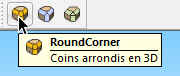
        tooltip SU13 Rdc.jpg

      This is therefore strange

      Fredo

      1 條回覆 最後回覆 回覆 引用 0
      • OxerO 離線
        Oxer
        最後由 編輯

        I know it, and yes, it's very strange.
        Of your Plugins, the Tooltips work fine only in JointPushPull (appear translated) and FredoTools (appears in English).

        "The result is the end what is important is the process" by Oxer
        http://www.oxervision.blogspot.com/

        1 條回覆 最後回覆 回覆 引用 0
        • fredo6F 離線
          fredo6
          最後由 編輯

          @oxer said:

          I know it, and yes, it's very strange.
          Of your Plugins, the Tooltips work fine only in JointPushPull (appear translated) and FredoTools (appears in English).

          It may be a bug in SU13, maybe related to the Spanish version of Sketchup. I don't have it on my PC, with a English and French SU13.

          By the way, what do you get if you switch to NO default language in LibFredo6. Do you get the correct tooltips in English

          Fredo

          1 條回覆 最後回覆 回覆 引用 0
          • OxerO 離線
            Oxer
            最後由 編輯

            I changed to default language and the problem persists, perhaps is an error only on Mac & SU2013, if another mac user could tell us if he has the same problem or it's a problem only mine.
            I don't want that you lose time with this.

            "The result is the end what is important is the process" by Oxer
            http://www.oxervision.blogspot.com/

            1 條回覆 最後回覆 回覆 引用 0
            • TeknicalT 離線
              Teknical
              最後由 編輯

              I have a problem with this plugin in SketchUp 2013 Pro. I installed the new lib file and the new version of RoundOver but when i use it, it crashes SketchUp. Any idea on how to fix this? Here's the bug report

              http://img844.imageshack.us/img844/8743/xql8.jpg

              1 條回覆 最後回覆 回覆 引用 0
              • A 離線
                AcesHigh
                最後由 編輯

                I have a problem with Roundcorner. I am trying to apply it on some furniture. As soon as I apply, everything looks good. But as soon as I try to save, Sketchup says there are problems on my model that need to be fixed. If I try to fix them, I lose most corners of the model.

                Below, attached, is the log if I manually fix the model in the model info window. It results in a huge 1,3 mb txt file of error report!!!!!

                and also an image showing the apparently well rounded corners, and then, the rounded corners after errors are fixed.

                finally, you may ask: then why fix the erros? Just don´t fix them.

                Unfortunatelly, I did not fix the errors, but when I saved the file to render with Thea Render, Thea interpreted the file (or saved it to be used at Thea Studio) with the open corners, as if Sketchup had fixed the errors.
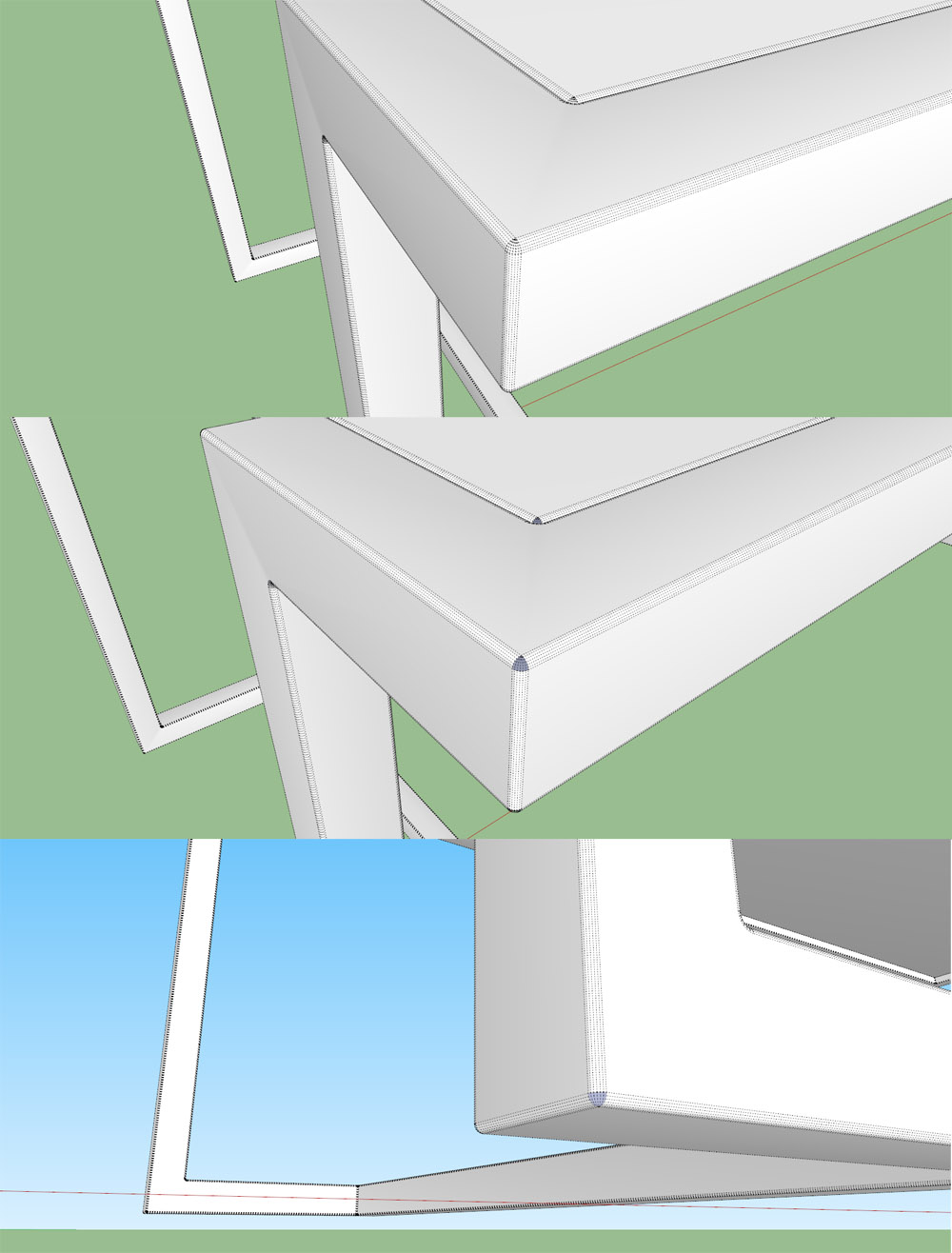

                roundcornererror.jpg


                roundcornererror.txt

                1 條回覆 最後回覆 回覆 引用 0
                • Dave RD 離線
                  Dave R
                  最後由 編輯

                  The faces are too small and endpoints of lines are too close together. Reduce the number of segments used to create the radius. You don't need as many as you are using for that tiny radius anyway. You might also scale a copy of the component up before running the Round Corner plugin. Once you've finished editing the component, close the scaled up copy and delete it.

                  Etaoin Shrdlu

                  %

                  (THERE'S NO PLACE LIKE)

                  G28 X0.0 Y0.0 Z0.0

                  M30

                  %

                  1 條回覆 最後回覆 回覆 引用 0
                  • BoxB 離線
                    Box
                    最後由 編輯

                    It looks suspiciously like the geometry is too small. Perhaps if you scale it up and save it. Then scale it down once saved.

                    Dave got there just before me.

                    1 條回覆 最後回覆 回覆 引用 0
                    • A 離線
                      AcesHigh
                      最後由 編輯

                      I see. Would it help if I changed model units to millimiters? If not, I will try the other methods.

                      1 條回覆 最後回覆 回覆 引用 0
                      • Dave RD 離線
                        Dave R
                        最後由 編輯

                        The units you're working in make no difference to whether or not the lines are too short.

                        Etaoin Shrdlu

                        %

                        (THERE'S NO PLACE LIKE)

                        G28 X0.0 Y0.0 Z0.0

                        M30

                        %

                        1 條回覆 最後回覆 回覆 引用 0
                        • A 離線
                          AcesHigh
                          最後由 編輯

                          @dave r said:

                          The units you're working in make no difference to whether or not the lines are too short.

                          doesn´t make much sense to me, in the moment you guys tell me I can create a component, increase its size and realize the operation on the large sized model. I mean, its a virtual enviroment, not the real world, why does it makes a difference zooming into the model or increasing it´s size? 😕 😕

                          1 條回覆 最後回覆 回覆 引用 0
                          • Dave RD 離線
                            Dave R
                            最後由 編輯

                            It just does. Don't think too hard about it. It isn't worth troubling yourself over it. Zooming in doesn't change the length of the lines, it only changes their apparent size.

                            If you use the process I described you won't have to scale back down after rounding over. You can see that same process in the video here.

                            Etaoin Shrdlu

                            %

                            (THERE'S NO PLACE LIKE)

                            G28 X0.0 Y0.0 Z0.0

                            M30

                            %

                            1 條回覆 最後回覆 回覆 引用 0
                            • BoxB 離線
                              Box
                              最後由 編輯

                              Do you have some hidden geometry hiding in the corners.

                              1 條回覆 最後回覆 回覆 引用 0
                              • A 離線
                                AcesHigh
                                最後由 編輯

                                @dave r said:

                                The faces are too small and endpoints of lines are too close together. Reduce the number of segments used to create the radius. You don't need as many as you are using for that tiny radius anyway.You might also scale a copy of the component up before running the Round Corner plugin. Once you've finished editing the component, close the scaled up copy and delete it.

                                didnt work.I created copies of the components. Scaled them up and edited the big copies. Closed them. When I fix the model for errors, the errors still appear.

                                it´s all somewhat funny, because I am using the same roundcorner sizes at other furniture models and that problem is not ocurring on them!

                                edit... the problems occur EVEN when I deleted the original sized components from the model and left only the big ones. Then I run the script with 2 cm round corner instead of 2mm...

                                and when I try to fix the problems in the model, the same holes appear, in the 10x larger models!

                                1 條回覆 最後回覆 回覆 引用 0
                                • A 離線
                                  AcesHigh
                                  最後由 編輯

                                  @box said:

                                  Do you have some hidden geometry hiding in the corners.

                                  no 😞

                                  I attached the skp file, if anyone can check it... 😞


                                  4.skp

                                  1 條回覆 最後回覆 回覆 引用 0
                                  • BoxB 離線
                                    Box
                                    最後由 編輯

                                    I'll admit I can't see what the problem is, but there is something strange happening in your model. It behaves the same for me.
                                    If I copy the frame into a clean file it works perfectly.

                                    Edit: I just noticed you are trying to do a 2mm round, I don't believe that is possible, it's simply too small. You may as well just soften the edge.


                                    Round.skp

                                    1 條回覆 最後回覆 回覆 引用 0
                                    • Dave RD 離線
                                      Dave R
                                      最後由 編輯

                                      If you were trying to use the process I outlined, it would fail because you are using groups, not components like I said to use.

                                      Etaoin Shrdlu

                                      %

                                      (THERE'S NO PLACE LIKE)

                                      G28 X0.0 Y0.0 Z0.0

                                      M30

                                      %

                                      1 條回覆 最後回覆 回覆 引用 0
                                      • A 離線
                                        AcesHigh
                                        最後由 編輯

                                        @dave r said:

                                        If you were trying to use the process I outlined, it would fail because you are using groups, not components like I said to use.

                                        I attached the original file. When I tried the process you outlined, I transformed each group in a component, but I did not sent THAT file because it did not work anyway, so I did not save it.

                                        @box said:

                                        Edit: I just noticed you are trying to do a 2mm round, I don't believe that is possible, it's simply too small. You may as well just soften the edge.

                                        yes, the funny thing however is that I used the 2mm round on other files and it worked quite well. Also, as pointed out, I DID transform the models into components, scaled them up 100x and made 22 centimeters round. Still, the same error happened, so I suppose it´s not related to the scale of the model or the round.

                                        1 條回覆 最後回覆 回覆 引用 0
                                        • BoxB 離線
                                          Box
                                          最後由 編輯

                                          Yeah, I take it back, just made a new one with a 5sided 2mm round and no problems. So there is something screwed up in your file.

                                          1 條回覆 最後回覆 回覆 引用 0
                                          • A 離線
                                            AcesHigh
                                            最後由 編輯

                                            @box said:

                                            Yeah, I take it back, just made a new one with a 5sided 2mm round and no problems. So there is something screwed up in your file.

                                            I will read a bit about quantum physics right now. Its certainly easier to understand than the inner workings of Sketchup 😆

                                            1 條回覆 最後回覆 回覆 引用 0
                                            • 1
                                            • 2
                                            • 3
                                            • 4
                                            • 5
                                            • 73
                                            • 74
                                            • 3 / 74
                                            • 第一個貼文
                                              最後的貼文
                                            Buy SketchPlus
                                            Buy SUbD
                                            Buy WrapR
                                            Buy eBook
                                            Buy Modelur
                                            Buy Vertex Tools
                                            Buy SketchCuisine
                                            Buy FormFonts

                                            Advertisement